

On this page
Use the kitchen queue
The Kitchen screen, on any screen you can stand beside the stove. What a kitchen ticket (a KOT) holds, the three columns Waiting, Being prepared and Ready, the buttons Start preparing, Ready and Noted, how a change to an order arrives as a ticket of its own headed Change to the order, and Print ticket and Reprint ticket, so nothing is made twice.
6 minute read
What the queue is
When an order is confirmed at the counter, the kitchen is sent a ticket: what to make, for which order. Many kitchens call it a KOT, a kitchen order ticket. Orzoni calls it a kitchen ticket.
Kitchen is the queue of those tickets. It runs on any screen with a browser: a tablet on the wall, a phone, an old laptop. It brings itself up to date every few seconds, so nobody in the kitchen has to press anything to see a new ticket.
A ticket is not the order. The order holds the prices and the money, and stays at the counter. The ticket holds only what to make.
Who this is for
| To do this | You need |
|---|---|
| See the queue, and print a ticket | Work the kitchen queue, or Take orders and payments |
| Move a ticket on: Start preparing, Ready, Noted | Work the kitchen queue |
The role Kitchen starts with Work the kitchen queue and nothing else. It sees the queue, and no prices, no payments and no figures. The roles Counter staff and Shift manager start with both switches. Someone who holds only Take orders and payments sees the queue and cannot move a ticket on, and the top of the screen says so. See Users and roles.
The café counter is a pilot, open to a few businesses while it is being tried. The queue is there once Café counter is switched on. See Set up a café.
Open the queue
Press Kitchen, under Counter at the side. On a phone, tap the Kitchen tab at the foot.
The page is headed Kitchen, with a line that counts the queue, such as 3 tickets waiting · 1 being prepared.
Leave it open. It asks for the queue again every few seconds while it is the screen on show. Refresh, at the top right, asks at once.
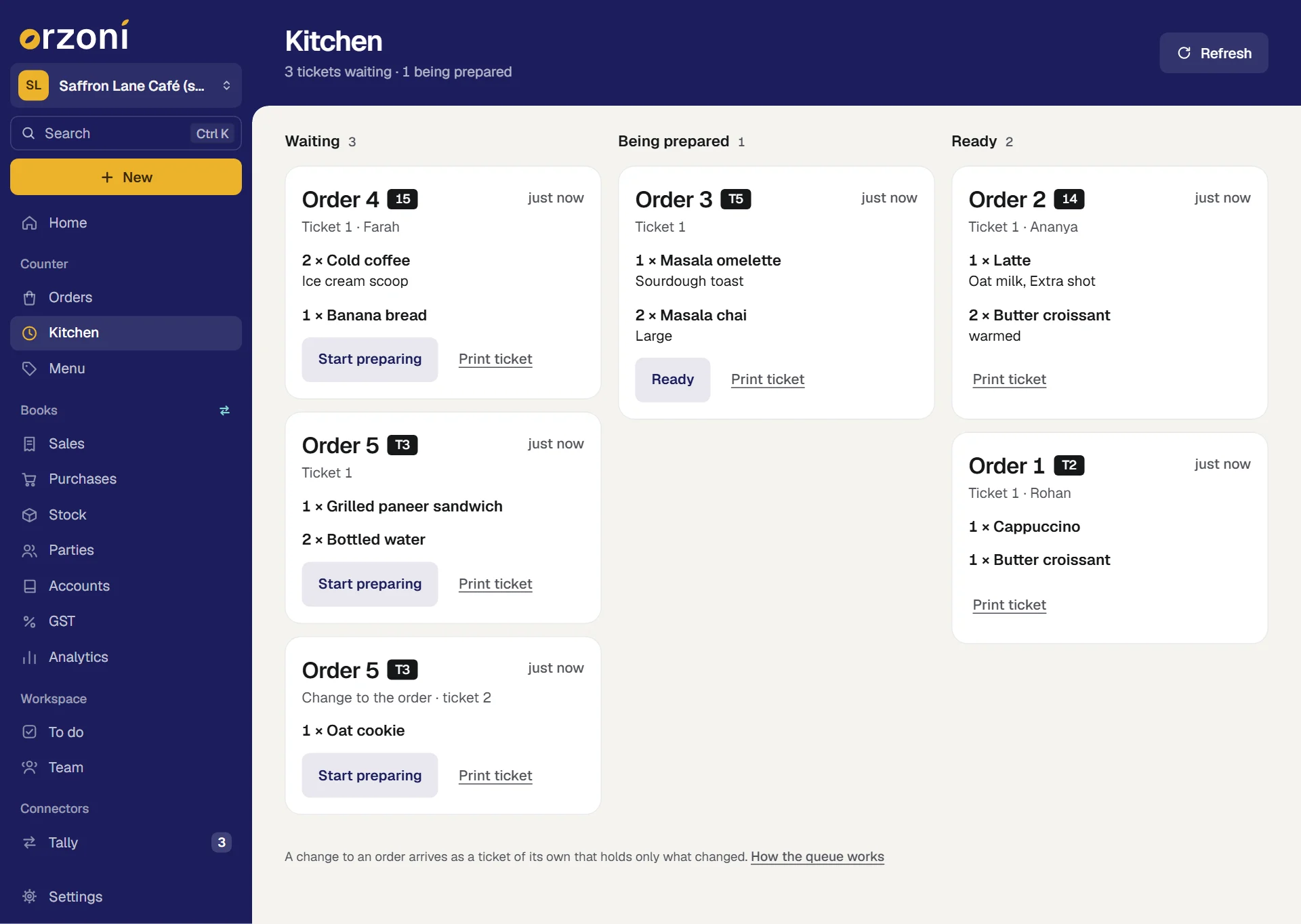
Read a ticket
| On the ticket | What it tells you |
|---|---|
| Order 4, and a dark tag such as 15 or T3 | Which order it is for, and the table or token it was given |
| Ticket 1, and how long ago, such as 4 min | Which ticket of that order this is, and how long it has waited. A name follows where the customer gave one |
| 2 × Cold coffee, with small print under it | How many of what, the choices picked with it, and any note typed for the kitchen |
| Change to the order · ticket 2, in place of Ticket 2 | Something was added or taken off after the order was confirmed. The ticket holds only the change. See A change to an order |
| Take off: and a line | Do not make this. It was taken off the order |
| This order was voided. Do not make it. | The whole order was called off |
Move a ticket on
The queue has three columns. A ticket moves from left to right, one step at a time.
| Column | What is in it | The button |
|---|---|---|
| Waiting | Sent by the counter, not started. The oldest is at the top | Start preparing |
| Being prepared | Started, not ready | Ready |
| Ready | The latest tickets made ready | None. It is done |
- When you begin a ticket, press Start preparing. It moves to Being prepared.
- When it is made, press Ready. It moves to Ready.
The counter sees each move the next time it looks: the order reads Waiting in the kitchen, then Being prepared, then Ready, on its own page, under Orders and on Today. An order with more than one ticket is ready when every one of its tickets is.
A ticket moves forward only. One pressed to Ready by mistake stays there: tell the counter by word, and carry on.
A change to an order
Tickets are added to, and never rewritten. So the kitchen never has to compare two versions of one ticket to see what is new.
- Something added after the order was confirmed arrives as a new ticket. Where a first ticket says Ticket 1, this one says Change to the order · ticket 2, and it holds only what was added. Make it like any other: Start preparing, then Ready.
- Something taken off arrives the same way, with Take off: before the line. A ticket that only takes things off has nothing to make, so its one button is Noted. Press it once you have seen it.
- A voided order sends a ticket that takes everything off, and says This order was voided. Do not make it.
The same ticket is named a little differently in three places. In the queue it is Change to the order · ticket 2. On the order's own page, under Kitchen tickets, it is Ticket 2, a change. On paper it is headed Kitchen ticket 2 (a change to the order).
The first ticket stays as it was sent. Read the tickets of one order together: what the first says to make, less what a later one takes off, plus what a later one adds.
Print a ticket
Printing is from the browser, on whatever printer that device has. Orzoni does not drive a receipt printer by itself, and hears nothing back from one.
- Press Print ticket on the ticket. The browser's own print box opens.
- Choose the printer, and print.
A ticket that has been printed says so, and its button becomes Reprint ticket (printed once). A ticket printed again carries a line at its head that begins REPRINT, with which print it is, and says Already with the kitchen: do not make again. Printing adds nothing to the queue.
The counter can print the same ticket from the order's page, under Kitchen tickets, where the buttons are Print and Reprint. A ticket just confirmed also offers Print the ticket on the line that says the order is with the kitchen.
Before you rely on paper, print one ticket on the printer the kitchen will use, and read it. Orzoni cannot tell whether a printer worked. See Set up a café.
An example
At the made-up Saffron Lane Café, the counter confirms Order 7: a latte with oat milk and an extra shot, and two butter croissants, ₹550.00 in all.
- The kitchen's queue gains one ticket under Waiting: Order 7, tagged 14, Ticket 1, with 1 × Latte (Oat milk, Extra shot) and 2 × Butter croissant. No price is on it.
- The kitchen presses Start preparing, and three minutes later Ready.
- Meanwhile the customer asks for an oat cookie as well. The counter presses Add items and sends it. A second ticket arrives: Order 7, Change to the order · ticket 2, 1 × Oat cookie. The first ticket is untouched.
The customer pays ₹300 in cash and the rest by UPI at the counter. None of that is the kitchen's to see.
If something looks wrong
| What you see | Why | What to do |
|---|---|---|
| A message that the ticket is already ready, or has moved, and that the queue has been brought up to date | Someone else moved it a moment before you | Nothing. The queue now shows it where it is |
| The kitchen's queue could not be shown, with a line about being online | This device is offline | Check its connection. The queue shows nothing old while it cannot be reached |
| No button on any ticket, and a line at the top saying moving a ticket on is for the kitchen | You may see the queue and not move it | Ask the owner for Work the kitchen queue |
| A ticket is missing from Ready | Ready holds the latest twelve, made ready in the last twelve hours | Open the order from Orders to see all its tickets |
| Café counter is switched off for this company. | The part is switched off | The owner switches it on under Settings, Business type |
| A dark bar at the top that reads Training counter | This tab is at the training counter. Its tickets are practice, and the real kitchen's are not shown | Press Go back to the real counter, on the bar. See Practise on the training counter |
Mistakes you can undo
| The mistake | How to put it right |
|---|---|
| Start preparing pressed on the wrong ticket | Carry on and make it, or leave it in Being prepared until its turn. Nothing is lost |
| Ready pressed too soon | A ticket does not move back. Tell the counter by word |
| The wrong thing was sent to the kitchen | The counter presses Take off on the order, and adds the right thing. Two tickets follow: one to take off, one to make |
| A ticket printed twice | The second says it is a reprint. Throw it away |
What it does to your data and to Tally
- Tickets are kept in Orzoni with the order: what each held, who sent it, when it was started and when it was ready, and how many times it was printed.
- Nothing in the kitchen reaches Tally. Moving a ticket changes no bill, no stock and no figure. The sale goes into Tally when the counter finishes the order.
- The queue goes on working while the computer that runs Tally is off. It needs this device to be online.
Recipes, ingredients and wastage are not part of the pilot. A ticket says what to make, and Tally stays the one count of stock.
What next
- Take a café order: where a ticket comes from, and how one is changed.
- Collect a split payment.
- Café receipts, and how a sale reaches Tally.
- Practise on the training counter: a queue to practise on.
Still stuck? Write to orzoni.official@gmail.com and say which step you are on, or book a walk-through call.