

On this page
Put a finished order right
Every way a café order is corrected, by how the order stands. A draft is changed or discarded, a confirmed order is added to, cut down or voided, and a payment taken by mistake is taken back. After finishing, Give money back records a refund you made by hand, and Put a payment right moves an amount recorded as the wrong way of paying. What each sends to Tally.
9 minute read
The rule behind all of it
Nothing at the counter is rubbed out. A line taken off, a payment taken back, a voided order and money given back all stay on the order, each marked for what it is, with who did it, when and why. So the counter's record and your books can always be set side by side.
What you can do depends on how the order stands.
| The order is | What can be put right | Who |
|---|---|---|
| A draft | Change anything, or discard it | Take orders and payments |
| Confirmed, not finished | Add things, take things off, take a payment back, void the order | Take orders and payments |
| Finished | Record money given back, and put right a payment recorded as the wrong kind | Put a finished order right |
The role Counter staff starts with the first switch. Shift manager starts with both, and so do the owner and an admin. See Users and roles.
The café counter is a pilot, open to a few businesses while it is being tried.
A draft
A draft has sent nothing to the kitchen and taken no money.
- Open it from Orders, and press Continue the order to change it.
- Press Discard to drop it. Orzoni asks first: Discard this draft? Nothing was sent to the kitchen. A discarded draft is kept in the list under Voided, and makes no bill.
A confirmed order
Until an order is finished, it can be changed on its own page. The kitchen is told each time, with a ticket of its own that holds only the change.
| To do this | Press | What happens |
|---|---|---|
| Add something | Add items, at the top | The kitchen gets a ticket for what was added |
| Take something off | Take off, beside the line | The line stays, marked Taken off, and the kitchen gets a ticket that says so |
| Call the whole order off | Void, at the top, and say why | The order is kept under Voided with your reason, the kitchen is told, and no bill is made |
An order with money against it is not voided as it stands. Take each payment back first. Take a café order has each of these step by step.
A payment taken by mistake, before finishing
- On the order's Payment card, press Take back beside the payment.
Orzoni asks why. Type a few words, such as "typed 350, meant 250". A reason is needed.
A small message says Taken back. The payment stays on the card, marked taken back with your reason, and no longer counts. What is left to pay goes back up.
- Record the payment again, as it should have been.
Nothing reaches Tally for a payment taken back.
After the order is finished
A finished order is never rewritten. What was sold, what was paid and the bill made from it stay exactly as they were. Two things can be added to it, on the card Put right:
| Press | When |
|---|---|
| Give money back | You handed money back to the customer: all of the order, or some of it |
| Put a payment right | The right amount was paid, and it was recorded as the wrong way of paying |
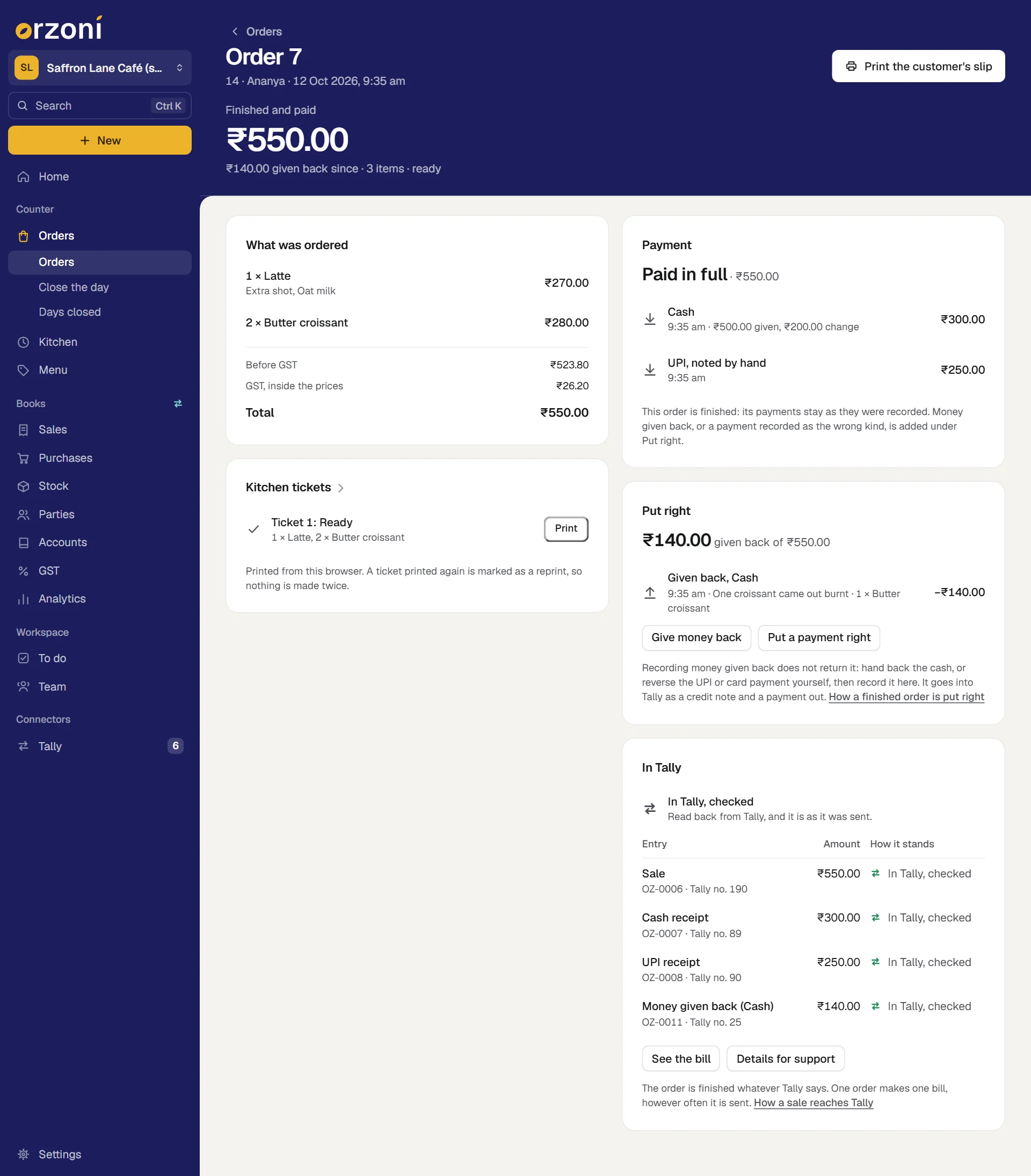
The card is on a finished order's page, under Payment. It is shown to whoever holds Put a finished order right. Anyone who can open the order sees what was put right on it.
Give money back
- Give the customer their money.
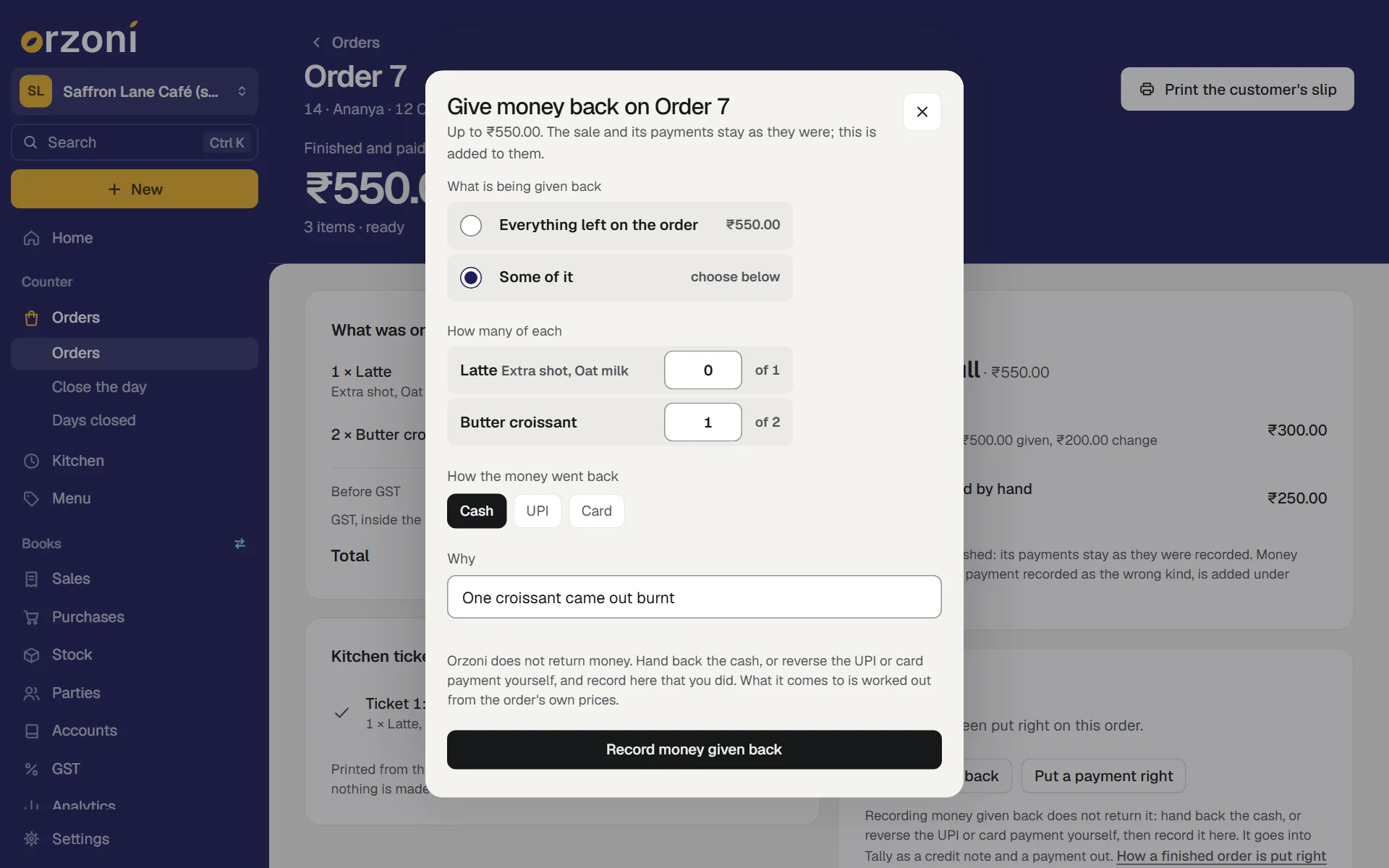
Open the order, and under Put right press Give money back.
A sheet opens, headed Give money back on Order 7. Its first line says the most that can be given back: Up to ₹550.00.
Under What is being given back, choose one:
Choice Use it when Everything left on the order The whole sale is being returned. The amount is beside it Some of it Only some things are. Under How many of each, type how many of each thing, up to the number shown after of - Under How the money went back, press Cash, UPI or Card: the way you really returned it. It need not be the way the customer paid.
- Under Why, say what happened in a few words, such as "One croissant came out burnt". A reason is needed.
Press Record money given back.
A small message says Recorded. It goes into Tally as a credit note and a payment out. The card Put right now lists it, and its first line says how much of the order has been given back.
How the amount is worked out
You do not type an amount. Orzoni works it out from the order's own sums: the prices it was sold at, with the same discount, the same GST and the same rounding.
- One butter croissant of Order 7 comes to ₹140.00, so that is what is recorded.
- When the last of an order is given back, the amount is whatever is left of what the customer paid, to the paisa. So an order given back in parts never comes to more or less than it sold for.
- No more of a thing can be given back than is left of it, and nothing more than the order came to.
Money can be given back more than once on an order, until nothing is left of it.
What money given back becomes in Tally
Two entries, made by the same part of Orzoni that makes every other bill:
| Entry | What it is |
|---|---|
| A credit note | For what was returned, to the customer your counter sales are billed to, with its GST worked out as the sale's was |
| A payment out | The money handed back, out of the ledger that cash, UPI or card is kept in, set against that credit note. Its note in Tally says the money was given back by hand |
Both are dated the day you recorded the money given back. On the order, the card In Tally gains a line Money given back (Cash), with its reference and how it stands. The order reads In Tally, checked again only when these entries have been read back from Tally too.
Put a payment right
The customer paid by UPI, and Cash was pressed. The amount is right and the sale is right. Only the money sits under the wrong heading: in the day's cash, and in the wrong ledger in Tally.
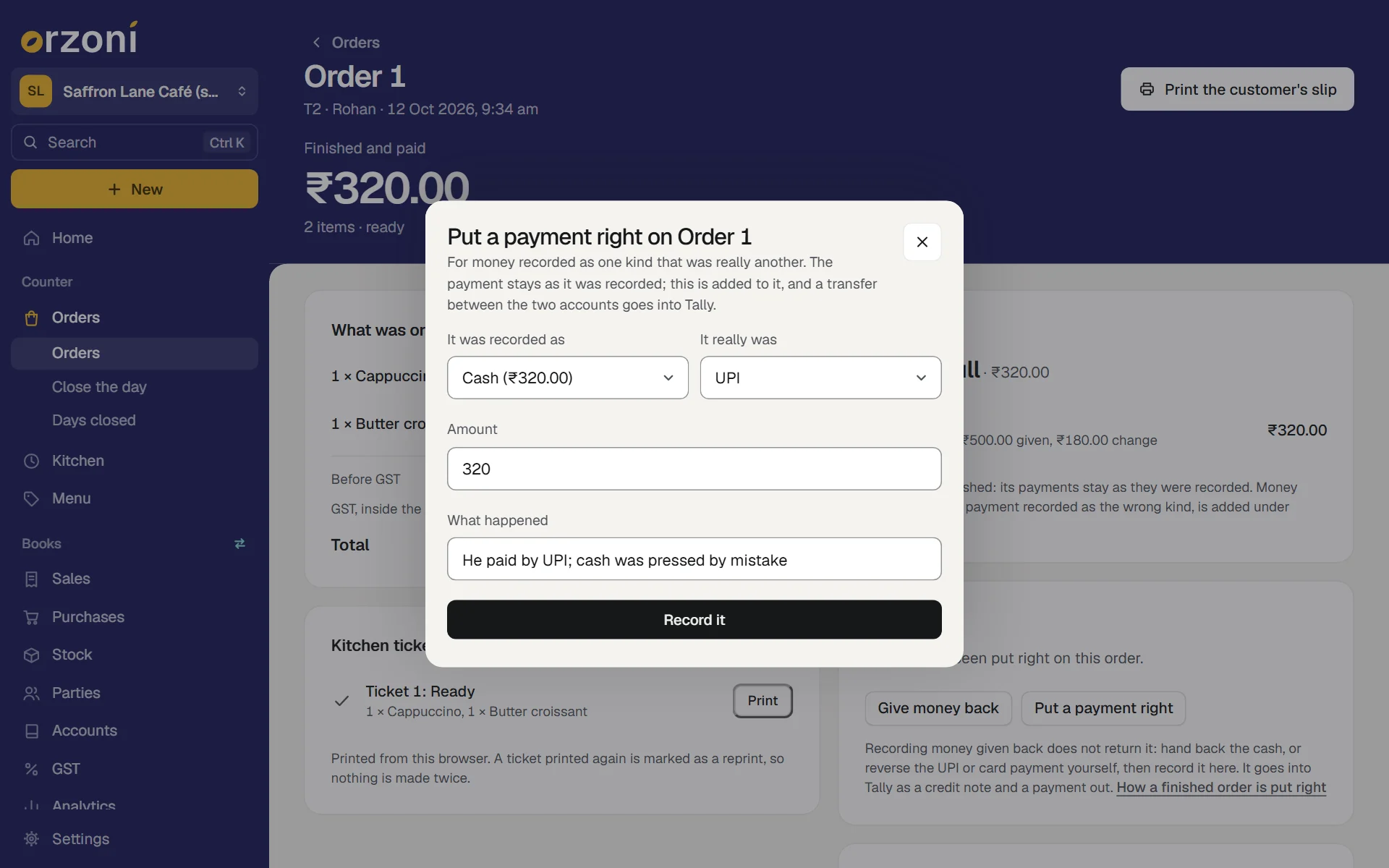
Open the finished order, and under Put right press Put a payment right.
A sheet opens, headed Put a payment right on Order 1.
- Under It was recorded as, choose what was pressed. Each choice shows how much of the order stands under it.
- Under It really was, choose how it was really paid.
- Check the Amount. It starts on the whole of what stands under the first choice. Type less if only part of it was wrong.
- Under What happened, say so in a few words, such as "He paid by UPI; cash was pressed by mistake".
Press Record it.
A small message says Recorded. The card Put right lists it: ₹320.00 recorded as Cash was UPI.
What a payment put right becomes in Tally
One entry: a transfer between the two ledgers, from the one the money was recorded in to the one it is really in. In the example, ₹320.00 from Cash to UPI Collections. The receipt made with the sale is left as it was.
Where you keep both kinds of money in one ledger in Tally, the books were right all along. Nothing is sent, and the order says Both are kept in one account in Tally: nothing to send.
The day's cash follows
A payment put right moves the amount in the day's money as well. On Today, and on the closing screen, ₹320.00 comes off Cash and is added to UPI, under the column Put right. So the cash that should be in the drawer is right again before you count it. See Close the day.
If Tally cannot take it yet
A correction is kept whether or not its entries can be made at that moment. It counts in the day's cash all the same, and the line on the card says Not in Tally yet, with the reason.
| The reason | What to do |
|---|---|
| The sale itself is not in Tally yet. | Nothing, if the sale is only waiting for Tally. Once the sale has gone in, press Send the correction on the order |
| Tally refused the sale itself. | Put that right first: see When Tally refuses the bill. Then Send the correction |
| Still to choose under Settings, Counter | Choose the ledger it names, then Send the correction |
| The credit note would come to a different sum in Tally from what was given back | The GST set up in Tally does not match the order's. Put that right with your accountant, then Send the correction |
Send the correction is on the order's In Tally card, for whoever holds Take orders and payments. A correction that Tally itself refused is sent again from Connectors, Tally, Waiting for Tally, like any other refused entry.
What is not done at the counter
| Not done here | Why, and what to do |
|---|---|
| Changing what a finished order sold | The order is the counter's record of what happened. Where the wrong thing was charged, give the money back for it, and take a new order for what was really sold |
| Opening a finished order again | A finished order stays finished. What needs putting right is added to it |
| Changing the bill itself | The bill is made from the order. It is not edited at the counter |
If the bill is changed or cancelled in Tally
Someone who holds Change or cancel entries in Tally can still change or cancel the bill from the bill's own page, or in Tally itself, as with any bill. The order does not follow them, and does not hide it either:
- An entry changed so that it no longer posts what the order sold reads Changed in Tally.
- An entry cancelled or deleted reads Removed in Tally.
- The order is listed under Needs attention, on Orders and on Today, until someone has looked.
Orzoni does not change the entry back. If the change was meant, the order still shows what was sold at the counter, and your accountant knows why the two differ. If it was not meant, it is put right in Tally. A change in Tally that still posts what the order sold is not flagged.
So the plain advice is: put a counter sale right from the order, with Give money back or Put a payment right, and leave its bill alone.
After the day was closed
A finished order can be put right on a later day. The correction belongs to the day it is recorded, not to the day of the sale.
- Money given back this morning on yesterday's order is counted in the day that is open this morning.
- Yesterday's close is not changed. Its page lists the correction under Since it was closed.
See Close the day.
If something stops you
| Orzoni says | What to do |
|---|---|
| Say in a few words why the money is being given back. | Type a reason. It is kept with the record |
| Say how many of at least one thing is being given back. | With Some of it chosen, type a number beside at least one thing |
| A thing's name, then one is left that can be given back. | Some of it was given back before. Type no more than is left |
| Everything on this order has already been given back. | Nothing more can be recorded on it |
| Only an amount of this order stands as Cash. | Type that amount or less. It is what is left under that way of paying |
| This order was changed on another screen. It is shown here as it now stands: look, then make your change again. | Someone else recorded something on it a moment before. Look, and record yours only if it is still needed |
| This order is not finished. | Before finishing, a payment is taken back and recorded again on the order's own page |
| This did not reach Orzoni, so it is not known whether it was recorded. | Check the connection and press again. The same record is not made twice |
Mistakes you can undo
| The mistake | How to put it right |
|---|---|
| A payment put right the wrong way round | Put it right again the other way, for the same amount, and say so in What happened |
| Money given back recorded under the wrong way, such as cash where you returned it by UPI | It is not changed at the counter. Say so in the close's note, and tell your accountant, who moves the amount between the two ledgers in Tally |
| Money given back recorded that was never handed over | Tell your accountant. The record stays on the order and in the day's money, so say so in the close's note. Its credit note and payment out are cancelled in Tally by someone who may, and the order then reads Removed in Tally for that entry |
| A reason typed wrongly | It cannot be changed. Say what was meant to whoever closes the day, who can add it to the close's note |
What it does to your data and to Tally
- In Orzoni: each correction is a record of its own on the order: what, how much, how, why, who and when. The order's lines and payments are untouched.
- In Tally, for money given back: one credit note and one payment out. For a payment put right: one transfer. Nothing else, and the sale's own bill and receipts are not changed.
- In the day's money: both count in the day they are recorded, whether or not Tally has them.
- On the customer's slip: a slip printed afterwards carries a line Given back, with how and how much.
What next
- Close the day: where the day's money is counted.
- Café receipts, and how a sale reaches Tally: every line the In Tally card can show.
- Change, cancel or delete an entry: for bills made in the bill form, which is another thing.
Still stuck? Write to orzoni.official@gmail.com and say which step you are on, or book a walk-through call.