

On this page
GuidesParties, accounts and GST
Accounts
The Day book in brief, every ledger under its group with one ledger's statement, and Cash and dues in full: what you hold, what came in and went out, what is owed to you and what you owe, and how each figure is worked out.
11 minute read
Three screens
Accounts in the rail holds Day book, Ledgers and Cash and dues.
| Screen | What it is | How it stands with Tally |
|---|---|---|
| Day book | Every entry in your books, newest first | Kept in step with Tally. What is made or changed here goes into your Tally books |
| Ledgers | Every ledger under its group, with its balance, and one ledger's statement | Worked out from your Tally books. Nothing here changes them |
| Cash and dues | Where the money stands today | Worked out from your Tally books. Nothing here changes them |
A small Tally mark beside each screen's title says the same. Point at it to read it.
On a phone, the Day book is the last name in the row under the Bills tab. Ledgers and Cash and dues are under More.
Day book
Every entry in your books, newest first, divided by month.
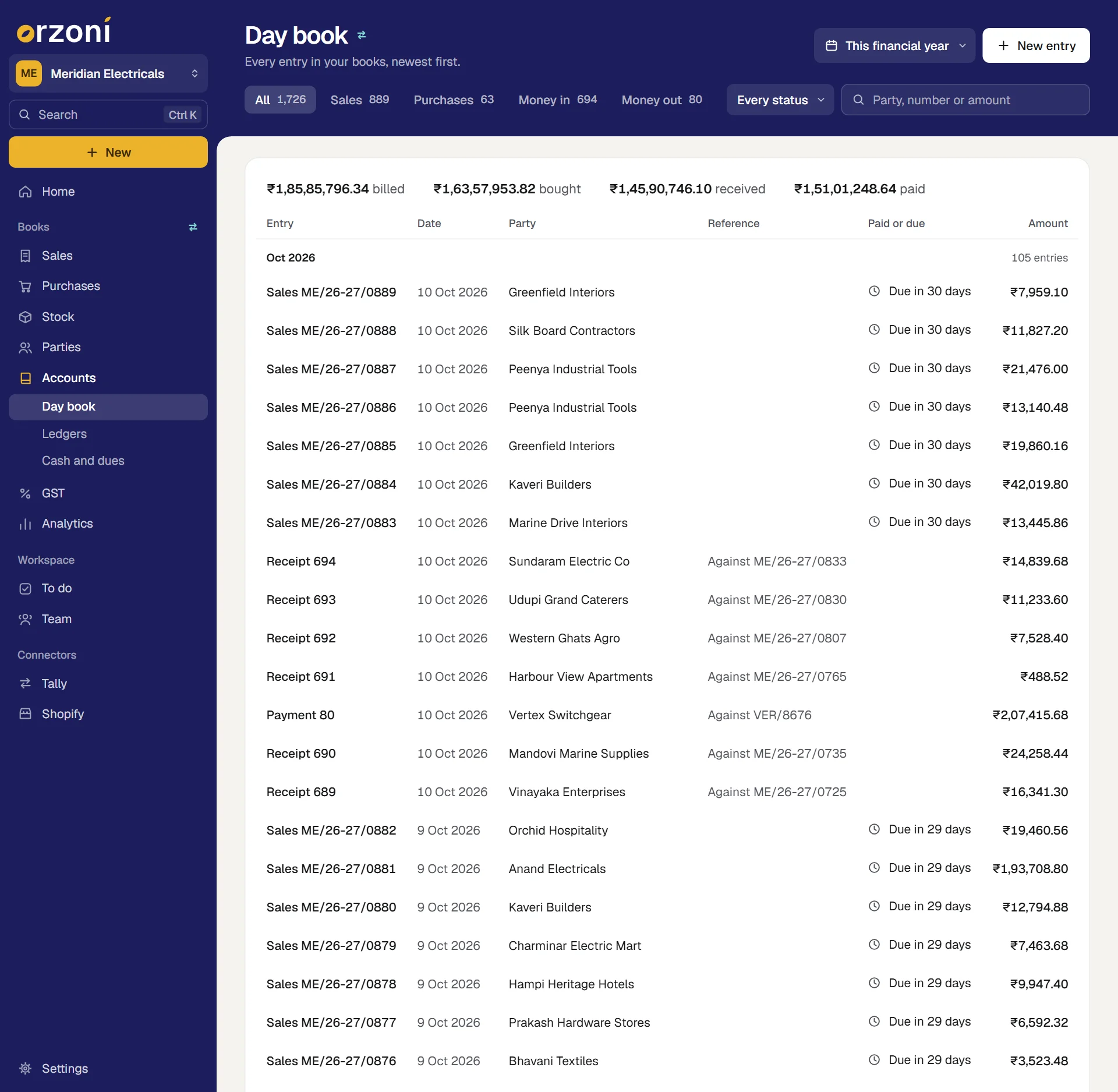
- Views. All, then one for each kind of entry your books hold: Sales, Purchases, Money in, Money out, Returns, Orders and challans and Journals and others. Each shows how many entries it holds.
- Every status narrows the list to Regular, Proforma or Cancelled entries.
- Search by party, number or amount.
- The dates button on the band chooses the dates the list covers.
- The first line of the list. With every kind on show it says what was billed, bought, received and paid in the dates chosen. With one kind chosen it is that kind's total.
- New entry opens the New list, where every kind of entry is made.
Press a row to open the entry. What you made in Orzoni and is still waiting for Tally sits on a card above the list.
From anywhere in Orzoni, D opens the Day book when you are not typing in a box.
The lists of one kind (Invoices, Purchase bills, payments and notes), their views, and what you can do from one entry are in Invoices, bills and the Day book.
Ledgers
Every ledger in Tally under the group it is kept in, with its balance today. The line under the title gives the day the balances are of.
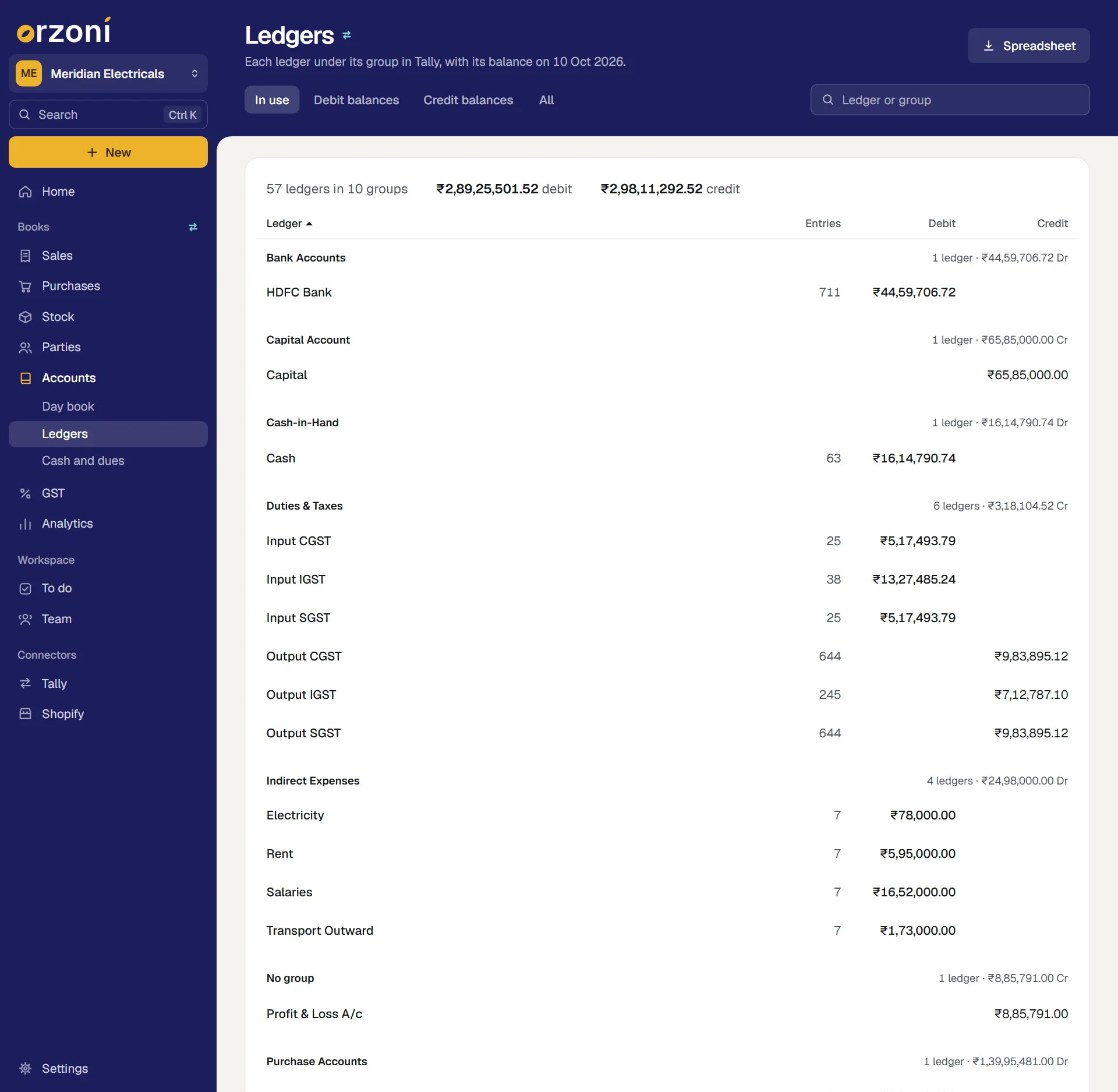
- Views. In use (ledgers with entries or a balance) is the one the screen opens on. The others are Debit balances, Credit balances and All.
- Search by the name of a ledger or of a group. To see one group alone, type its name.
- The first line counts the ledgers and groups on show, and adds up their debit balances and their credit balances.
- Each group has a heading with how many ledgers it holds and what they come to, Dr or Cr.
- Each row is a ledger: its name, how many Entries it has, and its balance under Debit or Credit.
- Sort by pressing Ledger, Entries, Debit or Credit. The ledgers are ordered inside their groups, and the groups too. Press the same heading again to turn the order round.
- The first 100 ledgers are shown. A button at the foot, such as Show 200 more of 340, adds the next ones.
- Spreadsheet, on a wide screen, saves every ledger (not only the view on show) with its group, entries and balance as a CSV file, which opens in any spreadsheet program. Alt E does the same.
The arrow keys move through the rows, and Enter opens the one you are on.
One ledger's statement
Press a ledger to open it.
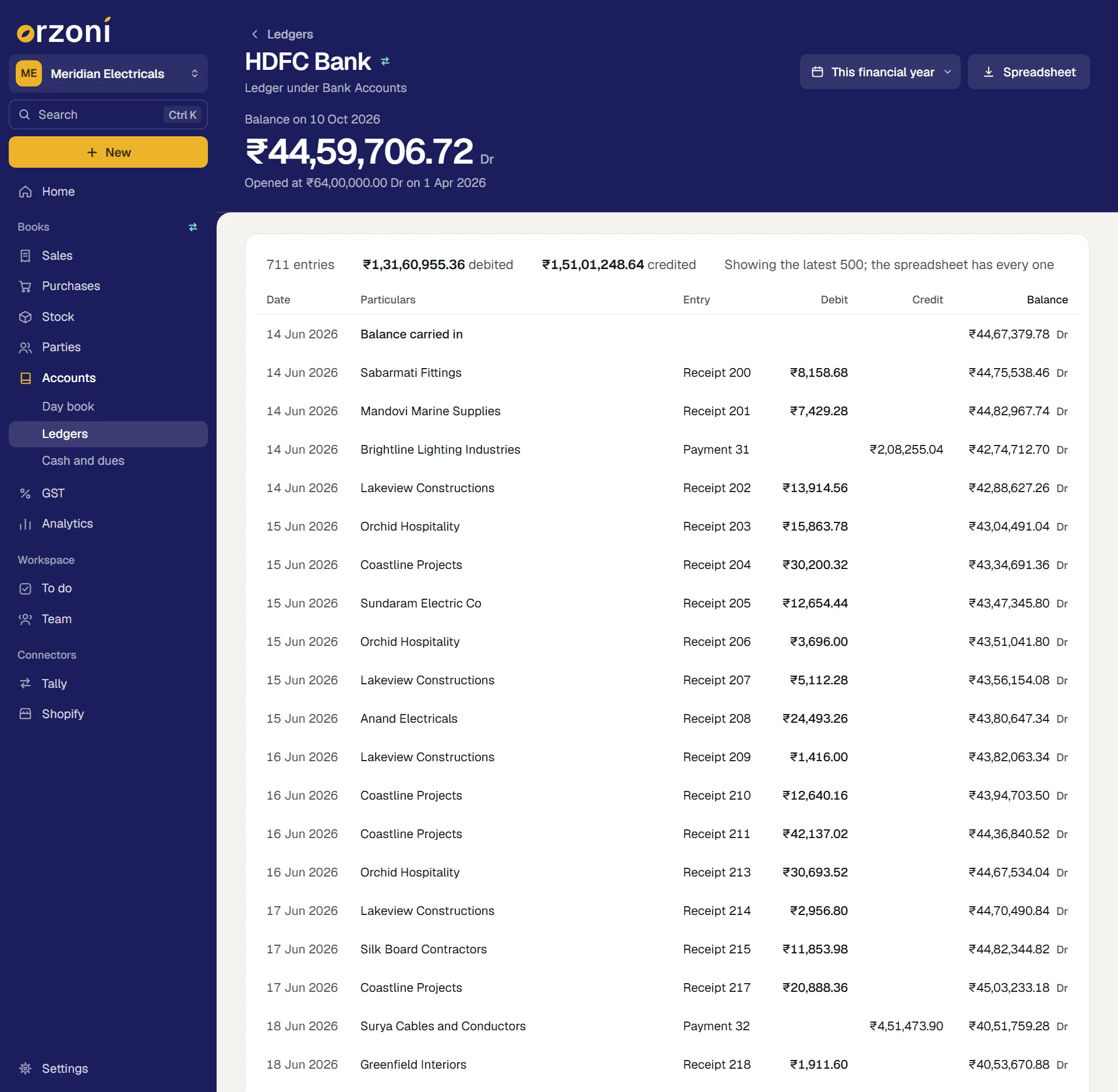
The band holds the ledger's name, the group it is under, the dates button, and the figure that leads: Balance on the last of those dates, Dr or Cr (or Nil), with what it opened at on the first date under it.
The statement under it starts with a line of totals: how many entries, how much was debited and how much credited in the dates. Then:
| Column | Shows |
|---|---|
| Date | The date of the entry |
| Particulars | What the entry was set against: the party on it, or the largest of the other ledgers. and 2 more when there were several |
| Entry | The kind of entry and its number |
| Debit, Credit | The amount, on its side |
| Balance | The balance the entry left, Dr or Cr |
The first row is the Opening balance and the last is the Closing balance, with the debit and credit totals beside it. Press any row between them to open that entry.
- Change the dates with the dates button on the band, or F2. The menu is the same everywhere: Today to Since the books began, and Custom range.
- No entries in these dates means the balance stood still. The page says what it stood at, with Other dates.
- A long statement shows its latest 500 entries, and the first line says so. The first row then reads Balance carried in: the balance brought into the first entry shown. The line of totals still covers the whole period.
- Spreadsheet, on a wide screen, saves every entry in the dates, not only those on screen, with the opening balance as its first row. Alt E does the same.
- Open account appears on a customer's or supplier's ledger. It opens that party's page: see Customers and suppliers.
Cash and dues
Where the money stands today: what you hold, what moved through cash and the bank, what is owed to you and what you owe. It is the one screen to open when the question is "how are we placed?".
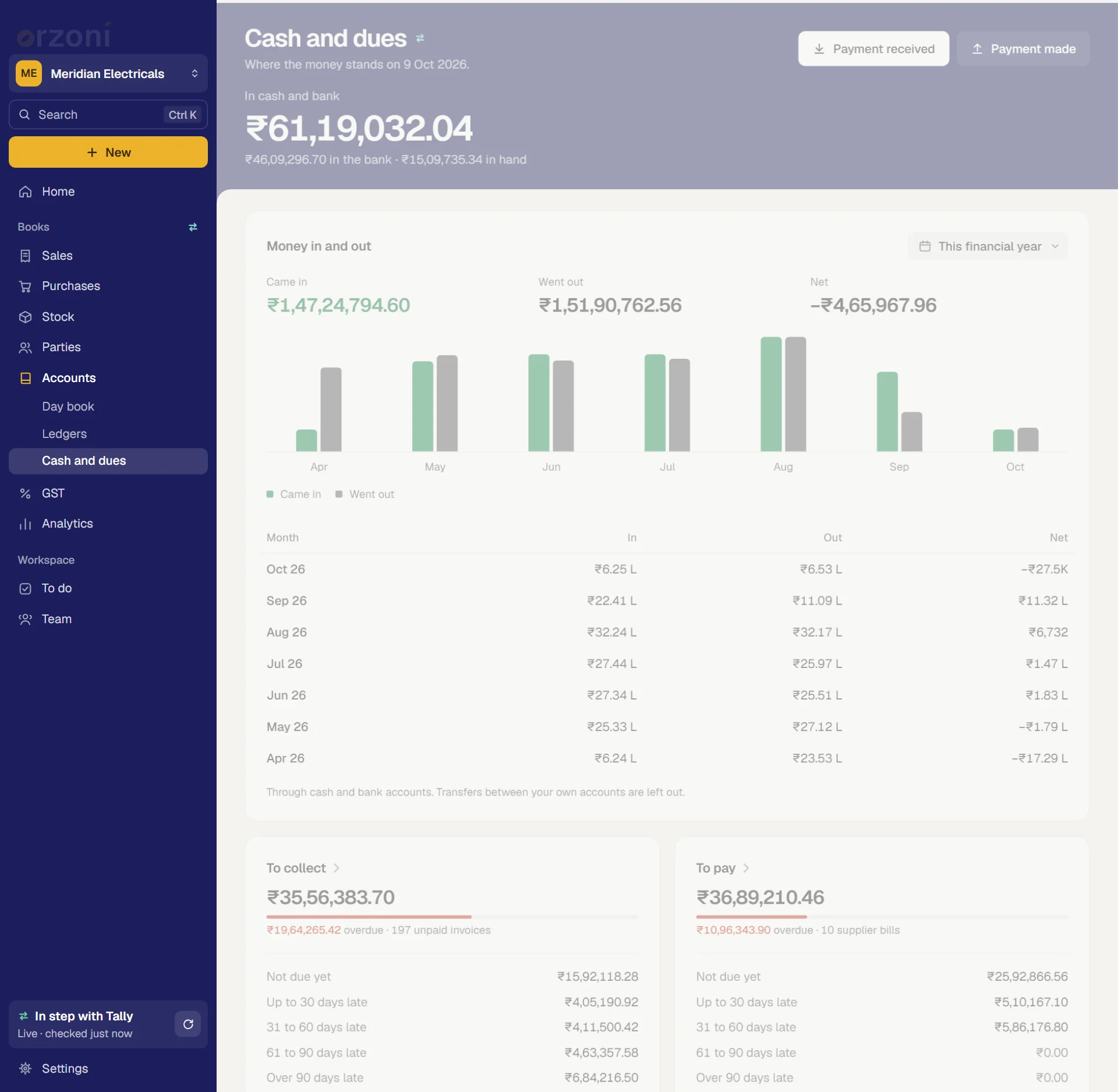
The screen has four parts, from the top:
| Part | What it answers |
|---|---|
| The band | How much is in cash and in the bank today |
| The line of accounts | Which accounts that is made of (shown only when there are several) |
| Money in and out | What came in and went out, month by month, in the dates you choose |
| To collect and To pay | What customers owe you and what you owe suppliers today, by how late it is, and who the largest are |
The band, the accounts, To collect and To pay are always as of today. The line under the title gives the date. Only Money in and out follows dates.
The band: in cash and bank
In cash and bank is the leading figure, to the paisa. Under it is the split: how much is in the bank and how much is in hand.
- In hand is the balance today of every ledger under Cash-in-Hand in Tally.
- In the bank is the balance today of every ledger under Bank Accounts and Bank OD A/c. An overdrawn account counts as a minus, so it brings the figure down.
- "Today" means Tally's closing balance less anything dated after today. An entry dated next week does not count yet.
Payment received and Payment made are at the top right. They open the two payment forms: see Record a payment. F6 and F5 do the same from anywhere in Orzoni.
The line of accounts
With one cash account and one bank account, the band has said it all and there is no line. With more (two banks, say, or a second cash box), a line under the band lists each account with its balance today, the largest first.
- Press an account to open its ledger and see its statement.
- Point at one to see whether it is Cash in hand, a Bank account, or a Bank account, overdrawn.
- Up to 12 accounts are listed. A last link, and 3 more accounts for example, opens Ledgers.
Money in and out
This card is the only part of the screen that follows dates, so the dates button is on the card itself. Choosing other dates redraws this card alone.
- Came in, Went out and Net for the dates chosen. Net is what came in less what went out, so a minus means more went out than came in.
- A pair of bars for each month, when the dates cover more than one: green for what came in and grey for what went out. Point at a pair to read that month's three figures. Over more than 12 months, only the first and last months are named under the bars.
- The months as a table, newest first: In, Out and Net. The table shortens its amounts to lakhs and crores. Point at one for the full figure.
- When no money moved in the dates, the card reads No money moved in these dates.
How it is counted:
- Every amount debited to a cash or bank ledger in the dates is money that came in. Every amount credited is money that went out.
- The ledgers are the same ones as on the band: those under Cash-in-Hand, Bank Accounts and Bank OD A/c.
- Contra entries are left out. Cash put into the bank, or moved from one of your accounts to another, is neither money in nor money out.
- A sale on credit is not money in until the customer pays. This card follows the money, not the bills.
To collect and To pay
Two cards side by side. To collect is what customers owe you. To pay is what you owe suppliers. Both are as of today.
Each card shows, from the top:
| On the card | What it is |
|---|---|
| The total | What is owed in all, to the paisa |
| A bar | The share of the total that is overdue. It is there only when something is |
| One line | The amount overdue (or None overdue), and how many unpaid invoices or supplier bills there are |
| Five lines | The total by how late it is: Not due yet, Up to 30 days late, 31 to 60 days late, 61 to 90 days late and Over 90 days late. The five add up to the total |
| Who owes the most | The five largest, each with its number of bills and how late its oldest one is, or not due yet. On To pay it reads Who is owed the most. When there are more than five, a line under them says how many others there are |
What you can press:
- Press a name to open that party's page.
- Press the heading To collect to open Customers, or To pay to open Suppliers.
- With nothing owed, the card reads Nobody owes you anything. Every invoice is paid. or Nothing to pay. Every supplier's bill is settled.
How each figure is worked out
| Figure | How it is worked out |
|---|---|
| To collect | What each ledger under Sundry Debtors owes you today, added up. What one owes is its ledger balance in Tally |
| To pay | The same for the ledgers under Sundry Creditors |
| A party in advance | Counted as nothing. A customer who has paid ahead does not bring To collect down |
| When a bill is due | Its date plus its credit period. A bill with no credit period is due on its own date |
| Overdue | The part of the unpaid bills that is past its due date today |
| Not due yet | The part still within its credit period |
| The four "late" lines | Days are counted from the day a bill fell due, not from the day it was made |
| The number of unpaid invoices | The bills Tally holds one by one for those parties that still have something unpaid |
| Money on account | A payment still to be set against a bill, or a credit note, is taken off the party's oldest bills first. So the bills always add up to the balance |
| A balance with no bills behind it | Where Tally does not keep bills one by one for a ledger, what is owed is aged from the party's latest billing backwards |
The same working is used on Home, on Customers and Suppliers, on a party's page and in Segments, so the figures agree. A party's own page shows the bills behind its figure: see Customers and suppliers.
What Cash and dues does not show
- No GST figure. GST is worked by return month on its own screen. See GST.
- No profit, sales or stock. Those are on Home and under Analytics. See Analytics.
- It cannot be rearranged. The screen is laid out one way for everyone.
- It changes nothing. To record money, use Payment received or Payment made.
If a figure looks wrong
| What you see | Why, and what to do |
|---|---|
| In cash and bank is not your bank balance | It is the balance in your books, not at the bank. Cheques still to clear and charges still to be entered make the two differ. Open the account's ledger and compare it with the bank statement |
| A bank or cash account is missing | Its ledger in Tally is not under Cash-in-Hand, Bank Accounts or Bank OD A/c. Move it there in Tally |
| Went out looks too large | A transfer between your own accounts was entered as a payment and a receipt in place of a contra. Enter transfers as contra entries |
| To collect is higher than you expect | A payment has not been entered, or was entered against another ledger. Open the customer from Who owes the most and look at All entries |
| Everything is Up to 30 days late or worse, and nothing is Not due yet | Your bills carry no credit period, so each fell due on its own date |
| A total here is not what Tally shows | Orzoni checks its figures against Tally's and lists any that differ. See Data health |
Keys on these screens
| Key | Where | What it does |
|---|---|---|
| D | Anywhere, when not typing | Opens the Day book |
| Up Down, then Enter | Day book, Ledgers, a statement | Move through the rows, and open one |
| F2 or Alt F2 | Day book, a statement, Cash and dues | Opens the dates menu |
| Alt C | Day book | Opens the New list |
| Alt E | Ledgers, a statement | Saves the spreadsheet |
| F6, F5 | Anywhere | Payment received, Payment made |
| Esc | A statement | Back to Ledgers |
Who sees what
Each person sees only what their role allows. Ledgers and Cash and dues are shown to someone who may see figures and reports. The Day book is shown to someone who may see bills. New entry, Payment received and Payment made are offered to someone who may make bills. See Users and roles.
What next
- Invoices, bills and the Day book: the lists of bills in full, and what can be done from one entry.
- Record a payment: money received and money paid, set against bills.
- Customers and suppliers: one party's unpaid bills, and a reminder on WhatsApp.
- GST: the tax in your books, one return month at a time.
- Find your way around: the rail, Search and the dates menu.
Still stuck? Write to support@orzoni.com and say which step you are on, or book a walk-through call.