

On this page
Returns at the shop counter
What to do when goods come back, or when a payment was recorded as the wrong kind. Record a return on the finished sale it belongs to, with how many came back, how the money went back and why. What a return becomes in Tally, a credit note and a payment out, how a payment is put right as a transfer, and why the sale itself is never changed.
6 minute read
The rule behind all of it
A finished sale is never changed and never deleted, and neither is its bill. What happens afterwards is added to it, as a record of its own with a name and a reason, and goes into Tally as entries of their own.
So the counter's record and the books can always be compared: the sale as it was sold, and beside it what came back.
| What happened | What you do | What it becomes in Tally |
|---|---|---|
| Goods were brought back | Record a return | A credit note for the goods, and a payment out |
| Money was recorded as the wrong kind | Put a payment right | A transfer between the two accounts |
| The customer wants something else in its place | A return, then a new sale | The two above, and a new sales bill |
Both are on a finished sale's own page, in the card Returns and corrections.
Who this is for
Whoever is allowed to put a finished sale right. Both need the permission Record a return, or put a payment right. The role Shop supervisor starts with it. Shop assistant does not, and is not shown the two buttons. See Users and roles.
The shop counter is a pilot, open to a few businesses while it is being tried.
Before the sale is finished
A sale that is still Being paid for needs neither of these.
- A payment recorded by mistake is taken back with Take back.
- A sale that will not be paid for is voided with Void this sale, which frees its stock.
Both are in Ring up a counter sale.
Record a return
- Open the sale. Shop, Sales, choose the day, and press the sale.
- In the card Returns and corrections, press Record a return.
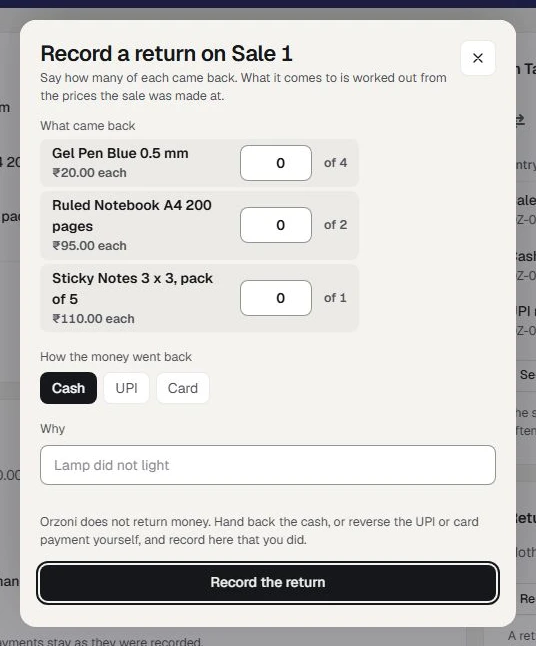
- Under What came back, type how many of each item came back. Each box says how many it can be, such as of 2.
- Under How the money went back, press Cash, UPI or Card.
- In Why, say in a few words why it came back.
- Press Record the return.
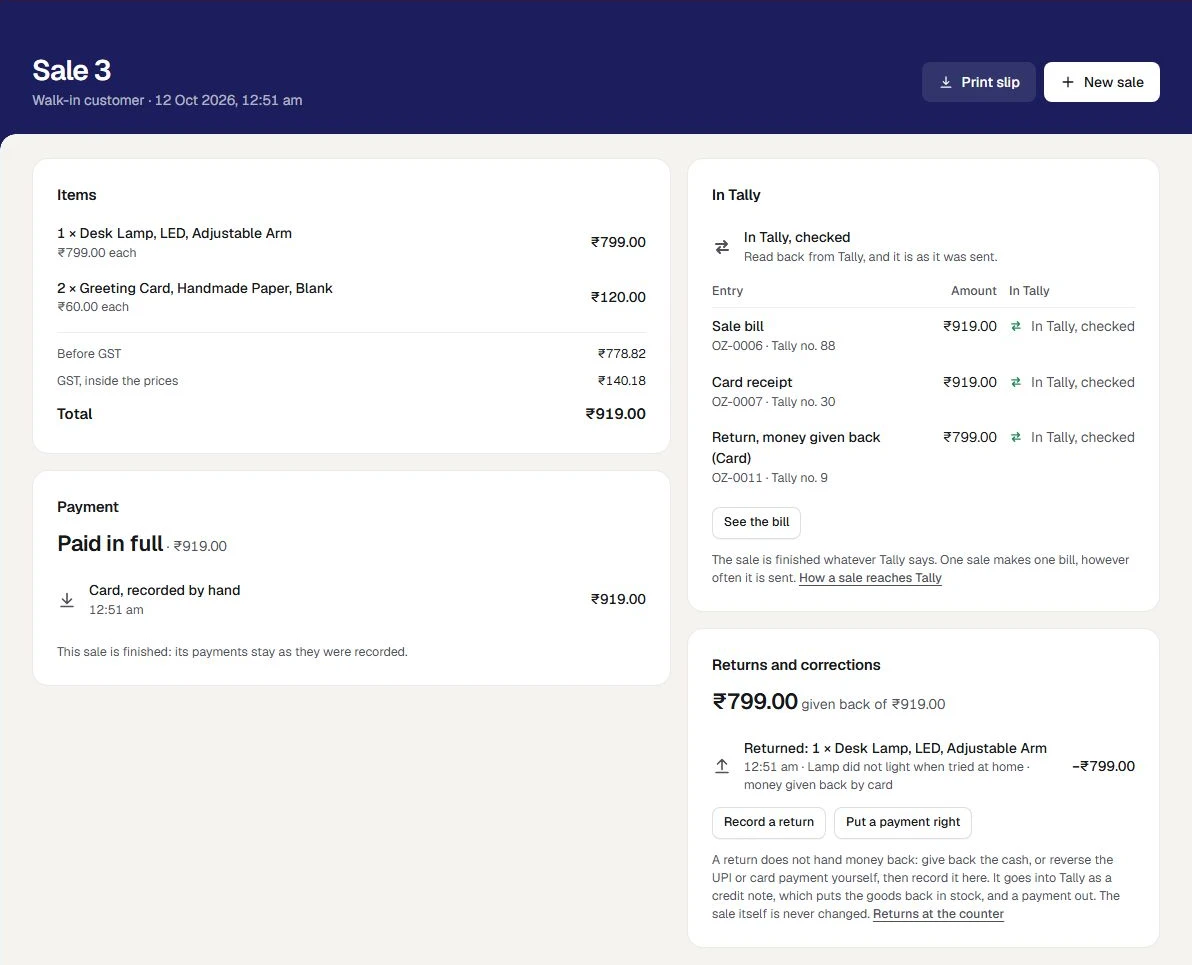
A small message says Recorded. It goes into Tally as a credit note and a payment out. The card now shows what was given back of the sale's total, and a line for the return with the items, who recorded it, when, the reason and how the money went back.
How the amount is worked out
You say how many came back. You do not type an amount. What the return comes to is worked out from the prices the sale was made at, GST included, so a price changed since makes no difference.
No more can come back than was sold. Where part of a line has already come back, the box offers only the rest. When everything on a sale has been given back, Record a return is no longer offered.
What a return becomes in Tally
| In Tally | What it is |
|---|---|
| A credit note | For the goods that came back, to the customer the sale was billed to. It puts the goods back in stock, and is dated the day of the return |
| A payment out | The money given back, from the cash, UPI or card account you chose, set against that credit note |
The sale's own bill and its receipts stay exactly as they were sent. Under In Tally, the return has a row of its own, Return, money given back, and says for itself whether it is waiting, in Tally, or checked.
Once Tally has taken the credit note and has been read again, the goods are back in Tally's count, and in what is left to sell at the counter.
The slip, after a return
Print slip on the sale now carries a line for the return: Returned, money given back, with the amount taken off.
An exchange
There is no exchange in one step. Do it as two.
- Record a return for what came back, and hand the money back.
- Ring up a New sale for what the customer takes, and take payment for it.
Each is a record of its own, so the books show both: what came back, and what was sold.
Put a payment right
Use this when the right amount was recorded as the wrong kind: cash was pressed where the customer paid by UPI.
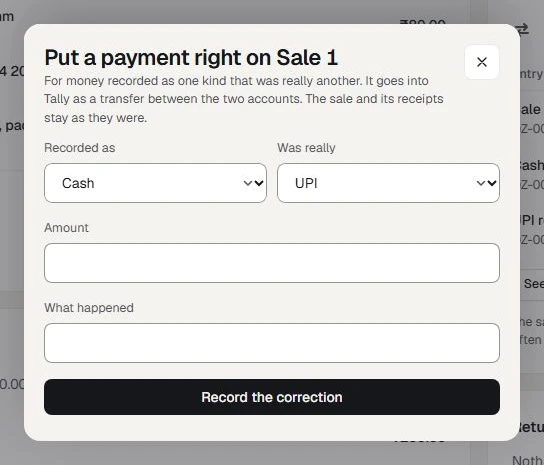
- On the finished sale, in Returns and corrections, press Put a payment right.
- Choose Recorded as and Was really. They have to be two different kinds.
- Type the Amount.
- Under What happened, say it in a few words.
- Press Record the correction.
A small message says Recorded. It goes into Tally as a transfer.
What a payment put right becomes in Tally
A transfer between the two accounts: out of the one the money was recorded in, into the one it really went to. The sale, its bill and its receipts stay as they were. The card Returns and corrections gains a line that says how much was recorded as one kind and was really the other.
Where both kinds of money are kept in one account in Tally, the books were right all along, and nothing is sent.
No money moves at the counter. This puts the record right, not the drawer.
If Tally cannot take it yet
A return and a payment put right wait for Tally exactly as a sale's bill does. With the computer that runs Tally switched off they read Waiting for Tally, and go in by themselves when it is back.
If one cannot be made for a set-up reason, its line on the card reads Not in Tally yet, with the reason. Put the reason right, then press Send the return on the card In Tally.
The words under In Tally are the same as for a sale: see Shop sales, stock and Tally.
If something stops you
| The screen says | Why | What to do |
|---|---|---|
| The two buttons are not there | Your role does not have Record a return, or put a payment right, or the sale is not finished | Ask a Shop supervisor or the owner. For a sale still being paid for, see Before the sale is finished |
| Say how many of at least one item came back. | Every box reads 0 | Type how many came back |
| Say in a few words why it came back. | Why is empty | Say why |
| Choose two different kinds. | Recorded as and Was really are the same | Change one |
| This did not reach Orzoni, or its answer was lost | The connection dropped as you pressed | Check the connection and press again. The same return is not recorded twice |
While the shop counter is closed to new sales for a business, returns can still be recorded.
Mistakes you can undo
| The mistake | How to put it right |
|---|---|
| The sheet opened on the wrong sale | Press the cross. Nothing was recorded |
| A payment put right the wrong way round | Put it right again, the other way |
| A return recorded that did not happen | It cannot be taken off at the counter. Tell your accountant, who puts the credit note and the payment out right in Tally. The sale's page then says that entry was changed or removed in Tally |
What it does to your data and to Tally
- In Tally, for a return: one credit note and one payment out. The credit note raises Tally's stock by what came back.
- In Tally, for a payment put right: one transfer.
- In Orzoni: the return or the correction is kept on the sale, with who recorded it, when and why. It is written down under Settings, Users and roles, What was done.
- The sale, its bill and its receipts are not changed by either.
What next
- Shop sales, stock and Tally: how each entry stands in Tally, and what is left of an item.
- Ring up a counter sale: the new sale for an exchange.
- Change, cancel or delete an entry: what is put right in the books themselves.
What returns do not do
- No money is returned by Orzoni. It records that you gave it back.
- No exchange in one step. It is a return, then a new sale.
- A finished sale is not opened again, and what it sold is not changed.
- A return is not undone at the counter. A return recorded by mistake is put right in the books.
- No return without its sale. A return is recorded on the finished sale it came from.
- No store credit, and no credit left on a customer's account. The money goes back by cash, UPI or card.
The whole list is in Set up a shop counter.
Still stuck? Write to orzoni.official@gmail.com and say which step you are on, or book a walk-through call.