

HomeFor your businessTrading and wholesale
For a business that buys and sells goods
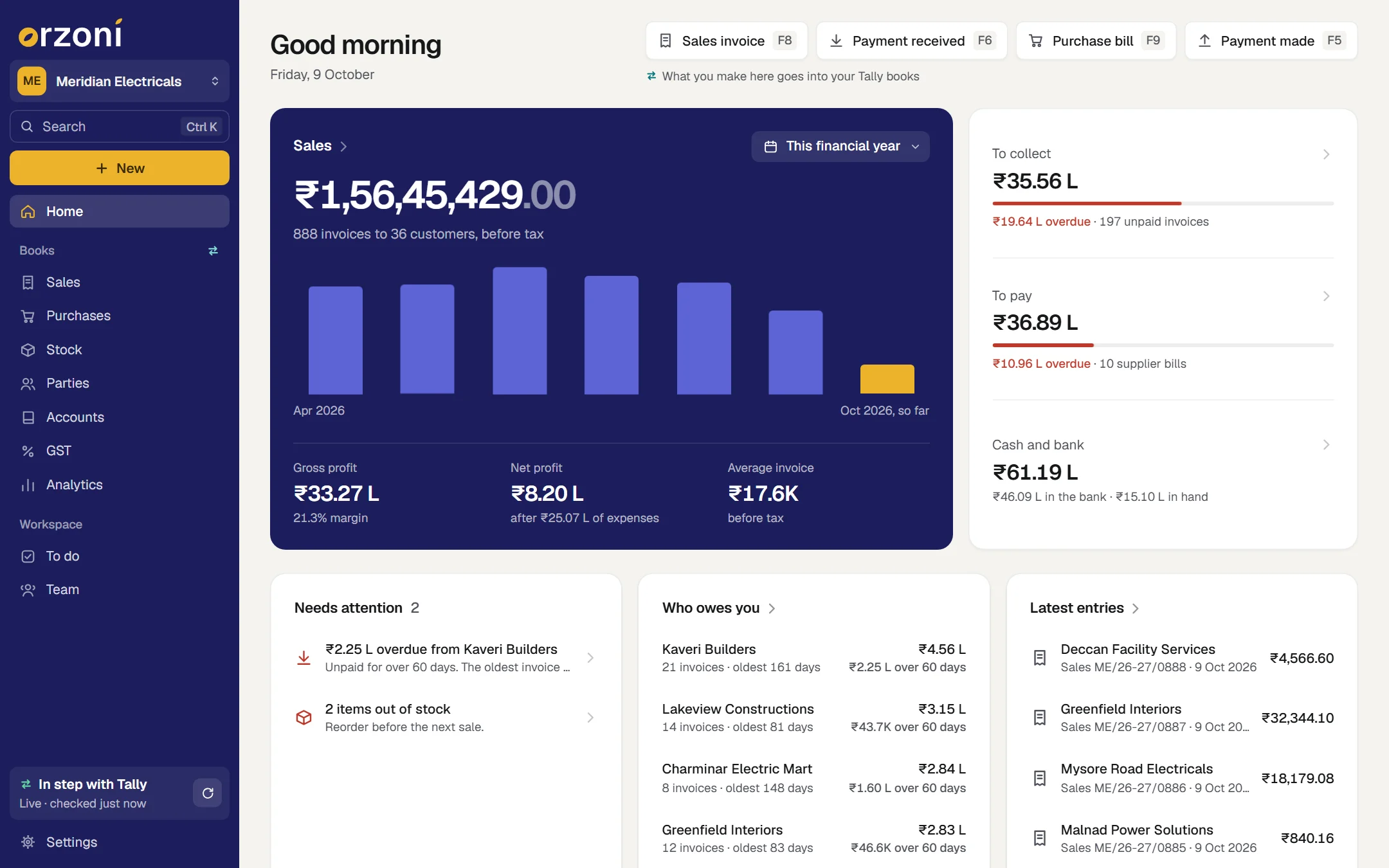
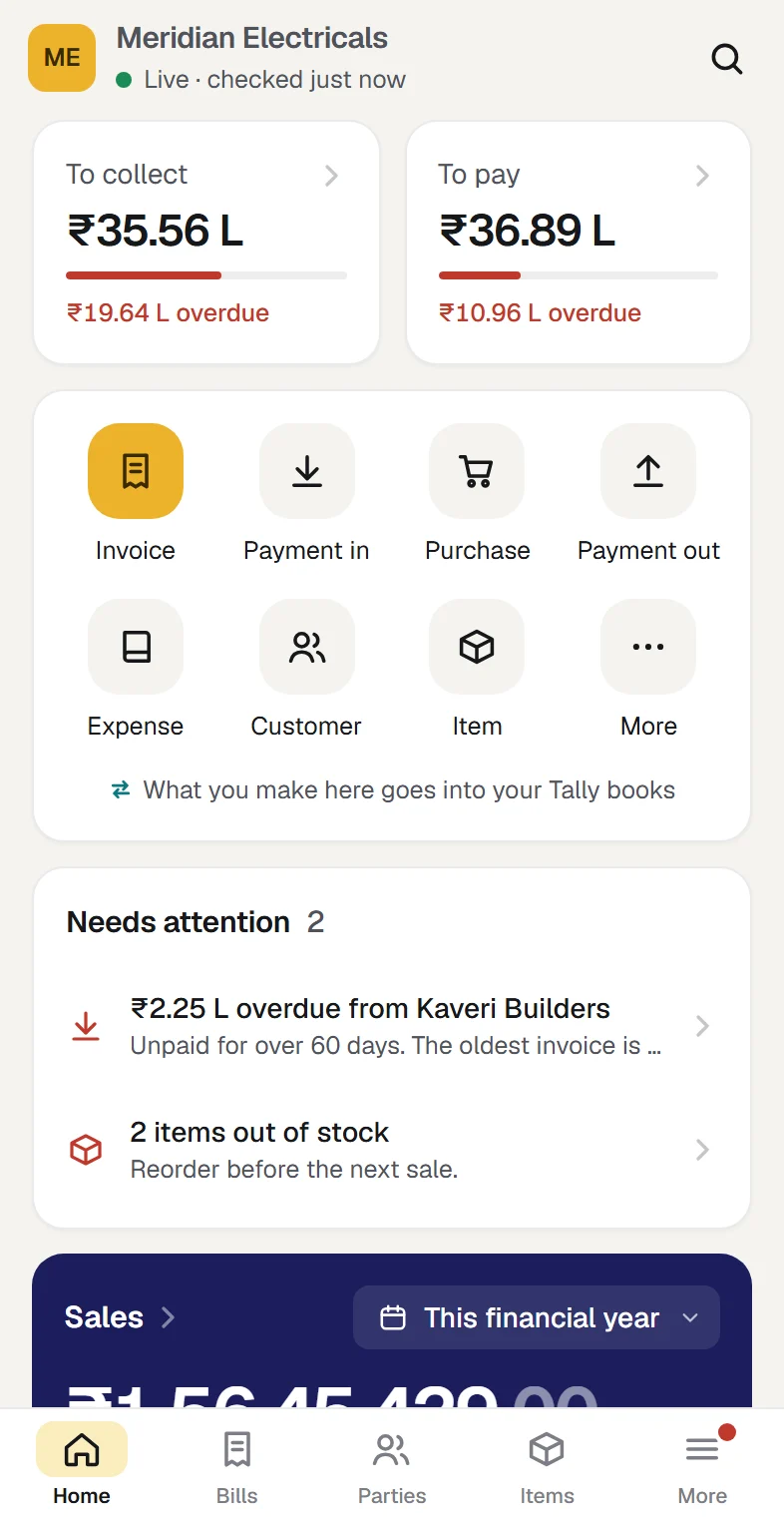
Make the bill at the counter or on the road, know what is in each godown, and see who owes you before you pick up the phone. Everything you make lands in your Tally books as a real entry.
You need TallyPrime on a Windows 10 or 11 computer. Everyone else uses a phone or a browser.
Who it is for
A business that keeps its books in Tally and sells goods with GST: an electricals distributor, a hardware wholesaler, a garments dealer, a shop with a godown behind it.
- You bill customers on credit, and someone has to chase what is due.
- You hold stock in one godown or several, and reorder from the same suppliers.
- Your accountant works in Tally, and you want it to stay that way.
Your first task
Make a sales bill, and find it in Tally
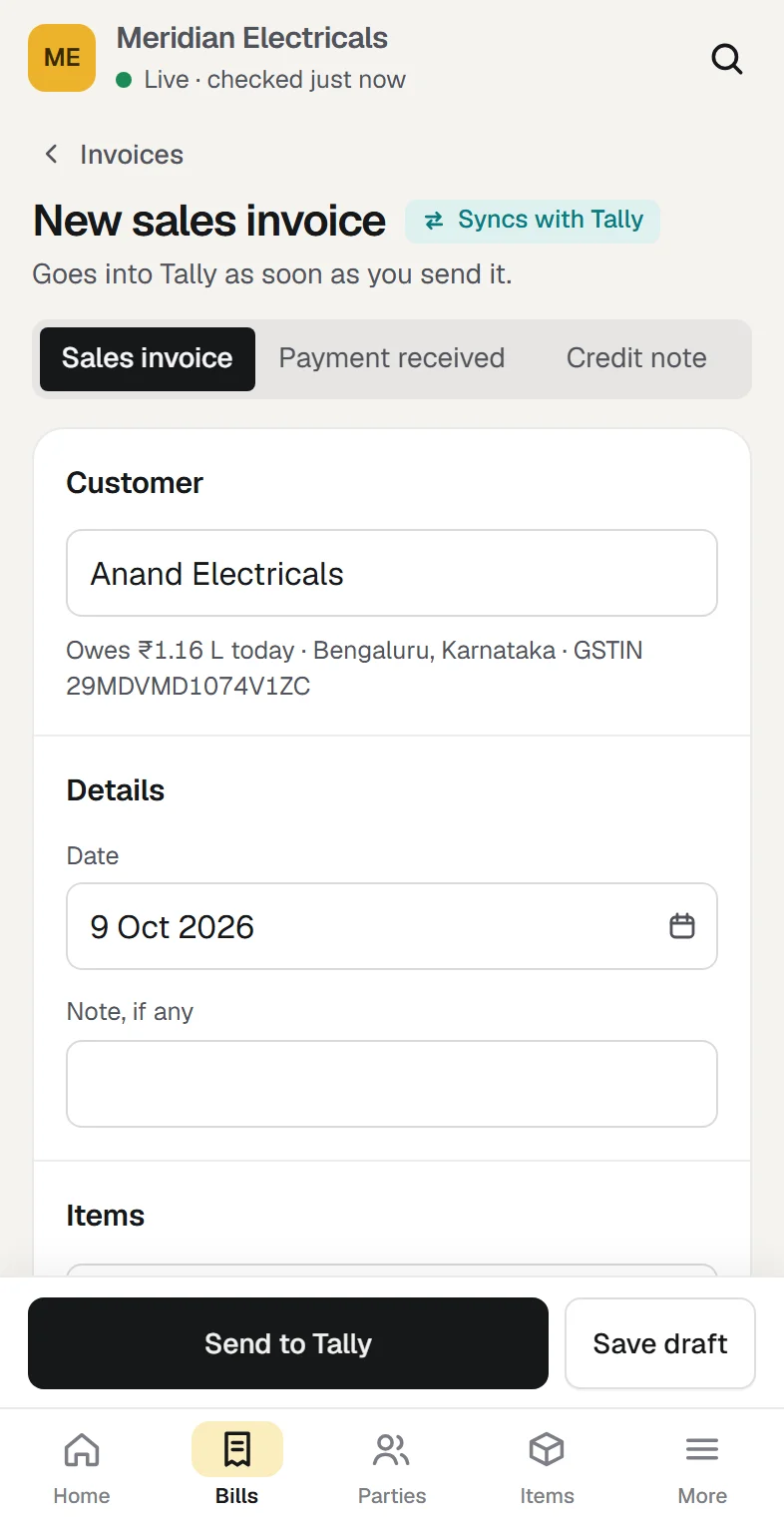
Once your company is linked, press New, pick a customer and add the items. Send it, then open Tally and look: it is there under Tally's own number, and Orzoni has read it back to be sure.
Make a sales billThe day, on real screens
Each step says what you do, and what happens next.
Know whom to call first
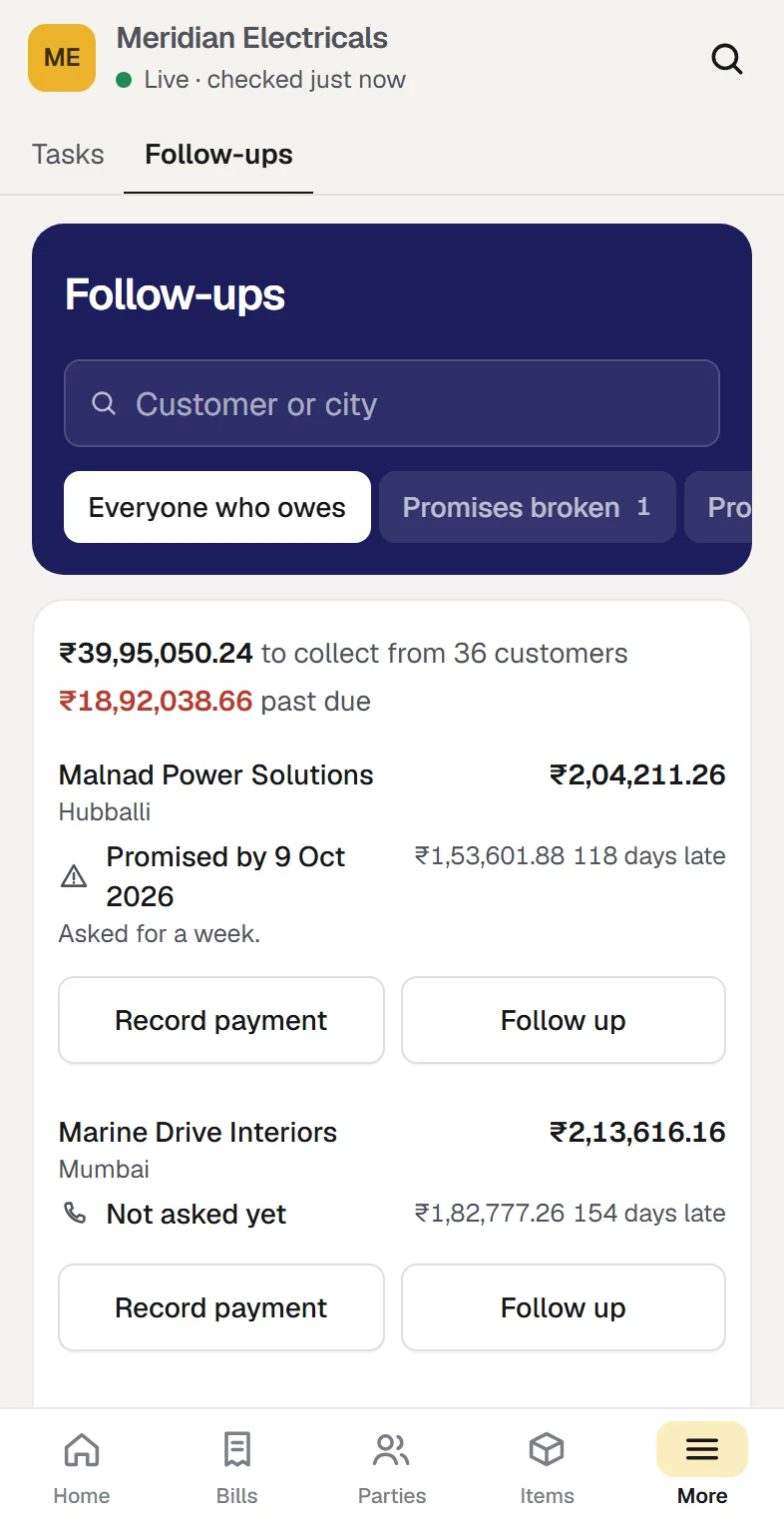
Open Follow-ups. Everyone who owes you is there with how late they are and what they last promised. Press Remind, and the message is written for your own WhatsApp with the unpaid bills in it.
What happens next. You record the payment from the same row, and the receipt goes into Tally.
Tasks and follow-ups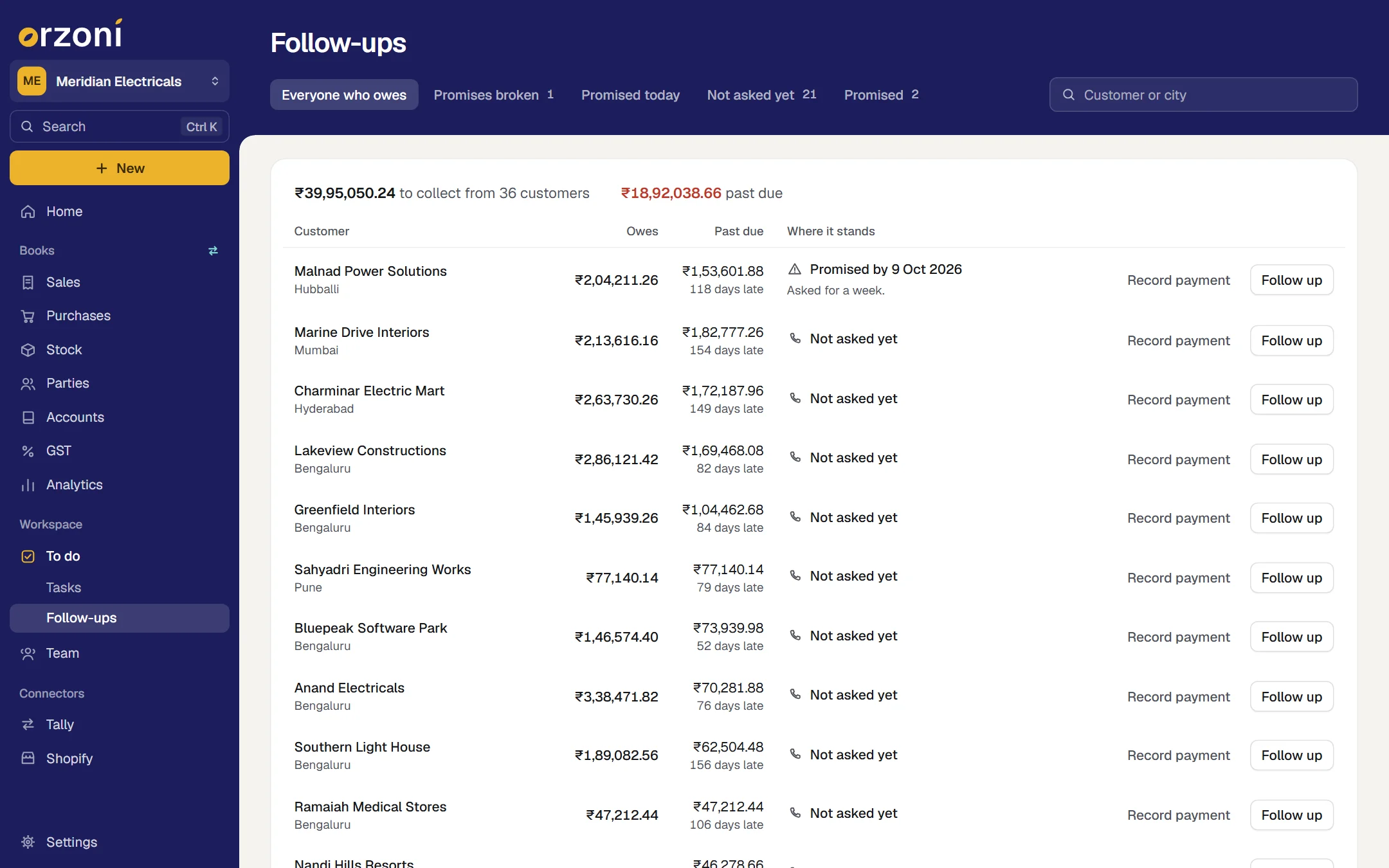
Reorder before you run out
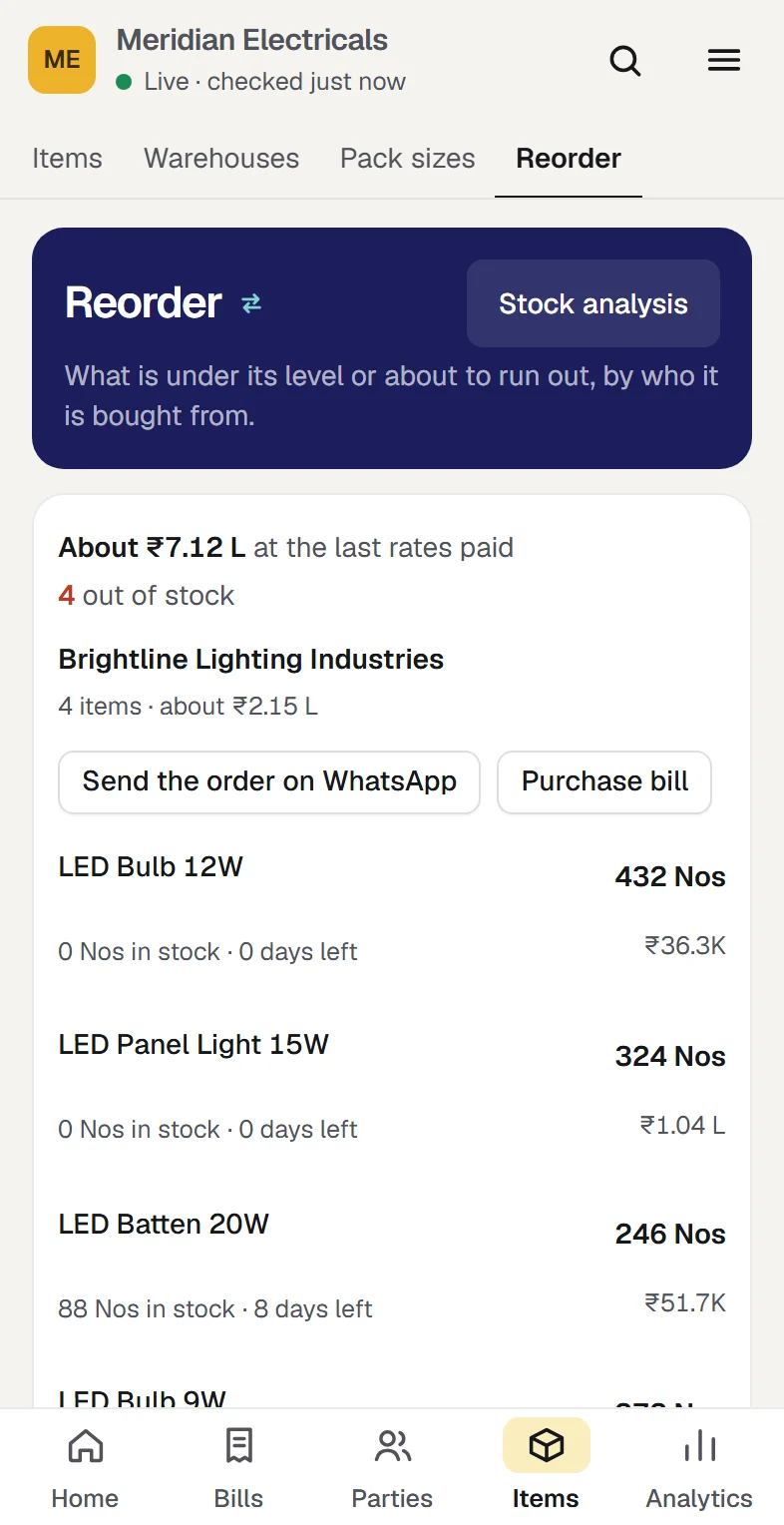
Open Reorder. What will run short is grouped by the supplier you buy it from, with the days of stock left for each item.
What happens next. The order for each supplier is written for you to send from your own WhatsApp.
Reorder and stock analysis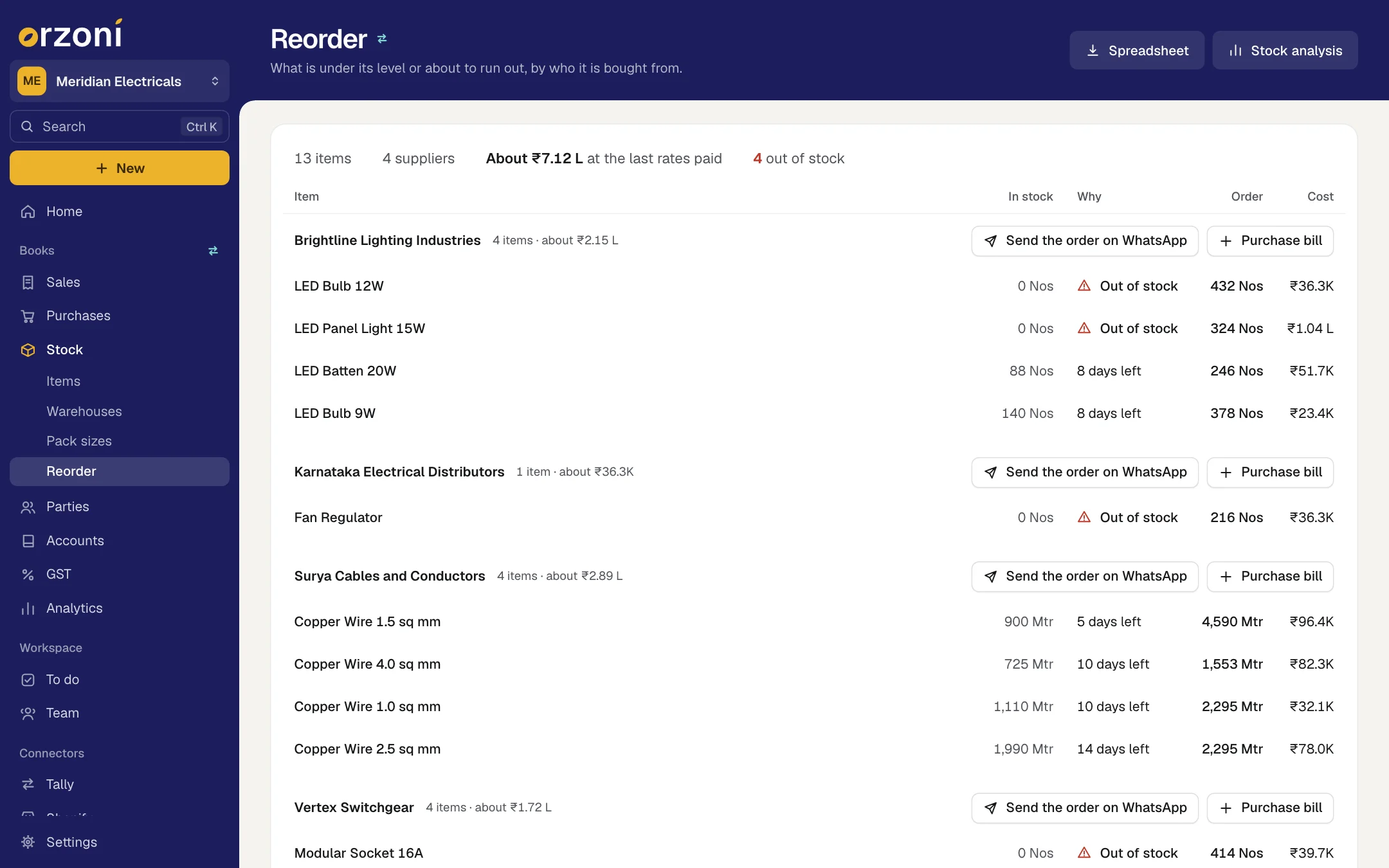
Give your accountant the month
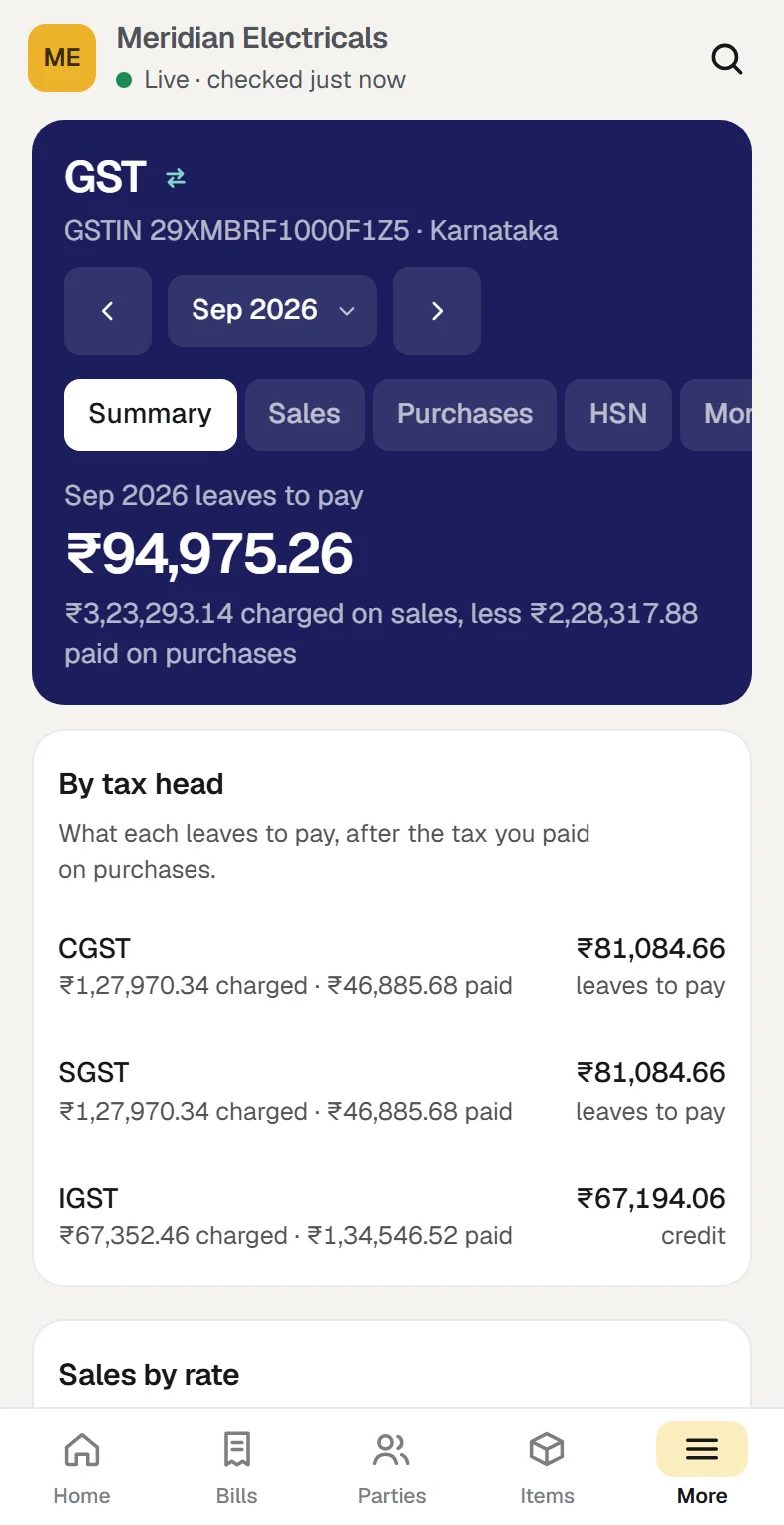
Open GST and choose the month. What it leaves to pay, your sales laid out for GSTR-1 with an HSN summary, and the tax paid on purchases bill by bill.
What happens next. Your accountant, signed in with a role of their own, prepares the return from the same figures.
GST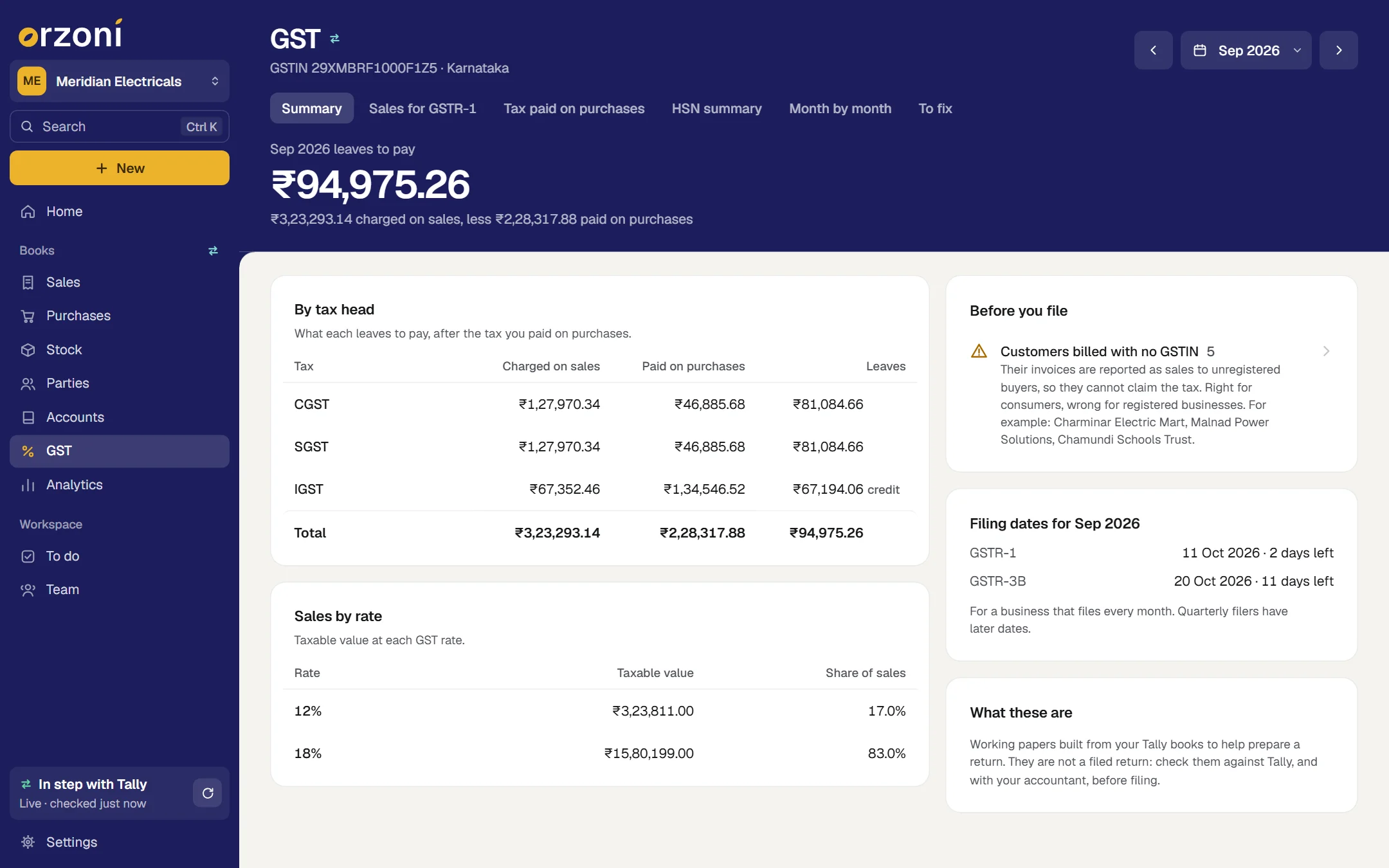
The business in these pictures is Meridian Electricals, a sample company. None of it is a real business's books.
₹13,629.00 paid now into HDFC Bank
Make the bill wherever you are. It lands in Tally as a proper entry
Pick the customer, add the items, choose paid now or pay later. CGST and SGST inside your state, IGST outside it, worked out line by line. Print it, save a PDF, or share it on WhatsApp from your own number. A new customer or a new item can be made from the bill itself.
Received in HDFC Bank. The receipt goes into Tally with the bill, and the customer's account is settled.

Invoice ME/26-27/0890₹13,629.00 · due 9 November · PDF attached
Opens in your own WhatsApp. You choose whom, and you press Send.
A tax invoice in Tally's own layout
GSTIN and state code, HSN, tax by rate, the amount in words, your address, bank details and signatory.
Bills that repeat
Rent, AMC, a monthly supply: set it once and the bill is made on its day whether or not Orzoni is open.
Proformas and drafts
A quote stays out of the books until you make it regular. A draft waits until you send it.
Ask your numbers anything. They come from your own books
Build a board of the figures you look at every morning: add a tile, size it, move it, and compare with last period. There are 66 board tiles, 11 ready-made reports, and a report builder with 29 measures across sales, purchases, expenses, GST, dues and stock. Download any report to a sheet. The figures are worked out from the books Orzoni reads from Tally and checks against it.
Your board4 of 66 tiles on this board
Net sales
₹1.59 Cr
Before tax, after returns
Net profit
₹8.86 L
5.6% of sales
To collect
₹39.95 L
₹18.92 L overdue
Sales trend
Apr to Oct 2026
Add a tile
Who owes the most
- Kaveri Builders₹5.14 L
- Anand Electricals₹3.38 L
- Tumkur Road Traders₹3.03 L
Items running low
3 items
Under 15 days of stock
Sales by city
Customers gone quiet
No invoice in 45+ days
Repeat buyers month by month
GST for the period
GST to pay
Where you sell, on the map
Four places in Karnataka
Best customer
Kaveri Builders
By sales this year
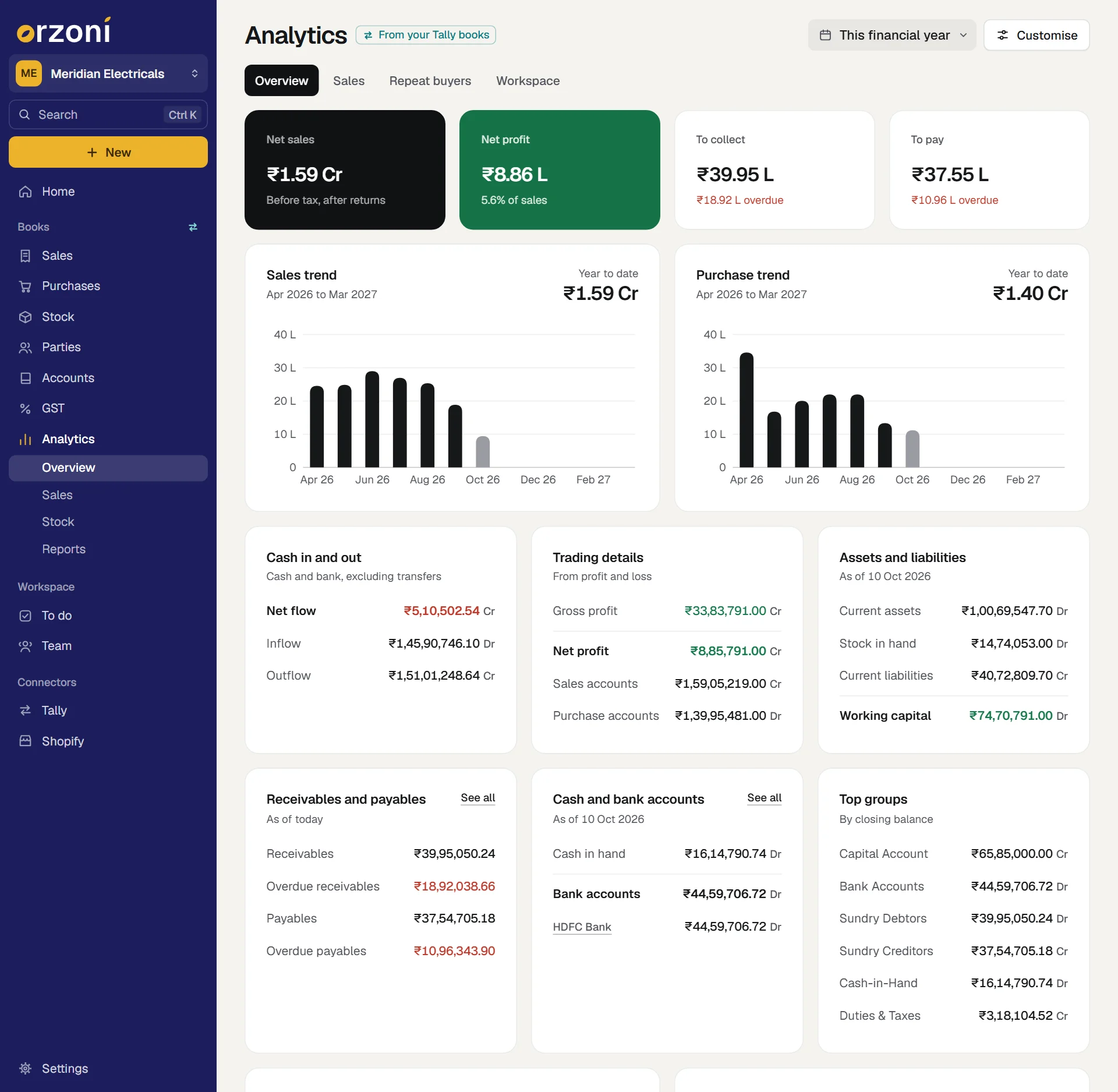
Net sales, net profit, to collect, to pay, trends, cash in and out, assets and liabilities, ratios.
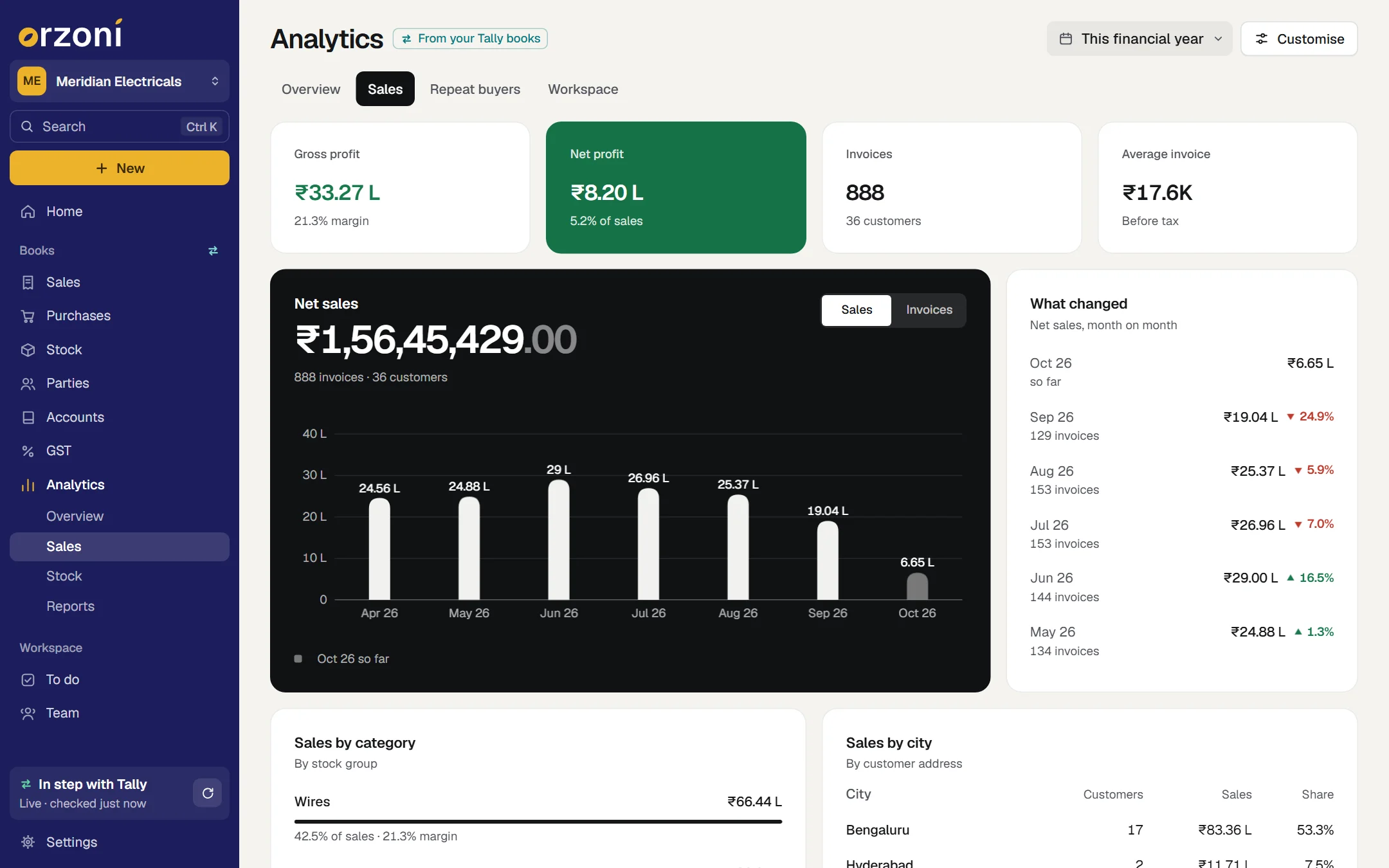
By product, category, city and customer; margin at average cost; repeat buyers.
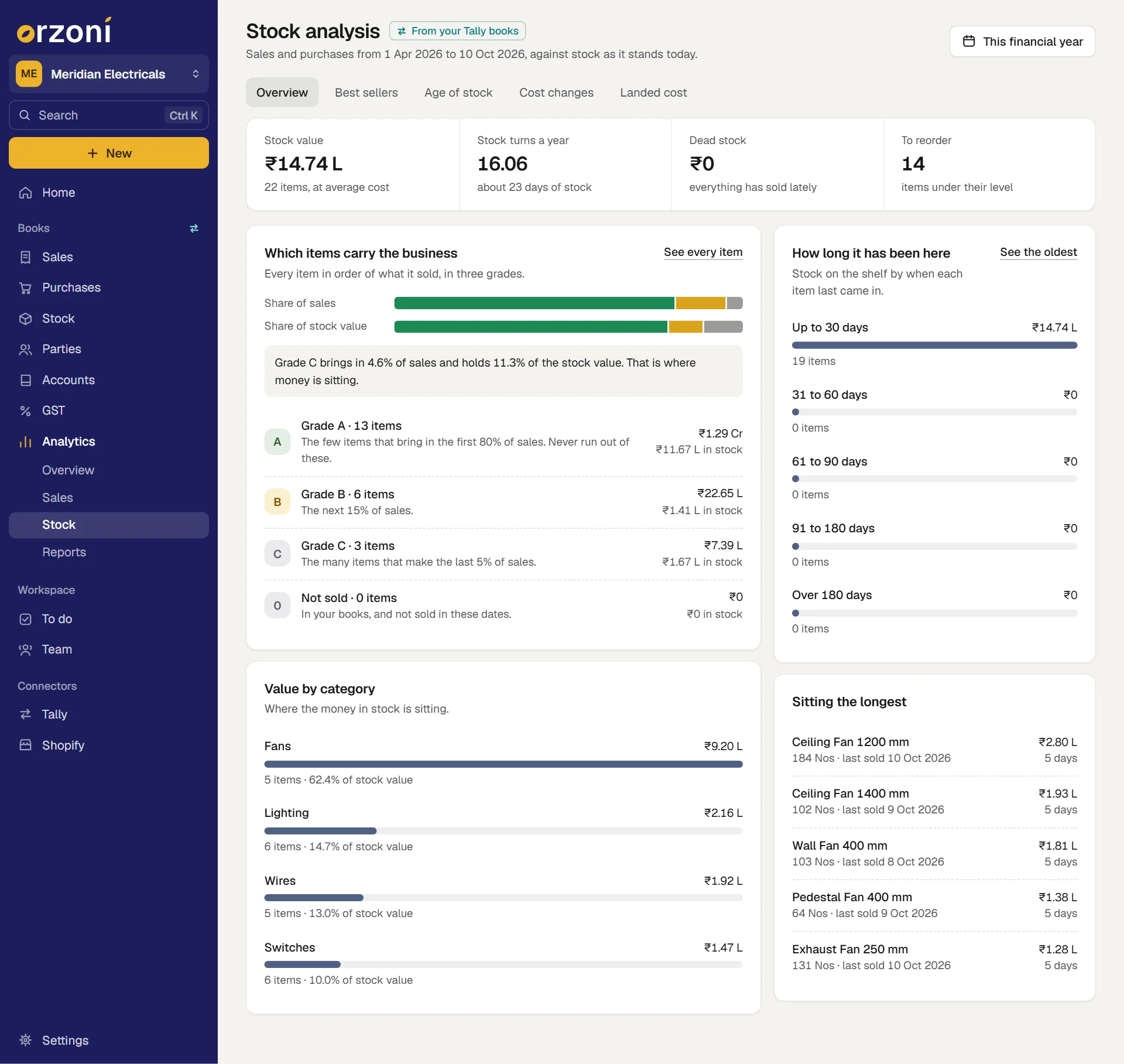
Best sellers in A, B and C; age of stock; cost changes; landed cost; what to reorder.
Written the way business is done here
Made in India
Lakhs and crores to the paisa and in words on every bill. GST by state. An April to March year that follows the one your company keeps in Tally. Godowns, not warehouses, if that is what you call them. The accountant invited with a role of their own.
GST on every bill
CGST and SGST within your state, IGST outside it, line by line. A GSTIN is checked as you type it.
Within your stateCGST + SGSTTo another stateIGST
GST papers ready for your accountant
What the month leaves to pay, your sales laid out for GSTR-1 with an HSN summary, tax paid on purchases bill by bill, and what to fix before filing.
SummarySales for GSTR-1Tax paid on purchasesHSN summaryMonth by monthTo fix
April to March
"This financial year" means the year your company keeps in Tally, with nothing to set up.
Bills the way Tally prints them
A tax invoice in Tally's own layout, with the amount in words.
- Goods on this bill
- 1,56,58,455.00
- CGST
- 9 %
- 14,09,260.95
- SGST
- 9 %
- 14,09,260.95
- Round Off
- 0.10
Total₹ 1,84,76,977.00
Amount Chargeable (in words)E. & O.E
Rupees One Crore Eighty Four Lakh Seventy Six Thousand Nine Hundred Seventy Seven Only
Tax Amount (in words): Rupees Twenty Eight Lakh Eighteen Thousand Five Hundred Twenty One and Ninety Paise Only
for Meridian Electricals
Authorised Signatory
The foot of a tax invoice, as Orzoni writes it. Meridian Electricals is a sample company.
What is included
All of it is in both plans, from your first day.
Bills into Tally
Sales and purchase bills with GST worked out, receipts and payments, credit and debit notes, all sent into Tally and checked against it.
Make a sales billDues and collections
What customers owe and what you owe, by age, with a collections diary.
Customers and suppliersStock
Stock by item and warehouse, pack sizes, reorder levels and what stock costs.
ItemsGST working papers
What the month leaves to pay, sales laid out for GSTR-1 with an HSN summary, and tax paid on purchases bill by bill, ready for your accountant.
GSTAnalytics and reports
A board you arrange yourself, reports ready to run, and a builder for your own. Any report downloads to a sheet.
Analytics and reportsTeam and roles
Attendance, payroll and tasks, and a sign-in for each person with one of seven roles, your accountant included.
Users and roles
Choose what kind of business you are, and switch any other part on whenever you need it. Nothing is deleted by changing your mind. Choose your kind of business
What you need before you start
- TallyPrime, with your company in it
Tally holds your books and stays the book of record, with your own licence for it. Proven on TallyPrime 7.1.
- The Windows 10 or 11 computer that runs Tally
The Tally connector is installed on it once, in about two minutes, with no administrator password. The Tally connector
- Tally's connection switched on
One setting inside Tally. The connector shows you where it is if it is off.
- A phone or a browser for everyone else
Nothing is installed on them. Orzoni opens in the browser, and on a phone it can be added to the home screen.
Where the line is
Orzoni works with Tally, and some things stay Tally's to do. These are the ones a trader asks about.
E-invoices and e-way bills are made in Tally.
The bills they belong to still show in Orzoni, with everything else.
The GST screens are working papers, not a filed return.
Your accountant prepares the return from them, and files it in Tally or on the portal as today.
Orders, delivery notes and manufacturing entries are made in Tally.
Orzoni reads them and shows them wherever they affect a figure.
A bill for goods Tally keeps by batch is made in Tally.
Orzoni says so when you press Send, and names the item.
Customers, suppliers and items are removed in Tally itself.
Nothing is deleted from your books by a press on a phone.
Making or changing anything needs a connection.
With no signal Orzoni still opens and shows the figures it last had, for reading.
Setting it up, step by step
Create your account
On the web, with your email address and a six-digit code. Then name your business.
Install the Tally connector
On the computer that runs Tally. It finds the companies open in Tally by itself.
Install the Tally connectorPick your company and link the computer
The connector shows a six-character code. Type it into your account, and the books are read and checked against Tally.
Connect TallyChoose Trading and wholesale
Under Settings, Business type. Orzoni opens on bills, stock and dues.
Choose your kind of business
The guides for this
- Make a sales invoiceCustomer first, then items, GST worked out for you, paid now or later, and Send to Tally.
- Purchases, notes and other entriesEnter a supplier's bill, a credit or debit note, an expense, a transfer between cash and bank, or a journal.
- Customers and suppliersThe Customers and Suppliers lists with their views, search and sort, one party's page with what is owed and the account behind it, a reminder on WhatsApp, adding or editing a party, and why a party cannot be deleted from Orzoni.
- Reorder and stock analysisThe Reorder list grouped by supplier and sent on WhatsApp, and the five views of Analytics, Stock, with how each figure is worked out.
- GSTThe GST screen works one return month at a time.
- Users and rolesEach person signs in as themselves.
Questions people ask first
Do my staff need Tally on their own computers?
No. Tally and the connector are on one computer. Everyone else signs in to Orzoni in a browser or on a phone, with the role you give them.
Can I still make entries in Tally itself?
Yes, exactly as you do now. Orzoni reads what changed, every minute if you like, and your screens follow. If someone changed an entry in Tally after you opened it in Orzoni, Orzoni stops and shows you rather than writing over it.
What if I keep more than one company?
Each company you keep in Tally and add to Orzoni has its own books, bills and reports. One plan covers one company, the other up to three. Pricing
Try it on your own books
Start your free trial, install the connector on your Tally computer and choose your company. Then open Orzoni on your phone.
- 7 days free to try it with your books.
- Your books stay in Tally. Read about cancelling.
- Need help connecting Shopify? We'll guide you on a call.