

On this page
Your store's health
The first view of a connected Shopify store. One answer to how it stands, then everything that needs someone, what is left to put right, and what explains a count, each dealt with on its own line.
8 minute read
What Health is for
Health is the first view of a connected store. It gives one answer to "how does my store stand?", then lists what needs someone, each thing with what to do beside it.
It has up to four parts under the answer:
| Part | What is in it |
|---|---|
| Needs you | What is wrong right now. Each is dealt with from its own line |
| To put right | What keeps a listing out of step |
| Worth knowing | Nothing to do. These explain a count |
| Lately sent | The last few times counts went to the store |
How a store is connected is in Connect your Shopify store. A business connects one store.
Open Health
In the rail, press Connectors, then Shopify.
The store's screen opens on Health.
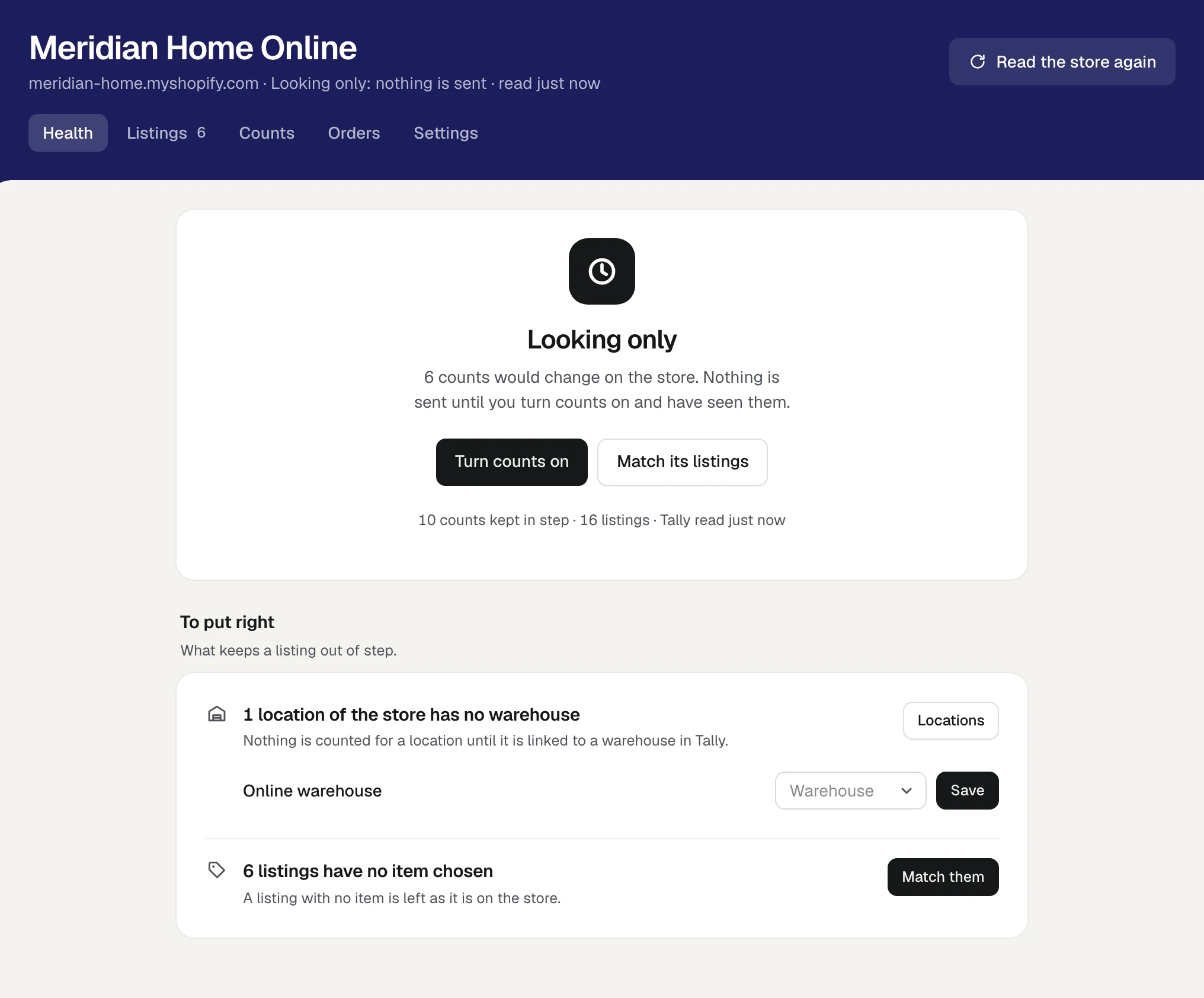
The band at the top carries the store's name. Under it are the store's address, how counts stand (Looking only: nothing is sent or Counts are sent as Tally changes) and when the store was last read.
The store has five views, and four of them can carry a number:
| View | The number beside it |
|---|---|
| Health | How many things need you |
| Listings | How many listings are still to match |
| Counts | How many counts wait for your word |
| Orders | How many orders wait for a bill |
| Settings | None |
Read the store again, at the top right, asks the store afresh for everything it lists and the count it holds for each. Nothing is changed on the store by reading it.
On Connectors itself, the store's line says the same in a few words: Looking only, In step, how many things need you, or how many are left to put right.
The answer at the top
| The answer | What it means |
|---|---|
| Looking only | Nothing is sent to the store. Under it, Health says how many counts would change if counts were turned on |
| Counts are in step with Tally | Counts are being sent as Tally changes. Under it: Nothing is waiting, or how many things are left to put right |
| 1 thing needs you, 3 things need you | Something is wrong right now. Each is named under Needs you |
Two buttons can stand under the answer while the store is looking only:
- Turn counts on. It is offered when nothing needs you and at least one count can be kept in step, to whoever holds Business settings. Pressing it sends nothing yet: the first set of counts waits for your word. See Counts.
- Match its listings, while any listing is still to match. See Match your store's listings.
The small line under the buttons gives the figures: how many counts are kept in step, how many listings the store has, how many counts are on their way, when Tally was last read, and when every count was last read back from the store.
A count is one listing at one of the store's locations. A store with 10 listings kept at 2 locations has 20 counts.
Needs you
These are wrong now. Each has its own line and its own button.
| Health says | What it means | What to do |
|---|---|---|
| Shopify is not showing Orzoni its orders | Orders cannot be read, so an order still to be billed could not be taken off the count. No count is sent until they can. What Shopify said is shown under the line | It clears by itself the next time the orders are read. If it stays, write to support@orzoni.com with what the line says |
| 5 counts wait for your word | A set of counts is held until someone has looked at it. The line says why, and how many listings would show 0 | Press See what would change. It opens Counts, where the set is sent. See Counts |
| 2 counts were changed on Shopify | Someone set these on the store. Orzoni has not written over them. Each row shows what Shopify shows and what Tally works out | Press Use Tally's count. If the store is the one that is true, press Correct Tally first |
| Shopify refused 1 count | The store would not take the count. What it said is under the row | Press Send it again |
| 1 listing is matched to an item no longer in Tally | The item was renamed or removed in Tally | Press Match it again. It opens Listings on that listing, to choose the item again |
| 2 orders have waited over a week for a bill | A bill typed in Tally without the order's number does not clear its order here, and its units stay off the count | If its bill is in Tally, press Billed in Tally, then press again when the button asks Its bill is in Tally? See Orders from your store |
A long list shows its first 200 rows and says how many more there are. The rest are listed as these are dealt with.
A count changed on Shopify
Each row names the listing and its location, then says, for example, Shopify shows 20 and Tally works out 11, with how Tally's figure was worked out under it.
- Use Tally's count sends Tally's figure to the store. While the store is looking only, Tally's count will be used once counts are turned on.
- Correct Tally opens Correct the stock for that item, set to Write off where the store shows fewer and to Stock found where it shows more. It goes into Tally as a stock journal: see Warehouses and pack sizes. Then press Use Tally's count. The two now agree, so nothing changes on the store.
To put right
These keep a listing out of step. Nothing here is urgent: a listing that cannot be kept in step is left as it is on the store.
| Health says | What it means | What to do |
|---|---|---|
| 1 location of the store has no warehouse | Nothing is counted for a location until it is linked to a warehouse in Tally | Choose a warehouse in the box beside the location and press Save. Or press Locations, which opens Settings, Locations |
| 6 listings have no item chosen | A listing with no item is left as it is on the store | Press Match them |
| 2 items are below zero in Tally | Tally's count has gone below nothing. The store is shown 0 for these | Press Record a purchase, or Correct the count |
| 1 item has no unit to count in | An item with no unit, or one counted in two units at once, cannot be given a count | Press Open the item to see how Tally counts it |
When nothing is left, this part says Nothing is left. Every listing that can be kept in step is.
Worth knowing
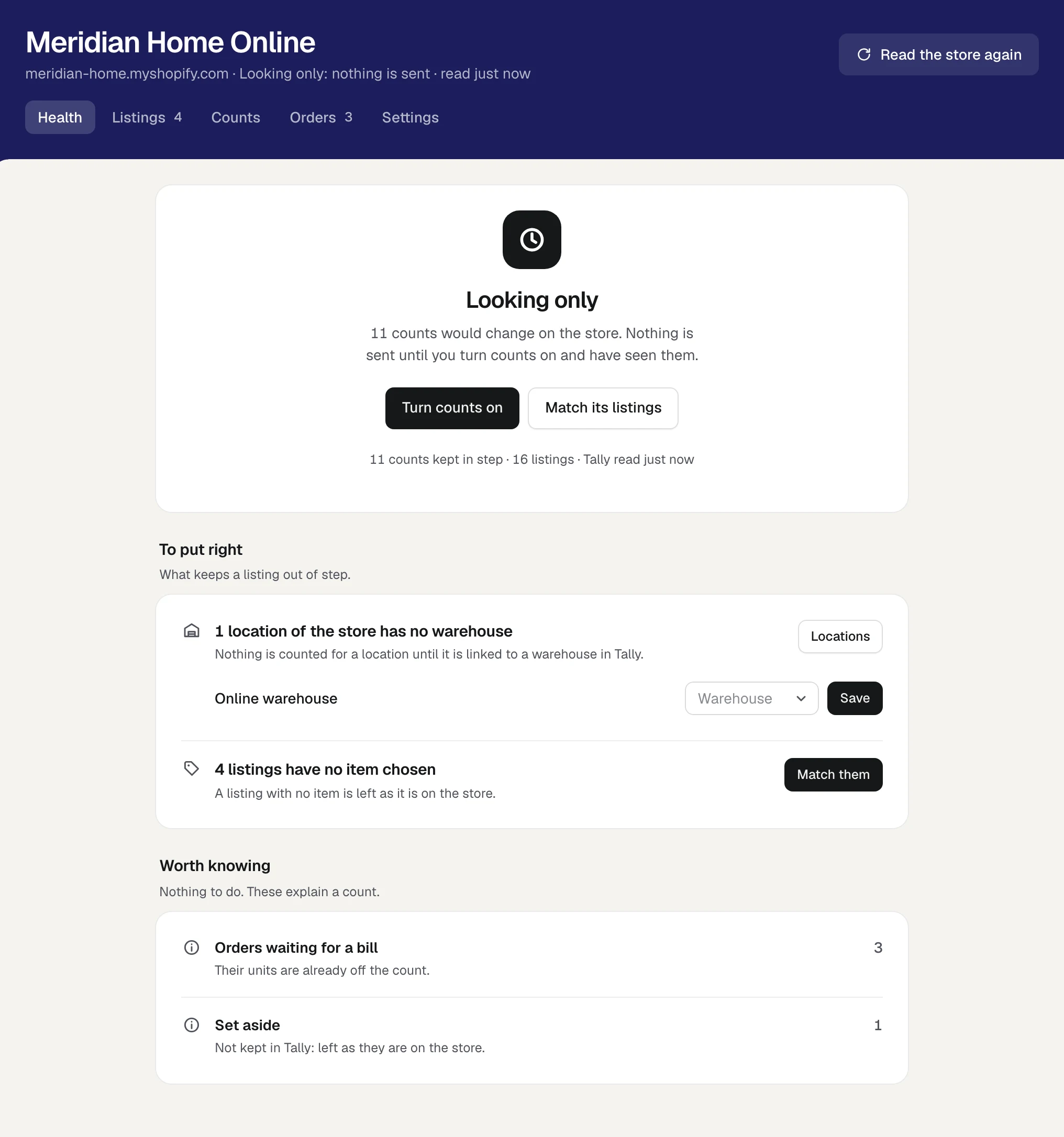
There is nothing to do here. Each line explains why a count is what it is, with how many it covers.
| Line | What it means |
|---|---|
| Orders waiting for a bill | Their units are already off the count |
| Listings that share an item | Two or more listings are matched to the same item, with the same number of it to a sale. Tally cannot say how many are which, so no count is sent for them |
| Set aside | Listings you said are not kept in Tally. They are left as they are on the store |
| Not counted by the store | The store keeps no count for these listings |
| Orders found by asking | The store's own notice of these orders never came. Orzoni also asks the store for its orders every few minutes, and that is what makes sure of every order |
Lately sent
Once counts have gone to the store, the foot of Health lists the last eight sendings, with how long ago each was:
| Line | What it means |
|---|---|
| 12 counts sent | The store took them |
| 12 counts sent, 1 refused by the store | The refused one is under Needs you |
| 3 counts held back: the store showed something else | The store did not hold what Orzoni expected. Those counts are read back and looked at again |
| 12 counts not sent: the store did not answer | Nothing was lost. They are tried again |
While the screen is open
A store changes by itself: an order comes, a count is sent, someone changes a count on Shopify. While the store's screen is open and in view, Orzoni asks how the store stands twice a minute and draws the screen again when something has moved. It does not do so while you are typing, have a row open to change, or have listings ticked.
If the store has not been read
A store just connected says Reading your store while it is first read. If it has still not been read after three minutes, Health says The store has not been read yet. Press Read the store. Nothing is changed on the store by asking again.
Who may do what
| To do this | A person needs |
|---|---|
| See the store, its Health and its other views | See stock |
| Read the store again, Use Tally's count, Send it again, Correct Tally, Correct the count, Billed in Tally, link a location to a warehouse | Change stock |
| Record a purchase | Make bills and record payments |
| Turn counts on | Business settings |
Someone without Change stock sees every line and no buttons on it, and is told that someone who may change stock can deal with them. See Users and roles.
What next
- Match your store's listings: say which item in Tally each listing is.
- Counts: what the store should show, the three ways counts are sent, and locations.
- Orders from your store: orders waiting for a bill, and making the bill.
- Products on Shopify and in Tally, shown as one: the marks beside a product's name, and merging.
Still stuck? Write to support@orzoni.com and say which step you are on, or book a walk-through call.