

HomeFor your businessRetail shops
For a shop that sells across one counter
PilotWorking today, and open to a few businesses while it is being tried. Ask us and we will tell you when it is open to you.
Ring up the items Tally already holds by name or by code, see what is left of each as you sell, record how the sale was paid, and find it in Tally as a bill with its receipts. The counter goes on selling while the computer that runs Tally is switched off.
Your books still need TallyPrime on a Windows 10 or 11 computer. The people at the counter need only a browser.
Who it is for
One shop with one counter, selling goods that Tally already holds as stock items and counts one by one: stationery, gifts, home goods. It is not for goods kept by batch or expiry, a pharmacy, a jeweller, or anything sold by weight.
- You sell from one shop, and what is on your shelf is in Tally as stock items, each with a unit.
- People pay at the counter by cash, UPI or card, and sometimes part by each.
- You want each sale in Tally as a proper bill, and the count to fall with it, without typing the day in again at night.
Your first task
Give each item its selling price
An item can be sold at the counter once it has a selling price, set on its own page under Items, a unit in Tally and, where you charge GST, a GST rate in Tally. Then ring up a first sale on the practice counter.
Set up a shop counterThe counter, on real screens
Each step says what you do, and what happens next.
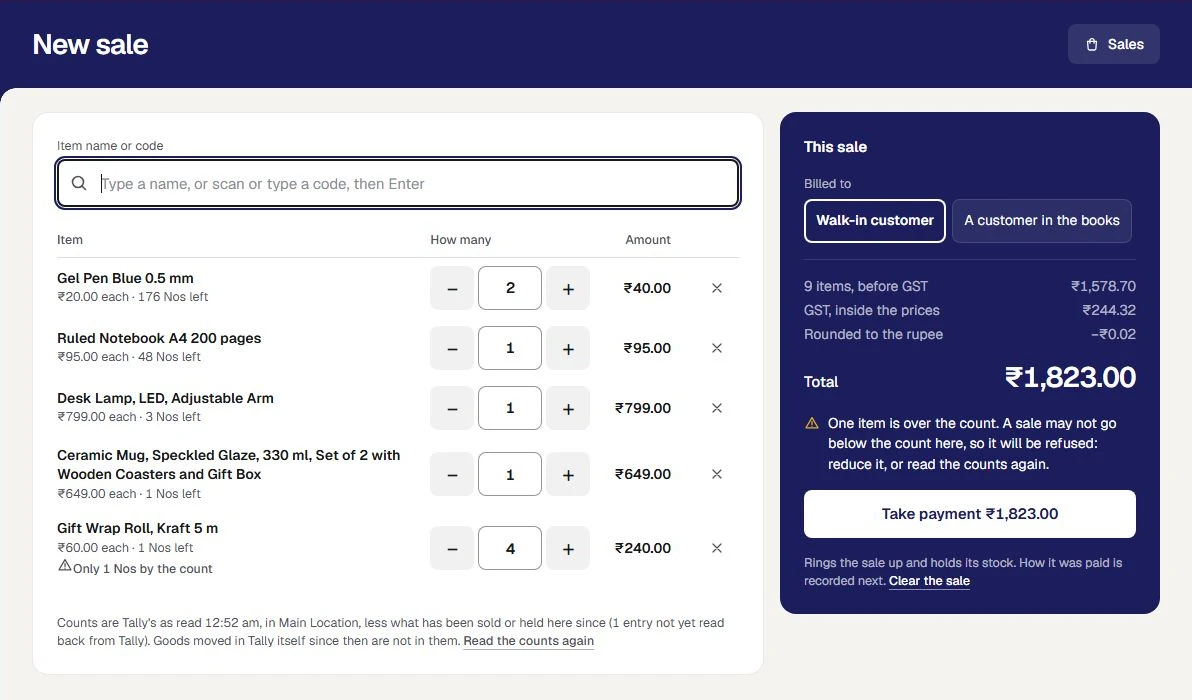
Find the item, or scan it
Type a few letters of the name, or scan or type a code and press Enter. One of the item is added, and the box is ready for the next. Each item shows its price and how many are left.
What happens next. An item that cannot be sold says why beside it, and a sale that wants more than the count says so before any money is taken.
Ring up a counter sale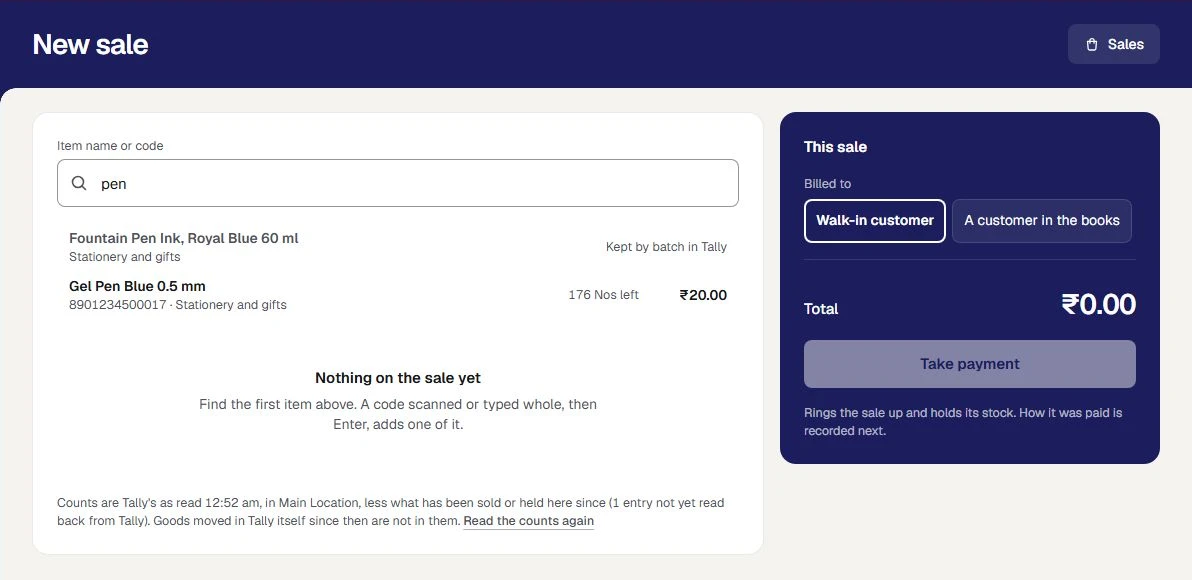
Take the payment
Press Take payment. The sale gets its number and holds its stock. Then record Cash, UPI or Card, split any way: Orzoni shows what is left to pay, and the change to give on cash.
What happens next. The payment that pays the sale in full finishes it in the same press. For UPI or card, the person at the counter looks at their own phone or card machine first.
Take the payment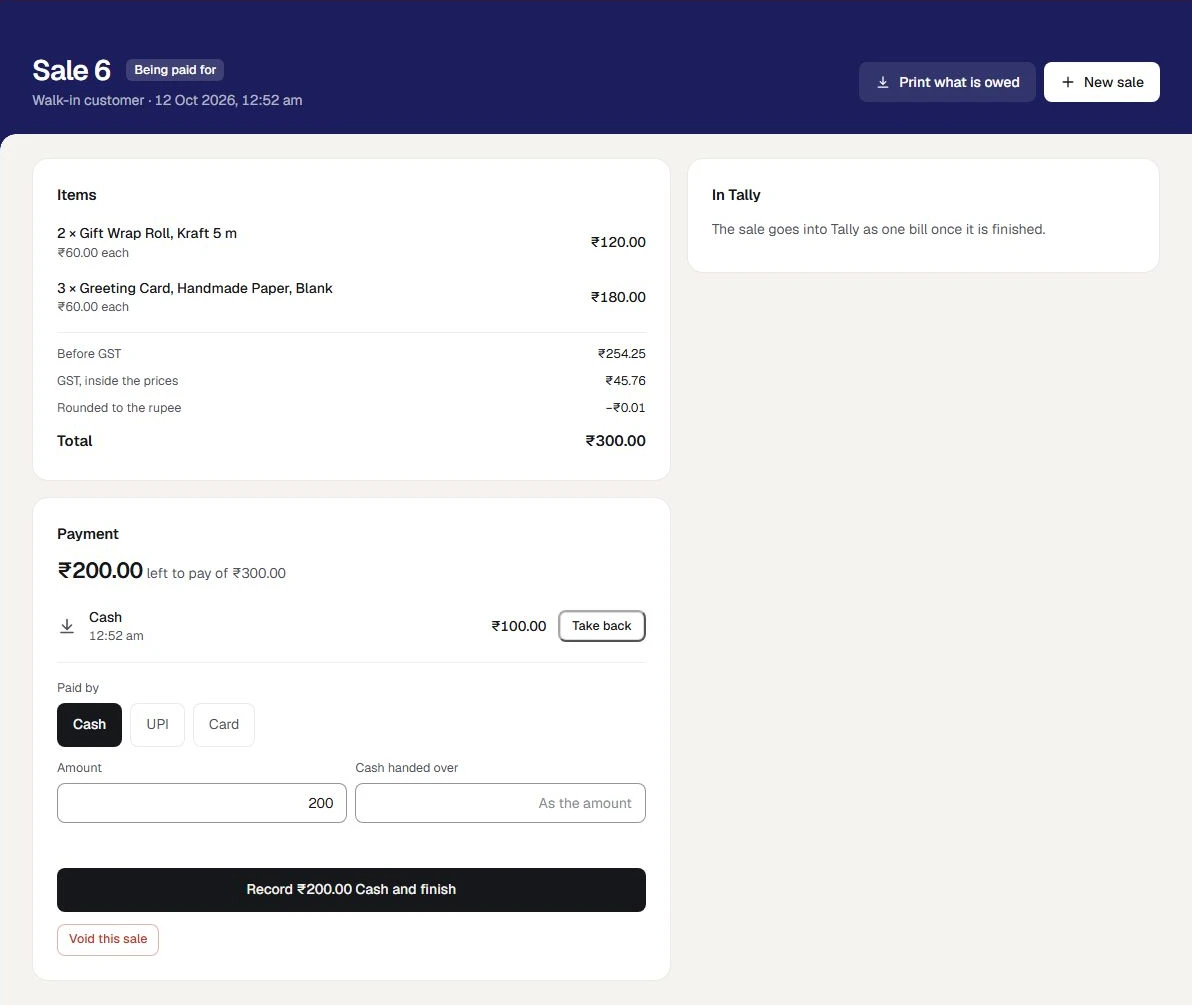
Find the sale in Tally
A finished sale makes one sales bill in Tally, with a receipt for each way it was paid. The sale's own page lists each of them, and how it stands.
What happens next. Orzoni reads each one back from Tally, and marks it In Tally, checked only when it is as it was sent. If Tally refuses the bill, the sale is finished all the same, says why, and is sent again once that is put right.
Shop sales and Tally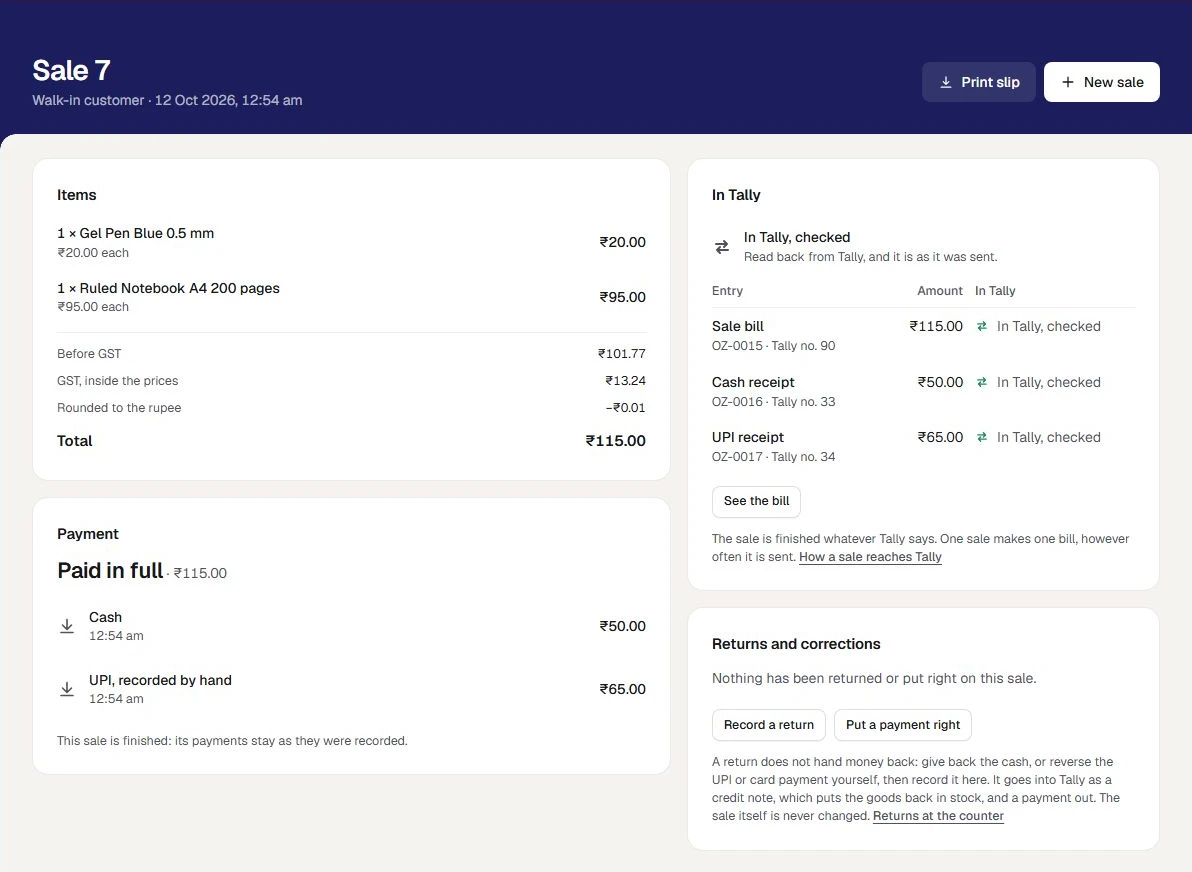
Record a return
A lamp comes back. On the finished sale, press Record a return, say how many of each item came back, how the money went back, and why.
What happens next. The sale stays as it was. The return goes into Tally as a credit note, which puts the goods back in stock, and a payment out. Orzoni returns no money itself: you hand it back, then record that you did.
Returns at the shop counter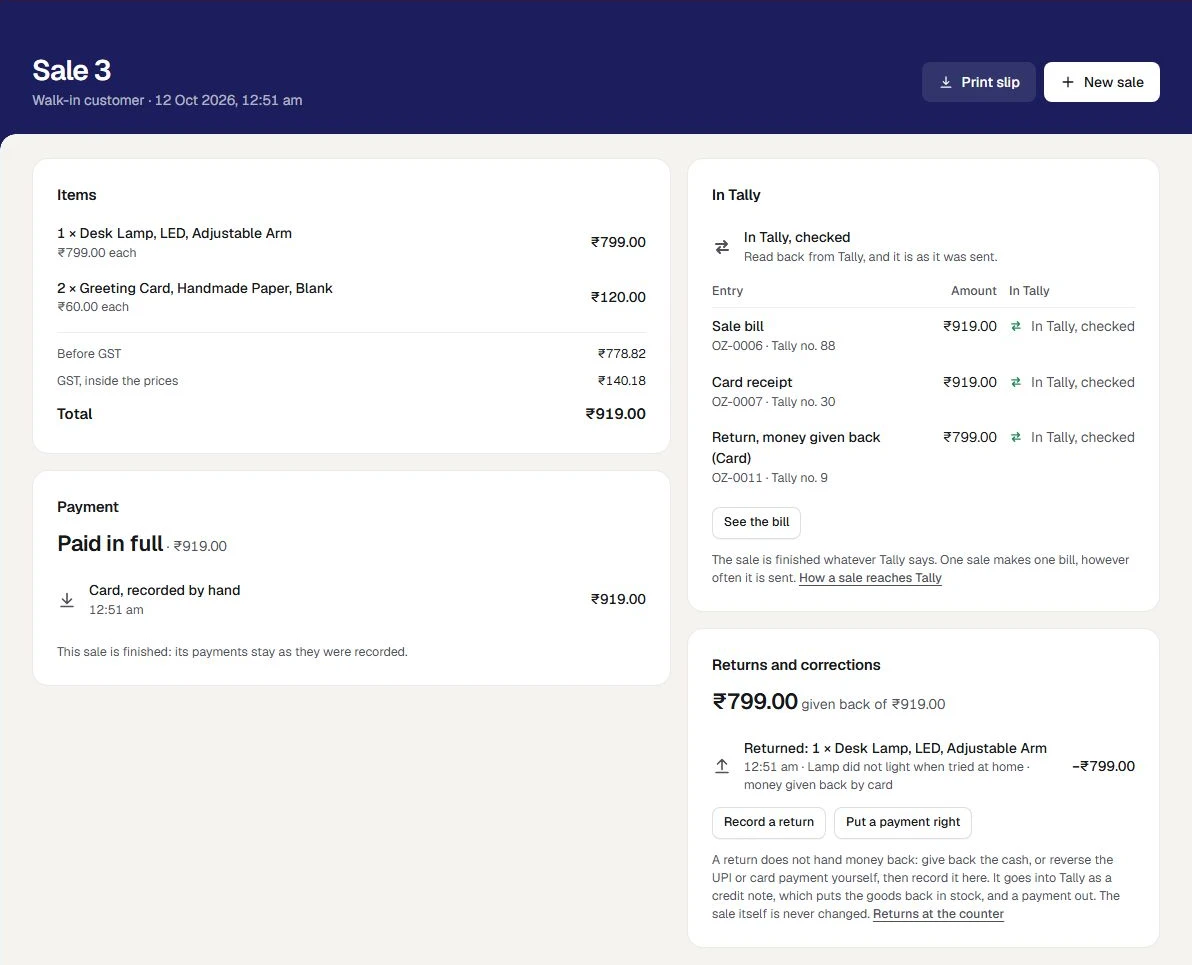
Set the day against Tally
Open Stock and Tally check. For the day it shows how each finished sale stands in Tally, the money recorded by cash, UPI and card beside the receipts in Tally, and each item sold with what is left to sell.
What happens next. A sale that needs someone is named, with the reason. Nothing is put right from this screen: you open the sale.
Stock and Tally check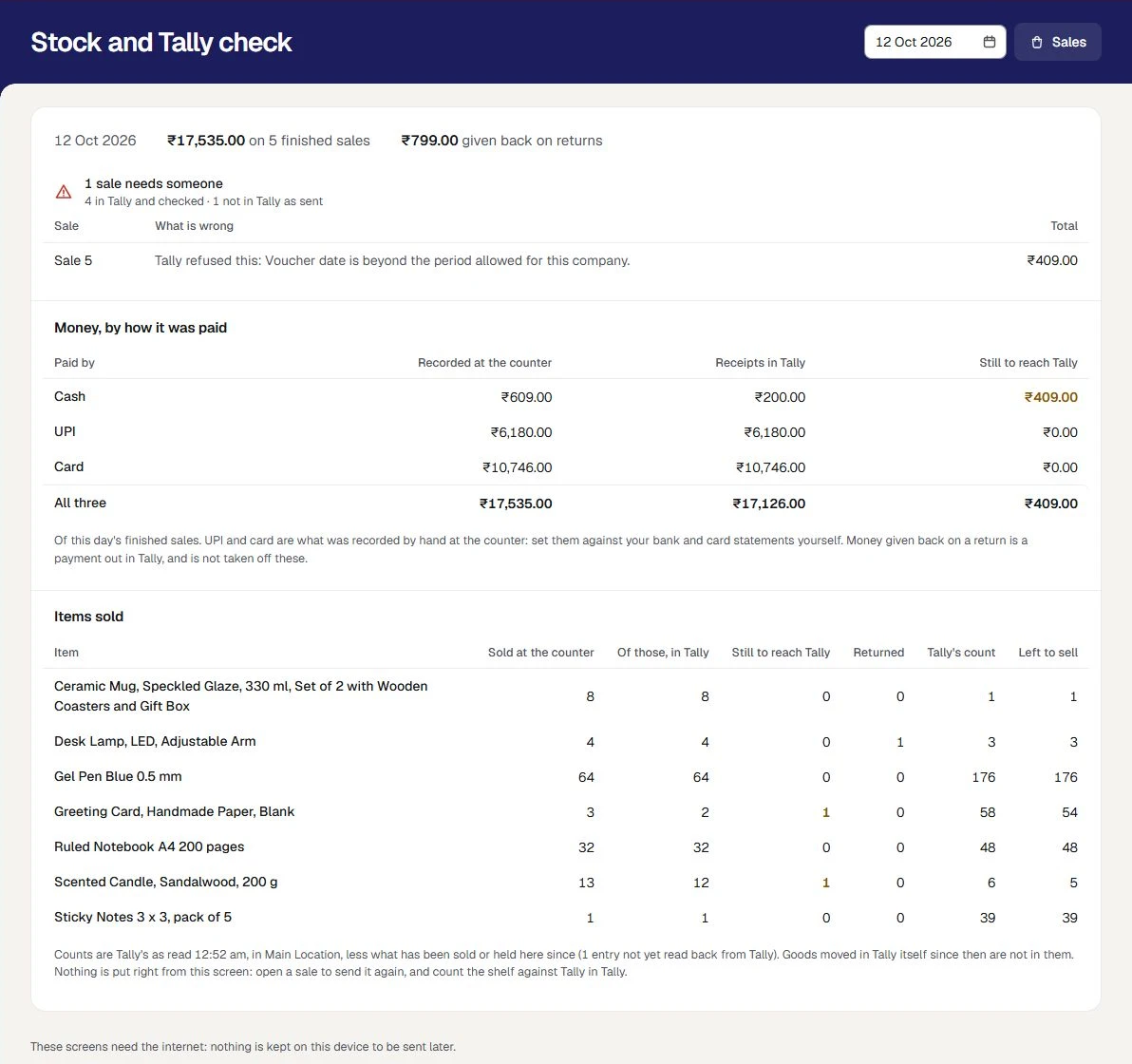
The shop in these pictures is Paper Kite Stationers, a sample. It is made up: none of it is a real shop's sales.
What is included
All of it is working today, and inside the plan you already have.
A counter set up from your Tally
A shop counter set up from what Tally already holds: the warehouse it sells from, a walk-in customer, where cash, UPI and card money are kept, and a list that says what is still to do, with one sale tried against your Tally set-up.
Set up a shop counterSales rung up by name or code
A sale rung up from your stock items, found by name or by a code typed or scanned, each at its own selling price and its GST rate from Tally. Billed to a walk-in customer or to a customer in your books.
Ring up a counter salePayments, split any way
Cash, UPI and card recorded against a sale, split any way, with the change to give. A sale paid in full is finished in the same step, and its slip prints from the browser.
Ring up a counter saleEach sale into Tally
Each finished sale becomes one sales bill in Tally, with a receipt for each way it was paid. Sales go on being rung up while the Tally computer is off.
Shop sales and TallyWhat is left, as you sell
What is left of each item, beside it as you sell: Tally's count at the last read, less what has been sold or held at the counter since. Two tills cannot both sell the last one.
Shop sales and TallyThe day, set against Tally
A day's sales set against Tally on one screen: money by cash, UPI and card, and each item sold, with what has still to reach Tally.
Shop sales and TallyReturns on the sale they came from
Goods brought back recorded on the sale they came from. A return goes into Tally as a credit note and a payment out, and a payment recorded as the wrong kind as a transfer.
Returns at the shop counterTwo more roles for your staff
A Shop assistant rings up sales and records how they were paid. A Shop supervisor also records returns, puts a payment right, and sees the bills and the stock. Neither sees figures or settings.
Users and rolesA counter to practise on
A practice counter with your real items and prices, apart from the real one. Nothing rung up there is a real sale: it holds no stock, is in none of your figures, and never goes to Tally.
Practise first
The books behind the counter are the same as any other business's: purchases, stock, accounts, GST working papers, analytics and the team. A business can have a shop counter and a café counter, each with an outlet of its own. What every business has
Choose what kind of business you are, and switch any other part on whenever you need it. Nothing is deleted by changing your mind. Choose your kind of business
What you need before you start
- A place in the pilot
Working today, and open to a few businesses while it is being tried. Ask us and we will tell you when it is open to you. Ask about the shop counter pilot
- TallyPrime on a Windows 10 or 11 computer
As for every business, Tally holds the books and the Tally connector sits beside it. That computer does not have to be on while you sell: it is needed for the bills to go in, and for the counts to be read again. Proven on TallyPrime 7.1.
- Your items in Tally, each with a unit
The counter sells the stock items Tally already holds. An item with no unit, or one kept by batch, is not sold at the counter.
- A selling price, and a GST rate, for each item you sell
The price is set on the item's own page under Items. The GST rate is the one Tally holds for the item. No price is typed at the counter, and no rate is assumed.
- A few ledgers in Tally
A walk-in customer under Sundry Debtors, the cash or bank ledgers your cash, UPI and card money arrive in, and one named Round Off if sales are rounded to the rupee.
- A browser for each person at the counter
A phone, a tablet or a computer. Nothing is installed on it, and the Tally connector is not needed on it.
- The internet at the counter
Sales are kept on Orzoni's service, not on the device, so two tills always see the same count.
- A printer, if you want paper
Any printer the device's browser already prints to. The slip is laid out narrow enough for a 58 mm or an 80 mm roll.
Where the line is
The pilot is for one shop with one counter. Each of these is something a shop owner might otherwise assume, so it is said here before you ask.
One shop for each company, selling from one warehouse. There is no second outlet, and goods are not moved between outlets at the counter.
A business that keeps two companies in Tally has a shop counter for each. Stock is moved between warehouses with Move stock, under Warehouses, as for any business.
Whole items that Tally counts one by one. Goods Tally keeps by batch or expiry are not sold at the counter, nothing is weighed, and it is not for a pharmacy or a jeweller.
Such goods are billed in Tally, where the batch is chosen. At the counter the item is listed with the reason it cannot be sold.
An item is sold at its own selling price. There are no discounts, schemes or loyalty points, and a price is not changed at the counter.
Change the selling price on the item's own page under Items, and the counter charges it from the next sale. A sale at another price is made as a sales bill, where the rate is typed.
A sale is paid for in full before it is finished. Sales on credit, and goods put aside for a customer to pay for later, are not taken at the counter.
Make a sales bill for a customer who pays later. It carries its credit days, and is followed up with every other bill.
Payments are recorded by the person at the counter. Orzoni does not ask a bank or a payment company whether a UPI or card payment arrived, and it returns no money itself.
Look at your own phone or card machine, then record the payment. For a return, hand the money back yourself, then record that you did.
A code is typed, or scanned by a scanner that types like a keyboard and ends with Enter. Orzoni does not drive a scanner, and scanning has been tried only as typed characters followed by Enter, with no scanner in hand.
Scan into the box Item name or code, as you would type into it. Try your own scanner on the practice counter before your first sale.
The slip is printed from the browser, on the printer it has. Orzoni does not drive a receipt printer or a cash drawer, and prints no barcode labels.
Press Print slip and choose the printer in the browser's own window.
There is no drawer count and no day close at the shop counter. Stock and Tally check sets a day's sales against Tally, and puts nothing right itself.
Count the drawer as you do today. The check gives the cash recorded on the day's finished sales to count against. Money given back on a return is not taken off it.
An exchange is a return and then a new sale. A finished sale is not opened again, and what it sold is not changed.
Record the return on the first sale, then ring up what the customer takes in its place.
The counter is worked online. With no internet it says so and rings nothing up, and nothing is kept on the device to send later.
Keep the counter's device on Wi-Fi or mobile data. When the connection drops, the screen says so at once.
For a company registered for GST in one state. Where a company is registered in more than one, a sale is kept, and says why its bill is not made.
The list under Shop, Set up tries a sale against your Tally set-up, and says what it finds before your first sale.
Setting it up, step by step
Ask to be let in
Leave your number on this page. We call you, show you the counter working, and tell you when the pilot is open to you.
Ask about the shop counter pilotLink your Tally company
Your account, the connector on the computer that runs Tally, and one code to type.
Connect TallyChoose Retail shop
Under Settings, Business type. The rail gains Shop, with New sale, Sales, Stock and Tally check and Set up under Counter.
Choose your kind of businessSay how the shop sells
Under Shop, Set up: the shop's name, the warehouse it sells from, the walk-in customer, and where cash, UPI and card money are kept.
Set up a shop counterGive your items their selling prices
On each item's own page under Items. The list under Set up says how many items can be sold, and why the rest cannot.
ItemsInvite the people at the counter
As Shop assistant and Shop supervisor, each with their own sign-in.
Invite your teamPractise, then ring up a first sale
Try the screens on the practice counter. Then ring up a real sale, record the payment, and see In Tally, checked.
Ring up a counter sale
The guides for this
- Set up a shop counterFrom a company in Tally to a first sale across the counter.
- Ring up a counter saleHow to sell across the shop counter.
- Shop sales, stock and TallyWhat a finished sale at the shop counter becomes in Tally.
- Returns at the shop counterWhat to do when goods come back, or when a payment was recorded as the wrong kind.
- Choose your kind of businessTell Orzoni whether you trade, sell online or run a café, and it opens on what you do most.
- Users and rolesEach person signs in as themselves.
Questions people ask first
Does every device at the counter need the Tally connector?
No. The connector is installed once, on the Windows computer that runs Tally. A phone, a tablet or a computer at the counter needs only a browser and the internet.
How does the counter know how many are left?
It takes Tally's count from the last time Tally was read, in the warehouse the shop sells from, and takes off what has been sold or held at the counter since and is not in that count. The screen says when Tally was last read. Goods moved in Tally itself since then are not in the figure until Tally is read again.
Can two tills sell the last one?
No. The count is looked at in the same step that keeps the sale. The second till is told how many are left, and nothing of its sale is saved. An owner whose counts in Tally often run behind the shelf can allow a sale below the count, and such a sale is marked.
What happens while the computer that runs Tally is off?
You go on selling. Sales and payments work as usual, and each finished sale's bill waits and goes into Tally by itself when the computer is back. The counts stay as Tally last gave them, less what the counter has sold since.
How does Orzoni know a UPI or card payment arrived?
The person at the counter records it, after looking at their own phone or card machine. Orzoni does not ask a bank or a payment company, and a reference typed in is a note, not a proof.
Will my scanner work?
A scanner that types like a keyboard sends the code and then Enter, and the counter takes that as typing. It has been tried that way only, with no scanner in hand, and Orzoni does not drive a scanner itself. Try yours on the practice counter: the codes it finds are the part number and the aliases Tally holds for each item.
Does the pilot change what I pay?
No. Your plan is the same two prices, by the number of companies. An outlet is the place your counter is: it is not a company, and the plan does not count it. Pricing
Ask about the shop counter pilot
Working today, and open to a few businesses while it is being tried. Ask us and we will tell you when it is open to you. Leave your number and a person calls you.
We call you
On the mobile number you give, to fix a time that suits you.
We show you the counter working
Two items scanned, the sale paid part in cash and part by UPI, and found in Tally as a bill with its two receipts.
We tell you where you stand
Whether the pilot is open to you today, and what to have ready in Tally before your first sale.
Sell across the counter. Find it in Tally
The shop counter pilot is opened by arrangement, for one shop with one counter. Ask, and a person calls you.
- The pilot adds no charge to your plan.
- An outlet is not a company, and is not counted by your plan.
- Your books stay in Tally.