

On this page
A job's money, and Tally
What a job puts into Tally, and when. An advance as a receipt the day it is taken, one sales invoice when the job is completed, what is paid after, an advance given back, and what becomes of an advance when a job is cancelled. What each line under In Tally means, and what to do when Tally refuses an invoice or an entry is held back.
10 minute read
The short version
A job is Orzoni's own record. Only its money goes into Tally, as entries of the ordinary kind.
| What happens | What goes into Tally | When |
|---|---|---|
| An estimate is written, revised or agreed | Nothing | |
| An advance is taken | A receipt | The day it is taken |
| The job is completed | One sales invoice, reference JOB- and the job's number | When you press Complete and invoice |
| The rest is paid | A receipt against that invoice | Once the invoice is in Tally |
| An advance, or part of one, is given back | A payment out to the customer | The day it is recorded |
| A job is cancelled with its advance left as credit | Nothing more |
An advance and the job's invoice go in under one bill name. So Tally holds one bill for the job, and what is unpaid under it is what is left to pay. That is how it has been tried, against a stand-in for Tally, and it is being confirmed on a real Tally during the pilot: look at the first job you take an advance on in Tally itself, with your accountant.
How a job stands is three things, said separately at the head of its page: the job, the money, and Tally. Completed does not mean paid, and it does not mean in Tally.
Who this is for
| To do this | You need |
|---|---|
| Take an advance or a payment, give an advance back, complete a job, cancel one, press Send to Tally | Take money on jobs, complete and cancel them |
| See how a job stands in Tally | Take in and work jobs, or See bills and entries |
| The view Waiting for Tally | See bills and entries |
| Try again or Discard on a refused invoice | Make bills and record payments |
| Change the ledgers under Jobs, Set up | Business settings |
So the Service desk takes money and completes jobs. A Technician sees how a job stands and takes no money. The owner or the accountant looks after anything Tally refuses. See Users and roles.
Jobs are a pilot, open to a few businesses while they are being tried.
Take an advance
An advance is money taken while the job is open: new, in progress or ready. It is optional.
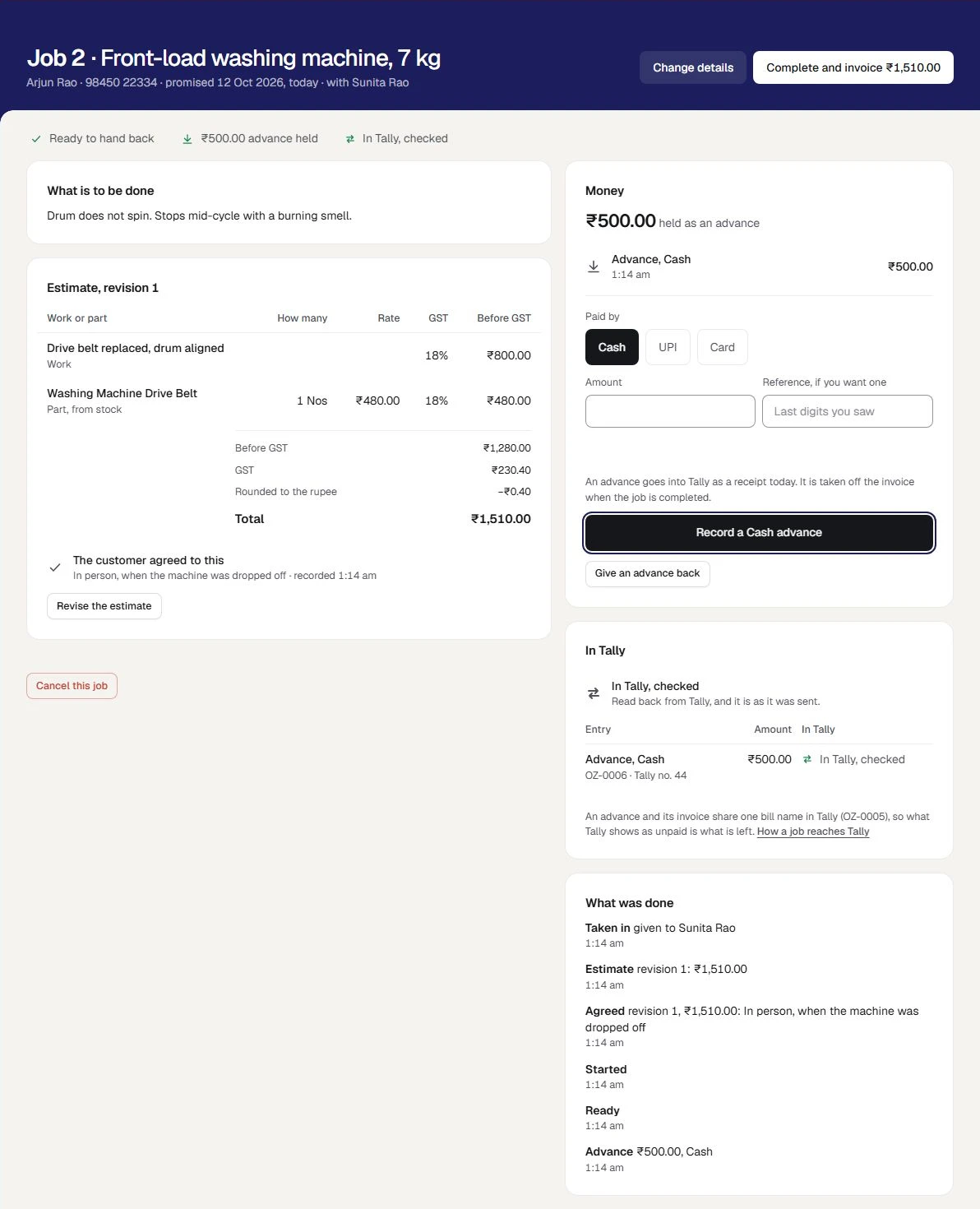
- On the job's page, in the card Money, press Cash, UPI or Card under Paid by.
- Type the Amount.
- For UPI or card, look at your own phone or card machine first. You can type a note in Reference, if you want one.
- Press the button. It says what it will do, such as Record ₹400.00 Cash advance.
The card reads ₹400.00 held as an advance, and the head of the page gains ₹400.00 advance held.
- Where an estimate has been written, an advance cannot be more than it. The screen says how much more can be taken.
- UPI and card are recorded by hand. Orzoni does not ask a bank or a payment company whether the money arrived.
- Pressing twice records one advance, not two.
In Tally, the advance is a receipt, dated the day it is taken: into the cash, UPI or card ledger chosen under Set up, from the customer, set against the bill name the job's invoice will later carry. The card In Tally on the job names that bill name.
Complete the job, and its invoice
Complete a job when it is handed back. It has to be in progress or ready, and the customer has to have agreed to the latest revision of the estimate.
- Press Complete and invoice, with the amount, at the head of the job's page.
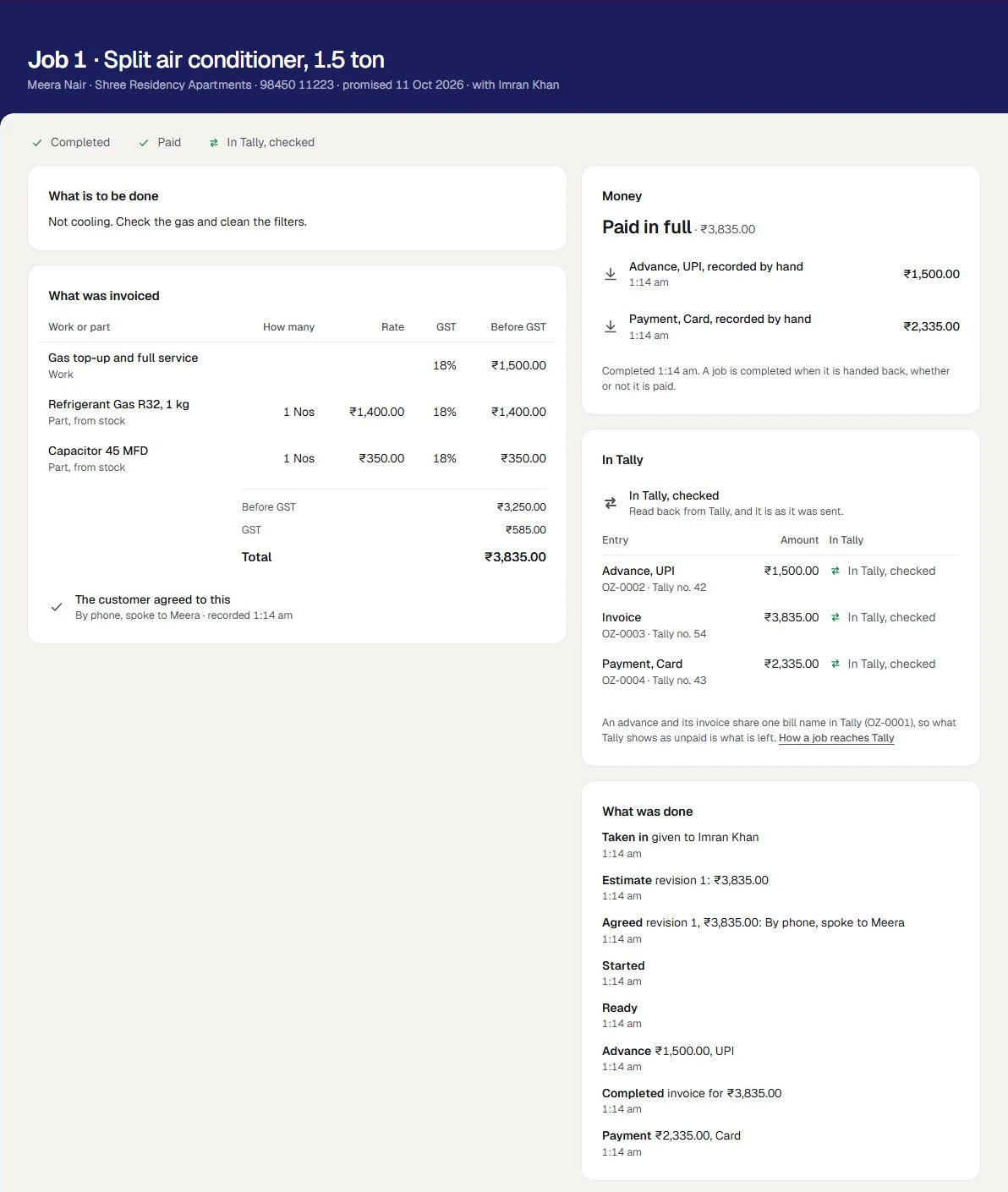
A small message says Completed. Its invoice goes into Tally by itself. The job reads Completed, the card Estimate becomes What was invoiced, and Money says what is left to pay.
One sales invoice is made, by the same part of Orzoni that makes every other bill.
| On the invoice | Where it comes from |
|---|---|
| The customer | The customer of your books the job was taken in for, or the walk-in party chosen under Set up |
| The date | The day the job was completed |
| Each line of work | A line for its value, under the ledger chosen as Work is billed as, with the GST rate you gave it |
| Each part | A line for the stock item, with how many and its rate. It leaves Tally's stock, from the warehouse chosen as Parts leave from |
| GST | Worked out as for any sales bill: CGST and SGST, or IGST for a customer in another state |
| The reference | JOB- and the job's number, such as JOB-8 |
| The bill name | The one the job's advance was set against. With no advance, the invoice's own |
The invoice comes to the amount the customer agreed to, to the paisa, or it is not made. If a GST rate or a ledger was changed in Tally after the estimate was written, the job is completed all the same, and says what the invoice would come to and what was agreed: see When it says Not in Tally yet.
Parts leave stock once, by the invoice and by nothing else. Completing a job twice makes one invoice.
| If the screen says | What to do |
|---|---|
| The customer has not agreed to revision 2 of the estimate | Record that they agreed, or revise it. See Take in a job |
| This job has no estimate, so there is nothing to invoice. | Write the estimate, and record that the customer agreed |
| An amount is held as an advance, and the job comes to less. Give the difference back first | See Give an advance back |
A completed job is not changed, estimated again, started again or cancelled.
Record what is paid after
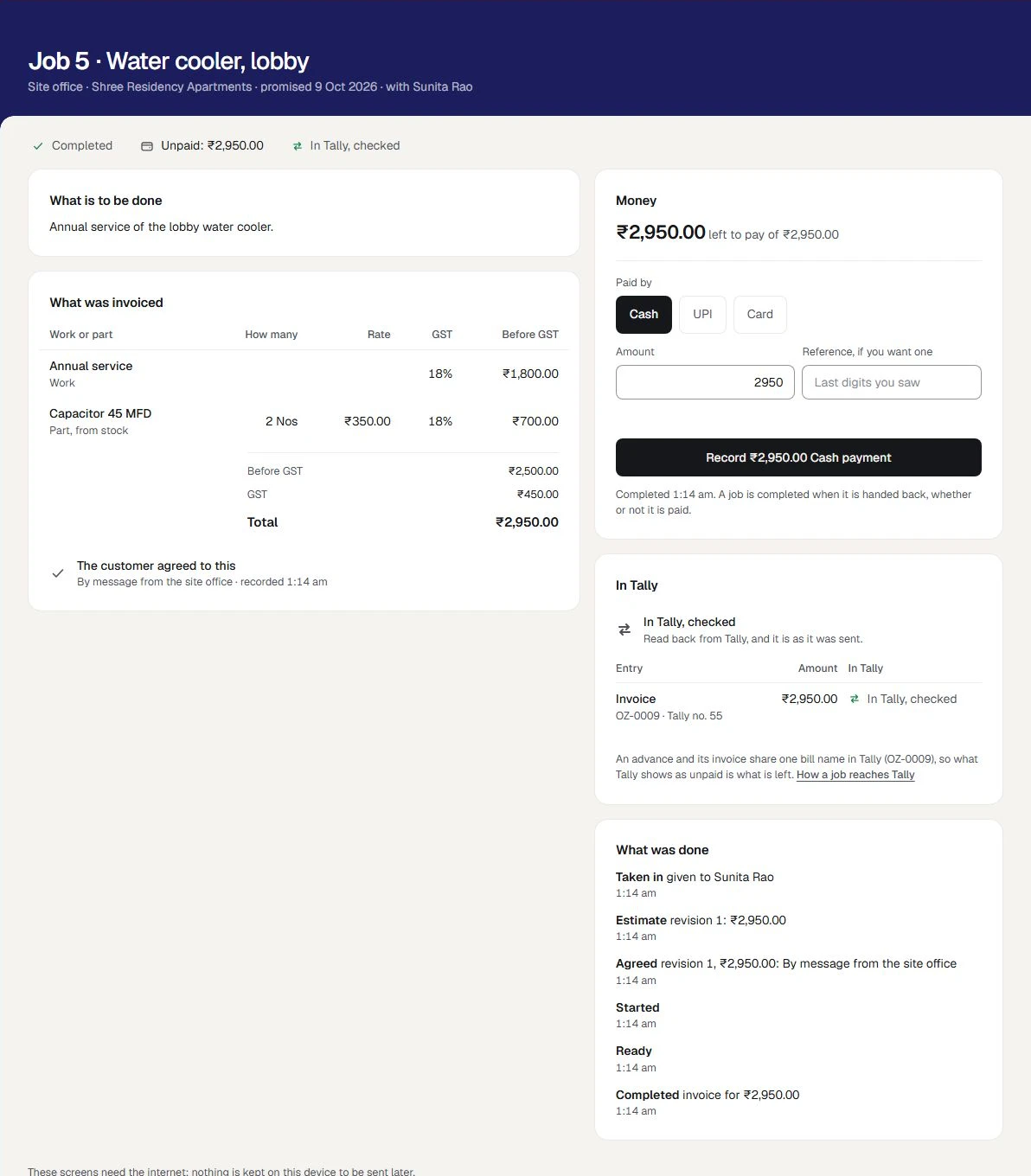
On a completed job, the card Money reads what is left to pay, such as ₹662.00 left to pay of ₹1,062.00, and has the same short form.
- Choose Cash, UPI or Card. Amount starts as what is left.
- Press the button, such as Record ₹662.00 UPI payment.
A payment cannot be for more than is left. When nothing is left, the job reads Paid, and the card reads Paid in full.
In Tally, a payment is a receipt against the job's invoice. It is sent only once the invoice is in Tally: until then it reads Waiting for Tally, behind its invoice.
A job does not have to be paid to be completed. One that is completed and still owed is under To be paid in the list, with what there is to collect.
Give an advance back
While a job is open and an advance is held:
- In the card Money, press Give an advance back.
- Check the Amount. It starts as everything held, and can be less.
- Under How the money went back, press Cash, UPI or Card.
- In Why, say why in a few words.
- Press Record the advance given back.
A small message says Recorded. It goes into Tally as a payment out. It is a payment out to the customer, from the ledger of the kind you chose, against the job's bill name.
When the advance is more than the job came to. If the estimate was revised down below what is held, the job cannot be completed until the difference is given back. The screen says how much. Give it back, then complete the job: it is then paid in full by what is left of the advance.
Cancel a job
A job that will not be done is cancelled, from new, in progress or ready.
- On the job's page, press Cancel this job.
- In Why, say why in a few words.
If an advance is held, say what becomes of it.
You choose What it means In Tally It was given back You handed the money back. Say how it went back A payment out to the customer, against the job's bill name, which then stands at nothing It stays with the customer as credit The customer keeps it with you Nothing is sent. The advance stays in Tally under the job's bill name, to be set against another bill there - Press Cancel the job.
The job is kept, marked Cancelled, with your reason. No invoice is made. With the advance left as credit, the head of the page reads the amount left as credit, and the job says the bill name it stands under in Tally.
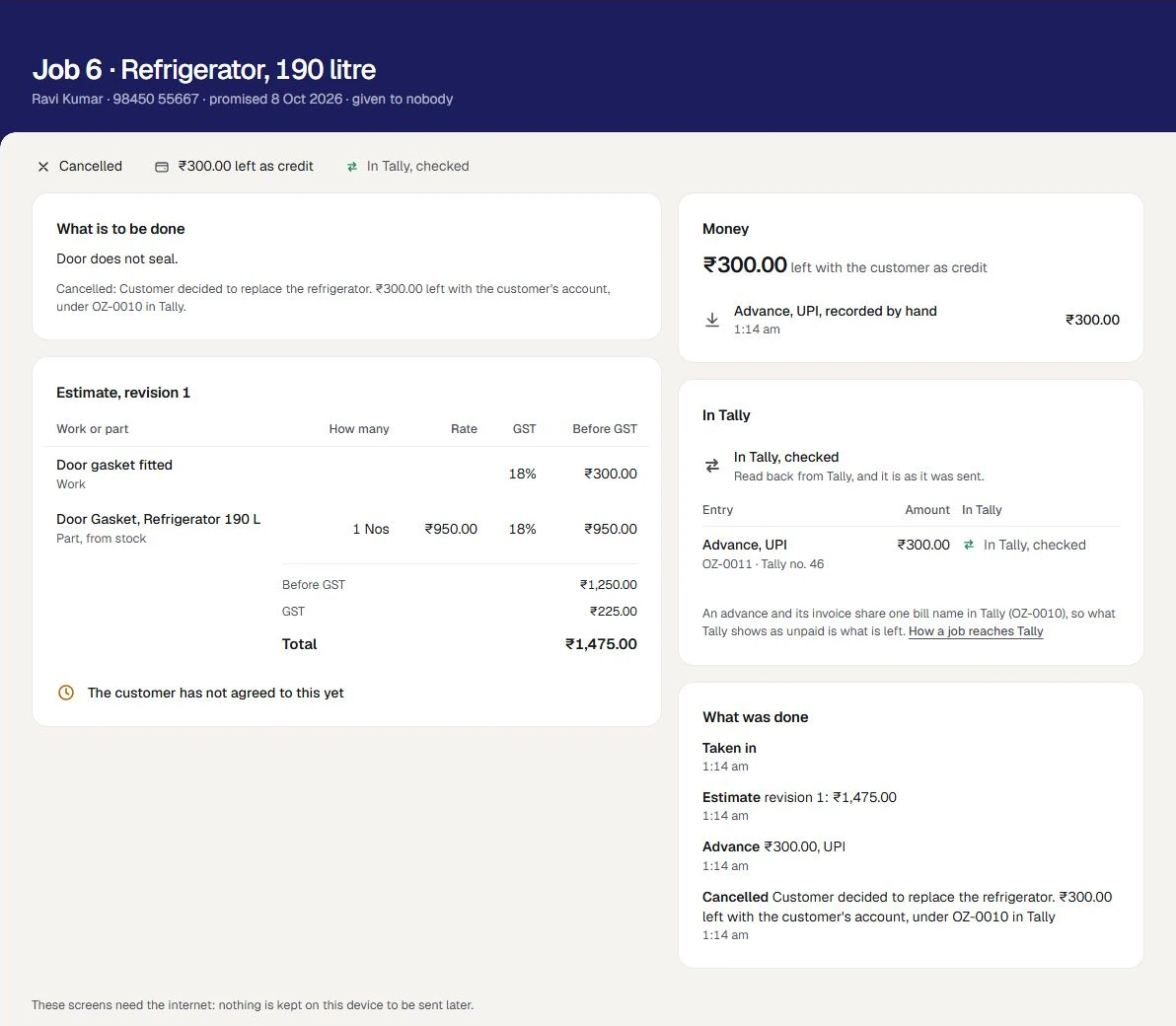
A job with an advance held is not cancelled until you say what becomes of the advance. A completed job is not cancelled: its invoice is in the books, and is put right there with a credit note. See Change, cancel or delete an entry.
What In Tally says
The card In Tally has one line for the job as a whole, then a table with a row for each entry: each advance, the invoice, each payment, each amount given back. Each row says for itself how it stands.
| The words | What they mean | What to do |
|---|---|---|
| Nothing yet. An advance goes in when it is taken, and the invoice when the job is completed. | The job has made no entry | Nothing |
| Waiting for Tally | The entry is made, and goes into Tally by itself as soon as the computer that runs Tally can be reached | Nothing |
| In Tally, not checked yet | Tally has taken it. It is checked against Tally at the next read | Nothing |
| In Tally, checked | Read back from Tally, and it is as it was sent | Nothing. It is done |
| Refused by Tally | Tally would not take it. Tally's own reason is under it | See When Tally refuses the invoice |
| Not in Tally yet | No entry could be made yet. The reason is under it | See When it says Not in Tally yet |
| Not in Tally | The entry was discarded before it reached Tally | Press Send to Tally on the job |
| Changed in Tally | The entry was changed in Tally after it was sent | See Changed, or removed, in Tally |
| Check in Tally | Tally holds the entry, but not as it was sent | The same |
| Removed in Tally | The entry was cancelled or deleted in Tally afterwards | The same |
The same words stand on each row of Jobs, on a line of their own under the job and the money.
When Tally or its computer is off
Carry on. Jobs are taken in, estimated, completed and paid for, all as usual.
Each advance, invoice and payment reads Waiting for Tally. When the computer is on again with Tally open on your company, they go in by themselves, in the order they were made, and each is read back and checked. Nothing has to be sent again by hand.
The device you work on is a different thing: it needs the internet for every step. With no connection the screens say so, and nothing is kept on the device to be sent later.
When Tally refuses the invoice
Tally can say no for its own reasons: a date outside the period your company allows, or a ledger that was renamed. The job stays completed, and paid if it was paid. Only its invoice needs someone.
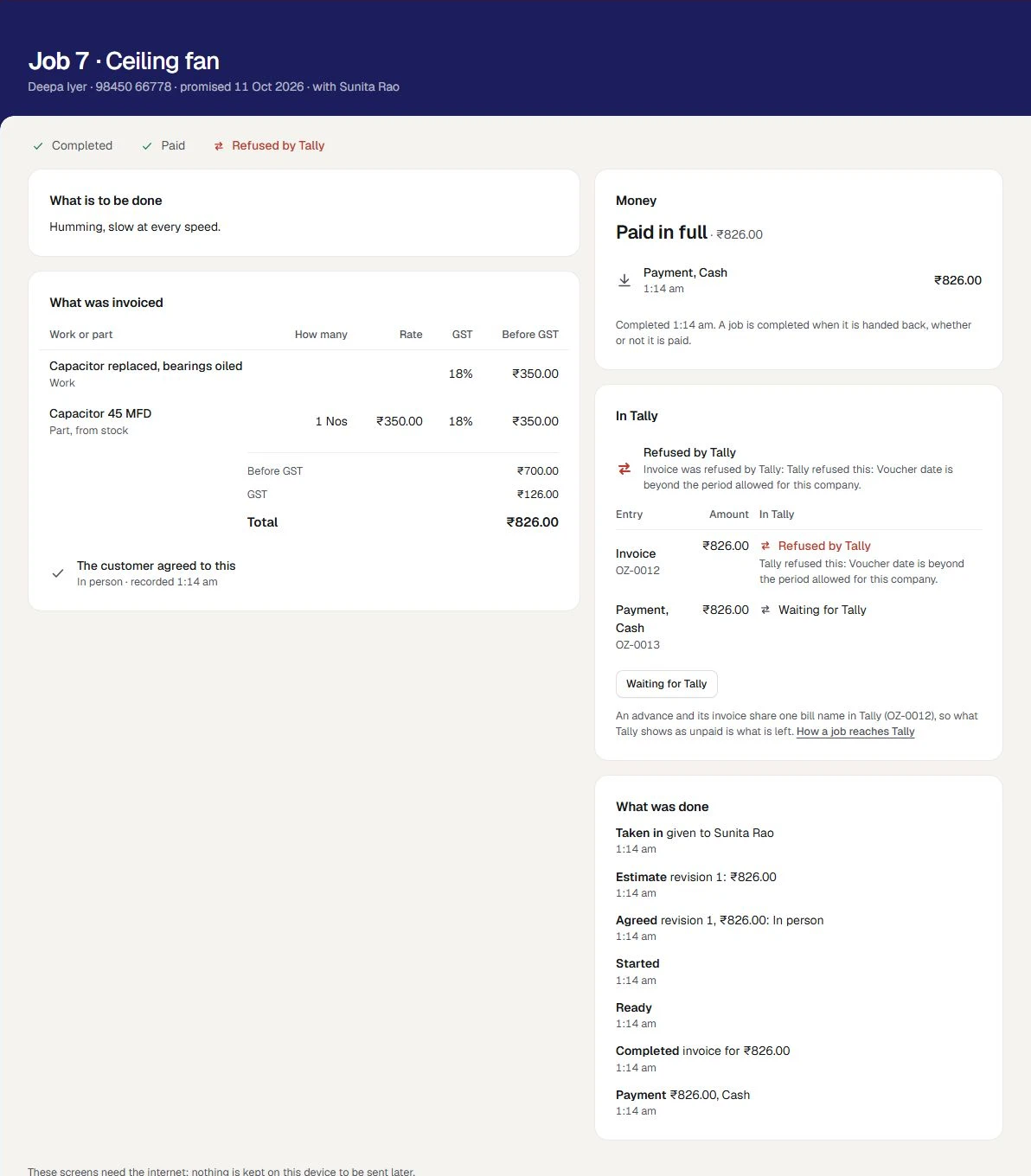
- Read Tally's reason, under Refused by Tally.
- Put the cause right where it is. A date or a ledger is put right in Tally.
- Press Waiting for Tally on the job, or open Connectors, Tally, Waiting for Tally.
- On the invoice's line, press Try again. It is sent once more as it is.
A payment is not sent ahead of its invoice. While the invoice is refused, the payment reads Waiting for Tally, and follows it in once it is taken. See When a bill is waiting or refused.
A job with a refused invoice is under Needs attention in the list.
When it says Not in Tally yet
Money was taken, or a job completed, while something was still to be set up. The job keeps it, and the line says what to choose. Nothing is lost.
| The reason begins | What to do |
|---|---|
| Still to choose under Jobs, Set up | Whoever holds Business settings opens Set up, chooses what it names, and saves. Then Send to Tally |
| The ledger work is billed as has not been chosen. | The same |
| The invoice for this job would come to one sum in Tally, and the customer agreed to another | A GST rate or a ledger was changed in Tally after the estimate was made. Put it right in Tally with your accountant, then Send to Tally |
| The invoice itself has not been made yet. | This is a payment waiting for its invoice. Send the invoice first: Send to Tally sends them in order |
- Put the reason right.
- On the job, in the card In Tally, press Send to Tally.
A small message says Sent. It goes into Tally as soon as the computer that runs Tally can be reached. If something still stands in the way, the job says what, and nothing is made. An entry that was made is never made a second time from here.
If an entry still cannot go after that, press Ask us for help on the card, or write to us from Settings, Help and support, with the job's number.
Changed, or removed, in Tally
These mean an entry reached Tally and is not there now as it was sent. Someone changed, cancelled or deleted it in Tally.
Orzoni does not change an entry back. The job still shows what was invoiced and what was paid. Look at the entry in Tally. If the change was meant, there is nothing to do. If it was not, your accountant puts it right in Tally.
GST on a job
- GST is worked out on the invoice, by the part of Orzoni that makes every sales bill: CGST and SGST, or IGST for a customer in another state.
- A line of work carries the rate you chose for it. A part carries the rate Tally holds for the item. No rate is assumed.
- A company under the composition scheme makes invoices with no GST.
- A company registered for GST in more than one state bills in Tally. Here such a job is kept, and says why its invoice is not made.
- An advance is recorded as money received. No GST is accounted on it when it is taken.
Orzoni gives no advice on tax. Ask your accountant how your work should be charged, and whether an advance you take needs anything more in your books.
Why one job makes one invoice
- A job is tied to its invoice once. Pressing Complete and invoice twice, or Send to Tally again, finds the same invoice and makes no second one.
- Each advance and each payment is recorded once, however often it is sent.
- The invoice is made only when it comes to exactly what the customer agreed to. Otherwise it is held back and says why.
- The invoice is not opened in the bill form, and cannot be written over from it.
Mistakes you can undo
| The mistake | How to put it right |
|---|---|
| An advance recorded for too much, on an open job | Give an advance back for the difference, with the reason |
| An entry held back for a set-up reason | Put the reason right, then Send to Tally |
| An invoice discarded from Waiting for Tally by mistake | Send to Tally on the job |
| A job completed that should not have been | A credit note against its invoice, in the books. See Change, cancel or delete an entry |
What it does to your data and to Tally
- In Tally: a receipt for each advance, one sales invoice for each completed job, a receipt for each payment after, and a payment out for each amount given back. The invoice lowers Tally's stock by the parts on it. Nothing else is written, and none of Tally's settings is changed.
- In Orzoni: the job keeps the link to each entry, its reference and the number Tally gave it, and everything done to it under What was done.
- An estimate, a revision, an agreement, a job moved on and a cancelled job with no advance make nothing in Tally.
- What was done is also written down under Settings, Users and roles, What was done: an advance taken or given back, a payment, a job completed or cancelled, an agreement recorded.
What next
- Take in a job: the job, the list and the estimate.
- When a bill is waiting or refused: the Waiting for Tally view in full.
- How Orzoni stays in step with Tally: every status of the Tally connection.
- Set up jobs.
What this does not do
- No money is returned by Orzoni. It records that you gave it back.
- No payment is checked with a bank. UPI and card are recorded by the person at the desk.
- No invoice before the job is completed, and none in parts. One job makes one invoice.
- No GST is accounted on an advance when it is taken.
- A completed job is not cancelled, and its invoice is not changed from the job. It is put right in the books.
- An entry is not changed back in Tally.
- It gives no advice on tax.
The whole list is in Set up jobs.
Still stuck? Write to orzoni.official@gmail.com and say which step you are on, or book a walk-through call.