

For a café that serves at the counter
PilotWorking today, and open to a few businesses while it is being tried. Ask us and we will tell you when it is open to you.
Take the order on any screen, send it to the kitchen, record how it was paid, and find the sale in Tally as a bill with its receipts. Count the drawer and close the day at the counter. The counter goes on serving while the computer that runs Tally is switched off.
Your books still need TallyPrime on a Windows 10 or 11 computer. The people serving need only a browser.
Who it is for
A café, a bakery counter, a tea room or a juice bar where people order and pay at the counter, and whose books are kept in Tally.
- You take orders at one counter and call them by name, table or token.
- People pay by cash, UPI or card, and sometimes part by each.
- You want each sale in Tally as a proper bill, without typing it in again at night.
Your first task
Put your menu in
Add what you sell, the choices each thing can take, its price, and the GST it is charged at. Then take your first order and watch it reach the kitchen.
Set up a caféThe counter, on real screens
Each step says what you do, and what happens next.
Take the order
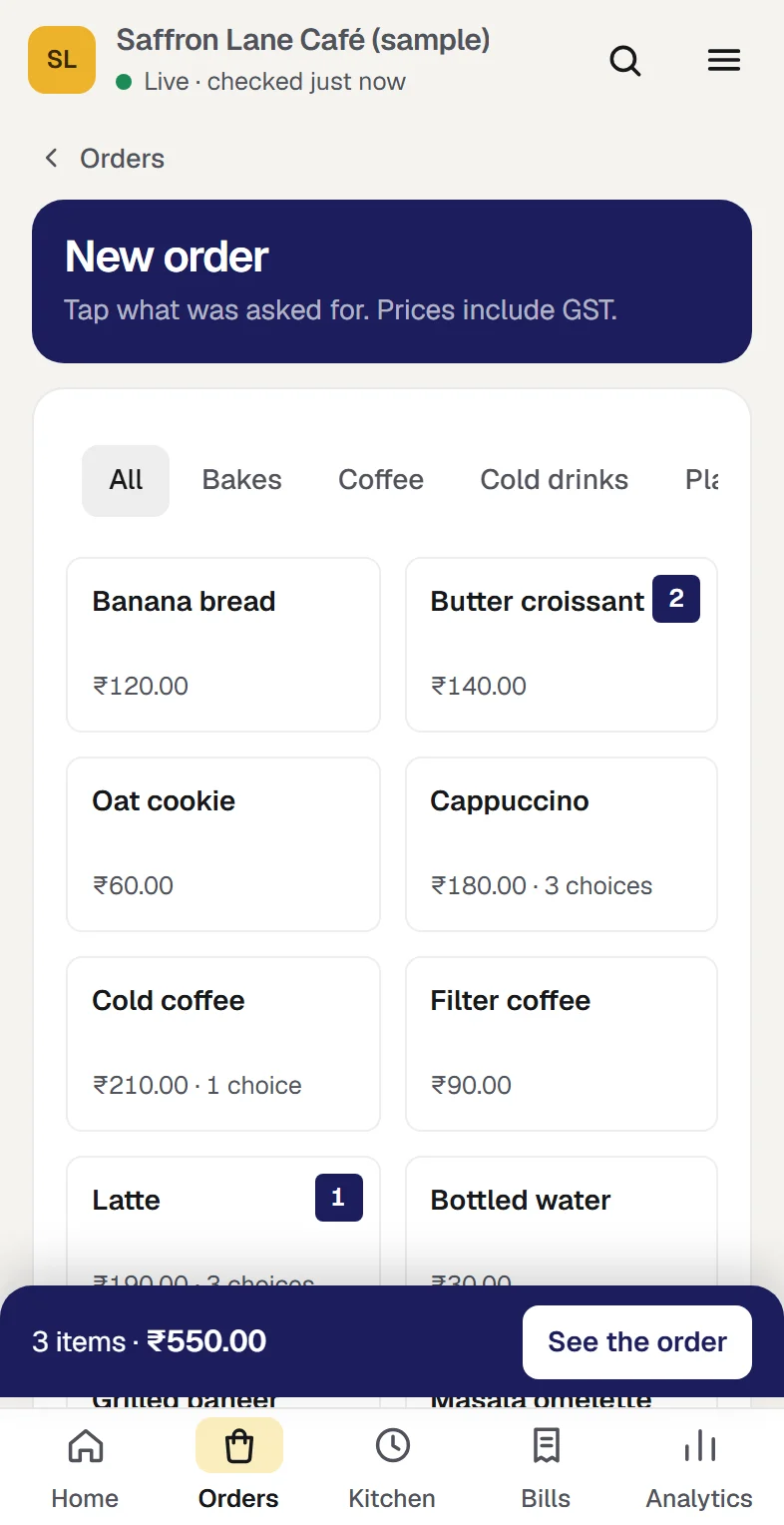
Tap what was asked for and pick its choices: oat milk, an extra shot. Add a name and a table or token if you use them. Orzoni works out the total, GST included.
What happens next. Confirm order sends one ticket to the kitchen. An order saved as a draft sends nothing.
Take a café order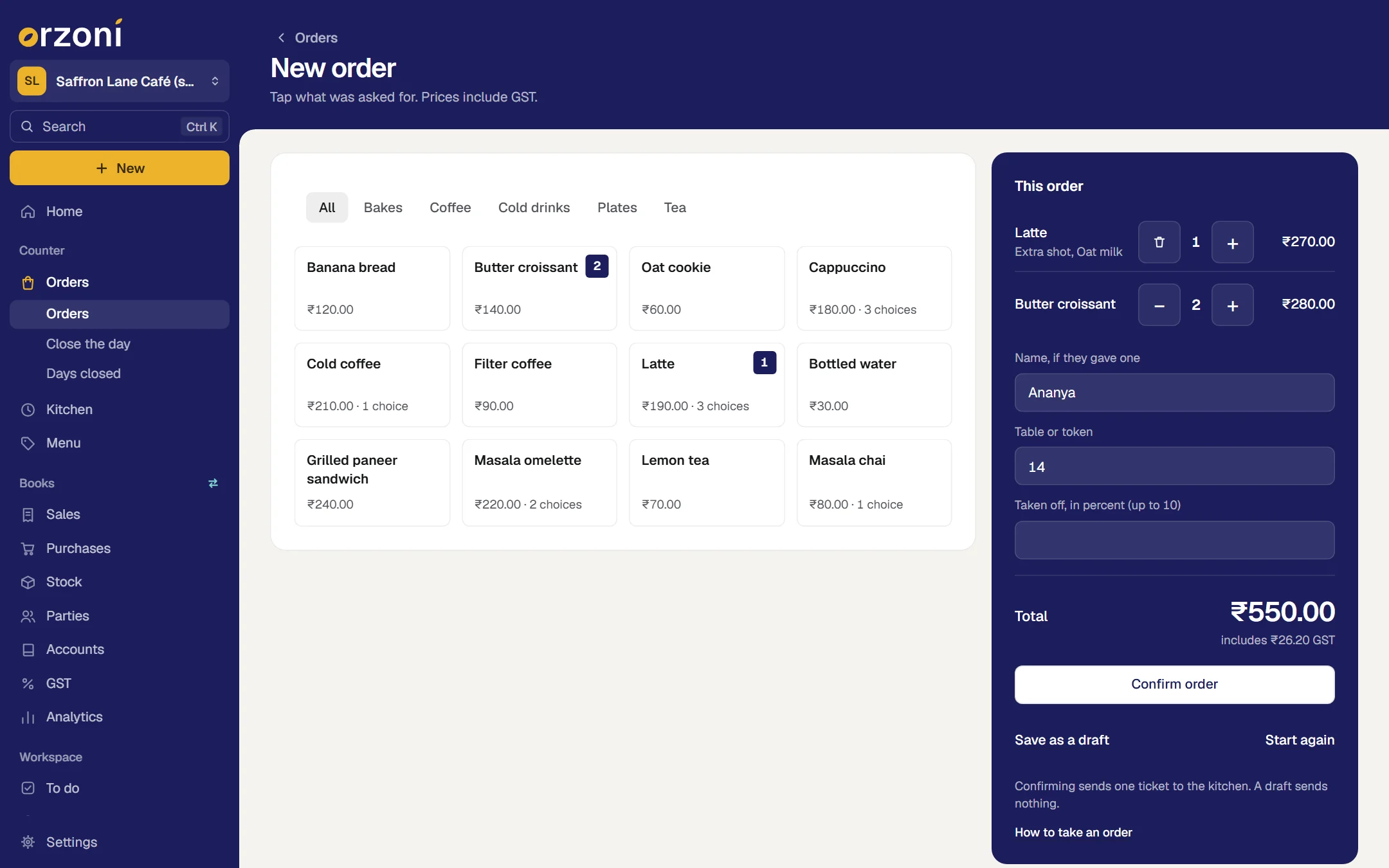
The kitchen sees it
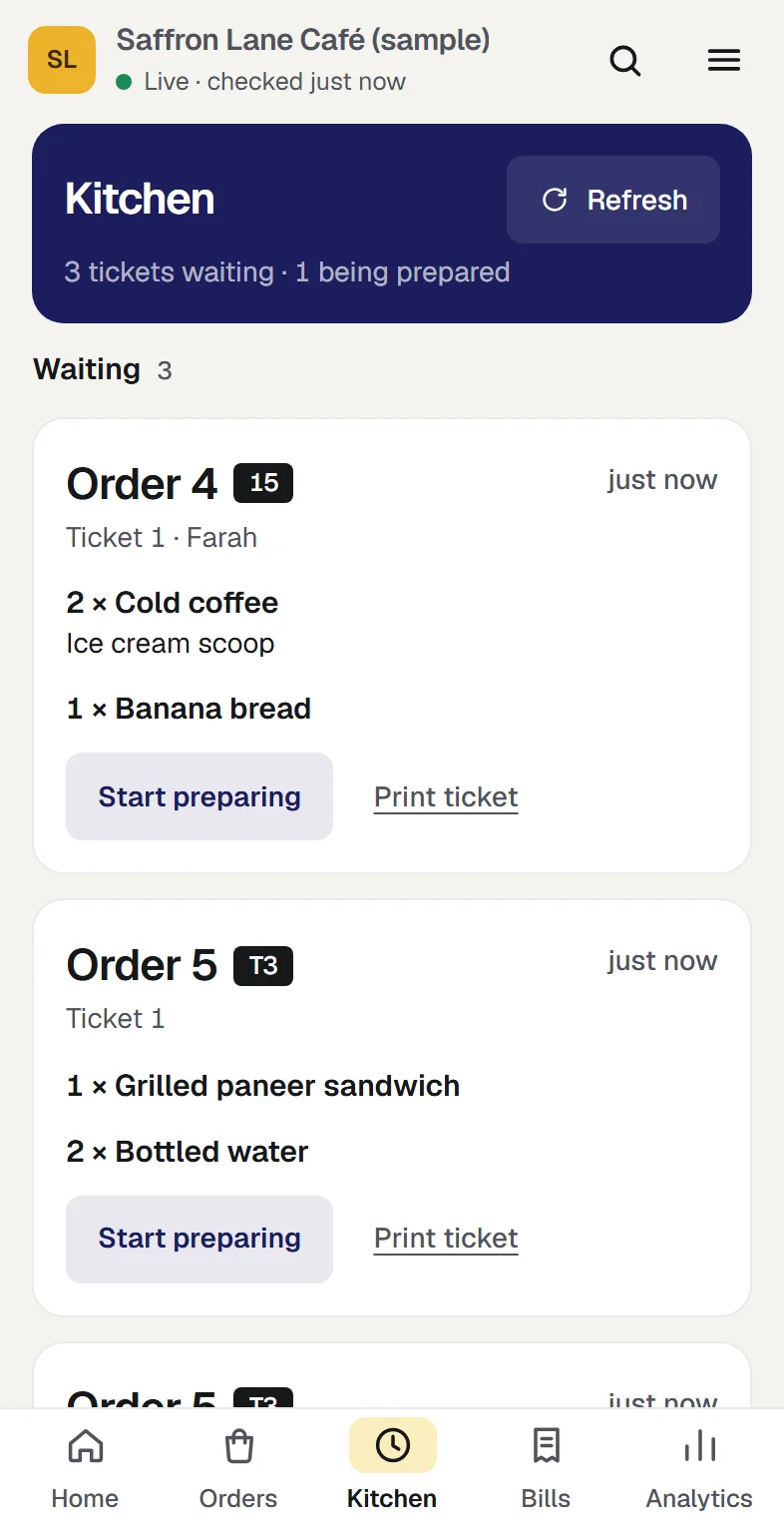
The kitchen opens the queue on any screen: Waiting, Being prepared, Ready. It keeps itself up to date, and a ticket can be printed from it.
What happens next. Something added to an order later, or taken off it, arrives as a ticket of its own that holds only the change.
Use the kitchen queue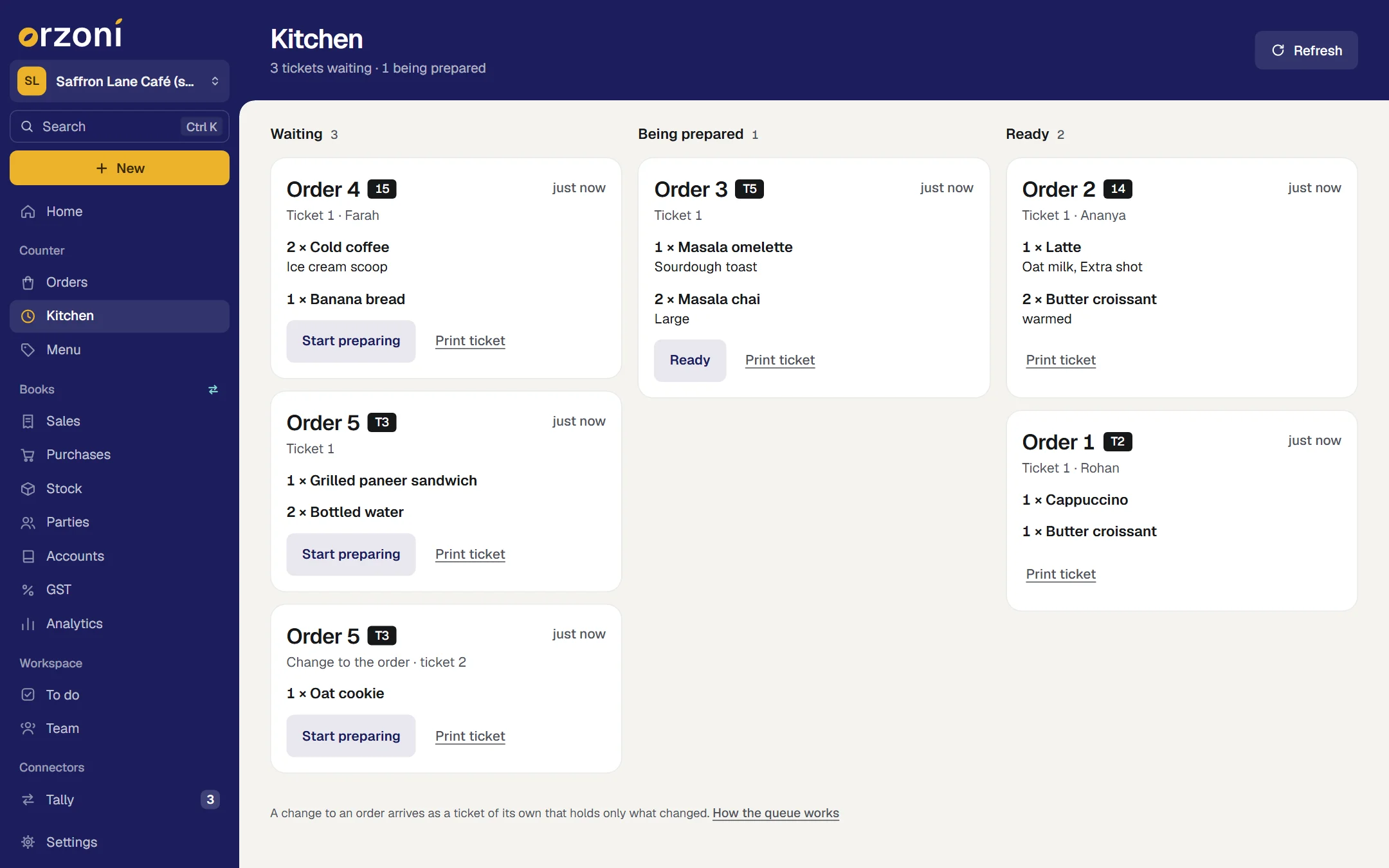
Record how it was paid
Cash, UPI and card, split any way. Orzoni shows what is left to pay, and the change to give on cash.
What happens next. For UPI or card, the person serving looks at their own phone or card machine, then presses Record payment.
Collect a split payment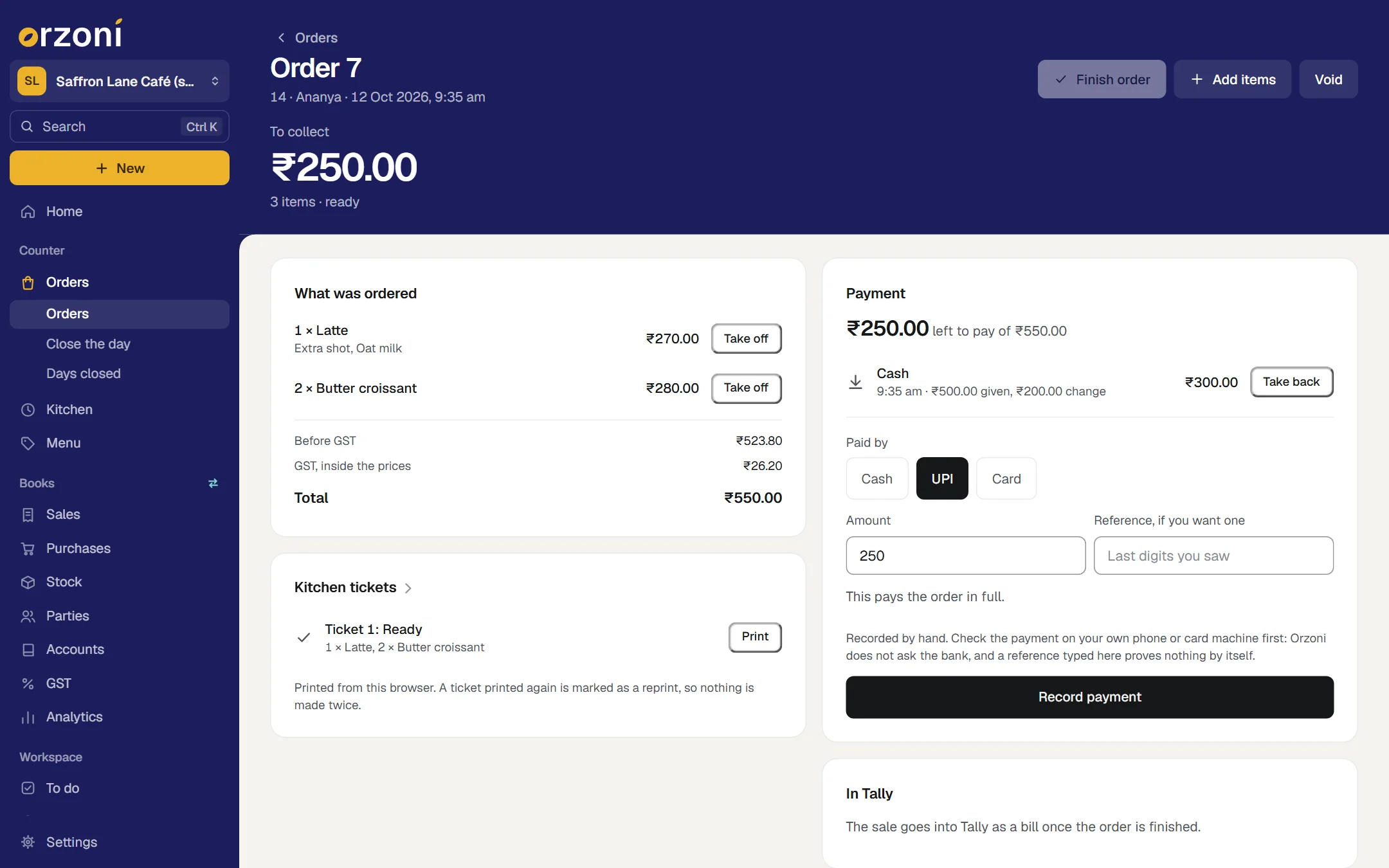
Finish the order, and find it in Tally
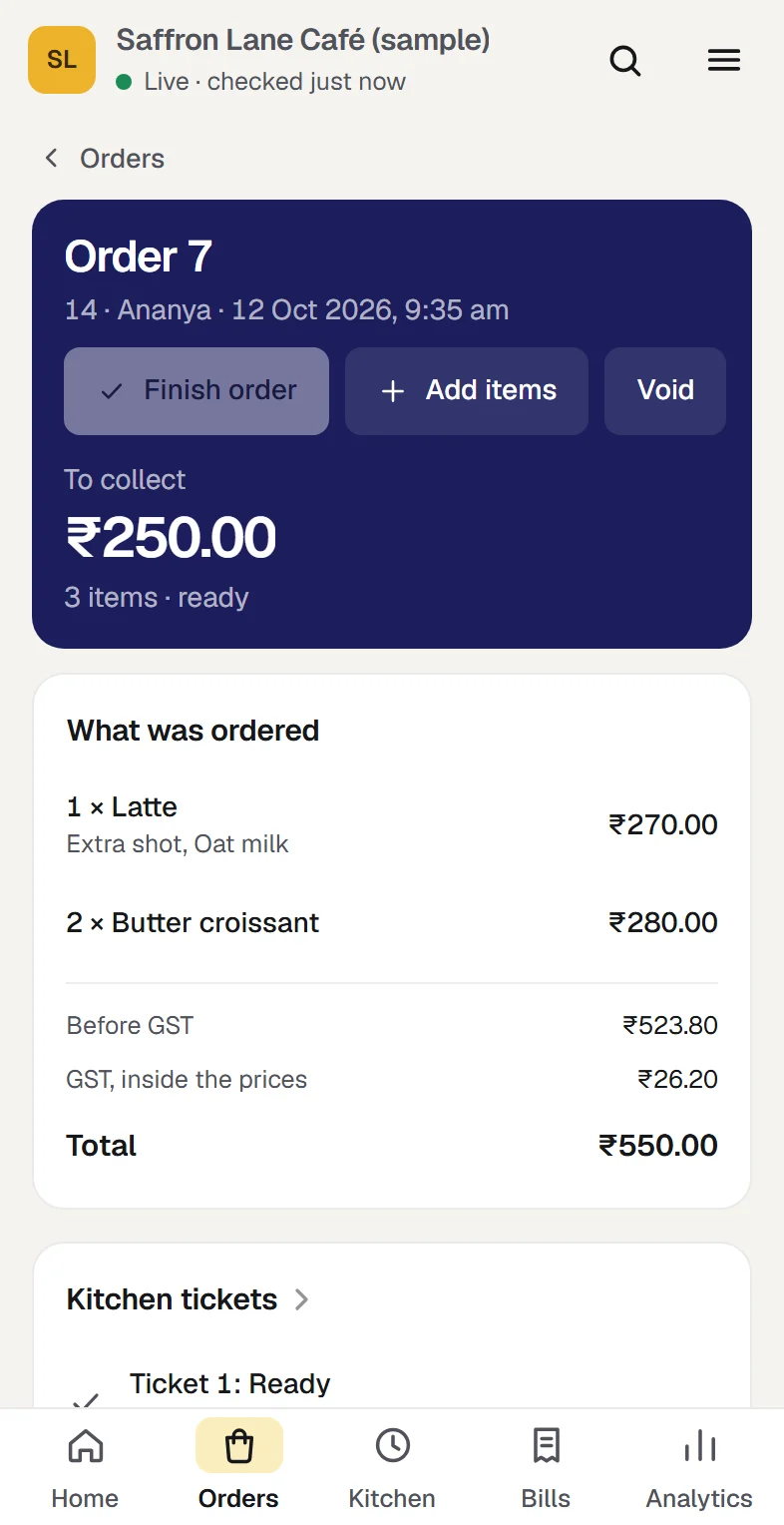
Press Finish order. One sales bill goes into Tally, with a receipt for each way it was paid.
What happens next. Orzoni reads the bill and its receipts back from Tally, and marks the order In Tally, checked only when every one of them is as it was sent. If Tally refuses one, or something is still to be set up, the order is finished all the same, says why, and is sent again once that is put right.
Café receipts and Tally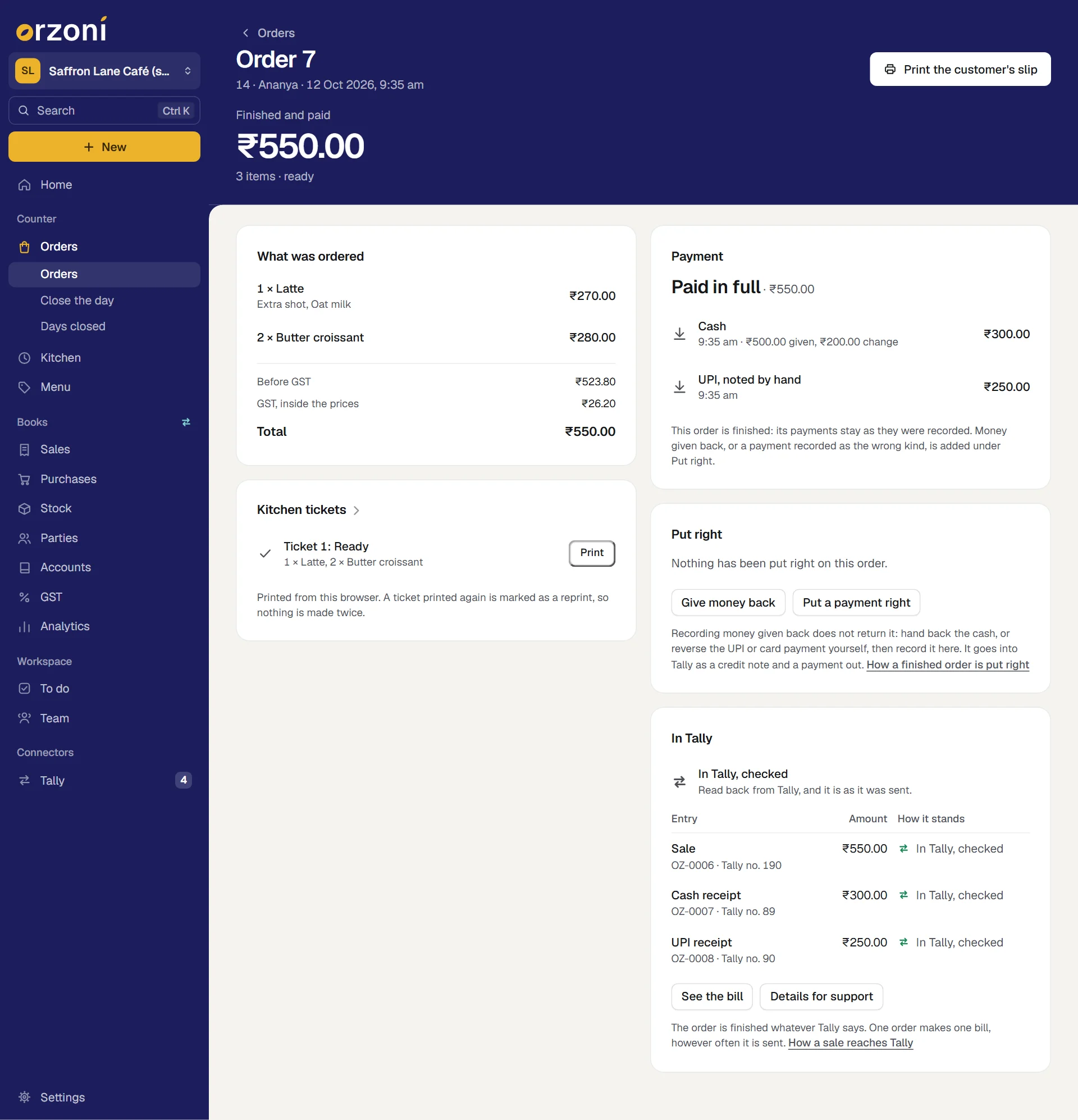
Put it right when something was wrong
A croissant came out burnt, or cash was pressed where the customer paid by UPI. On the finished order, press Give money back or Put a payment right, and say why.
What happens next. The sale stays as it was. Money given back goes into Tally as a credit note and a payment out, and a wrong way of paying as a transfer. Orzoni returns no money itself: you hand it back, then record that you did.
Put a finished order right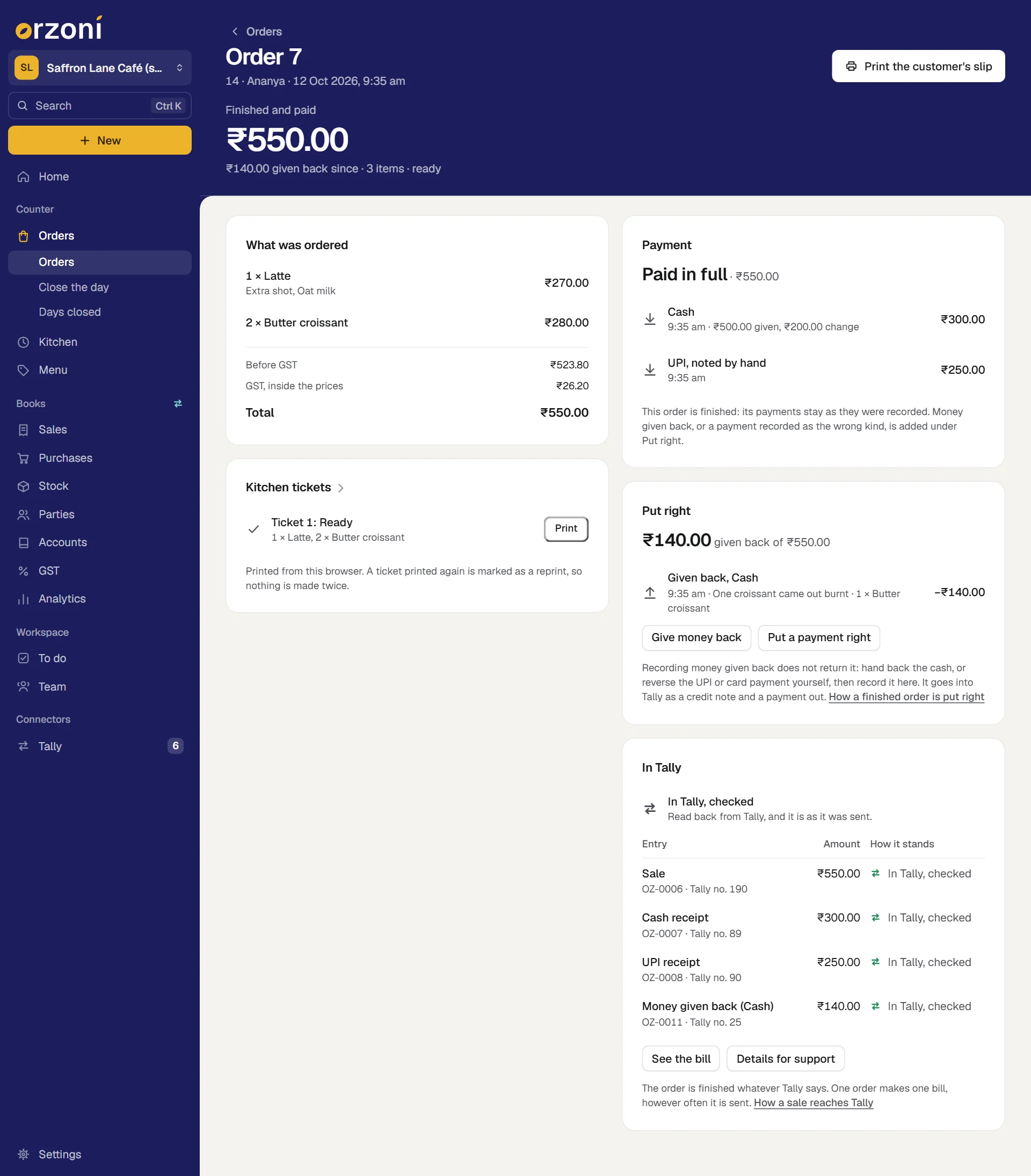
Close the day
Count the drawer and type what is in it. Orzoni sets it against the starting cash, the cash recorded, and what was put in or taken out, and says what the difference is.
What happens next. The close keeps the day as it stood: sales, money by cash, UPI and card as staff recorded them, the orders carried over, and how the day's sales stood with Tally. The counter keeps working while you close.
Close the day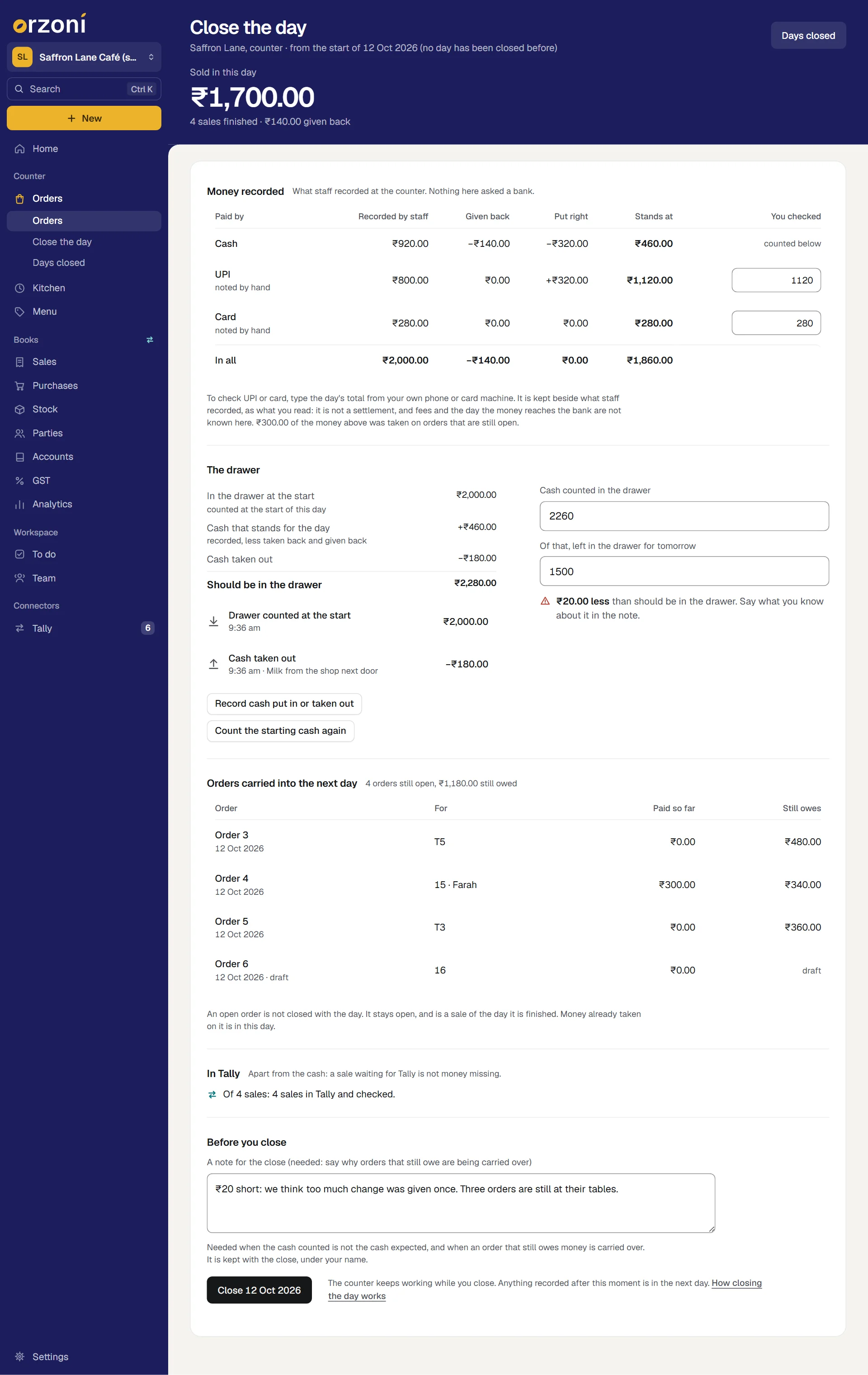
The café in these pictures is Saffron Lane Café, a sample. It is made up: none of it is a real café's orders.
What is included
All of it is working today, and inside the plan you already have.
A menu, and orders at the counter
A menu with choices, orders taken at the counter, and a total worked out by Orzoni, not typed.
Take a café orderA kitchen queue
A kitchen queue on any screen: waiting, being prepared, ready. A change to an order arrives as its own ticket.
Use the kitchen queuePayments, split any way
Cash, UPI and card recorded against an order, split any way, with what is left to pay and the change to give.
Collect a split paymentEach sale into Tally
Each finished order becomes one sales bill in Tally, with a receipt for each way it was paid. Orders go on being taken while the Tally computer is off.
Café receipts and TallyThe day, closed at the counter
The day closed at the counter: the drawer counted against the cash recorded, UPI and card as staff recorded them, the orders carried over, and a record of the day that stays as it was closed.
Close the dayA finished order put right
A finished order put right on its own page. Money given back goes into Tally as a credit note and a payment out, and a payment recorded as the wrong kind as a transfer.
Put a finished order rightToday, on one screen
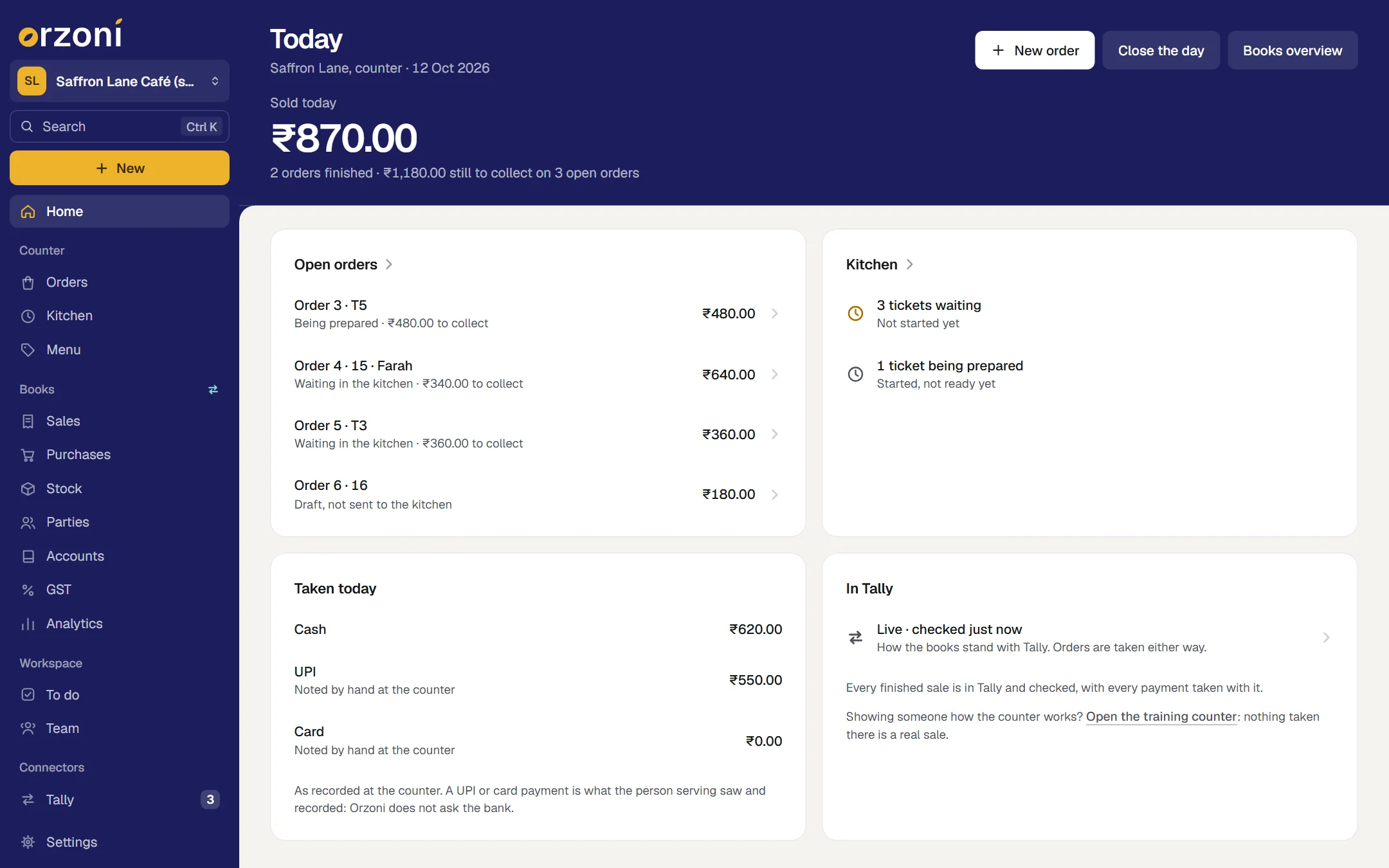
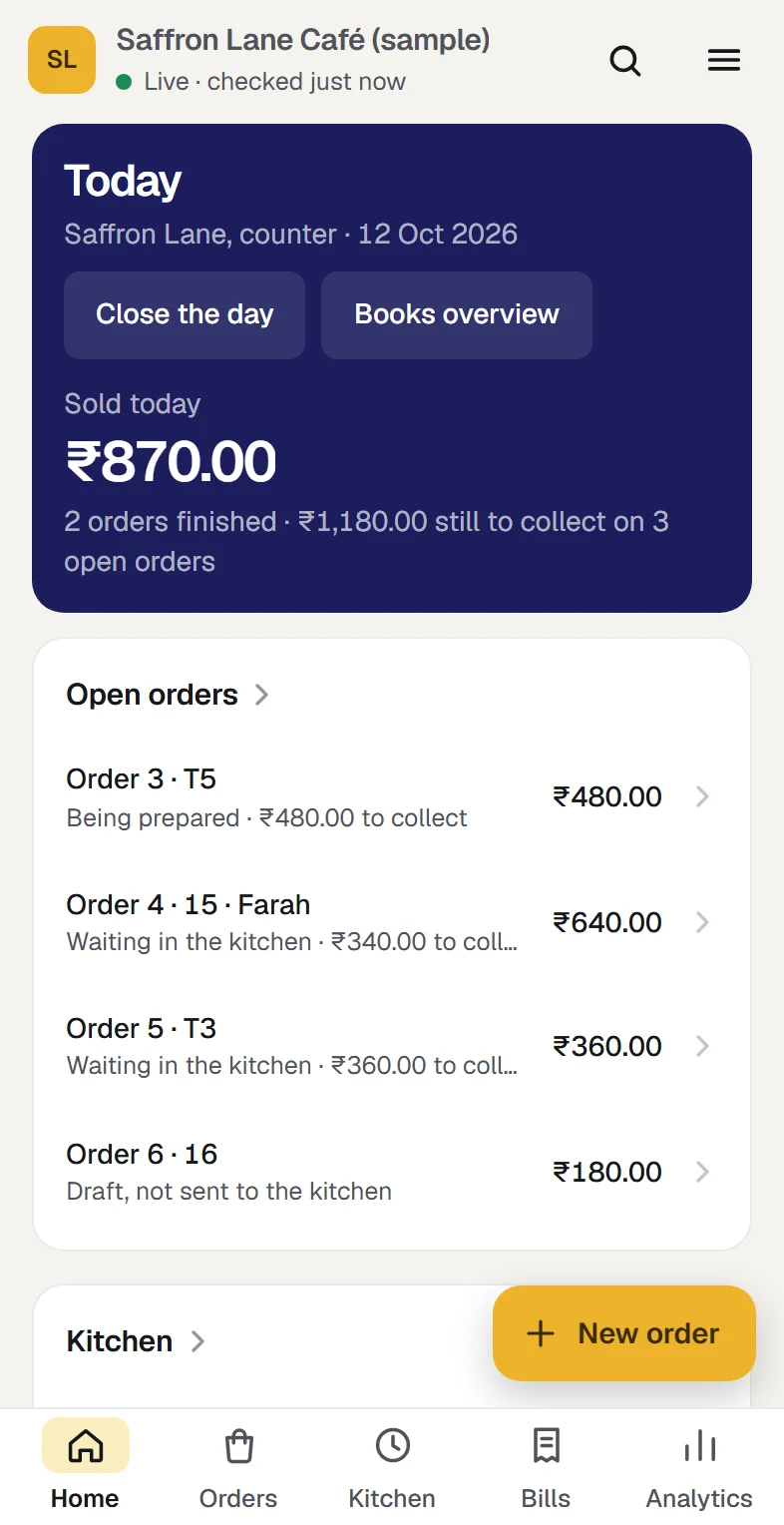
A café's Home is the day: what was sold, the open orders, the kitchen, what was taken by cash, UPI and card, and how the day's sales stand with Tally. A list on it says what is still to set up before your first order.
Set up a caféThree more roles for your staff
Counter staff take orders and payments and work the kitchen queue. A Shift manager also closes the day and puts a finished order right. Kitchen sees the queue, and nothing else: no money, no books.
Users and rolesA counter to practise on
A training counter with a copy of your menu, apart from the real one. Nothing taken there is in your sales or your day's close, and nothing from it goes to Tally.
Practise on the training counter
The books behind the counter are the same as any other business's: purchases, stock, accounts, GST working papers, analytics and the team. What every business has
Choose what kind of business you are, and switch any other part on whenever you need it. Nothing is deleted by changing your mind. Choose your kind of business
What you need before you start
- A place in the pilot
Working today, and open to a few businesses while it is being tried. Ask us and we will tell you when it is open to you. Ask about the café pilot
- TallyPrime on a Windows 10 or 11 computer
As for every business, Tally holds the books and the Tally connector sits beside it. That computer does not have to be on while you serve: it is needed for the bills to go in. Proven on TallyPrime 7.1.
- A browser for each person serving
A phone, a tablet or a computer. Nothing is installed on it, and the Tally connector is not needed on it.
- The internet at the counter
Orders are kept on Orzoni's service, not on the device, so the counter and the kitchen always see the same thing.
- A few ledgers in Tally
A customer that stands for everyone served at the counter, a sales ledger, the ledgers your cash, UPI and card money arrive in, and one named Round Off if totals are rounded to the rupee.
- The GST rate for each thing you sell
You set it by hand for each thing on the menu, with your accountant. Orzoni assumes no rate for food.
- A printer, if you want paper
Any printer the device's browser already prints to. A kitchen can also work from the queue on a screen.
Where the line is
The pilot is for counter service at one outlet. Each of these is something a café owner might otherwise assume, so it is said here before you ask.
One outlet for each company.
A business that keeps two companies in Tally has a counter for each.
Counter service and takeaway: an order carries an optional table or token. Tables are not moved or merged, there are no courses, and one order is not split into several bills.
Call an order by its name, table or token. Where people pay separately, take an order for each, or take one order and record each person's payment against it.
Payments are recorded by the person serving. Orzoni does not ask a bank or a payment company whether a UPI or card payment arrived.
Look at your own phone or card machine, then record it. At the day's close you can type the total you read there beside what staff recorded, and your accountant sets both against the bank's statement.
Kitchen tickets and the customer's slip are printed from the browser, on the printer it has. Orzoni does not drive a receipt printer by itself.
Press Print and choose the printer in the browser's own window, or work from the queue on a screen.
Tally stays the one count of stock. Recipes, ingredients and wastage are kept where you keep them today.
What is sold from stock, such as a bottle of water, is billed as its stock item, so Tally's count falls with each sale.
Orders from food delivery services are typed in at the counter like any other order. They do not arrive by themselves.
They stay where you take them today.
The counter is worked online. With no internet it says so and takes nothing, so that nothing is taken twice.
Keep the counter's device on Wi-Fi or mobile data. When the connection drops, the screen says so at once.
What a finished order sold is not changed at the counter, and the order is not opened again. Money given back, and a payment recorded as the wrong kind, are added to it and go into Tally as entries of their own.
Until an order is finished, things can be added to it or taken off it, a payment taken back, or the order voided, each with its reason kept.
For a company registered for GST in one state. Where a company is registered in more than one, a counter sale is kept, and says why its bill is not made.
The list under Settings, Counter tries a sale against your Tally set-up, and says what it finds before your first order.
Setting it up, step by step
Ask to be let in
Leave your number on this page. We call you, show you the counter working, and tell you when the pilot is open to you.
Ask about the café pilotLink your Tally company
Your account, the connector on the computer that runs Tally, and one code to type.
Connect TallyChoose Café
Under Settings, Business type. Orzoni opens on Today, with Orders, Kitchen and Menu in the rail.
Choose your kind of businessSay how counter sales go into Tally
Under Settings, Counter: name your outlet, and choose the ledgers from the ones Tally has.
Set up a caféPut the menu in
Each thing with its part of the menu, its choices, its price and its GST.
Invite the people who serve and cook
As Counter staff, Shift manager and Kitchen, each with their own sign-in.
Invite your teamPractise, then take a first order
Try the screens on the training counter. Then confirm a real order, record the payment, finish it, and see In Tally, checked.
Practise on the training counter
The guides for this
- What the café counter coversRead this once before your first order.
- Set up a café and its menuFrom a company in Tally to a first sale at the counter.
- Practise on the training counterA counter to practise on before a real customer is waiting.
- Take a café orderAn order taken at the counter, tap by tap.
- Use the kitchen queueThe Kitchen screen, on any screen you can stand beside the stove.
- Collect a split paymentHow to take part of an order in cash and the rest by UPI or card.
- Café receipts, and how a sale reaches TallyWhat pressing Finish order does.
- Put a finished order rightEvery way a café order is corrected, by how the order stands.
- Close the day at the counterHow to close the day at a café's counter.
Questions people ask first
Does every device at the counter need the Tally connector?
No. The connector is installed once, on the Windows computer that runs Tally. A phone, a tablet or a computer at the counter or in the kitchen needs only a browser and the internet.
What happens while the computer that runs Tally is off?
You go on serving. Orders, the kitchen queue and payments work as usual, and each finished order's bill waits and goes into Tally by itself when the computer is back. Today says how the day's sales stand with Tally.
How does Orzoni know a UPI or card payment arrived?
The person serving records it, after looking at their own phone or card machine. Orzoni does not ask a bank or a payment company, and a reference typed in is a note, not a proof. Your accountant sets the day's UPI and card totals against the bank's own statement.
How do kitchen tickets and the customer's slip print?
From the browser, on the printer that device already prints to. A ticket printed a second time is marked as a reprint, so nothing is made twice, and a slip printed again says it is a copy. The slip says it is not a tax invoice: the tax invoice is the bill in your books.
Does the pilot change what I pay?
No. Your plan is the same two prices, by the number of companies. An outlet is the place your counter is: it is not a company, and the plan does not count it. Pricing
What if an order was finished wrongly?
It is put right on the order's own page, by someone you have allowed to. Hand the money back yourself, press Give money back and say why: a credit note and a payment out go into Tally. Where the right amount was recorded as the wrong way of paying, Put a payment right sends a transfer. The sale itself is never rewritten, so the counter's record and the books can always be compared.
Does closing the day settle my UPI and card money?
No. A close keeps what staff recorded, and a total you typed after reading your own phone or card machine. Neither comes from a bank, and fees and the day the money reaches your account are not known to Orzoni. Your accountant sets the close against the bank's statement.
Ask about the café pilot
Working today, and open to a few businesses while it is being tried. Ask us and we will tell you when it is open to you. Leave your number and a person calls you.
We call you
On the mobile number you give, to fix a time that suits you.
We show you the counter working
An order taken, sent to the kitchen, paid part in cash and part by UPI, and found in Tally as a bill.
We tell you where you stand
Whether the pilot is open to you today, and what to have ready in Tally before your first order.
Serve at the counter. Find it in Tally
The café pilot is opened by arrangement, for counter service at one outlet. Ask, and a person calls you.
- The pilot adds no charge to your plan.
- An outlet is not a company, and is not counted by your plan.
- Your books stay in Tally.