

On this page
Products on Shopify and in Tally, shown as one
Where a store is connected, a product is one row whichever side it is on. The three marks, the views on Items, merging what differs into Tally, a product that is on Shopify only, and a store's product on a bill line.
11 minute read
One product, two places
The same product can be in two places: listed on your Shopify store, and kept as a stock item in Tally. Once a listing is matched to an item, Orzoni treats the two as one product, linked, and shows it as one wherever products are shown.
Three things hold throughout:
- Merging never changes the live Shopify product. It updates the item in Tally. Nothing here writes a name, a code or a price to your store.
- Once the two sides have agreed, Tally leads. From then on the store follows Tally's count, not the other way round.
- With no store connected, nothing here appears. Every product is simply an item.
A listing is linked by matching it: see Match your store's listings. How a store is connected is in Connect your Shopify store.
The three marks
A small mark beside a product's name says which side it is on. Point at it to read it. On a product's own page it is spelled out in words.
| The mark | In words | What it means |
|---|---|---|
| Two links of a chain | Linked | On Shopify and in Tally, linked as one product |
| A shopping bag | Shopify only | On Shopify only. Not in Tally yet |
| Tally's two arrows | Tally only | In Tally only. Not on Shopify |
A product whose item is on its way into Tally carries the bag with the words Being added to Tally.
The marks are shown on the Items list, on an item's own page, in what a warehouse holds, in the reorder and stock analysis lists, in the list under an item's box on a bill, and beside a linked item on the lines of an entry.
A listing you have set aside is on neither side's list: you said it is not kept in Tally.
The views on Items
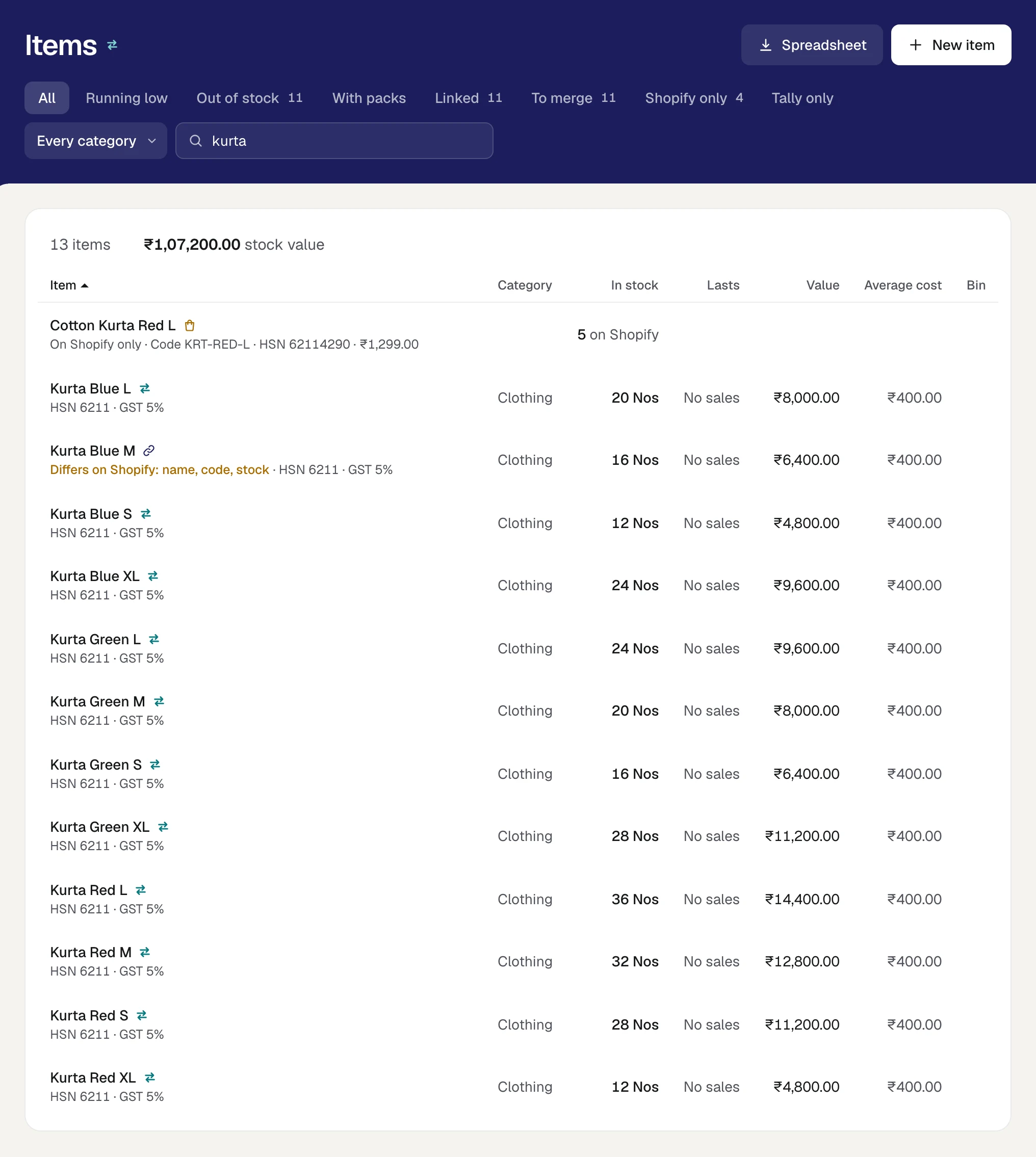
In the rail, press Stock, then Items. Where a store is connected, the list holds every product once, whichever side it is on, and four more views stand on the band.
| View | What it holds |
|---|---|
| Linked | Products that are on Shopify and in Tally, as one |
| To merge | Linked products whose two sides say different things |
| Shopify only | Products the store lists that Tally does not have |
| Tally only | Items in Tally that no listing is matched to |
The first three carry a number, and each is offered only while it holds something.
How each kind of row reads:
- A linked product is the item's own row, with the chain mark. Where its two sides differ, the small line says which, as in Differs on Shopify: name, code, stock. It can name the name, the code, the HSN code and the stock.
- A product on Shopify only is a row of the same list. In place of Tally's figures it shows what the store holds, as in 5 on Shopify, or Not counted. Its small line reads On Shopify only, with its code, HSN code and price where the store has them.
- An item in Tally only reads as it always did, with Tally's mark.
Spreadsheet leaves out the products that are on Shopify only: they have no figures in Tally. The rest of the list is in Items.
A linked product's page
Open a linked item and its page says Linked under its name. A card, On Shopify, lists each listing the item is, the store's location, and the count the store shows. Where the store is due a different count it says so, as in to be 13. Where the count is not kept in step it gives the one reason. Open the store leads to the store's Counts.
Where the item's two sides say different things, a sheet at the top of the page sets them side by side.
Merge as one
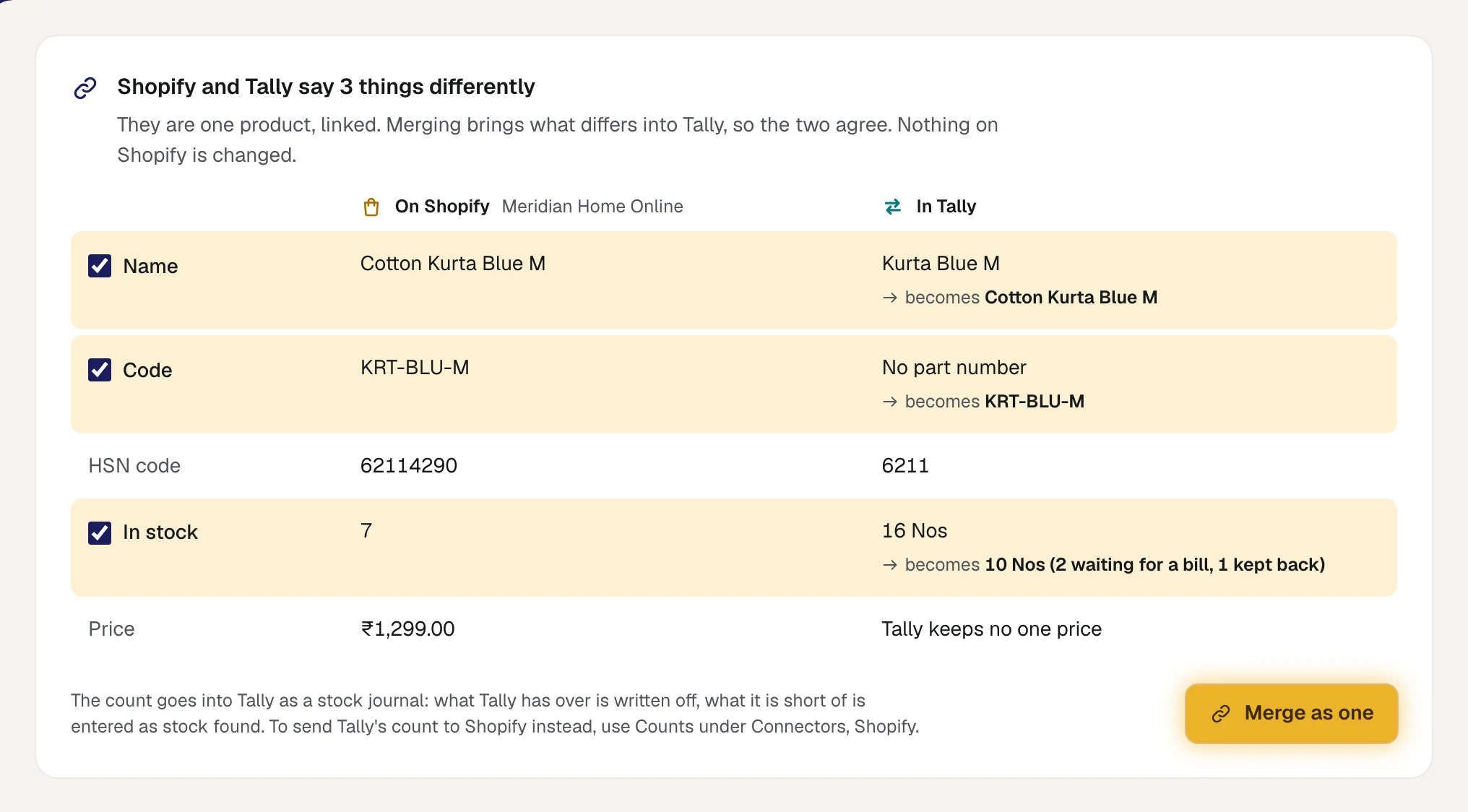
The sheet is headed, for example, Shopify and Tally say 3 things differently. It has a column for each side, On Shopify and In Tally, and a row for each thing compared. A row that differs is ticked, and under Tally's value it says what Tally's would become.
- Open the item. Stock, Items, To merge lists every product with something to merge.
- Read each ticked row. Untick any you want left as it is in Tally.
Press Merge as one.
Orzoni says Merged. Tally now agrees with Shopify. Only what is ticked is brought into Tally. Nothing on Shopify is changed.
What each row brings into Tally
| Row | What is compared | What merging does in Tally |
|---|---|---|
| Name | The product's name on the store, with its variant after it. Cotton Kurta sold as Blue / M is Cotton Kurta Blue M | Renames the item. Its page moves to the new name once Tally has renamed it |
| Code | The store's code for the listing, against the item's name, part numbers and aliases | Sets the code as the item's part number |
| HSN code | The store's code, against the item's. A code that is the other with more digits after it counts as the same | Sets the item's HSN code |
| In stock | The store's count, against what Tally's count gives for the store, at each location | Sets Tally's count by a stock journal: what Tally has over is written off, what it is short of is entered as stock found |
| Price | Shown, never ticked. Tally keeps no one price for an item | Nothing. The store's price is kept in Orzoni as the item's Selling price, each, where none was set |
The count Tally is set to is the store's count turned back into Tally's terms: the store's count, plus what is waiting for a bill, plus what is kept back. In the picture the store shows 7, with 2 waiting for a bill and 1 kept back, so Tally becomes 10. After that the sum in Counts gives exactly what the store shows, and nothing is sent to it.
- A name, a code and a count are compared only where the item is matched to that one listing and one sale is one of the item. A pack of 10, or an item several listings share, is shown as linked and is not merged by name or code.
- The code is put to Tally once. If your Tally keeps no part numbers, the code is not shown as differing again.
While a merge is on its way
What you merge goes into Tally through the Tally connector, as anything made in Orzoni does. Until Tally has it, the sheet offers no button and says how things stand:
| The sheet says | What it means |
|---|---|
| Tally is being set to match Shopify | The count is on its way. Nothing is sent to the store for that count meanwhile |
| A change to this item is on its way into Tally | The name, code or HSN code is on its way. See what is waiting opens it |
| Tally refused a change to this item | See why opens the entry, to send again or drop. See When a bill is waiting or refused |
If Tally is closed, Orzoni says Saved. Tally is brought in step as soon as it opens.
If Orzoni will not merge
| Orzoni says | What to do |
|---|---|
| What differs has changed since it was shown. Look at it again, then merge. | Tally was read, or an order came, while the sheet was open. The page is drawn again: read it and press once more |
| Something made here that moves this item is still on its way into Tally, or has not been read back yet. | A bill or a transfer for this item has not landed. Merge its count once that has: check Tally now, then look again |
| Choose what to bring into Tally. | Every row was unticked. Tick at least one |
Once the two have agreed, Tally leads
A count is offered for merging in two cases only: the first time, when the two sides have never agreed, and where someone changed the count on Shopify.
After that, a difference usually means Tally has moved: a sale was billed there, or a purchase entered. The store's count still stands where the two last agreed. That is the store being behind, not a difference to merge. Merged the other way, the sale Tally has just taken off would be put back.
So for such a product:
- It is not listed under To merge.
- Its page says Shopify's count is behind Tally's, with what Shopify shows and what Tally's count now gives.
- Tally's count is sent from the store's Counts. Where nothing else differs, the button Open Counts under Connectors leads there. See Counts.
While counts are being sent and none waits for your word, a count that differs is about to be put in step by itself, and is not offered for merging either.
A product that is on Shopify only
Press a product in the Shopify only view and its own page opens.
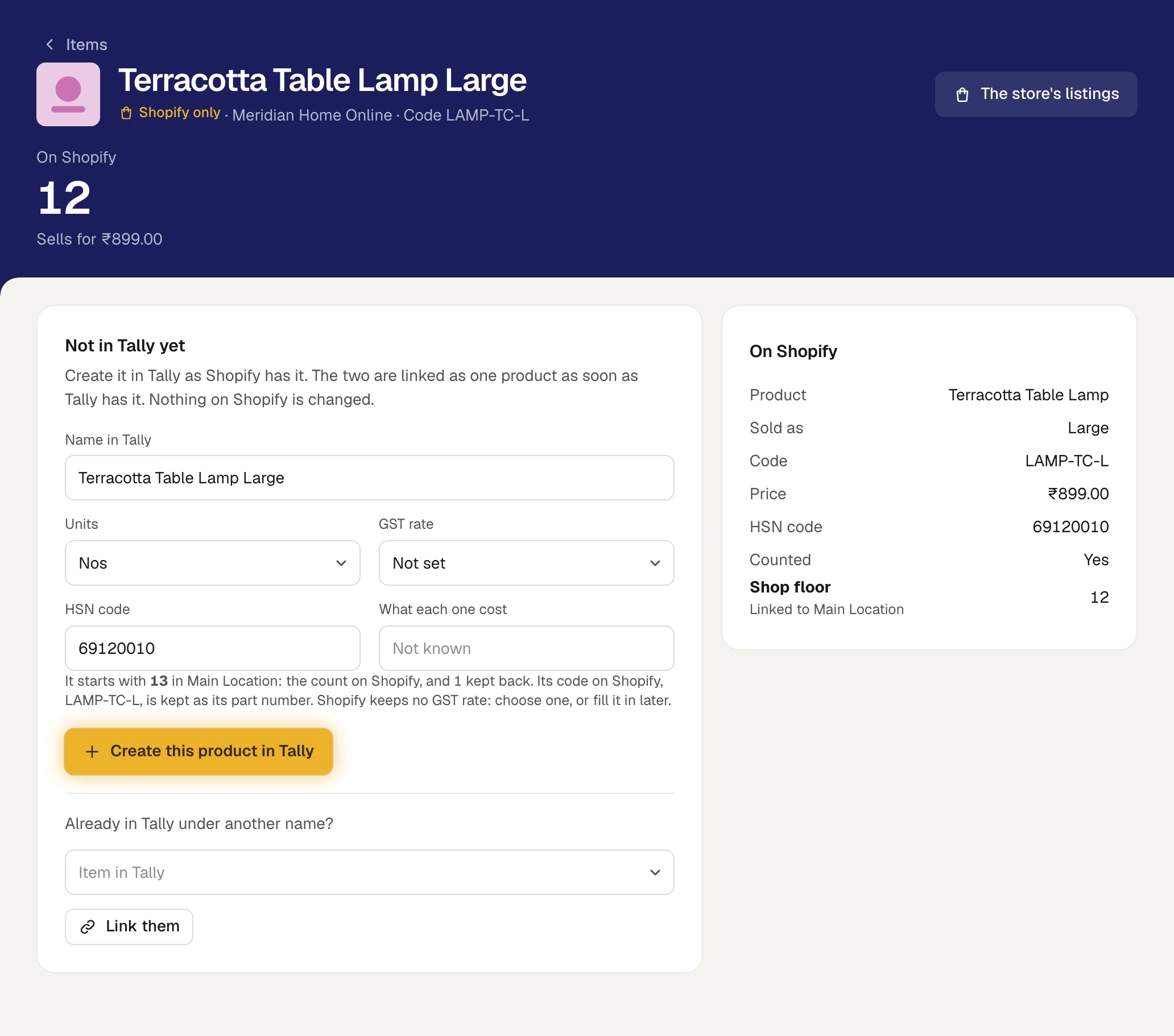
The band says how many the store shows and what it sells for. The card On Shopify lists what the store says of the product: its name, what it is sold as, its code, barcode, price and HSN code, whether the store counts it, and the count at each location with the warehouse that location is linked to.
There are two things to do with it.
Create this product in Tally
Check the form under Not in Tally yet. It is filled in from the store:
Box What it starts as Name in Tally The product's name, with its variant after it Units The unit most of your items are counted in GST rate Not set. Shopify keeps no GST rate: choose one, or fill it in later HSN code The store's code What each one cost Empty. A store does not say what an item cost - Read the line under the form. It says what the item starts with, as in It starts with 13 in Main Location: the count on Shopify, and 1 kept back.
Press Create this product in Tally.
Orzoni says Added to Tally. It is linked as soon as it has been read back. The page then opens the item by itself.
What the item starts with is what makes the store's count the right one: the count on Shopify, plus what was sold there and is still to be billed, plus what you keep back. It goes into the warehouse linked to the store's location. With no location linked yet, what the store holds goes into Main Location, or into your first warehouse where Tally has no place of that name. Where the store shows none, or does not count the product, the item starts with nothing.
- The store's code is kept as the item's part number.
- With no cost given, the stock goes in at no value. Type a cost to give it one.
- Where the store keeps the product at more than one location, the item starts in the warehouse behind the location that holds the most. The count at each other location then shows on the item's page as a count that differs, and is merged from there.
- If Tally is closed, Orzoni says Saved. It goes into Tally when Tally opens, and is linked then. Until then the page says the item is on its way, and nothing about its count is sent anywhere.
- If Tally already has an item of that name, Orzoni says so and makes nothing. Link the product to that item instead.
Link it to an item Tally already has
Often the product is in Tally already, under another name.
- Under Already in Tally under another name?, type a few letters in Item in Tally and pick the item. Where Orzoni has a likely item, the line reads It looks like an item Tally already has and the box is filled in for you.
Press Link them.
Orzoni says Linked. They are one product now. The item's page opens.
Where the two sides then differ, the item's page offers Merge as one.
A product that was set aside says so on its page, with Open the store's listings. Bring it back there first.
A store's product on a bill line
The list under an item's box on a bill carries the same marks, and it holds the products that are on Shopify only as well. Tally's own items come first, and the last place in the list is kept for the nearest product that is on Shopify only, so it is never crowded out.
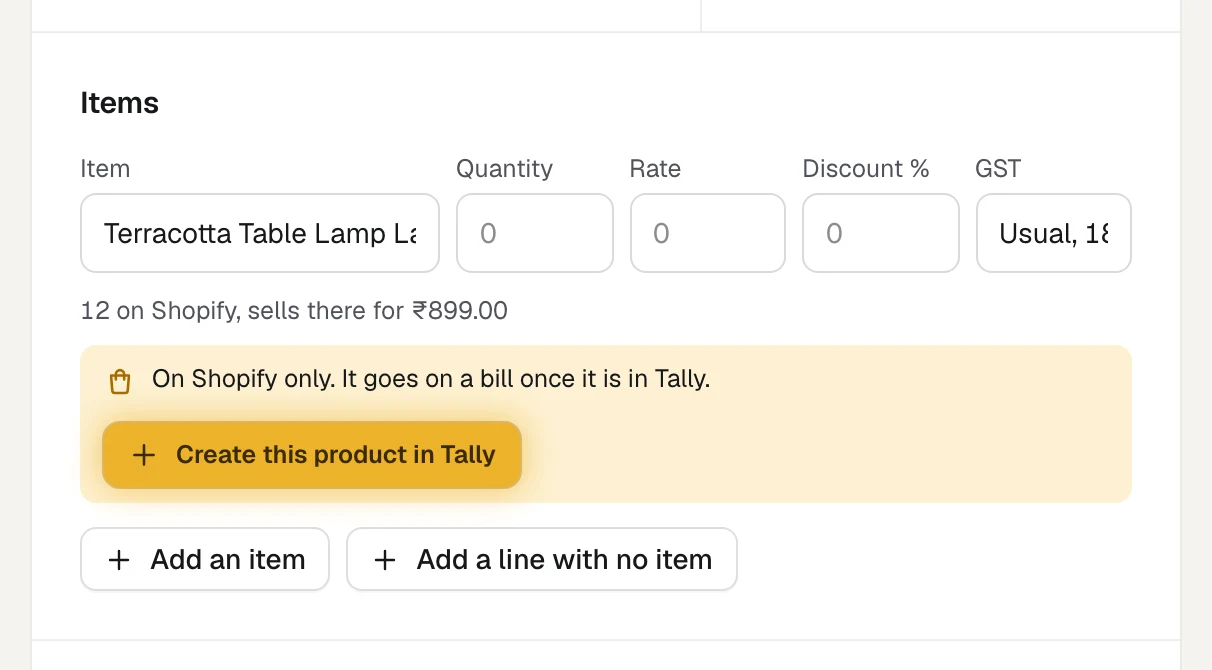
Type the product's name in the item box and pick it. A product on Shopify only shows how many the store holds, as in 12 on Shopify.
It goes on the line as it is on the store. Under the line Orzoni says what the store holds and what it sells for there, then On Shopify only. It goes on a bill once it is in Tally.
Press Create this product in Tally on the line.
The product is made in Tally as the store has it, and linked. Orzoni says Added to Tally and linked to Shopify. The bill is left as it was, and the line carries on as the item, with the quantity ready to type.
- Finish the bill as usual. See Make a sales invoice.
Made from a bill line, the product takes the name, the unit and the HSN code the form on its own page would start with. To change any of them first, or to give a GST rate or a cost, create it from its own page.
A bill cannot be sent, or saved as a draft, with a product that is not in Tally. Orzoni names the product and says Create it in Tally first, with the button on its line.
Who may do what
| To do this | A person needs |
|---|---|
| See the marks, the four views, the merge sheet and a product's page | See stock |
| Merge as one, Link them | Change stock |
| Create this product in Tally, from its page or from a bill line | Change stock, or Make bills and record payments |
Someone without Change stock sees the sheet with the line Merged by someone who may change stock. See Users and roles.
What stays as it is on your store
Your live store is yours to arrange. Orzoni does not add a product to it from an item that is in Tally only, and it does not change a product's name, code or price on Shopify. The count is the one thing it sends to your store.
What next
- Match your store's listings: linking a listing to an item.
- Counts: sending Tally's count to the store.
- Items: the Items list and an item's page in full.
- Warehouses and pack sizes: stock journals, writing stock off and adding stock found.
Still stuck? Write to support@orzoni.com and say which step you are on, or book a walk-through call.