

On this page
Café receipts, and how a sale reaches Tally
What pressing Finish order does. The customer's slip and what it says, the one sales bill made in Tally with a receipt for each way it was paid, what each line of the In Tally card means and why an order is checked only when every entry is, the Needs attention tab, what to do when a sale is refused or held back, and why orders go on being taken while the computer that runs Tally is off.
10 minute read
The short version
When an order is paid in full, you press Finish order. Orzoni then makes one sales bill for it in Tally, with a receipt in Tally for each way it was paid. You do nothing more. The order's page says how each of those entries stands, under In Tally.
Four things come from one sale. They have four names, and they are not the same thing.
| Thing | What it is | Where it lives |
|---|---|---|
| The order | What was asked for, and how it stands | Orzoni |
| A kitchen ticket | What the kitchen was asked to make | Orzoni, and on paper if printed |
| A payment | Money recorded against the order. The customer's slip is the paper the customer takes away | Orzoni |
| The sales bill | The sale in your books, with a receipt entry for each way it was paid | Tally |
So "receipt" here means an entry in Tally. The paper is called the customer's slip.
An order is finished at the counter whatever Tally says. The bill follows it.
Who this is for
| To do this | You need |
|---|---|
| Finish order, Print the customer's slip, and Send to Tally on an order | Take orders and payments |
| See the bill, and the view Waiting for Tally | See bills and entries |
| Try again or Discard on a refused bill | Make bills and record payments |
| Details for support on an order, and the ledgers under Settings, Counter | Business settings |
So someone with the role Counter staff finishes orders, and the owner or the accountant looks after anything Tally refuses. See Users and roles.
The café counter is a pilot, open to a few businesses while it is being tried. For sales to go into Tally, the ledgers under Settings, Counter have been chosen. Set up a café covers it.
Finish an order
- Open the order, and check that Payment reads Paid in full. See Collect a split payment.
Press Finish order, at the top of the page.
A small message says Order 7 is finished. The top of the page reads Finished and paid. Nothing more can be added to the order or taken off it.
Look at the card In Tally.
Its first line reads Waiting for Tally, then In Tally, not checked yet, then In Tally, checked, each by itself. With Tally open this takes moments.
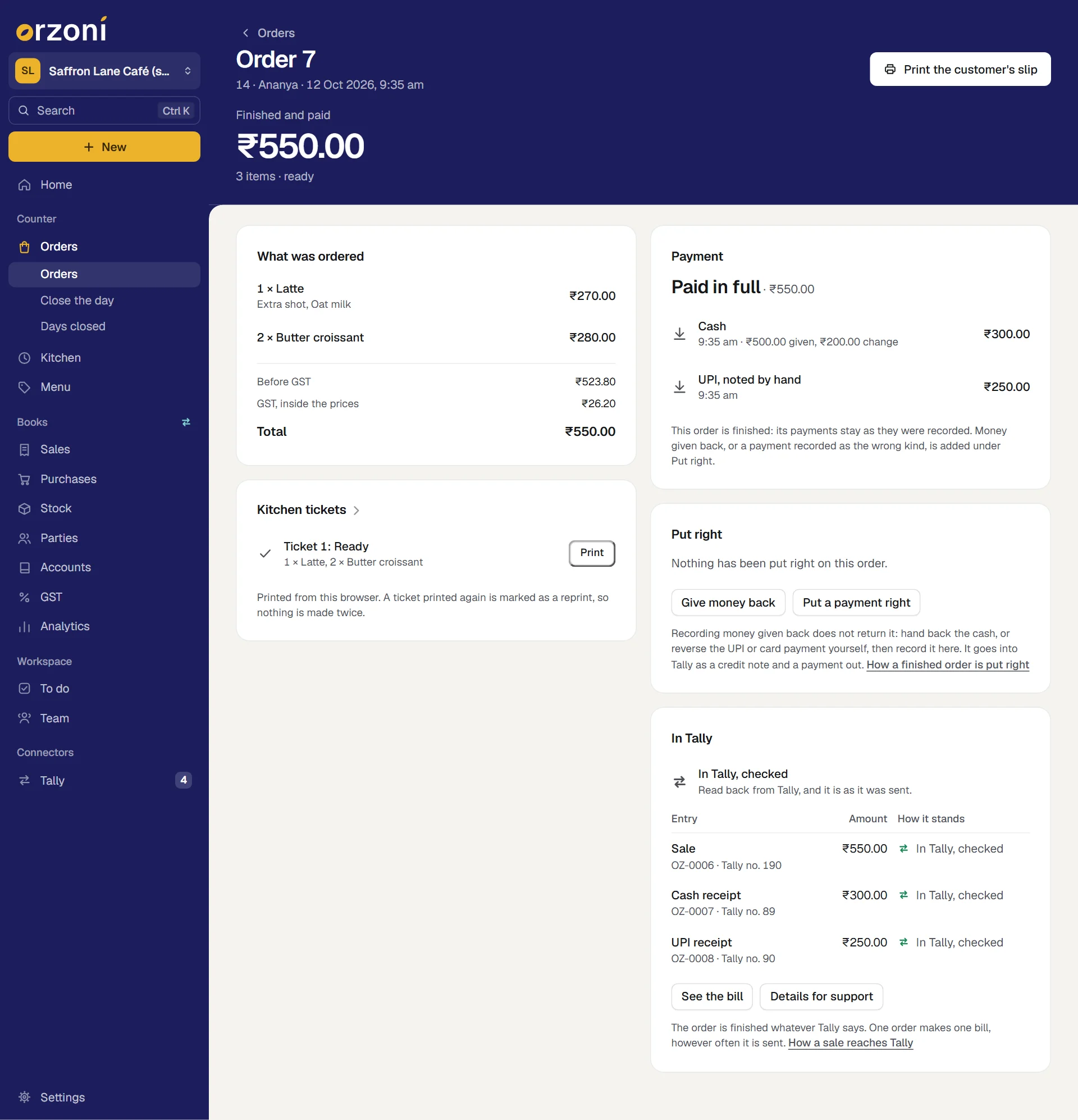
Finish order stays asleep until the order is paid in full. An order can be finished before the kitchen has marked it ready.
The customer's slip
Press Print the customer's slip on a finished order. It prints from this browser, on whatever printer the device has.
The slip holds:
- your company's name, your outlet's name, and the words Order and payment slip
- the order's number, the table or token and name where they were given, the date and time
- Ref. and the order's own reference, such as ORD-20261012-7: the day and the order's number. The bill in Tally carries the same reference, so either can be found from the other
- each thing ordered, with its choices and its price
- Before GST, GST and Total, with a discount or rounding where there was one
- each payment. Cash shows what was handed over and the change. A UPI or card payment reads as recorded at the counter
- money given back since, where there was any
- a last line that begins This slip is not a tax invoice.
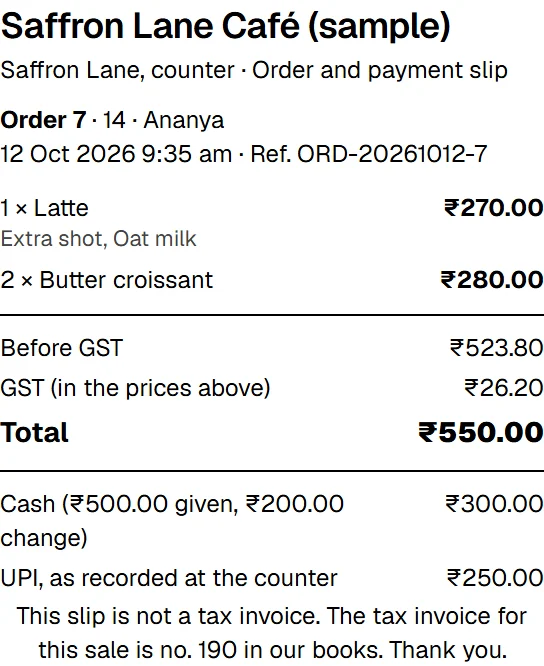
It is not a tax invoice
The slip is a record of what was ordered and how it was paid. The tax invoice is the bill in your books.
- Once the bill is in Tally, the slip's last line gives its number: The tax invoice for this sale is no. 190 in our books.
- Before that, it says The tax invoice is made from our books: ask for it if you need one.
For a customer who needs a tax invoice, press See the bill on the order and print or share the bill itself: see Invoices, bills and the Day book.
A second print says COPY
A slip printed again is headed COPY 2. Not a second order or payment., and the next COPY 3. A second paper is never a second sale. The count is kept while Orzoni stays open on that device.
If nothing printed
Orzoni does not drive a printer by itself, and hears nothing back from one. The browser's own print window opens, and you choose the printer. After you press, a small message says Sent to this browser's print window. If nothing printed, check the printer and press Print again: the order and its payment are not affected.
What the sale becomes in Tally
One sales bill for one order, made by the same part of Orzoni that makes every other bill. Press See the bill on the order to open it.
| On the bill | Where it comes from |
|---|---|
| The customer | The one chosen under Billed to, such as Counter Sales |
| The date | The day the order was finished. An order taken before midnight and finished after it is a sale of the day it was finished, as it is in the day's close |
| A thing billed as a sales ledger | A line for its value under that ledger, described by its name, its choices and how many |
| A thing billed as a stock item | A line for the item, with its quantity and rate. It leaves Tally's stock from the outlet's godown |
| GST | The rate set for each thing on the menu, as CGST and SGST. A sale across a counter is supplied where the counter is |
| Rounding | The paise a rounded total moved by, to your Round Off ledger |
| The reference | ORD-, the day and the order's number, such as ORD-20261012-7 |
| The narration | "Counter order 7 of 2026-10-12", the name if one was given, what was sold, then "Made in Orzoni" and the bill's own reference |
| The payments | A receipt in Tally for each way it was paid, set against this bill: here ₹300.00 into Cash, and ₹250.00 into UPI Collections with the note "UPI, noted by hand" |
There is one receipt for each way the order was paid, however many payments were taken that way. Two cash payments on one order make one cash receipt for their sum.
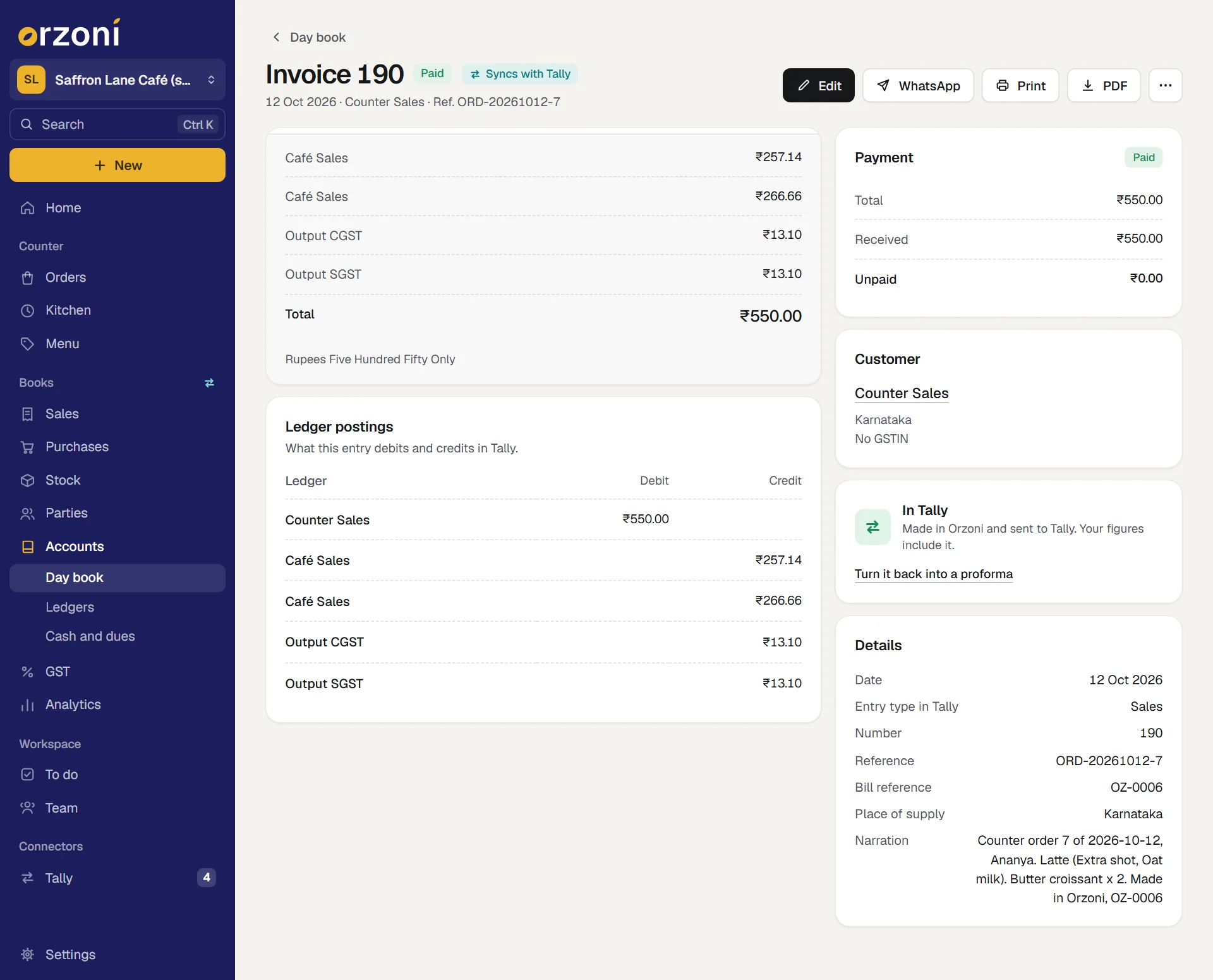
From then on it is a bill like any other. It is under Sales, Invoices and in the Day book, its receipts are under Payments received, and it is in every figure: sales, cash and bank, GST, and stock where an item was sold.
The bill is always made from its order. It is never typed in the bill form.
What In Tally says
The card has two parts.
- One line for the order as a whole. It is the worst of what its entries say, so one glance tells you whether anything needs you.
- A table of each entry the order should have in Tally, under Entry, Amount and How it stands: the Sale, then a receipt for each way it was paid, such as Cash receipt and UPI receipt, then anything put right since. Each row has its reference, Tally's own number once it has one, and how that entry stands.
A payment recorded at the counter and a receipt in Tally are two facts, and the card keeps them in two places: the payment under Payment, its receipt under In Tally.
An order is checked only when every entry is
In Tally, checked on the first line means the sale and every receipt, each one, was read back from Tally and found as it was sent. Until then the line says what is short, and the table shows which entry it is.
| The first line reads | What it means | What to do |
|---|---|---|
| The sale goes into Tally as a bill once the order is finished. | The order is still open | Finish it when it is paid |
| Waiting for Tally | The entries are made, and go into Tally by themselves as soon as the computer that runs Tally can be reached | Nothing |
| In Tally, not checked yet | Tally has taken it. It is checked against Tally at the next read | Nothing |
| In Tally; a payment is not checked yet | The sale is checked. A receipt is in Tally and has not been read back yet | Nothing |
| In Tally, checked | Every entry was read back from Tally, and is as it was sent | Nothing. It is done |
| In Tally | Found in your Tally books by the order's reference. It is not sent again | Nothing |
| Not in Tally yet | An entry could not be made yet. The reason is under it | See When it says Not in Tally yet |
| Not in Tally | An entry never reached Tally and nothing is on its way: a bill discarded before Tally had it, or a payment with no receipt | See When it says Not in Tally |
| Refused by Tally | Tally would not take an entry. Tally's own reason is under it | See When Tally refuses the bill |
| Check in Tally | Tally holds an entry, but not as it was sent | See Check, Changed and Removed in Tally |
| Changed in Tally | An entry was changed in Tally after it was checked, and no longer posts what the order sold | The same |
| Removed in Tally | An entry was cancelled or deleted in Tally afterwards | The same |
| A voided order makes no bill. | The order was voided | Nothing |
Where the trouble is with a receipt and not the sale, the line under it begins The sale is in Tally. and then names the payment: for example, that the UPI payment of ₹250.00 was refused, with Tally's reason. Where it is with something put right on the order, it names that.
The rows of Orders carry the same words, shortened. One that is about a receipt ends in : payment, such as Refused by Tally: payment, and one about something put right ends in : correction.
Needs attention
A finished sale that needs someone is never left for you to stumble on.
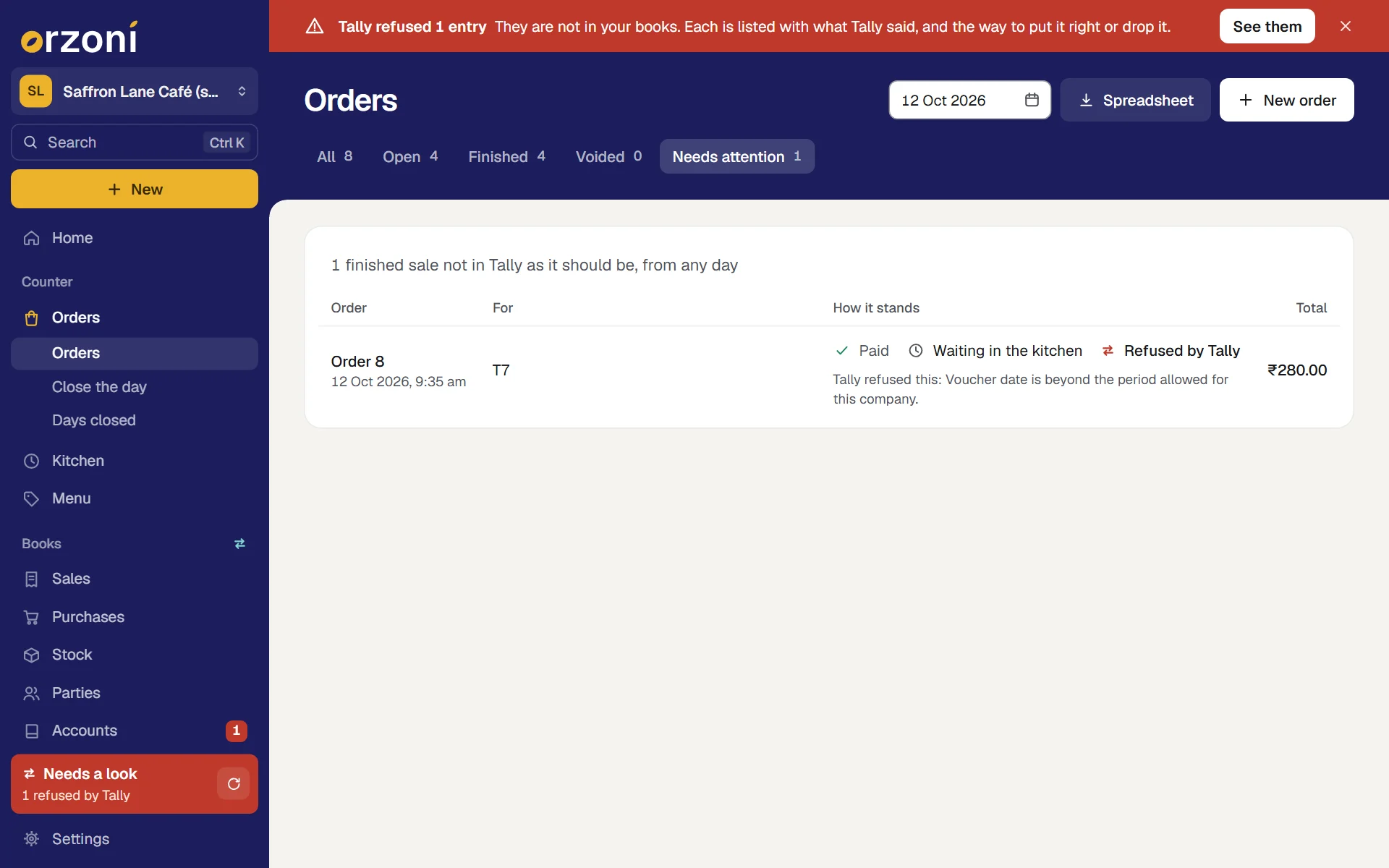
- On Orders, a tab named Needs attention appears when there is anything in it. It lists every finished sale, from any day, that is not in Tally as it should be, with the reason under each. It does not empty at midnight.
- On Today, the same sales are listed under In Tally, each with its order's number and day.
- At the day's close, those among the day's own sales are counted and listed under In Tally, apart from the cash.
A sale is listed there when it reads Not in Tally yet, Not in Tally, Refused by Tally, Check in Tally, Changed in Tally or Removed in Tally. A sale that is only waiting for Tally, or in Tally and not read back yet, is not: it needs nobody.
When Tally or its computer is off
Carry on. Orders are taken, the kitchen works its queue, payments are recorded and orders are finished, all as usual.
Each finished sale reads Waiting for Tally. When the computer is on again with Tally open on your company, the bills go in by themselves, in the order they were made, and each is read back and checked. Nothing has to be sent again by hand.
Meanwhile:
- Today says how the books stand under In Tally, with a line such as 3 sales waiting to go into Tally.
- Connectors, Tally, Waiting for Tally lists each waiting bill as a Sales invoice for your counter's customer, with its receipts behind it. See When a bill is waiting or refused.
- The day can still be closed. The close writes down how the sales stood with Tally, apart from the cash.
A night with the computer off loses nothing.
When this device is offline
That is a different thing. The counter itself needs to be online. With no connection it says Could not reach Orzoni. Check that you are online, then try again. and shows no orders, no queue and no payments from earlier.
That is on purpose: an order, a payment and a kitchen queue are only ever shown as they stand this moment, so nothing is taken twice. The rest of Orzoni still shows the figures it last saw, to read. Get a signal, and carry on.
When Tally refuses the bill
Tally can say no for its own reasons: a date outside the period your company allows, or a ledger that was renamed. The order stays finished and paid. Only its entries need someone.
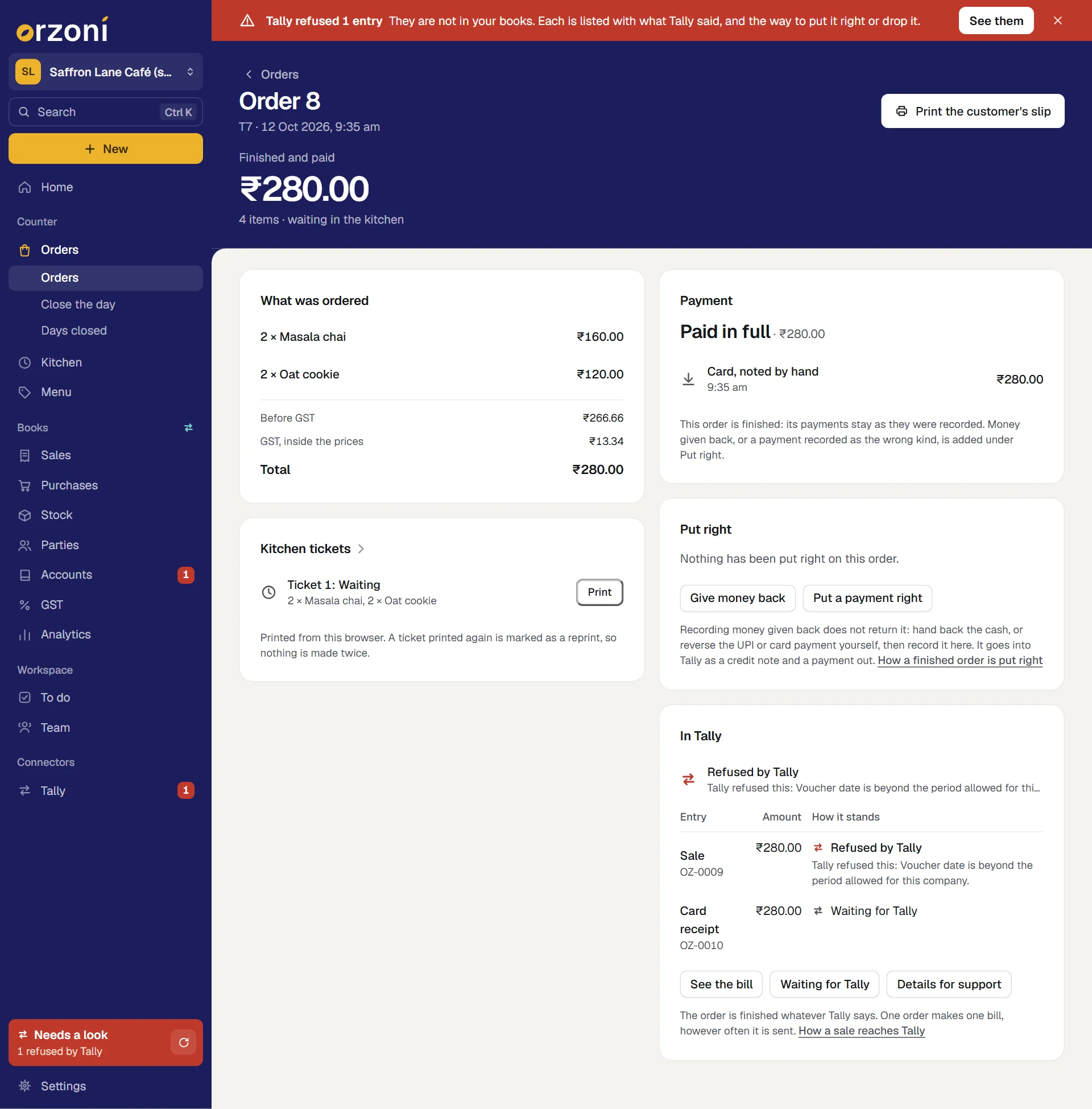
- Read Tally's reason, under Refused by Tally. The table shows which entry was refused. A receipt goes in only after its sale, so while the sale is refused its receipt reads Waiting for Tally.
- Put the cause right where it is. A date or a ledger is put right in Tally.
- Press Waiting for Tally on the order, or open Connectors, Tally, Waiting for Tally.
- On the entry's line, press Try again. It is sent once more as it is.
If the cause was one of the ledgers chosen under Settings, Counter: choose the right one there, press Discard on the bill's line, then open the order and press Send to Tally. The bill is made afresh from the order, with the ledgers as they now stand.
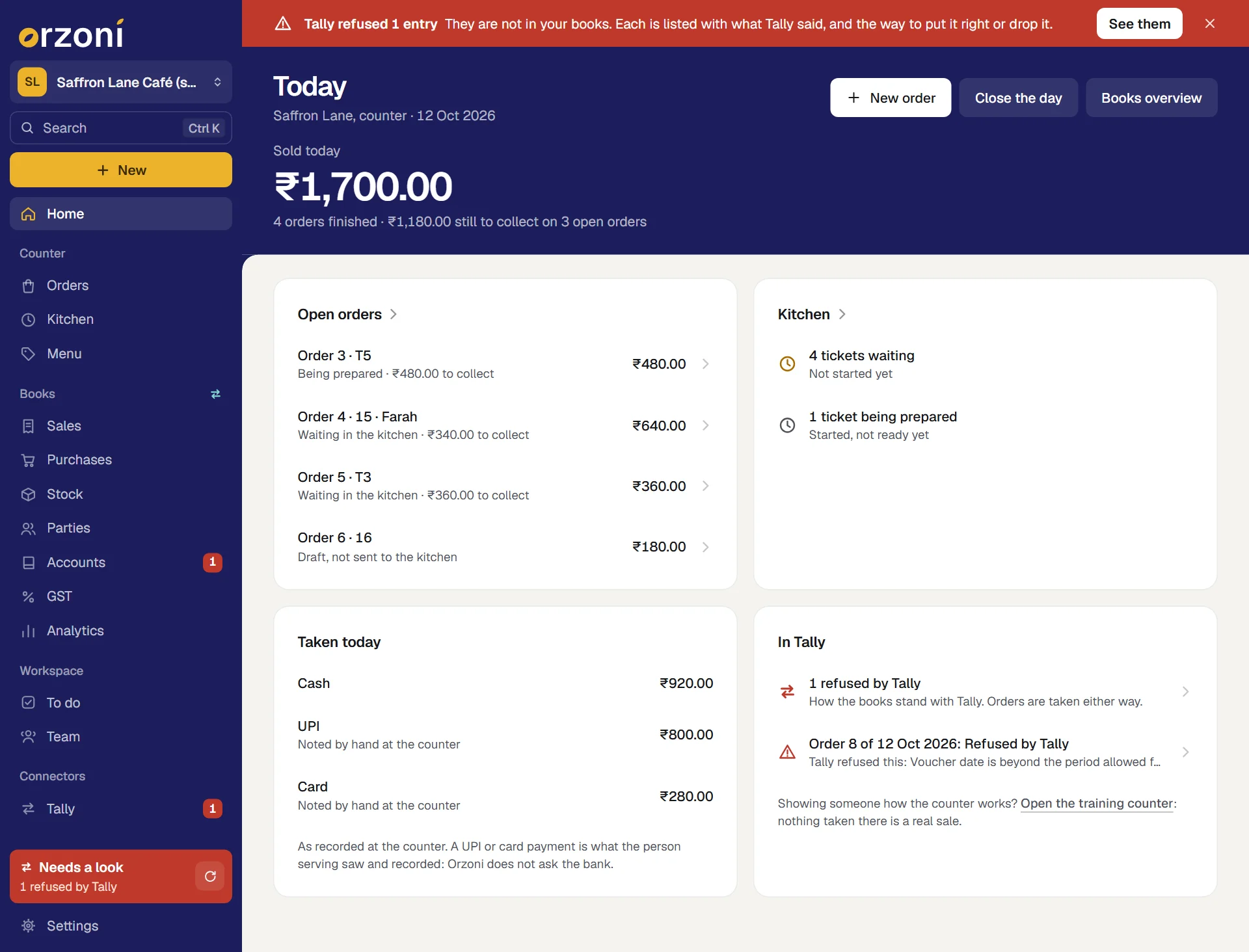
A refused sale is hard to miss. It is on Today under In Tally, with the order's number, under Needs attention on Orders, and in the red strip and the rail, as any refused bill is.
When it says Not in Tally yet
The order is finished, and Orzoni held the bill back because it could not be made right. The reason is on the card. Put it right, then press Send to Tally on the order.
| The reason begins | What to do |
|---|---|
| Still to choose under Settings, Counter | Press Counter settings, choose what it names, and save. Then Send to Tally |
| This order was rounded to the rupee, and Tally has no ledger for rounding to go to. | Add a ledger named Round Off in Tally. After the next read, Send to Tally |
| The bill for this order would come to one sum in Tally, and the customer was charged another | The GST on your menu and the GST set up in Tally do not agree. The card says which: no GST ledgers in Tally, rates that differ, or a company under the composition scheme. Put it right with your accountant, then Send to Tally |
| This company is registered for GST in more than one state | The counter does not make this bill: Orzoni cannot say which registration it is made under. Make it in Tally. See What the café counter covers |
After Send to Tally, a small message says Sent. It goes into Tally as soon as Tally can be reached. If the reason still stands, the card says so again and nothing is lost by asking.
The readiness list is there to tell you about these before a sale meets them. See Set up a café.
When it says Not in Tally
Something never reached Tally, and nothing is on its way. The button on the card names what it sends.
| What the card says | The button | What it does |
|---|---|---|
| The bill made for this sale was discarded before it reached Tally. | Send to Tally | The bill is made again from the order, with its receipts |
| The sale is in Tally. A payment is not in Tally: no receipt for it is in Tally or on its way there | Send the missing receipt | That one receipt is made, alone, against the bill as Tally holds it. The sale is not touched, and a receipt that is anywhere at all is not made a second time |
| The sale is in Tally. Something put right is not in Tally | Send the correction | Its entries are made. See Put a finished order right |
Each is for whoever holds Take orders and payments.
Orzoni sends a missing entry only once the books have been read from Tally, so that it can be sure Tally does not already hold it. Until then the card says so, and the press can be made again after the next read.
Check, Changed and Removed in Tally
These three mean the entry is in Tally, or was, and is not as the order made it.
| It reads | What happened |
|---|---|
| Check in Tally | The entry reached Tally and was read back different from what was sent. It is rare |
| Changed in Tally | The entry was checked once, and was changed in Tally since, so that it no longer posts what the order sold |
| Removed in Tally | The entry was cancelled or deleted in Tally after it went in |
Orzoni does not change an entry back. The card says so: Orzoni does not change an entry back. Look at it in Tally: if the change was meant, the order here still shows what was sold.
- For Check in Tally, open the bill with See the bill, compare it with the entry in Tally, and tick it off as any such bill is: see Check in Tally.
- For Changed in Tally and Removed in Tally, ask whoever changed it. If it was meant, there is nothing to do: the order keeps what was sold at the counter. If it was not, your accountant puts the entry right in Tally from the order's page, which keeps every figure.
A change in Tally that still posts what the order sold is not flagged. Put a finished order right says why a counter sale is better put right from its order.
Details for support
When a sale will not go and the card's own words do not settle it, whoever holds Business settings can press Details for support on the order.
A sheet opens with the order's reference and ids, how each part of it stands, each entry that carries it into Tally with its state and times, and when the books were last read from Tally. Press Copy, and paste it into a message to us from Settings, Help and support.
- It names no customer, no table or token, and none of the references someone typed.
- Reading it changes nothing.
On the web, a sale that needs someone also offers Ask us for help on its card. The order is safe meanwhile.
Why one order makes one bill
- An order is tied to its bill once. Pressing Finish order twice, or Send to Tally again, finds the same bill and makes no second one.
- The bill carries an id of its own into Tally, as every bill made in Orzoni does. Sent again after a lost answer, Tally recognises it.
- The bill is made only when it comes to exactly what the customer was charged, to the paisa. Otherwise it is held back and says why.
- Where the books already hold a sale under the order's own reference, Orzoni does not send another.
Mistakes you can undo
| The mistake | How to put it right |
|---|---|
| A wrong ledger under Settings, Counter, found before any sale | Choose the right one and save |
| A sale held back or refused for a set-up reason | Put the reason right, then Send to Tally or Try again |
| A bill discarded from Waiting for Tally by mistake | Send to Tally on the order |
| An order finished that should not have been, or paid the wrong way | On the order, under Put right. See Put a finished order right |
What it does to your data and to Tally
- In Tally: one sales bill for each finished order, and one receipt for each way it was paid. A thing billed as a stock item lowers Tally's stock through the bill. Where a finished order was put right, a credit note and a payment out, or a transfer. Nothing else is written, and none of Tally's settings is changed.
- In Orzoni: the order keeps the link to its bill and to each receipt, their references and the numbers Tally gave them.
- Stock: Tally stays the one count. Orzoni keeps no second one.
- A voided order, a draft and an open order make nothing in Tally. Nor does anything taken at the training counter.
What next
- Put a finished order right: money given back, and a payment recorded as the wrong kind.
- Close the day: the day's sales and money, kept as they stood.
- When a bill is waiting or refused: the Waiting for Tally view in full.
- How Orzoni stays in step with Tally: every status of the Tally connection.
- Invoices, bills and the Day book: find a bill again, print it or save it as a PDF.
Still stuck? Write to orzoni.official@gmail.com and say which step you are on, or book a walk-through call.