

On this page
Practise on the training counter
A counter to practise on before a real customer is waiting. How to open the training counter from Today or from Settings, Counter, the dark bar that says you are in it, what it copies from your real counter, what never leaves it, how to go back to the real counter, and how to empty it and start again.
4 minute read
What the training counter is
A second counter, beside your real one, for showing someone how the screens work. It has a copy of your menu, and every screen behaves as the real one does: an order is taken, the kitchen gets a ticket, money is recorded, the order is finished, and the day can be closed.
Nothing taken there is real.
- It is in none of your sales, your money or your day's close.
- Nothing from it is ever sent to Tally. No bill is made for a training order.
- Your real orders are in none of its lists either.
So a new member of staff can press every button, and make every mistake, with nothing to put right afterwards.
Who this is for
Whoever is training someone, and whoever is learning.
| To do this | You need |
|---|---|
| Open the training counter from Today | Take orders and payments |
| Open it from Settings, Counter | Business settings |
| Empty the training counter | Business settings |
So counter staff can open it for themselves, and the owner or an admin clears it out. What a person may do inside it is what their role allows at the real counter. See Users and roles.
The training counter is there once Restaurant and café counter is switched on. See Set up a café.
Open it
Open it on the device the practice will be done on, in the browser tab that will be used. There are two ways in.
From Today
Open Today, and look at the foot of the card In Tally.
A line there reads Showing someone how the counter works? Open the training counter: nothing taken there is a real sale. It is shown to whoever may take orders.
- Press Open the training counter.
From Settings
- Open Settings, then Counter.
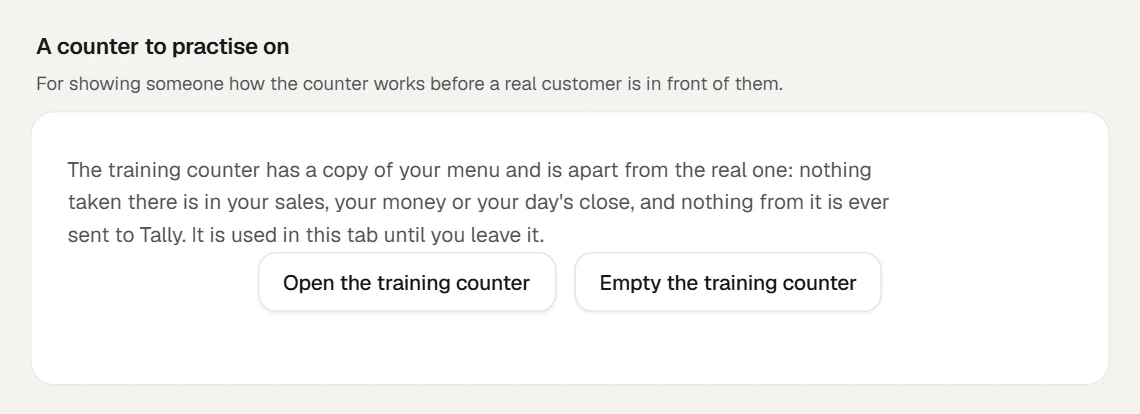
- Find the part named A counter to practise on.
- Press Open the training counter.
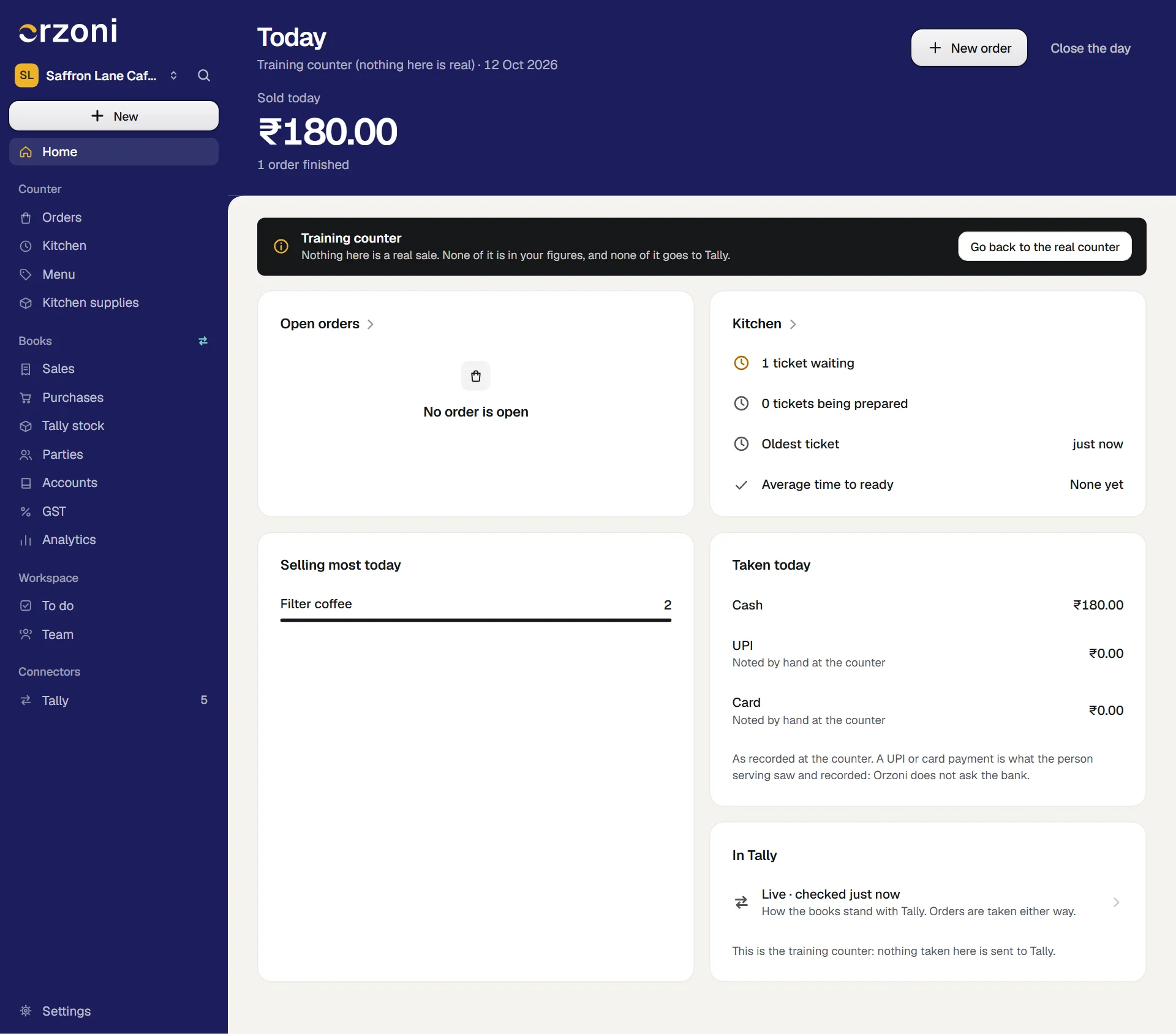
Either way, Today opens again, as the training counter. Under its heading, in place of your outlet's name, it reads Training counter (nothing here is real).
How you know you are in it
A dark bar stands at the head of every screen of the counter while the tab is in training: Today, Orders, an order's own page, a new order, Kitchen, Menu and Close the day.
It reads Training counter, and under that: Nothing here is a real sale. None of it is in your figures, and none of it goes to Tally.
If the bar is not there, the sale in front of you is a real one.
Four more things say so:
- On Today, the card In Tally reads This is the training counter: nothing taken here is sent to Tally.
- A finished training order's In Tally card reads Taken at the training counter: no bill is made, and nothing goes to Tally.
- The slip printed for a training order carries Training counter (nothing here is real) under your company's name.
- The kitchen tickets of a training order show only in Kitchen opened in a tab that is in training. They are not in the real kitchen's queue.
What to practise
Everything a shift does. A good first run:
- Take an order with a thing that has choices, and confirm it. See Take a café order.
- Open Kitchen in the same tab, where the practice ticket is, and move it on. See Use the kitchen queue.
- Record part of the payment in cash and the rest by UPI, and finish the order. See Collect a split payment.
- Add something to an order, take something off, take a payment back, and void an order.
- On a finished order, press Give money back, then Put a payment right. See Put a finished order right.
- Record a starting cash, count the drawer, and close the day. See Close the day.
Print a slip and a kitchen ticket while you are there, on the printer you will really use. It is the same print as the real counter's.
What it copies, and what it does not
| From your real counter | At the training counter |
|---|---|
| The menu | A copy of what is on your menu, with its parts, prices, choices and GST, taken when the training counter is first opened and each time it is emptied |
| How prices are worked out | Whether prices include GST, rounding to the rupee, and the most that may be taken off an order, as they stood when the training counter was first opened |
| Orders, payments, the kitchen's queue, the day's close | None. It starts empty, and keeps only what is practised on it |
| The readiness list | Always of the real counter, wherever you read it |
Changing the menu while in training changes the copy only. Your real menu is not touched.
Go back to the real counter
The training counter is used in that browser tab until you leave it. There are three ways out.
- Press Go back to the real counter, the button at the right end of the dark bar. It is on every screen of the counter.
- Under Settings, Counter, the button that opens the training counter now reads Go back to the real counter.
- Close the tab. A new tab always opens on the real counter, so a device left in training overnight is not in training the next morning.
Other tabs, other devices and other people are not affected. They are on the real counter throughout.
Empty it and start again
After a few sessions the training counter is full of practice orders. Whoever holds Business settings can clear it.
- Open Settings, then Counter.
- Under A counter to practise on, press Empty the training counter.
Orzoni asks: Empty the training counter? Every order practised on is removed and it is given your menu afresh. Your real counter is not touched. Agree.
A small message says The training counter is empty, with your menu as it now is.
Every order, ticket, payment and close practised on is removed, and the menu is copied from your real one again. This is the one place at the counter where something is removed, and it removes only what was never real.
Mistakes you can undo
| The mistake | How to put it right |
|---|---|
| A real order was taken while the tab was still in training | It is not a sale, and nothing went to Tally. Go back to the real counter, and take the order again there. The customer's money is recorded on the real order |
| A practice order was taken at the real counter | It is a real order. If it is not finished, take back any payment and void it with a reason. If it is finished, see Put a finished order right |
| The training menu was changed, and you want your real one back | Empty the training counter copies it afresh |
What it does to your data and to Tally
- Kept in Orzoni: what is practised on, apart from everything real, until the training counter is emptied.
- Sent to Tally: nothing, ever.
- Your figures, your stock and your day's close: untouched.
What next
Still stuck? Write to orzoni.official@gmail.com and say which step you are on, or book a walk-through call.