

DraftDraft · Sales invoice
Online Store Sales
- Kurta Blue M × 2
- ₹2,474.28
- Shipping
- ₹0.00
- CGST 2.5%
- ₹61.86
- SGST 2.5%
- ₹61.86
Sale within Karnataka: CGST and SGST, half the item's rate each.
Bill total₹2,598.00
Reference: Shopify order #1002
HomeFor your businessOnline selling
Run the shop and the store from one set of books. Your Shopify store shows what the godown really holds, and every order becomes a GST bill that a person looks over and sends to Tally.
You need TallyPrime on a Windows 10 or 11 computer, and a Shopify store you own.
A trader, a brand or a maker who sells from a Shopify store as well as over the counter or to dealers: a kurta label, a brassware shop that ships across India, a tea seller with a godown and a store.
Your first task
We connect it with you on a 15-minute call, or you do it yourself with the guide. Then each listing on the store is matched to its item in Tally, and Orzoni shows what every count should be before anything is sent.
Connect your Shopify storeEach step says what you do, and what happens next.
Open Listings. Orzoni puts the matches it is certain of in front of you, by code, barcode or name, and you approve them in one press. The likely ones you check one at a time.
What happens next. Each matched listing gets a count, worked out from what Tally holds.
Match your store's listings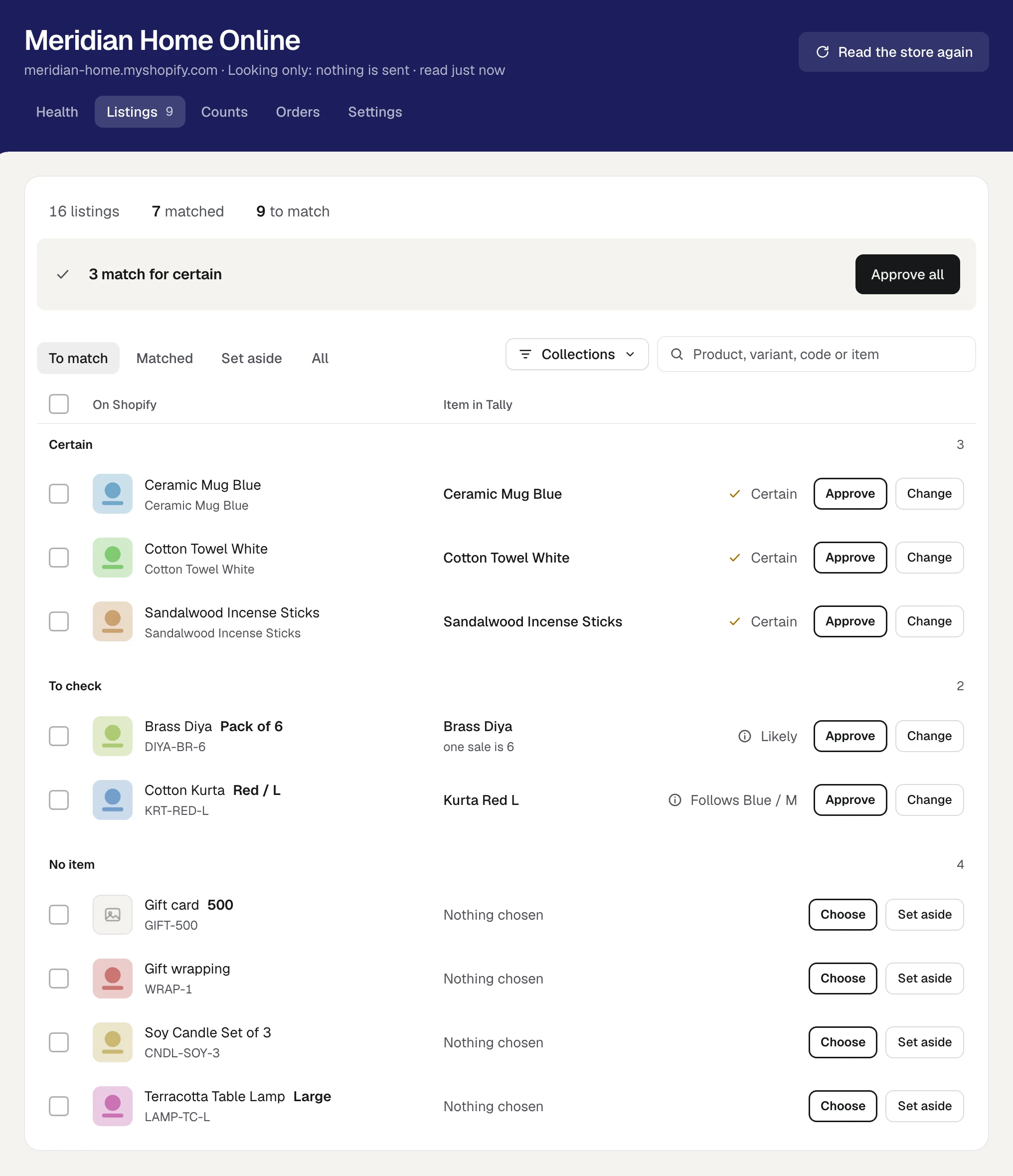
Open Health. A count someone changed on Shopify, an order that has waited over a week for its bill, a location with no warehouse: each is listed with what to do.
What happens next. You choose which side is right. Orzoni does not quietly undo what someone did on the store.
Your store's health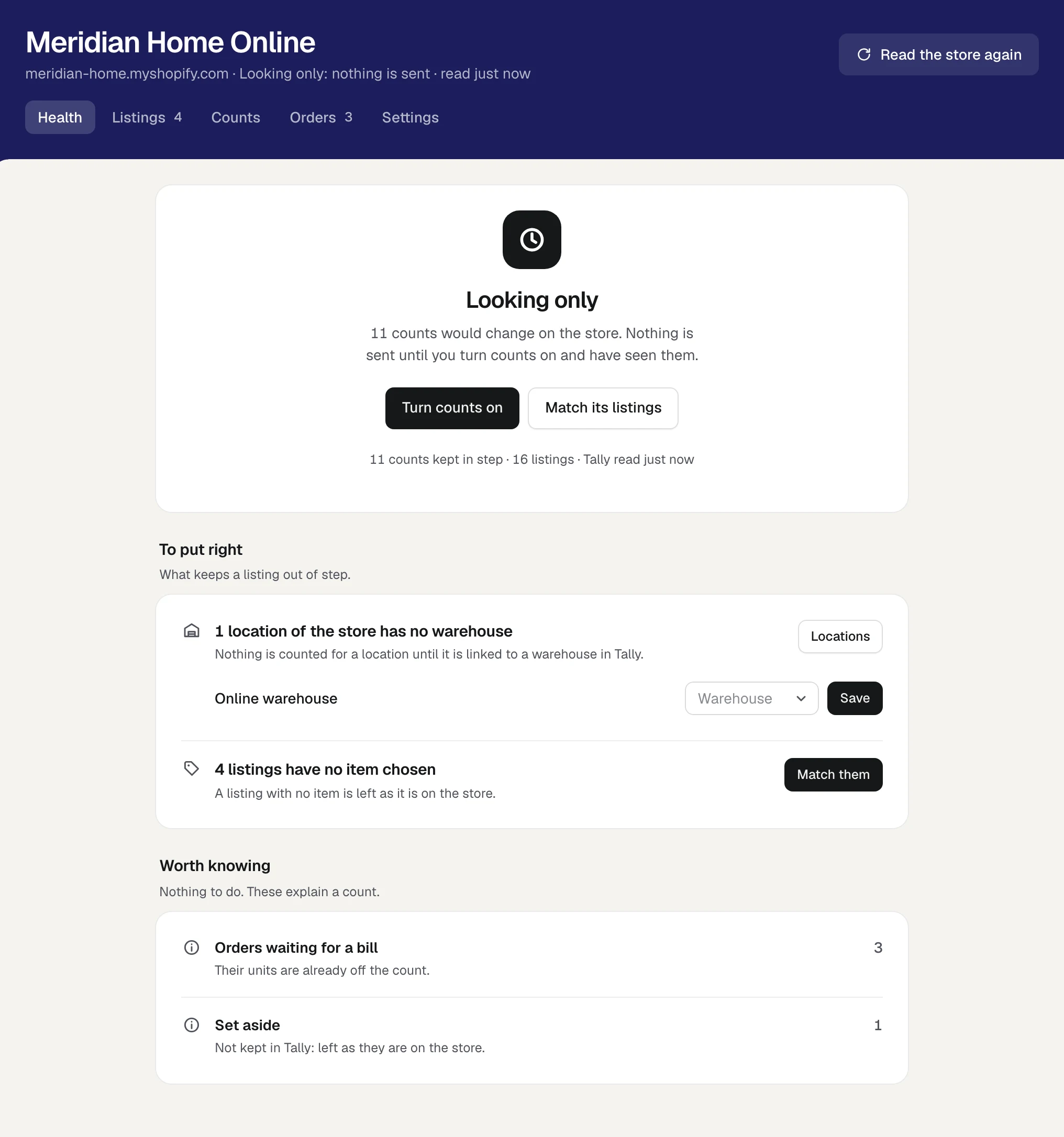
The store and the company in these pictures are samples. None of it is a real business's books.
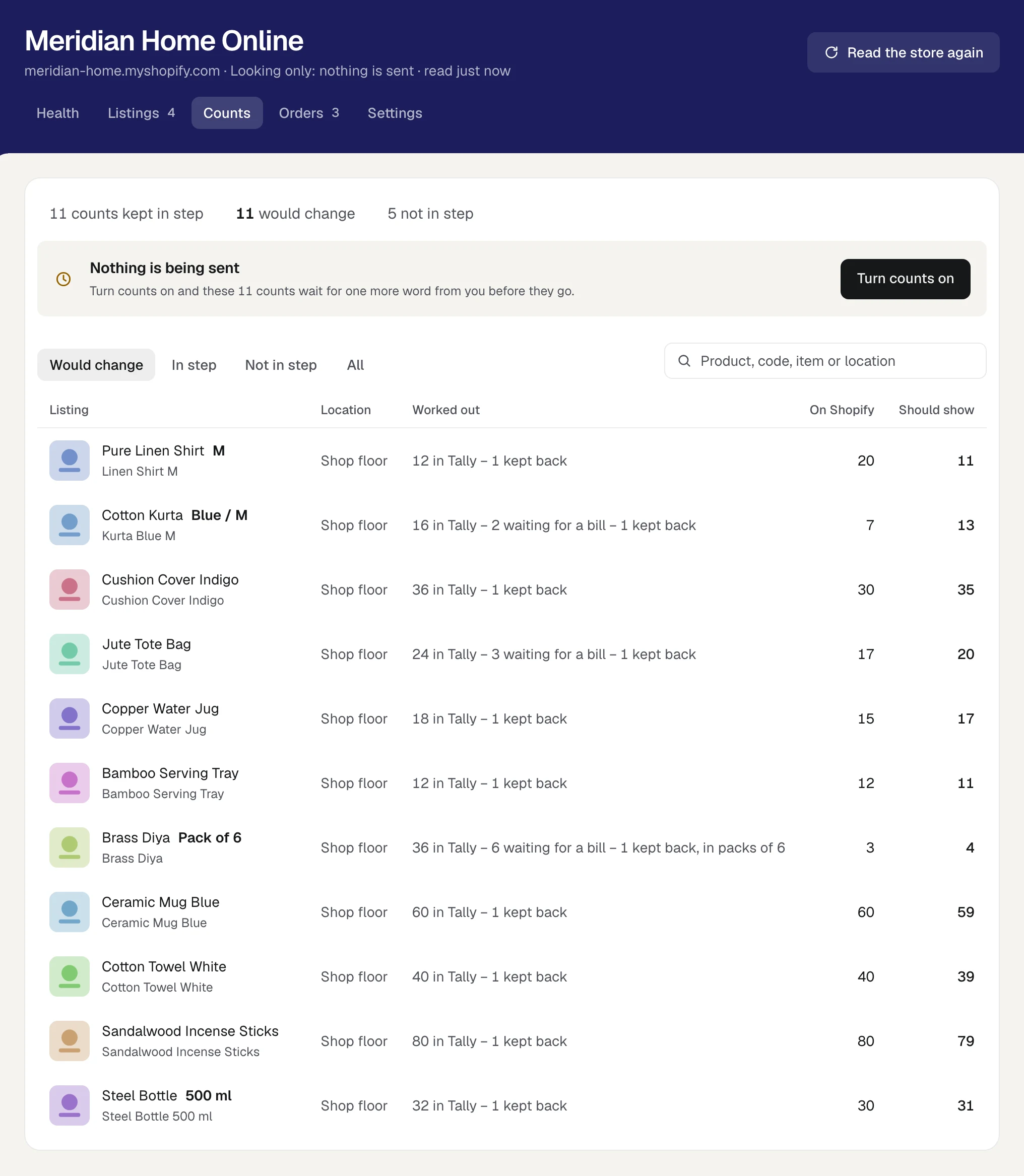
Connect your Shopify store and the count on every listing follows your Tally books. An order holds its units off the count the moment it lands, so the store is not left offering stock it has already sold. Your store tells Orzoni of each order as it is taken, Orzoni asks again every five minutes while counts are being sent, and every count is read back from the store each night.
 In Tally: 16, 2 held
 the count is 16
The first counts, and any large or unusual set, wait for your word. Choose how the store is kept: looking only, send and ask, or send and write over once twenty sets of counts have gone through clean.
Products, counts, locations and orders. Never a buyer's name, address, phone or email. The only thing Orzoni writes on the store is a count.
We connect your store with you on a call and stay until the first counts are ones you have seen and agreed to.
One Shopify store for each business. A count is as right as your Tally stock: keep a few back if you also sell over the counter. Connect a Shopify store
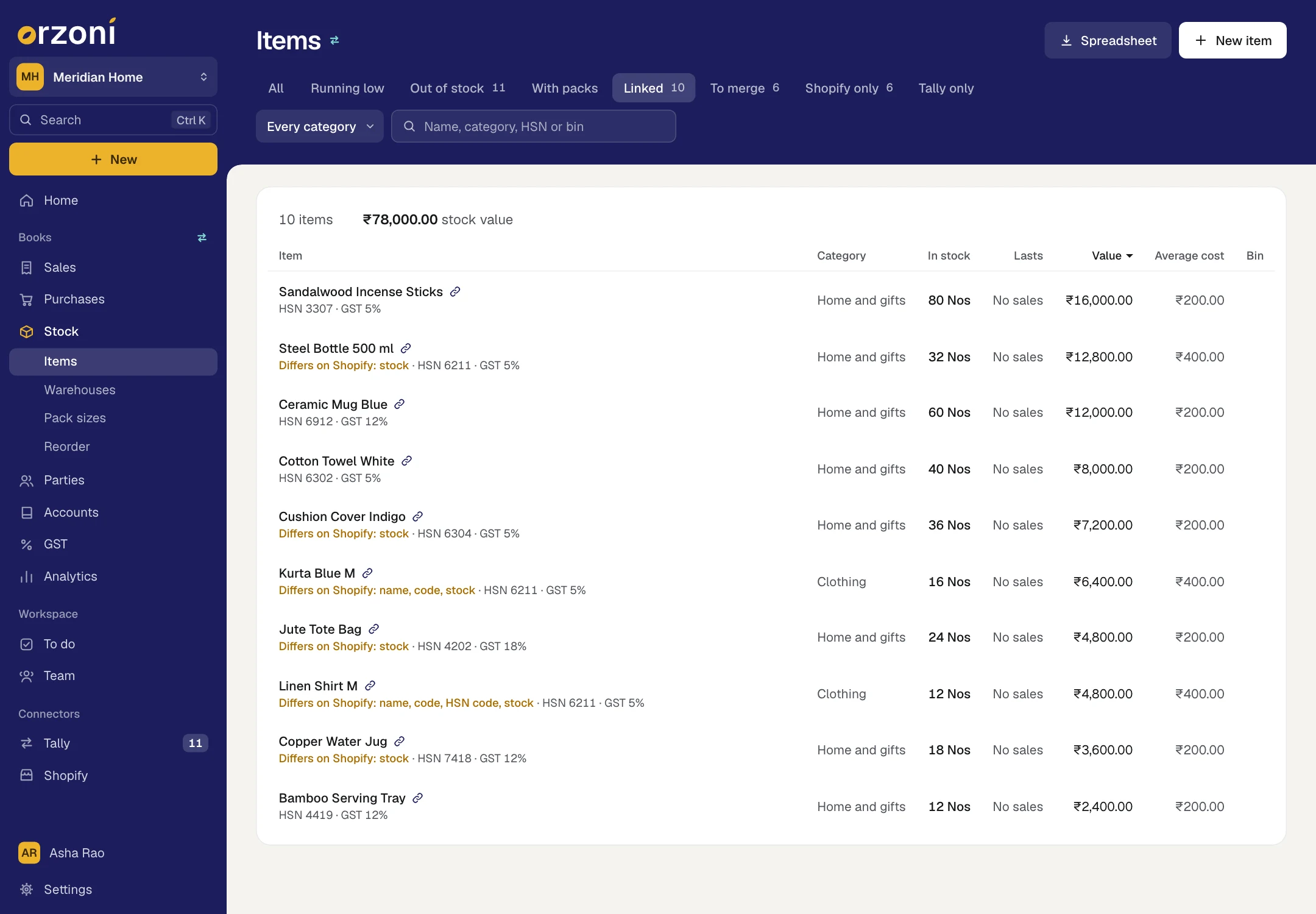
Link a Shopify listing to its Tally item once, by code, barcode or name; Orzoni puts the certain matches in front of you and you approve them all in one press. From then on it is one product everywhere: one name, one code, one count, on the store and in the books. Where the two sides differ, see them side by side and press Merge as one. Tally is brought in line. Your live store is never touched.
They are one product, linked. Merging brings what differs into Tally, so the two agree.
On Shopify · Meridian Home OnlineIn TallyThe count goes into Tally as a stock journal: what Tally has over is written off, what it is short of is entered as stock found.
Only on Shopifycode BRS-DIYA-2 · HSN 7418
In Tally now · code BRS-DIYA-2 · HSN 7418 · one product
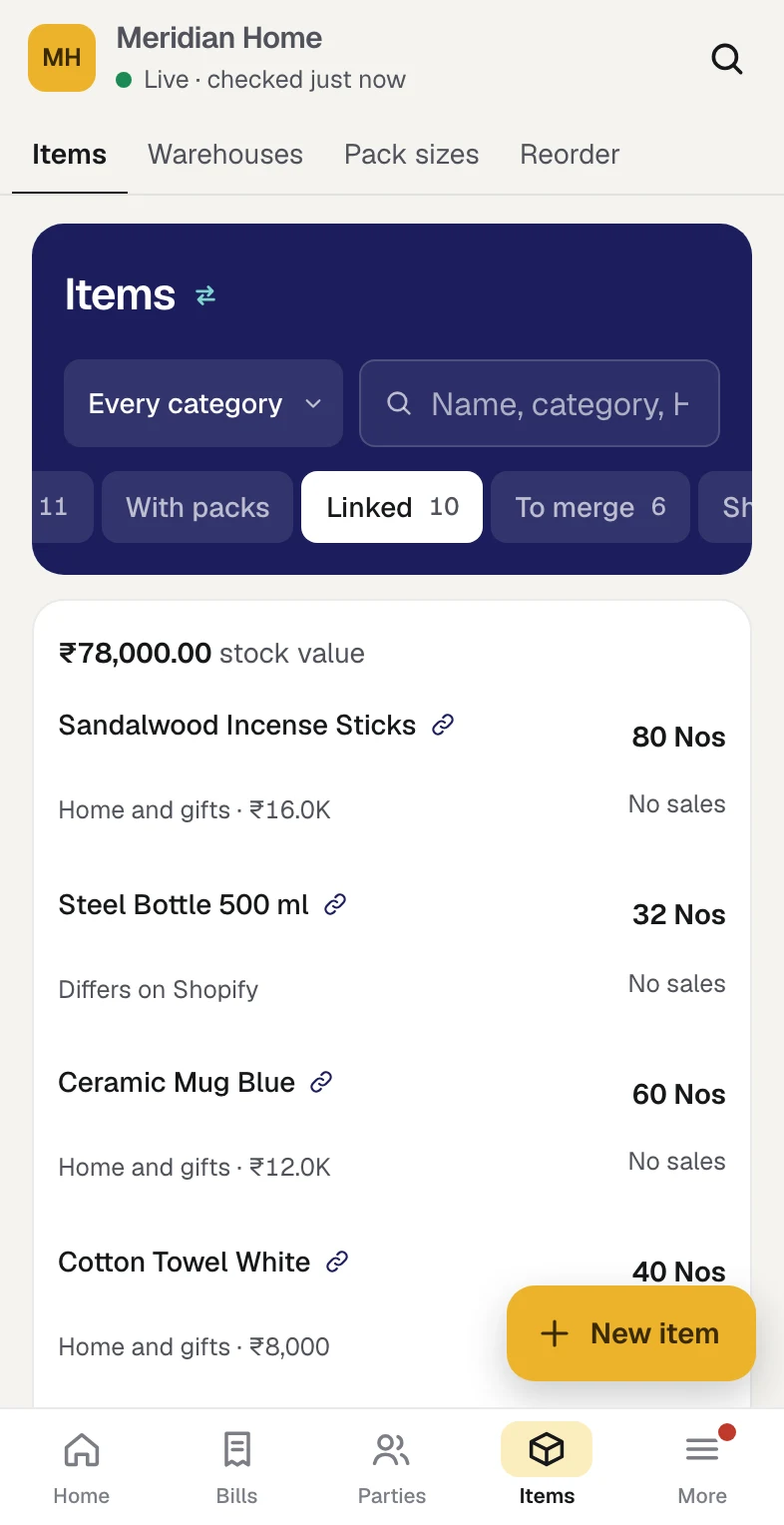
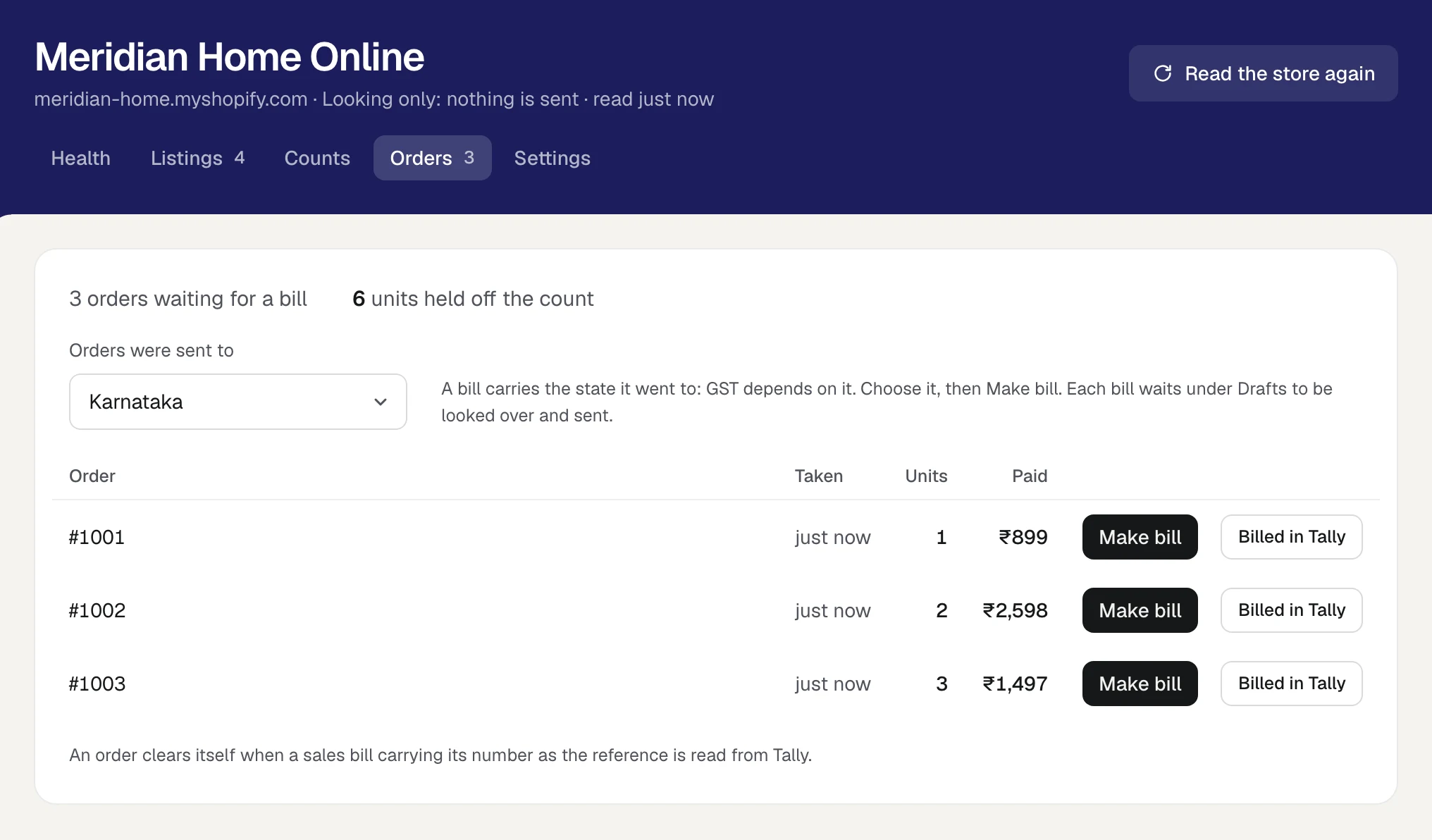
Every store order waits under Orders with its units held off the count. Press Make bill and it is a draft sales invoice: the right customer, each line at the price the buyer paid, shipping on its own line, GST worked out for the state it went to. Look it over, send it to Tally. The order ticks itself off when the bill comes back.
A bill carries the state it went to. GST depends on it.
3 orders waiting for a bill6 units held off the count
DraftDraft · Sales invoice
Online Store Sales
Sale within Karnataka: CGST and SGST, half the item's rate each.
Bill total₹2,598.00
Reference: Shopify order #1002
An order clears itself when a sales bill carrying its number is read back from Tally.Orders, step by stepFour ways to get Shopify orders into Tally, compared
All of it is in both plans, from your first day.
A Shopify store matched to Tally's items, with counts sent to the store and each order made into a draft bill.
Connect your Shopify storeWhat Tally holds, less what is ordered and waiting for a bill, less what you keep back, in whole packs where a listing is a pack.
Keep your store's counts in stepThe customer that stands for the store, each line at the price the buyer paid, shipping on a line of its own, and GST for the state you choose.
Orders from your storeA listing and its Tally item shown on one row, with Merge as one to bring Tally in line. Nothing on the store is changed.
Products on Shopify and in TallyProducts, counts, locations and orders. No buyer's name, address, phone or email. The one thing Orzoni writes on the store is a count.
Security and your dataBills, purchases, stock, dues, GST working papers, analytics and the team, exactly as for a trading business.
Trading and wholesaleChoose what kind of business you are, and switch any other part on whenever you need it. Nothing is deleted by changing your mind. Choose your kind of business
Tally holds your books and stays the book of record, with your own licence for it. Proven on TallyPrime 7.1.
The Tally connector is installed on it once, in about two minutes, with no administrator password. The Tally connector
Or a staff account there with the App development permission. We never ask for your Shopify password.
A listing has a count only once it is matched to an item. A product that is only on the store can be made in Tally from Orzoni.
Such as Online Store Sales. Every bill made from the store's orders is made out to it.
What the store connection does is exact, and so is where it stops.
One Shopify store for each business.
Both plans include it.
Counts go one way, from Tally to the store.
A count someone changes on Shopify is shown to you with Tally's beside it, and you choose which is right.
A count is as right as your Tally stock.
Goods sold over the counter come off the store once that sale is in Tally. If you sell both ways, keep a few of each item back.
A listing has a count only once it is matched to an item in Tally.
Until then it is left exactly as it is on the store.
Every bill is looked over and sent by a person.
An order becomes a draft in one press. Nothing from the store reaches your books by itself.
Orzoni does not read who bought, or where an order was sent.
You choose the state each order went to, which sets its GST, and bills are made out to one customer that stands for the store.
A refund on the store is a credit note you make.
In Orzoni or in Tally, as for any other sale.
An order in another currency, or with more than 60 lines, is billed in Tally.
Give that bill the order's number as its reference, and the order clears itself.
As for any business: your account, the connector on the computer that runs Tally, and one code to type.
Connect TallyUnder Settings, Business type. It switches the store's screens on.
Choose your kind of businessWith us on a call, or yourself in about ten minutes. The store is read, and nothing on it is changed.
Connect your Shopify storeApprove the certain matches together, then go through the rest.
Match your store's listingsThe first counts always wait for your word.
Keep your store's counts in stepChoose the customer the store's sales are billed to, then press Make bill.
Orders from your storeThe store shows what Tally holds, less what is ordered and waiting for a bill. So it is as right as your Tally stock: goods sold over the counter come off the store once that sale is in Tally. If you sell both ways, set Keep back per item, and the store is shown that many fewer of everything.
One thing: the count of each product that may be sold. Not a name, not a price, not a product. A store starts on looking only, and the first counts always wait for your word.
No. An order waits under Orders with its units held off the count. Press Make bill and it becomes a draft sales invoice, which a person looks over and sends.
It is part of both plans, for one store. Connecting it with us on a call carries no charge either.
Start your free trial, install the connector on your Tally computer and choose your company. Then open Orzoni on your phone.