

HomeFor your businessWholesale and distribution
For a distributor who takes orders before billing
PilotWorking today, and open to a few businesses while it is being tried. Ask us and we will tell you when it is open to you.
Write the order down while the customer is on the phone, with what they owe beside it. Confirm what will go, then fulfil it with one press: one sales invoice in Tally, at the rates and credit days agreed. Bills, stock, dues and statements are part of trading, and are open to every account. The pilot is the order before the invoice.
Your books still need TallyPrime on a Windows 10 or 11 computer. The people who take and send orders need only a browser.
Who it is for
One company, a distributor, selling stock items it keeps in Tally to business customers it knows, on credit. It already has everything a trader has. What it wants is the step before the invoice: an order that is written, priced and confirmed, and is not a sale until the goods go.
- Customers ring in their orders, and you agree a rate and credit days with each.
- Someone decides each day what can go, and it is not always everything that was asked for.
- You want one invoice in Tally when the goods leave, and nothing in the books before then.
Your first task
Write a first order
Choose a customer your books already hold, add the items, how many and the rate agreed, and work out the total. Nothing is set up first: an order uses the customers, items and accounts your books already have. Try it on practice orders.
Write a sales orderAn order, on real screens
Each step says what you do, and what happens next.
Write the order
Press New order and choose the customer. Add each item, how many, and the rate agreed before GST. Beside each item is Tally's count, and the rate this customer was last charged. Press Work out the total, then save the draft.
What happens next. What the customer owes is beside the order as you write: what they owe now, how much of it is past its due date, and their other confirmed orders. It is information, and stops nothing.
Write a sales order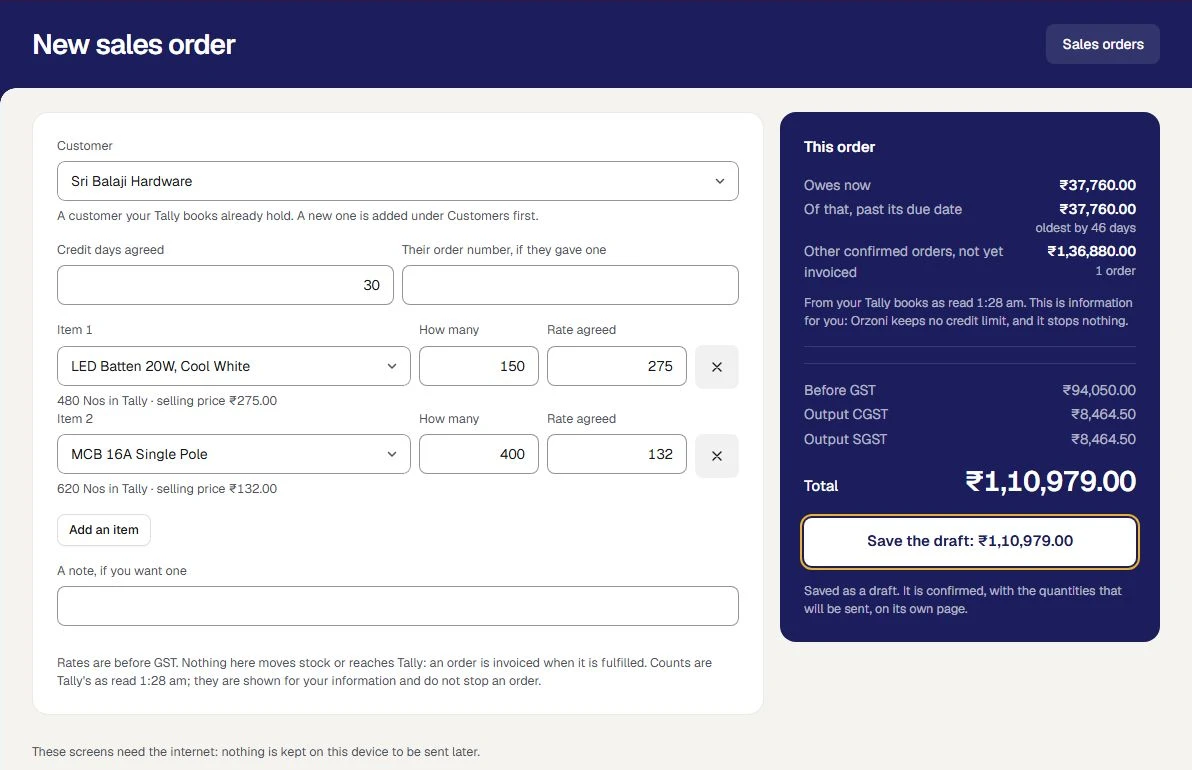
Confirm what will be sent
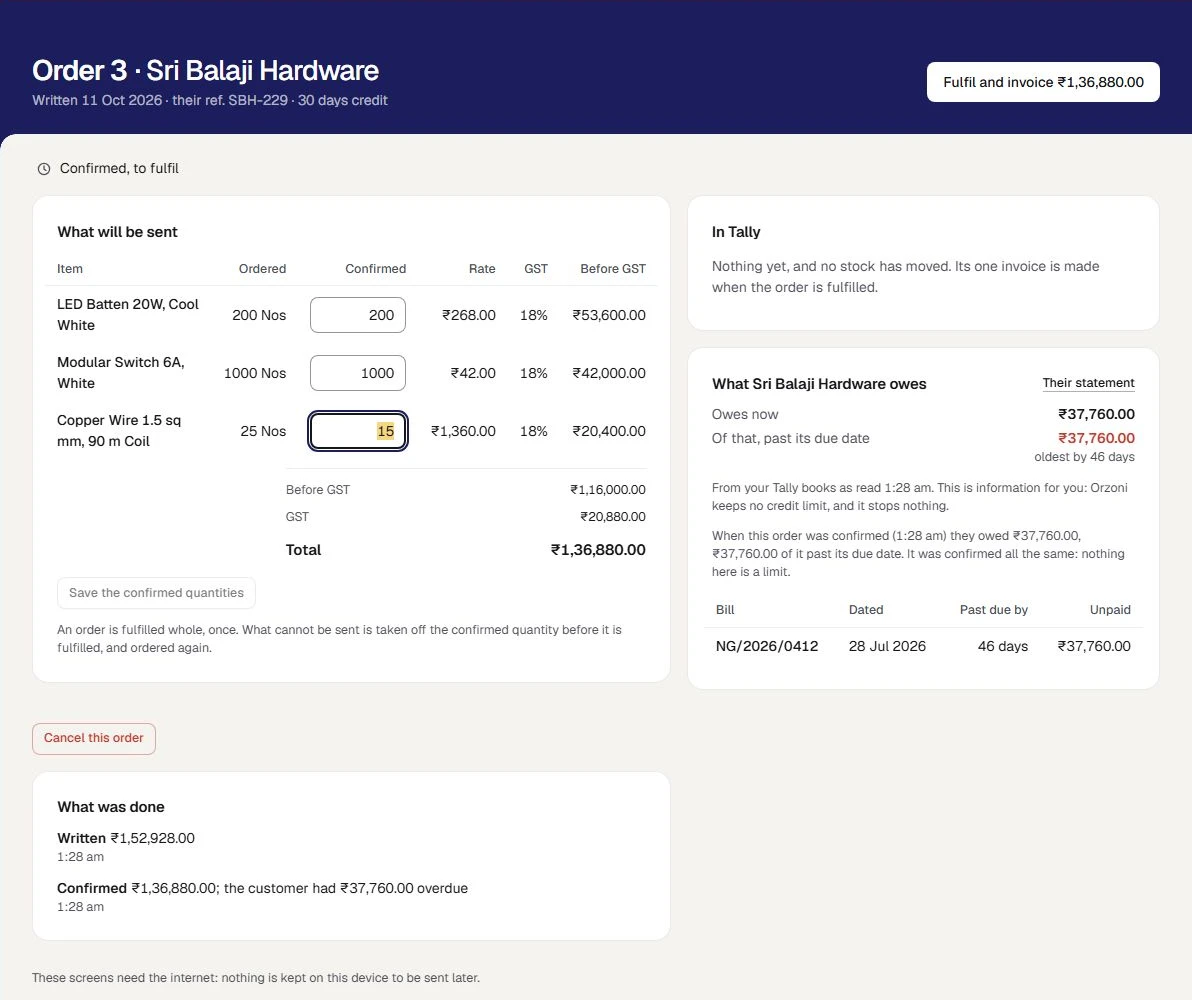
On the order's page, type a confirmed quantity for each line: all that was ordered, less, or nothing. Press Confirm order.
What happens next. The order is priced on what is confirmed. No stock moves and nothing is posted. The quantities can still be changed until the order is fulfilled.
Confirm the order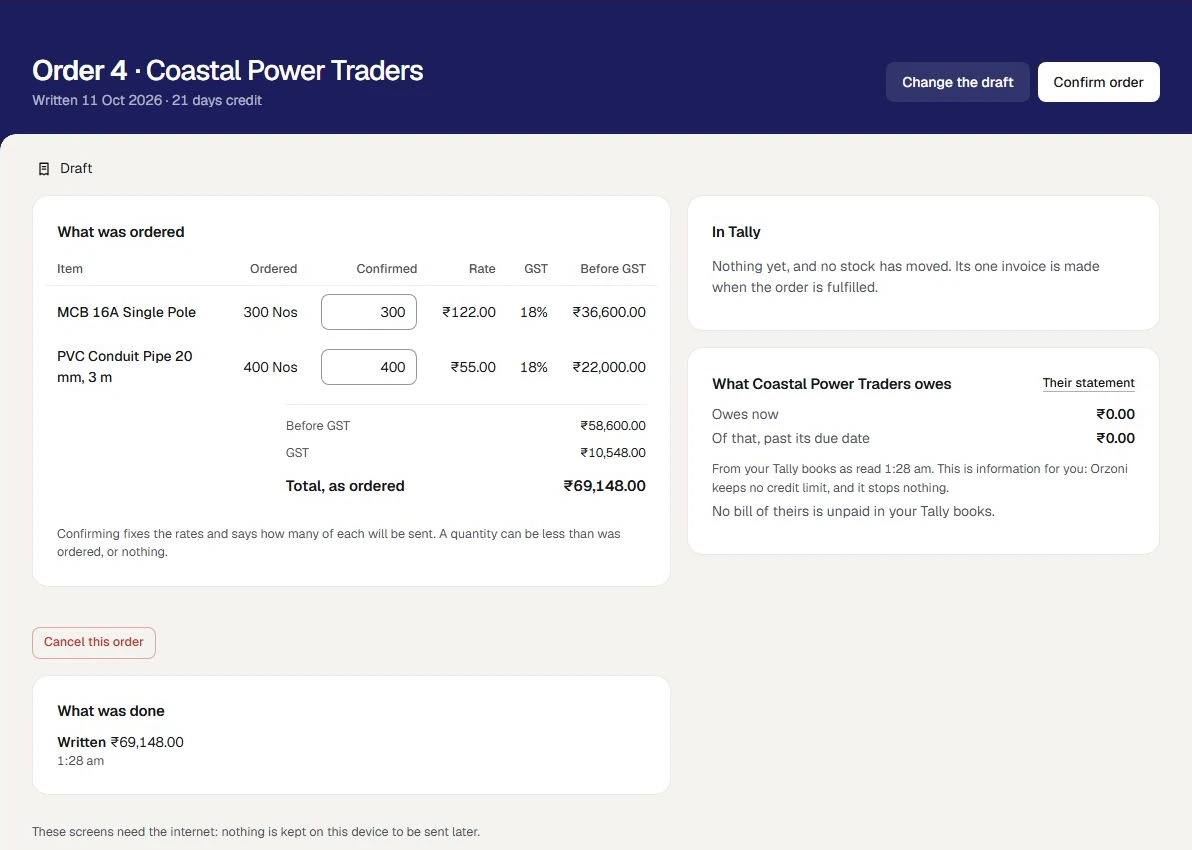
Fulfil it, with one invoice
When the goods go, press Fulfil and invoice. One sales invoice is made for every confirmed quantity, at the agreed rates, with the credit days agreed.
What happens next. That invoice is the one thing that moves stock and posts to the accounts. No delivery note is made, so there is no second movement to keep in step. Pressed twice, it is still one invoice.
Sales orders, invoices and receipts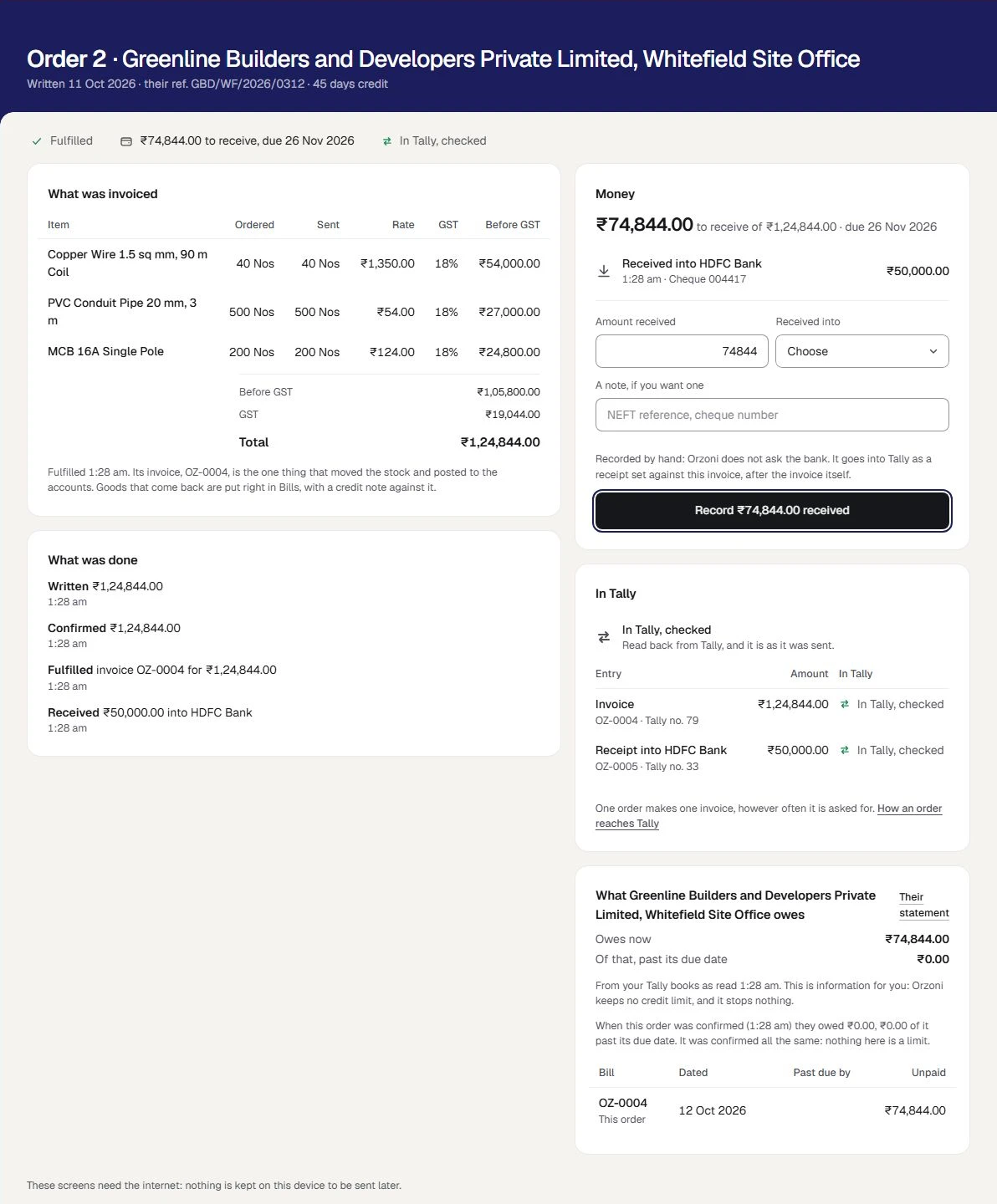
Receive the money, in part or in full
On the fulfilled order, type the amount received, choose the cash or bank account it went into, and add a note such as a cheque number. Record part now and the rest later.
What happens next. Each is a receipt in Tally against that one invoice, sent after the invoice itself. The order says what is left to receive and when it falls due, and reads Paid when nothing is left.
Record money received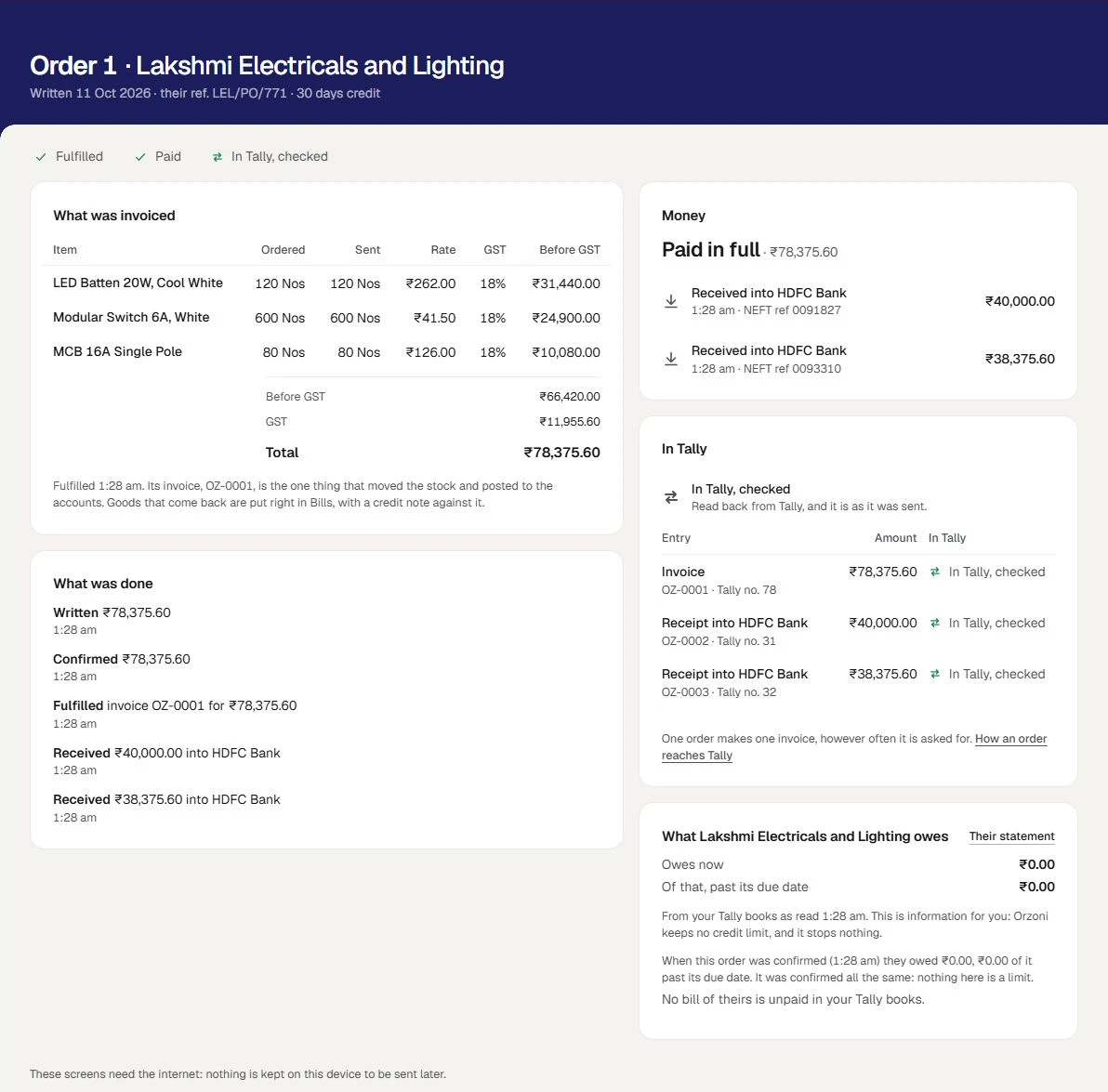
See what is to go, and what is owed
The list opens on To fulfil: the confirmed orders waiting for their goods. To be paid lists fulfilled orders with something left to receive, the oldest first, each with what is left and its due date.
What happens next. An order whose invoice is not in Tally as it should be is under Needs attention, with the reason.
The list of orders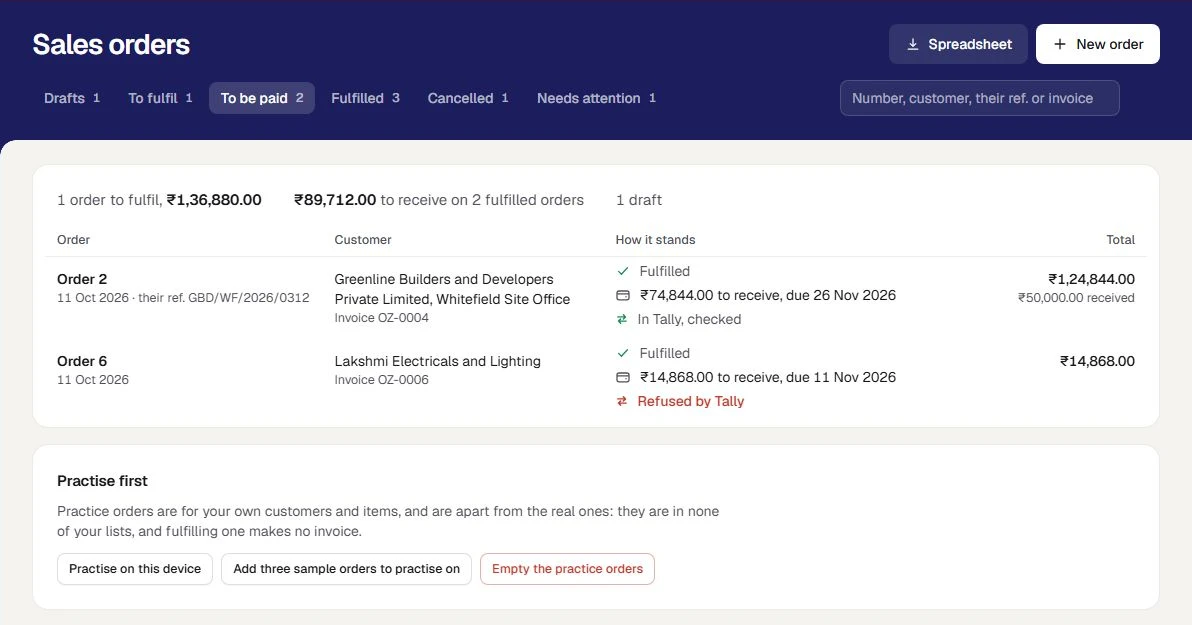
The business in these pictures is Northgate Electricals Distribution, a sample. It is made up: none of it is a real business's orders.
What is included
All of it is working today, and inside the plan you already have.
An order, before the invoice
A sales order written for a customer your books already hold: the items, how many, the rate agreed and the credit days, with Tally's count and the rate that customer was last charged beside each item.
Write a sales orderWhat the customer owes, beside it
What the customer owes, how much of it is past its due date and what their other confirmed orders will add, shown beside the order as it is written. It is information: Orzoni keeps no credit limit, and it stops nothing.
Write a sales orderConfirmed, line by line
An order confirmed line by line, for as many of each as will be sent. Confirming moves no stock and posts nothing.
Write a sales orderFulfilled by one invoice
A confirmed order fulfilled whole, by one sales invoice in Tally at the agreed rates and credit days. That invoice is the one thing that moves stock and posts to the accounts.
Sales orders, invoices and receiptsWhat is left to receive, and when
What is left to receive on each order and when it falls due, with money received in part or in full recorded as receipts against that one invoice.
Sales orders, invoices and receiptsTwo more roles for your staff
The Order desk writes, confirms and cancels orders, and sees what a customer owes as it does. A Dispatcher does all of that, and also fulfils an order, records what is received against it, and sees the bills and the stock.
Users and rolesOrders to practise on
Practice orders are made for your own customers and items, apart from the real ones. They are in none of your lists, and fulfilling one makes no invoice and moves no stock.
Practise first
Everything else a distributor needs is part of trading, and is open to every account today, in the pilot or out of it: sales and purchase bills with GST, stock by warehouse, what each customer owes by age, their statement, and receipts against bills. Trading and wholesale
Choose what kind of business you are, and switch any other part on whenever you need it. Nothing is deleted by changing your mind. Choose your kind of business
What you need before you start
- A place in the pilot
Working today, and open to a few businesses while it is being tried. Ask us and we will tell you when it is open to you. Ask about the sales orders pilot
- TallyPrime on a Windows 10 or 11 computer
As for every business, Tally holds the books and the Tally connector sits beside it. That computer does not have to be on while you take orders: it is needed for the invoice to go in. Proven on TallyPrime 7.1.
- Your customers in Tally
An order is for a customer your books already hold. A new one is added under Customers first.
- Your items in Tally, each with a unit
An order is made of stock items. The GST on each is worked out by the part of Orzoni that makes every bill, for the customer's own state.
- Cash and bank ledgers in Tally
The account money received is recorded into. They are the ones your books already have.
- Nothing to set up
There is no set-up screen. An order uses the customers, items and accounts already in your books.
- A browser for each person
A phone, a tablet or a computer. Nothing is installed on it, and the Tally connector is not needed on it.
Where the line is
The pilot is one step, the order before the invoice. Each of these is something a distributor might otherwise assume, so it is said here before you ask.
No price list and no schemes are kept. The rate agreed is typed on each order, with the rate that customer was last charged shown beside it.
The box Rate agreed starts as the rate this customer was last charged, or the item's selling price where they have not bought it before. You change it.
No credit limit is kept, and nothing holds an order. What a customer owes is shown as information, and an order is confirmed and fulfilled whatever it says.
Read what the customer owes before you confirm, and decide yourself. What they owed at that moment is kept with the order.
An order is fulfilled whole, and once. There are no part deliveries and no back orders: what cannot be sent is taken off the confirmed quantity, and ordered again.
Confirm only what will be sent. What is left over is a new order, when the goods are in.
Stock is not reserved for an order. Tally's count is shown beside an item for information, and does not stop an order.
Look at the count before you confirm. Two orders can be confirmed for the same goods: the invoice is what takes them from stock.
No delivery note, no delivery challan and no sales order in Tally is made. The invoice is the one entry, and the one thing that moves stock.
Send the goods with the invoice, as for any bill. A delivery note you need is made in Tally.
No transport details and no e-way bills are made here, and there are no routes and no van sales.
E-way bills are made in Tally, as for any bill.
An order does not name a warehouse or a batch. The goods leave from wherever the invoice takes them, as for any bill, and an item Tally keeps by batch is billed in Tally.
Stock is moved between warehouses with Move stock, under Warehouses, as for any business.
An order is written by your own people, for a customer your books already hold. There is no customer portal, and no order arrives from a marketplace or by itself.
A new customer is added under Customers first, and is then offered on the order.
No salesman targets and no commission are kept, and no purchase orders are made.
Purchase orders are made in Tally. A supplier's bill is entered under Purchases, as for any business.
Money received is recorded by a person. Orzoni does not ask a bank whether a payment arrived.
Look at your bank, or the cheque in your hand, then record what was received and the account it went into.
A fulfilled order is not cancelled or changed. Goods that come back, or a wrong invoice, are put right in the books with a credit note.
Make a credit note against the invoice under Bills, as for any other sale.
Sales orders are worked online. With no internet the screens say so, and nothing is kept on the device to send later.
Keep the device on Wi-Fi or mobile data. When the connection drops, the screen says so at once.
For a company registered for GST in one state. Where a company is registered in more than one, an order is not priced here, and the screen says why.
Such a company bills in Tally, where the registration is chosen on the bill.
Setting it up, step by step
Ask to be let in
Leave your number on this page. We call you, show you an order from written to paid for, and tell you when the pilot is open to you.
Ask about the sales orders pilotLink your Tally company
Your account, the connector on the computer that runs Tally, and one code to type.
Connect TallyChoose Wholesale and distribution
Under Settings, Business type. The rail gains Orders, with Sales orders and New order under it.
Choose your kind of businessInvite the people who take and send orders
As Order desk and Dispatcher, each with their own sign-in.
Invite your teamPractise, then write a first order
Try the screens on practice orders. Then write a real order, confirm it, fulfil it, and see In Tally, checked.
Write a sales order
The guides for this
- Write a sales orderThe step before the invoice, for a distributor selling to known customers on credit.
- Sales orders, invoices and receiptsWhat happens when a confirmed sales order is fulfilled.
- Make a sales invoiceCustomer first, then items, GST worked out for you, paid now or later, and Send to Tally.
- Customers and suppliersThe Customers and Suppliers lists with their views, search and sort, one party's page with what is owed and the account behind it, a reminder on WhatsApp, adding or editing a party, and why a party cannot be deleted from Orzoni.
- Choose your kind of businessTell Orzoni whether you trade, sell online or run a café, and it opens on what you do most.
- Users and rolesEach person signs in as themselves.
Questions people ask first
Do I need the pilot to bill my customers?
No. Sales bills, purchase bills, stock, what customers owe and their statements are part of trading, and every account has them today. The pilot adds one thing: an order written and confirmed before the invoice. Trading and wholesale
Does an order hold stock, or reach Tally?
No. An order is Orzoni's own record. Writing it and confirming it move no stock and post nothing. The one invoice made when it is fulfilled is what moves stock and posts to the accounts.
Will Orzoni stop an order for a customer who owes too much?
No. What the customer owes, and how much of it is past its due date, is shown beside the order as information. Orzoni keeps no credit limit and holds no order. What they owed when the order was confirmed is kept with it, so you can see later what was known.
What if I cannot send everything that was ordered?
Confirm less. Each line has a confirmed quantity, from nothing up to what was ordered, and the invoice is for what is confirmed. There are no part deliveries and no back orders: what is left over is a new order when the goods are in.
Is a delivery note made?
No. No delivery note and no sales order in Tally is made. The invoice is the one entry, so there is no second movement of stock to keep in step with the first. A delivery note you need is made in Tally.
What happens while the computer that runs Tally is off?
You go on working. Orders are written, confirmed and fulfilled as usual, and each invoice waits and goes into Tally by itself when the computer is back. A receipt waits behind its invoice.
Does the pilot change what I pay?
No. Your plan is the same two prices, by the number of companies. An outlet is the place your counter is: it is not a company, and the plan does not count it. Pricing
Ask about the sales orders pilot
Working today, and open to a few businesses while it is being tried. Ask us and we will tell you when it is open to you. Leave your number and a person calls you.
We call you
On the mobile number you give, to fix a time that suits you.
We show you an order from written to paid for
An order written for 100, confirmed for 80, fulfilled by one invoice in Tally, and paid in two receipts.
We tell you where you stand
Whether the pilot is open to you today, and what you already have without it.
Write the order. Find the invoice in Tally
The sales orders pilot is opened by arrangement, for a distributor selling to known customers on credit. Ask, and a person calls you.
- The pilot adds no charge to your plan.
- An outlet is not a company, and is not counted by your plan.
- Your books stay in Tally.