

HomeFor your businessRepairs and servicing
For a repair business that takes jobs in
PilotWorking today, and open to a few businesses while it is being tried. Ask us and we will tell you when it is open to you.
Take a job in with the day you promised it, write down what it will cost and record that the customer agreed, take an advance, and complete it in one press. The advance, the invoice and what is paid after go into Tally, and the job says how each of them stands.
Your books still need TallyPrime on a Windows 10 or 11 computer. The people at the desk and on the bench need only a browser.
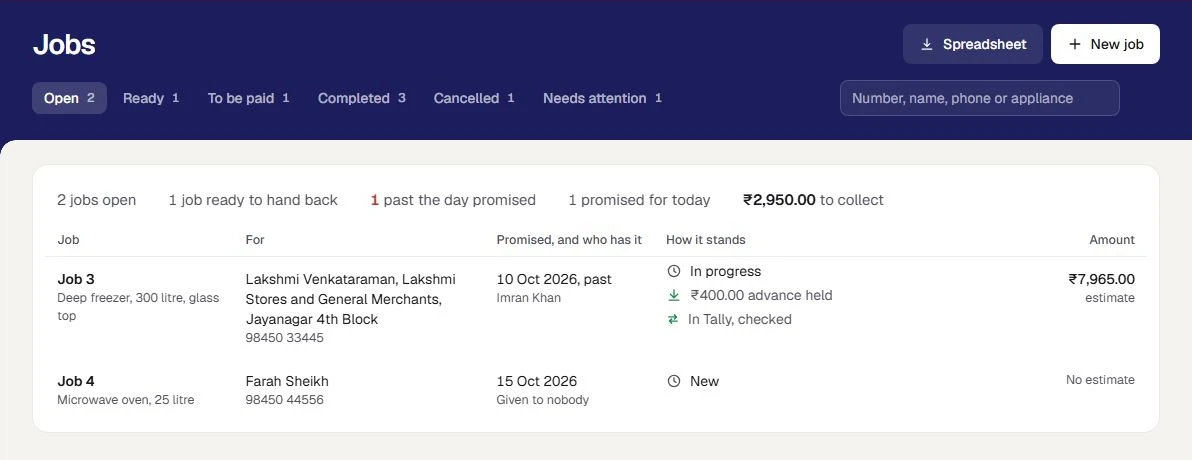
Who it is for
A small repair or maintenance business with simple jobs, such as appliance servicing: something is brought in or visited, worked on, handed back and paid for. It is not a booking calendar, and it is not for a clinic, a salon or an agency.
- You take jobs in at a desk, promise each for a day, and give it to one of your people.
- You tell the customer what it will cost before you start, and sometimes take an advance.
- You want the advance and the invoice in Tally as proper entries, without typing them in again.
Your first task
Take a first job in
Write who it is for, what is being worked on, what is to be done, the day you promised and who has it. Then write the estimate on the job's own page. Try it on practice jobs first.
Take in a jobA job, on real screens
Each step says what you do, and what happens next.
Take the job in
Press New job. Choose a customer from your books, or write a person's name and phone. Say what is being worked on, what is to be done, the day promised and who it is given to.
What happens next. The job gets the next job number. The list of open jobs shows it in the order of the day promised, with a job past its day marked.
Take in a job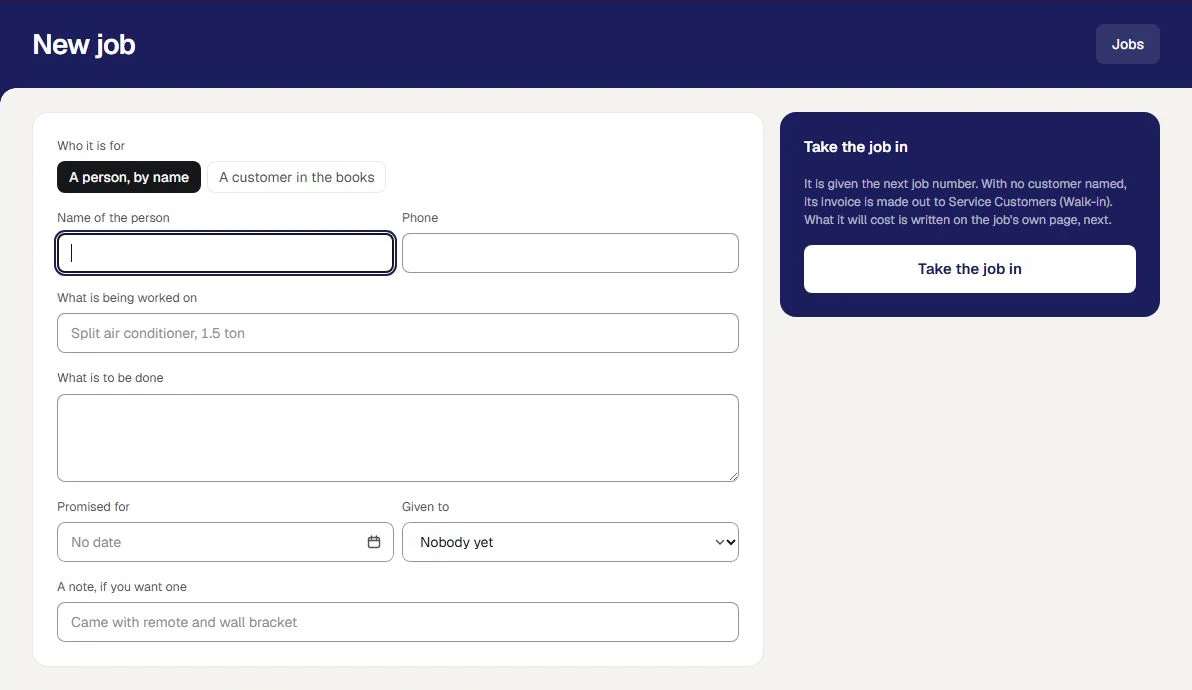
Say what it will cost
Write the estimate as lines of work and of parts from stock. Press Work out the total, and the part of Orzoni that makes every bill works out the GST. Then save it as a revision.
What happens next. Nothing of an estimate goes to Tally, and no stock moves. A revision made later is kept beside the one before it.
Write the estimate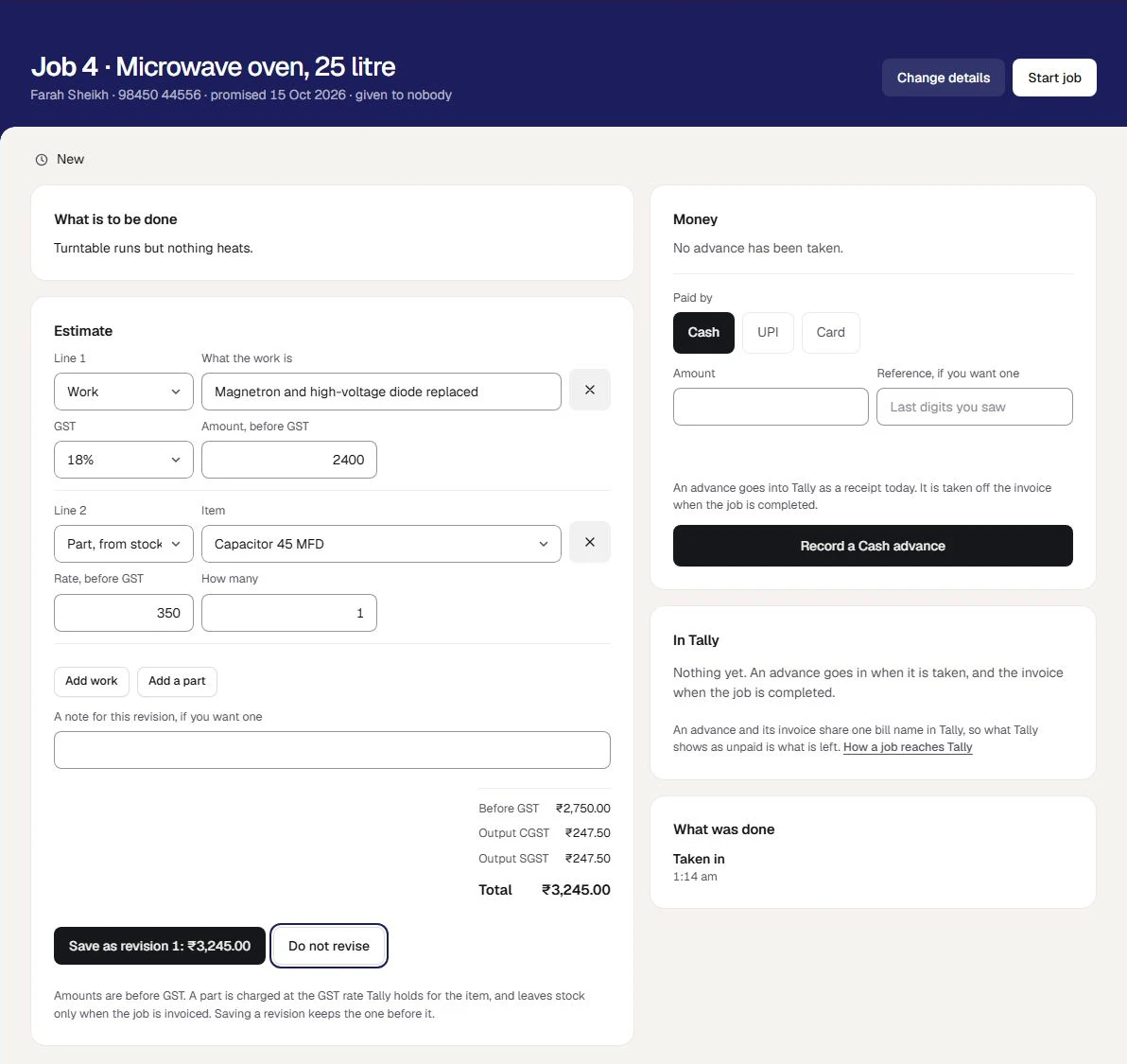
Record that the customer agreed, and take an advance
Press Record that the customer agreed, and say how: in person, by phone, by message. If the customer pays something now, record it as an advance by cash, UPI or card.
What happens next. The advance goes into Tally that day as a receipt. What was agreed, how, and who recorded it stay written under the estimate.
Take an advance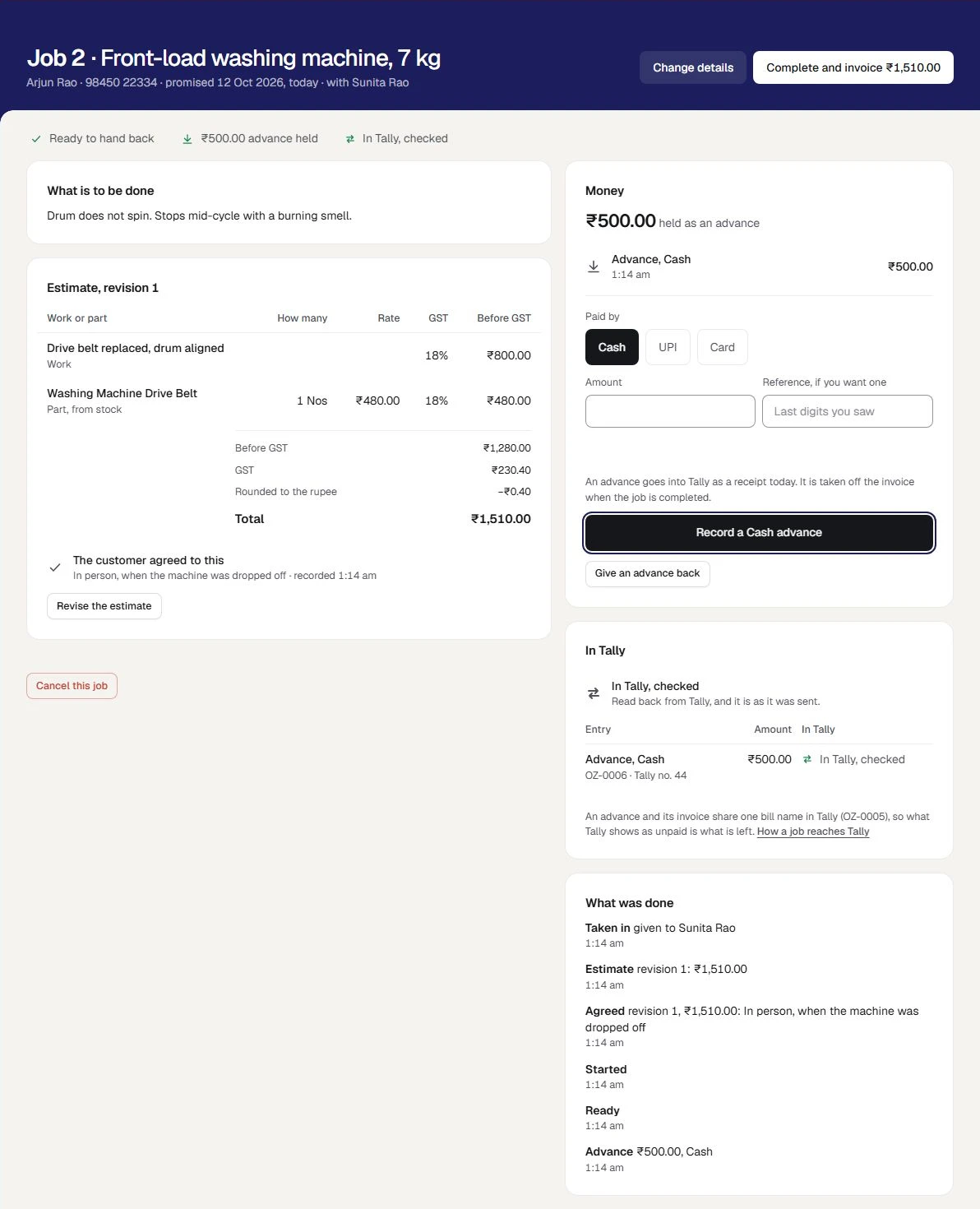
Complete it, and find the invoice in Tally
When the work is done, press Mark ready. When it is handed back, press Complete and invoice. One sales invoice is made, for the amount the customer agreed to. Record the rest when it is paid.
What happens next. The invoice goes in under the bill name the advance was set against, so what is unpaid under it is what is left. That is how it has been tried against a stand-in for Tally, and it is being confirmed on a real Tally during the pilot. Completed does not mean paid, and it does not mean in Tally: the job says each of the three separately.
A job's money, and Tally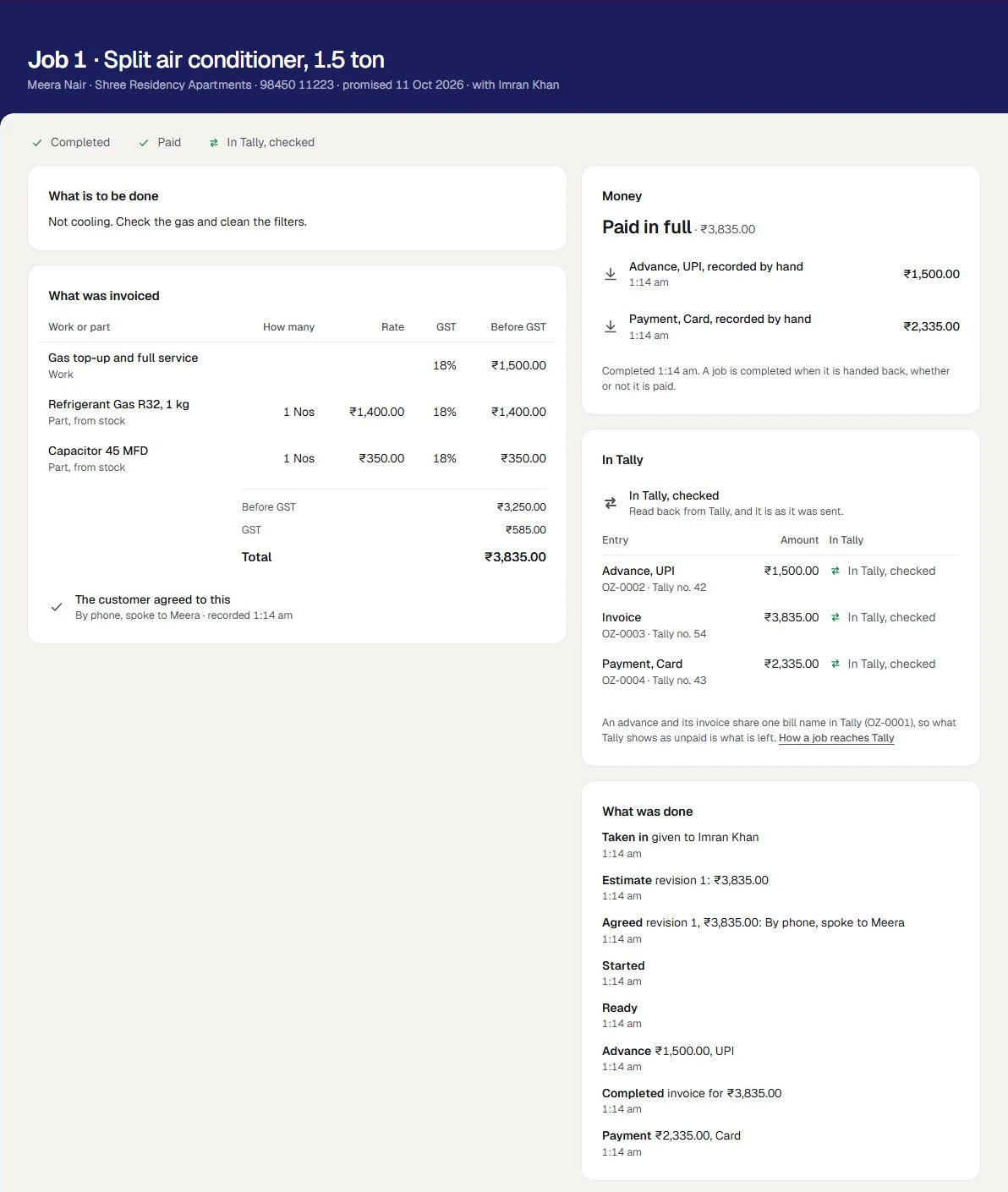
When the job changes
If the work turns out to be more, revise the estimate. If the job is called off, cancel it with a reason, and say what becomes of any advance: given back, or left with the customer as credit.
What happens next. A revision made after the customer agreed is not agreed until you record that it is, and the job is not completed before then. A completed job is not cancelled: its invoice is put right in the books.
Revise the estimate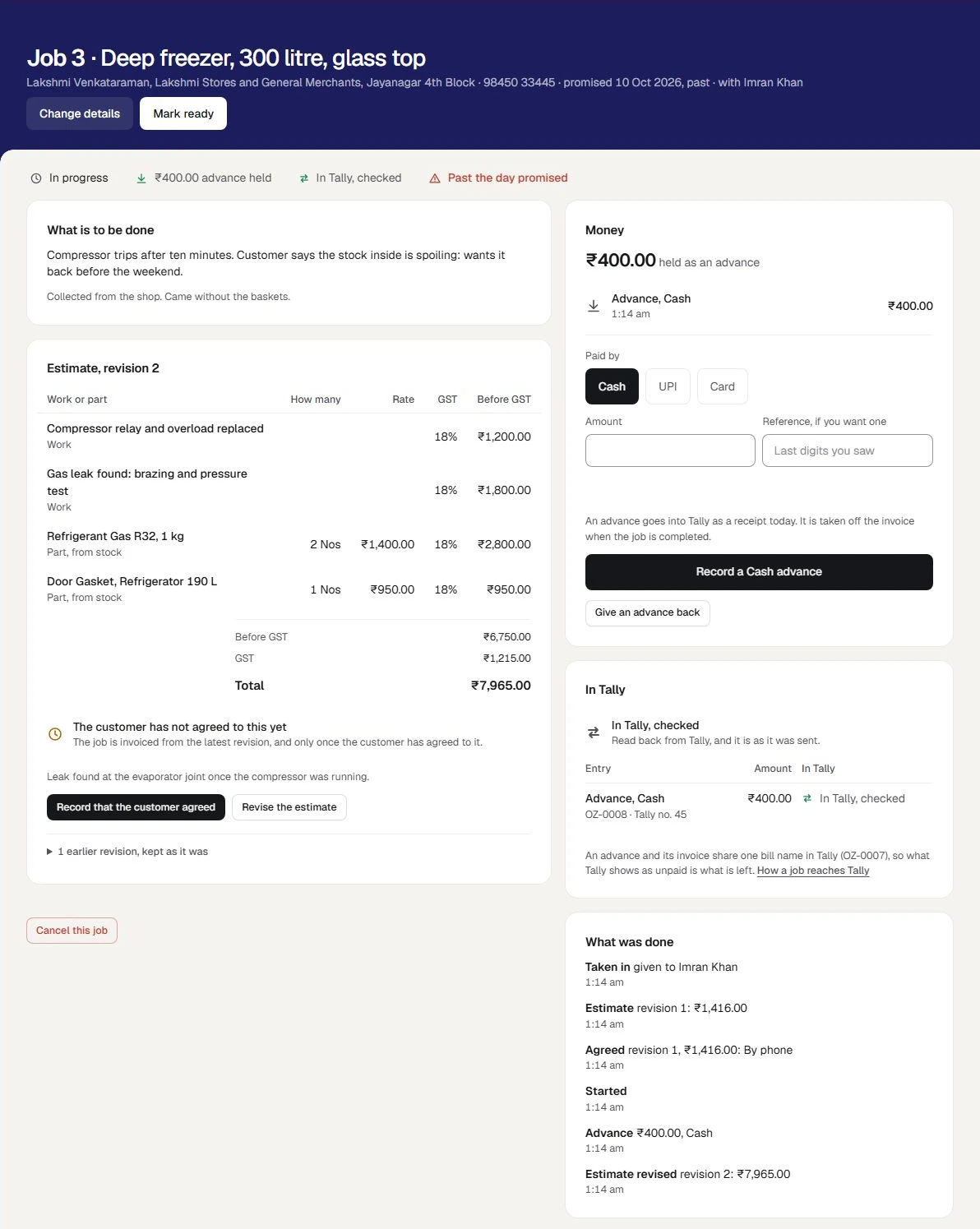
The business in these pictures is Coolwell Appliance Care, a sample. It is made up: none of it is a real business's jobs.
What is included
All of it is working today, and inside the plan you already have.
A desk set up from your Tally
A service desk set up from what Tally already holds: the ledger work is billed as, a party for walk-in customers, where cash, UPI and card money are kept, and a list that says what is still to do.
Set up jobsJobs taken in, by the day promised
A job taken in for a customer in your books or a person by name: what is being worked on, what is to be done, the day promised and who has it. The list of open jobs is ordered by the day promised.
Take in a jobEstimates the customer agrees to
An estimate of work and parts, worked out as the invoice will be. Every revision is kept, and under the latest is written how the customer agreed to it and who recorded that.
Take in a jobThe advance and the invoice into Tally
An advance recorded the day it is taken, and one sales invoice made when the job is completed, for the amount the customer agreed to. Both go into Tally under one bill name, so what is unpaid there is what is left: that is how it has been tried against a stand-in for Tally, and it is being confirmed on a real Tally during the pilot.
A job's money, and TallyWhat is paid after, given back or cancelled
What is paid after, an advance given back and a job cancelled, each recorded on the job with its reason. How the job stands, how its money stands and how it stands in Tally are said separately.
A job's money, and TallyTwo more roles for your staff
A Technician takes jobs in, marks them started or ready and revises estimates, and takes no money. The Service desk also takes advances and payments, and completes or cancels a job. Neither sees bills, figures or settings.
Users and rolesJobs to practise on
Practice jobs are apart from the real ones. They are in none of your lists, take no real job number, and nothing of them goes to Tally.
Practise first
The books behind the desk are the same as any other business's: purchases, stock, accounts, GST working papers, analytics and the team. The service desk has an outlet of its own, apart from a café counter's and a shop counter's. What every business has
Choose what kind of business you are, and switch any other part on whenever you need it. Nothing is deleted by changing your mind. Choose your kind of business
What you need before you start
- A place in the pilot
Working today, and open to a few businesses while it is being tried. Ask us and we will tell you when it is open to you. Ask about the jobs pilot
- TallyPrime on a Windows 10 or 11 computer
As for every business, Tally holds the books and the Tally connector sits beside it. That computer does not have to be on while you work: it is needed for the entries to go in. Proven on TallyPrime 7.1.
- A few ledgers in Tally
An income ledger that work is billed as, a party under Sundry Debtors for walk-in customers, and the cash or bank ledgers your cash, UPI and card money arrive in. One named Round Off if invoices are rounded to the rupee.
- Your parts in Tally, if you bill parts
A part on an estimate is a stock item with a unit. It is charged at the GST rate Tally holds for it, and leaves stock once, when the job is invoiced.
- The GST your work carries
You choose the rate on each line of work, with your accountant. Orzoni assumes none.
- Your people under Team
A job is given to one of them by name. A job can also be taken in with nobody named.
- A browser for each person
A phone, a tablet or a computer. Nothing is installed on it, and the Tally connector is not needed on it.
- The internet at the desk
Jobs are kept on Orzoni's service, not on the device, so the desk and the bench always see the same job.
Where the line is
The pilot is job tracking and billing for simple jobs. Each of these is something the owner of a repair business might otherwise assume, so it is said here before you ask.
Job tracking and billing for simple jobs. It is not a booking calendar, and it keeps no recurring contracts and plans no routes for people in the field.
The list of open jobs is ordered by the day promised, and says what is promised for today and what is past its day.
A job is given to a person of your team by name. Everyone who may see jobs sees every job: there is no sign-in that shows a technician only their own.
Find a job by a name, a phone number, its number or the appliance. Who has each job is on its row.
No message is sent to a customer by SMS, email or WhatsApp. You tell the customer yourself that the job is ready.
The customer's phone number is on the job. Call or message them yourself.
No job sheet is printed, and no photos or files are kept with a job.
Write what came with the job in its note, such as a remote or a wall bracket.
No warranty and no serial numbers are tracked, and no pay or commission is worked out from jobs.
Warranty terms stay where you keep them today. The team's pay is under Team, as for any business.
An estimate is not an invoice. A job is invoiced once, when it is completed, from the latest revision the customer agreed to and for that amount.
If the work changes, revise the estimate and record that the customer agreed again. The revision before it is kept.
GST is worked out on the invoice. An advance is recorded as money received, and no GST is accounted on it when it is taken.
Ask your accountant whether an advance you take needs anything more in your books. Orzoni gives no advice on tax.
Payments are recorded by the person at the desk. Orzoni does not ask a bank or a payment company whether a UPI or card payment arrived, and it returns no money itself.
Look at your own phone or card machine, then record the payment. To give an advance back, hand the money back yourself, then record that you did.
A completed job is not cancelled or changed. Its invoice is put right in the books, with a credit note.
Make a credit note against the invoice under Bills, as for any other sale.
It is not for a clinic, a salon or an agency.
Its words are a repair desk's: something brought in, an estimate, a job handed back.
Jobs are worked online. With no internet the screens say so, and nothing is kept on the device to send later.
Keep the desk's device on Wi-Fi or mobile data. When the connection drops, the screen says so at once.
For a company registered for GST in one state. Where a company is registered in more than one, a job is kept, and says why its invoice is not made.
The list under Jobs, Set up tries an invoice for work against your Tally set-up, and says what it finds before your first job.
Setting it up, step by step
Ask to be let in
Leave your number on this page. We call you, show you a job from taken in to paid for, and tell you when the pilot is open to you.
Ask about the jobs pilotLink your Tally company
Your account, the connector on the computer that runs Tally, and one code to type.
Connect TallyChoose Repairs and servicing
Under Settings, Business type. The rail gains Service, with Jobs, New job and Set up under Jobs.
Choose your kind of businessSay how jobs go into Tally
Under Jobs, Set up: what work is billed as, the party for walk-in customers, where cash, UPI and card money are kept, and where parts leave from.
Set up jobsInvite the people who use it
As Service desk and Technician, each with their own sign-in.
Invite your teamPractise, then take a first job in
Try the screens on practice jobs. Then take in a real job, complete it, and see In Tally, checked.
Take in a job
The guides for this
- Set up jobsFrom a company in Tally to a first job taken in.
- Take in a jobHow a repair or servicing job is taken in and worked.
- A job's money, and TallyWhat a job puts into Tally, and when.
- Choose your kind of businessTell Orzoni whether you trade, sell online or run a café, and it opens on what you do most.
- Users and rolesEach person signs in as themselves.
- When a bill is waiting or refusedWhat happens between pressing Send and the bill being in Tally.
Questions people ask first
Does every device at the desk need the Tally connector?
No. The connector is installed once, on the Windows computer that runs Tally. A phone, a tablet or a computer at the desk or on the bench needs only a browser and the internet.
Is an estimate sent to Tally?
No. An estimate is Orzoni's own record. Nothing of it goes to Tally, and no stock moves. What goes in is an advance when one is taken, the invoice when the job is completed, and what is paid after.
What if the work costs more than the estimate?
Revise the estimate. The revision before it is kept, with who made it. A revision made after the customer agreed is not agreed until you record that they agreed to it, and the job is not completed before then. The invoice comes to the agreed amount to the paisa, or it is not made and says why.
How does an advance stand in Tally?
As a receipt, sent the day it is taken, set against the bill name the job's invoice will later carry. When the job is completed, the invoice goes in under that same name, so what is unpaid under it is the total less the advance. That is how it has been tried against a stand-in for Tally, and it is being confirmed on a real Tally during the pilot. Where an estimate has been written, an advance cannot be more than it.
What becomes of an advance when a job is cancelled?
You say, as you cancel. Either it was given back, which goes into Tally as a payment out to the customer, or it stays with the customer as credit, and then nothing is sent: it stays in Tally under the job's bill name. Orzoni returns no money itself.
What happens while the computer that runs Tally is off?
You go on working. Jobs are taken in, estimated and completed as usual, and each advance, invoice and payment waits and goes into Tally by itself when the computer is back. A payment waits behind its invoice.
Does the pilot change what I pay?
No. Your plan is the same two prices, by the number of companies. An outlet is the place your counter is: it is not a company, and the plan does not count it. Pricing
Ask about the jobs pilot
Working today, and open to a few businesses while it is being tried. Ask us and we will tell you when it is open to you. Leave your number and a person calls you.
We call you
On the mobile number you give, to fix a time that suits you.
We show you a job from taken in to paid for
A job taken in, estimated and agreed, an advance, the job completed, and its invoice found in Tally with the receipts.
We tell you where you stand
Whether the pilot is open to you today, and what to have ready in Tally before your first job.
Take the job in. Find the invoice in Tally
The jobs pilot is opened by arrangement, for a small repair or maintenance business with simple jobs. Ask, and a person calls you.
- The pilot adds no charge to your plan.
- An outlet is not a company, and is not counted by your plan.
- Your books stay in Tally.