

On this page
Collect a split payment
How to take part of an order in cash and the rest by UPI or card. The Payment card on an order, Cash handed over and the change to give, what is left to pay after each payment, why a UPI or card payment is noted by hand, and how a payment recorded by mistake is taken back before the order is finished, or put right under Put right after it.
6 minute read
What this is for
A customer pays ₹300 in cash and the rest by UPI. Two friends each pay half. Someone pays the whole order by card. All of these are payments recorded against one order, and Orzoni always shows what is left to pay.
A payment is money recorded against an order. The customer's slip is the paper printed for the customer once the order is finished. The entry the payment becomes in your books, a receipt in Tally, is made later, with the sales bill: see Café receipts, and how a sale reaches Tally.
A split payment is one order paid in parts. It is not a split bill: one order still makes one bill.
Who this is for
Whoever takes the money at the counter. Recording a payment, and taking one back before the order is finished, need Take orders and payments. The roles Counter staff and Shift manager start with it. Putting a payment right on a finished order needs Put a finished order right, which Shift manager starts with and Counter staff does not. See Users and roles.
The café counter is a pilot, open to a few businesses while it is being tried. To take a payment, the order has to be confirmed. A draft takes none. See Take a café order.
Open the order's payment
- Open the order: from Today, under Open orders, or from Orders.
Look at the card Payment.
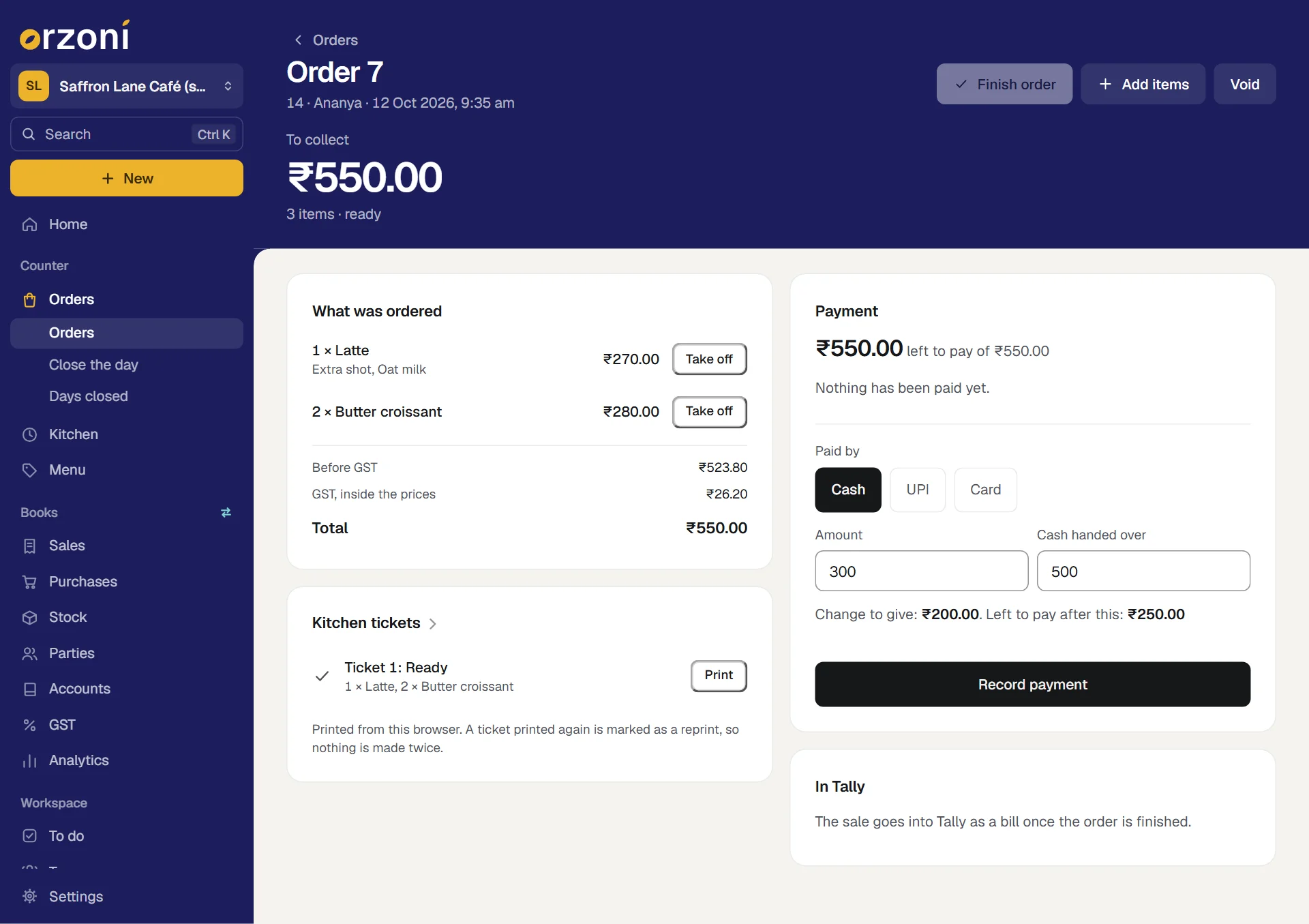
Its first line is what is left: ₹550.00 left to pay of ₹550.00. Under it, Nothing has been paid yet.
Money can be taken as soon as the order is confirmed, before or after the kitchen has made it.
Record the cash part
The customer hands over a ₹500 note and wants ₹300 of the order paid in cash.
- Under Paid by, press Cash. It is chosen to begin with.
- In Amount, type 300. The box starts on the whole of what is left.
In Cash handed over, type 500.
The line under the boxes reads Change to give: ₹200.00. Left to pay after this: ₹250.00.
Give the change, and press Record payment.
A small message says ₹300.00 recorded. The payment joins the card, with the time, ₹500.00 given and ₹200.00 change. The first line now reads ₹250.00 left to pay of ₹550.00.
Leave Cash handed over empty when the customer gives the exact money.
Record the rest by UPI
Under Paid by, press UPI.
Amount already holds the ₹250 that is left, and the line reads This pays the order in full.
- Wait for the customer to pay, and check that the money has arrived: on your own phone.
- If you want, type something to find it by in Reference, if you want one, such as the last digits you saw.
Press Record payment.
A small message says ₹250.00 recorded.
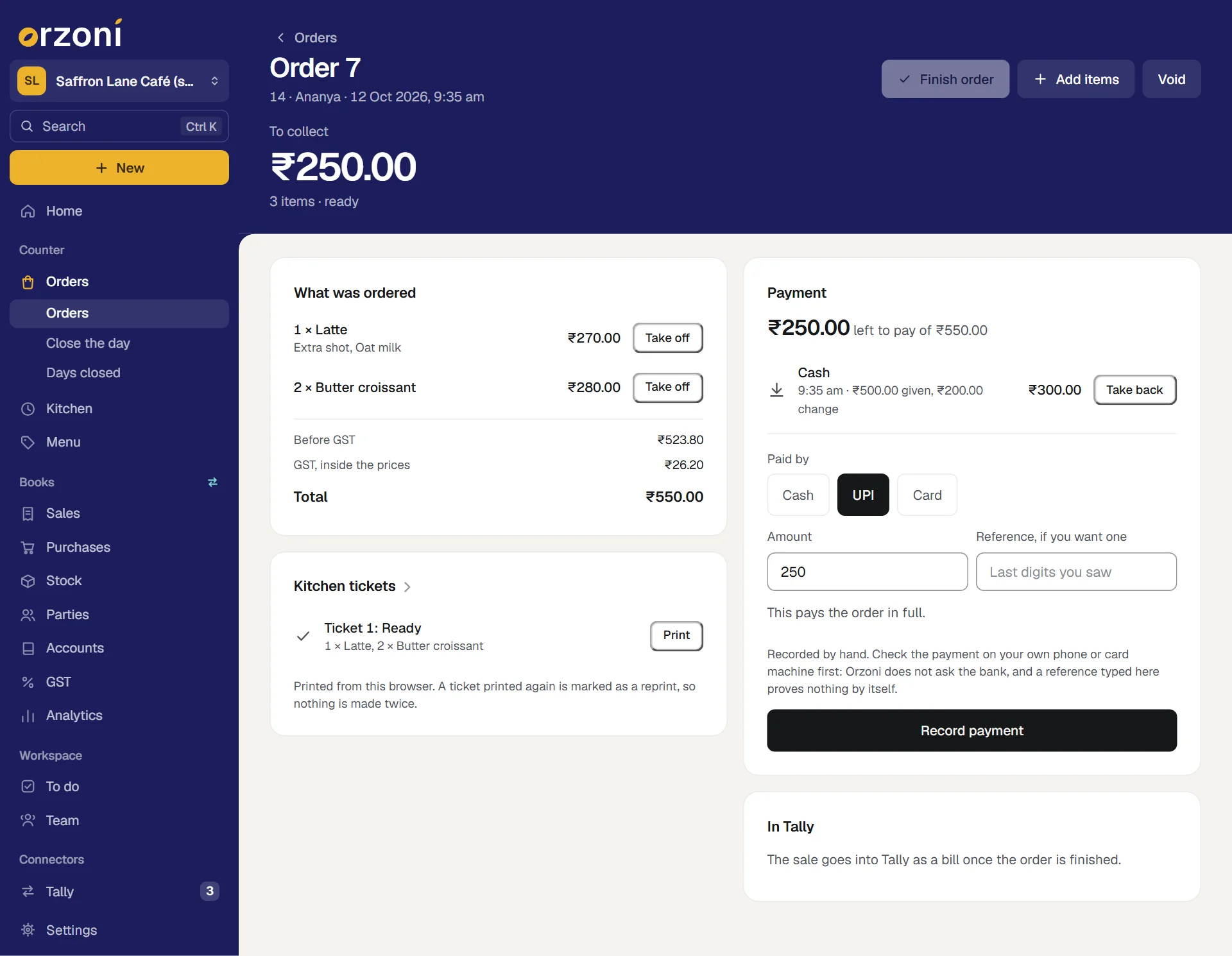
A card payment is the same, with Card pressed: take the payment on your card machine first, then record it.
What you should see when it is paid
The card's first line reads Paid in full, with the order's total. Each payment is listed under it: Cash, and UPI, noted by hand. The top of the page reads Paid, not finished yet, and Finish order has woken.
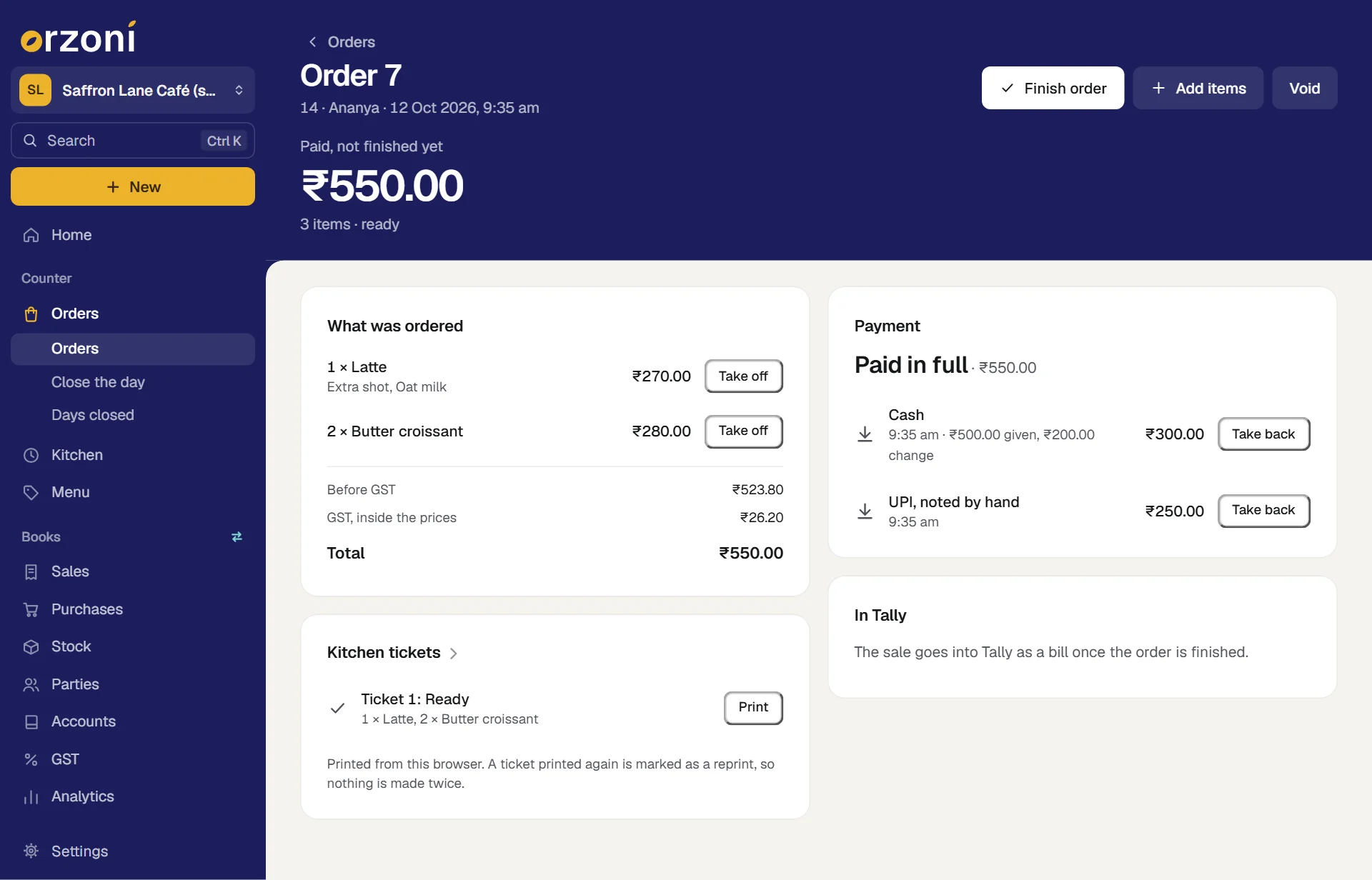
Press Finish order when the customer has what they ordered. The sale then goes into Tally, and Print the customer's slip prints a slip with each payment and the change on it. On the slip a UPI or card payment reads as recorded at the counter.
Any split works
However the payment is divided, the steps are the same. Splitting the bill itself, with a bill for each person, is not built: take an order for each person instead. Record one payment, read what is left, record the next.
| The customer wants | What to do |
|---|---|
| All of it in cash | Leave Amount as it is, type the money handed over, and record |
| All of it by UPI or card | Press UPI or Card, leave Amount as it is, and record |
| Part cash, part UPI | As above: the cash first, then the rest |
| Two people paying half each | Type half in Amount and record it, then record the other half. Each can pay a different way |
| Three ways at once | Record each in turn. There is no limit on how many payments an order takes |
One order makes one bill, however many payments it took.
UPI and card are noted by hand
A UPI or card payment is recorded by the person serving. Orzoni does not ask a bank or a payment company whether the money arrived.
- Check first, then record. Look at your own phone or card machine. The screen says the same under the boxes.
- A reference proves nothing by itself. It is kept as you typed it, to help find the payment later.
- It is marked for what it is. On the order, on Today, at the day's close and in the note of its receipt in Tally, a UPI or card payment reads noted by hand. Cash carries no such mark.
- Your accountant checks them against the bank. Each lands in the ledger you chose for it under Settings, Counter, so the day's UPI and card totals can be set against the bank's own statement.
- You can check the day's total yourself. When you close the day, there is a box beside UPI and beside card for the total you read off your own phone or card machine. It is kept beside what staff recorded, as what you read. It is not a bank settlement. See Close the day.
Taken today, on Today, adds up the day by cash, UPI and card, as recorded at the counter. Once a day has been closed it reads Money since the last close.
Put right a payment recorded by mistake
Before the order is finished, a payment is taken back.
- On the order's Payment card, press Take back beside the payment.
Orzoni asks why. Type a few words, such as "typed 350, meant 250".
A small message says Taken back. The payment stays on the order, marked taken back with your reason, and no longer counts. What is left to pay goes back up.
- Record the payment again, as it should have been.
Nothing is deleted. Anyone looking at the order later sees what was recorded, what was taken back, and why.
After the order is finished
Once an order is finished, its payments stay as they were recorded. The card says so: This order is finished: its payments stay as they were recorded. What went wrong is put right on the same page, on the card Put right, by someone who holds Put a finished order right.
| What went wrong | How it is put right |
|---|---|
| The customer was charged for something they did not get, or should have their money back | Hand the money back yourself. Then press Give money back, choose what it is for, how you returned it and why. A credit note and a payment out go into Tally |
| The whole sale should not stand | Give money back, with Everything left on the order chosen |
| The right amount, recorded as the wrong way of paying, such as cash where it was UPI | Put a payment right: say what it was recorded as, what it really was, and what happened. A transfer between the two ledgers goes into Tally, and the day's cash follows |
Orzoni returns no money itself. Recording that money was given back is a record of what you did by hand.
The order itself stays as it was finished, so the counter's record and the books can always be compared. Put a finished order right has each of these step by step.
If something stops you
| Orzoni says | What to do |
|---|---|
| Enter the amount paid. | Type an amount above zero |
| Only a sum is left to pay. A UPI payment cannot be for more than that. (or a card payment) | Type what is left, or less. Only cash can be handed over in excess, and the rest is change |
| The cash handed over cannot be less than the amount paid. | Correct Cash handed over, or leave it empty |
| This order is already paid in full. | Nothing more is owed. Someone recorded the last payment on another screen |
| More has been paid than the order would then come to. Take a payment back first. | You are taking something off a paid order. Take a payment back, take the line off, then record the right amount |
| Money has been taken against this order. Take each payment back first, then void it. | An order with payments is not voided. Take each back, then press Void |
Pressing Record payment twice records one payment.
What it does to your data and to Tally
- Each payment is kept on its order: how it was paid, the amount, the cash handed over and the change, the reference as typed, who took it and when.
- Nothing reaches Tally when a payment is recorded. When the order is finished, the payments that stand become receipts in Tally: one for each way the order was paid, however many payments were taken that way, set against the order's sales bill and paid into the ledger for that way of paying.
- A payment taken back makes nothing in Tally.
- A payment put right on a finished order makes one transfer in Tally, and leaves the receipt as it was.
- Payments can be recorded while the computer that runs Tally is off. They need this device to be online.
What next
- Café receipts, and how a sale reaches Tally: what finishing the order does.
- Put a finished order right: after the order is finished.
- Close the day: the day's money, counted.
- Take a café order.
- Record a payment: money for a bill made in the bill form, which is another thing.
Still stuck? Write to orzoni.official@gmail.com and say which step you are on, or book a walk-through call.