

On this page
Plan and billing
Your 7 free days, the two plans, how to choose one and when the first payment is taken, how it renews and how to stop it, changing plan, what you have paid, who may do what, how many companies a plan covers, and what happens when nothing is paid.
8 minute read
Where it is
Open Settings, then Plan and billing. On a phone, open the menu at the top right, then Settings, then Plan and billing.
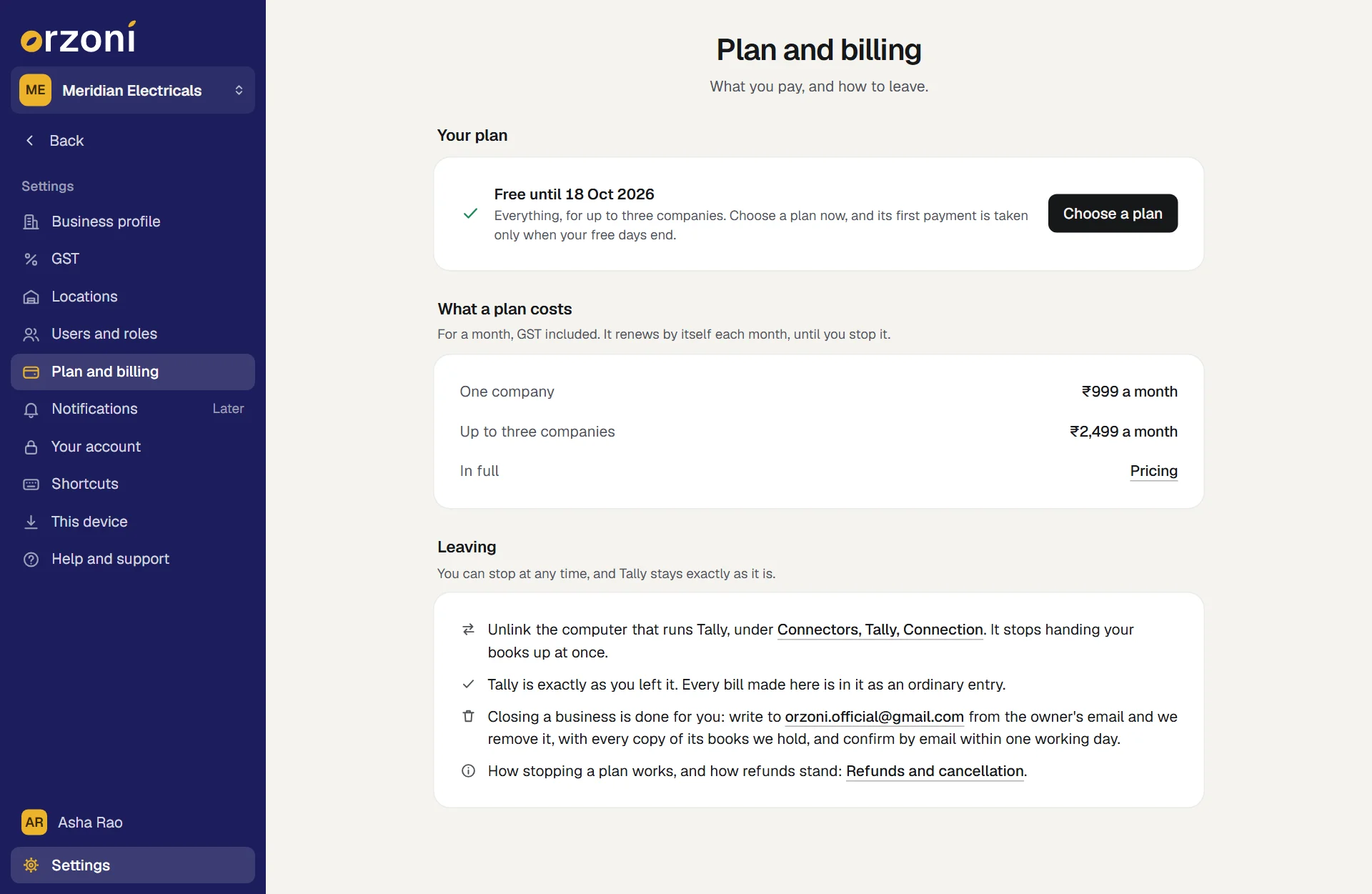
| Part | What is there |
|---|---|
| Your plan | How your plan stands, in one line, with the button for what comes next |
| What a plan costs | The two plans and what each costs for a month, GST included |
| What you have paid | Each payment, with its id. Shown once there is one |
| Leaving | How to stop, and what stays as it is |
Everyone in the business can open the screen and see how the plan stands. Choosing a plan, and the rest, is for some: see Who may do what.
The free days
A business's first 7 days are free, counted from the day it was opened. Everything is included, for up to three companies, and no card is asked for.
While they run, Your plan reads Free until the day they end. You can choose a plan on any of those days: its first payment is taken only when they end.
The two plans
After the free days a business pays by the month. Both plans hold the whole of Orzoni. They differ only in how many Tally companies they cover.
| Plan | For a month | Covers |
|---|---|---|
| One company | ₹999, GST included | One company from Tally |
| Up to three companies | ₹2,499, GST included | Two or three companies from Tally, each with its own books |
Both include a sign-in for everyone on your team and connecting one Shopify store. A plan is priced by companies, not by people: the staff and the accountant you invite cost nothing extra.
The plans in full, row by row, are on the pricing page.
Choose a plan
Open Settings, then Plan and billing, and press Choose a plan.
A page of its own opens, headed Choose your plan. The line under the heading says how your business stands: until when your free days run, or until when it is paid.
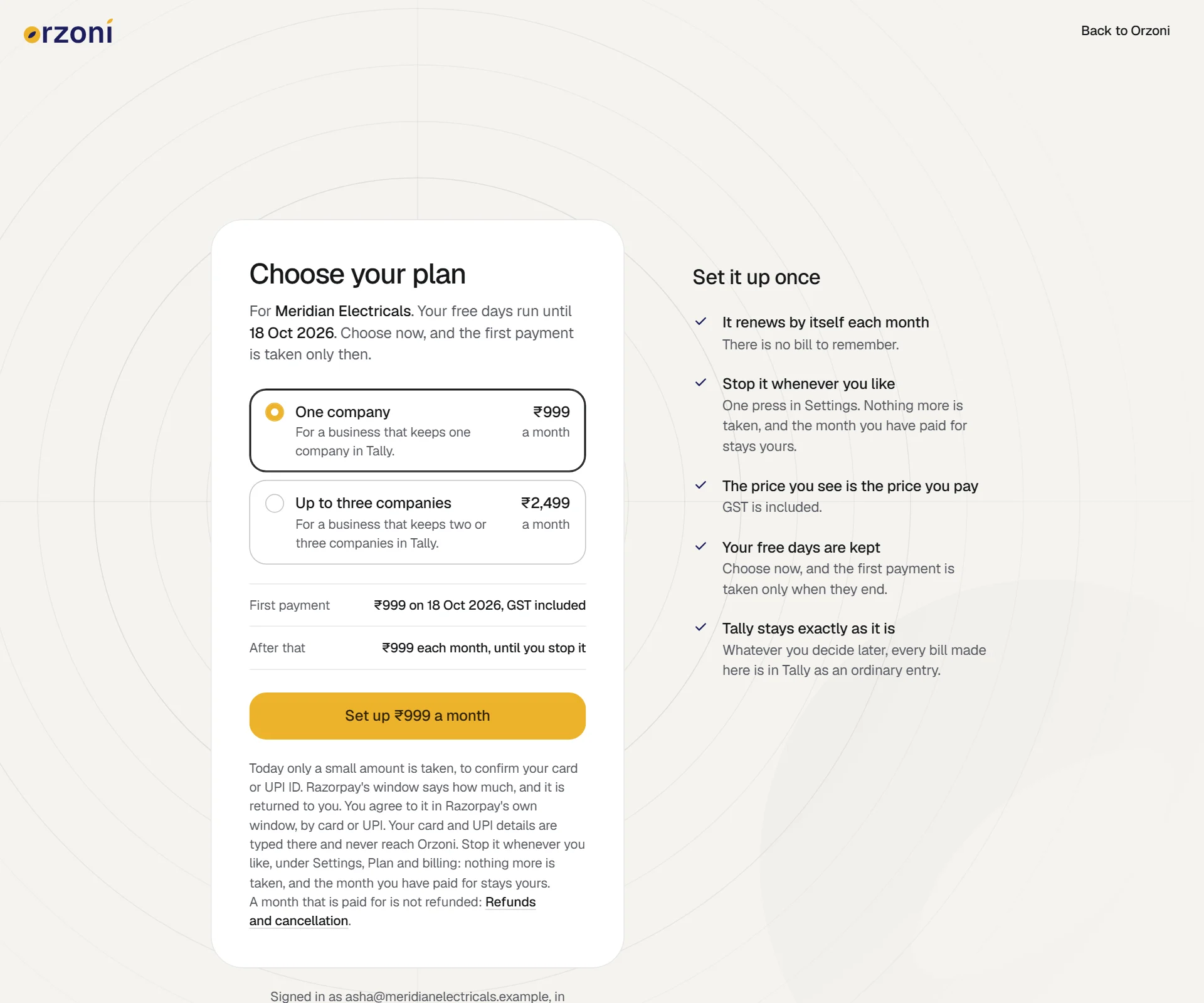
The page headed Choose your plan: One company at ₹999 a month and Up to three companies at ₹2,499 a month, the lines First payment and After that, and the button under them. Beside the card, Set it up once says the plan renews by itself, can be stopped whenever you like, and that GST is included. Pick One company or Up to three companies.
Two lines under the plans follow your choice. First payment says how much and on which day. After that says how much is taken each month, until you stop it.
Press the button under them. It is named for what it does:
The button reads When Set up ₹999 a month The first payment falls on a later day, as it does in the free days Pay ₹999 a month The first payment is taken today Change to ₹2,499 a month A plan renews already, and you are choosing the other one The payment window opens over the page. It is Razorpay's own window. Pay there by card or UPI, and agree to be charged each month.
Your card and UPI details are typed in that window and never reach Orzoni.
The page changes to You're all set. It names your plan, and under it:
Line What it says First payment or Next payment The day the next payment is taken Each month The amount, GST included Payment ID The id of the payment, when one was taken today - Press Open Orzoni.
The plan now shows under Settings, Plan and billing. A payment taken today is listed under What you have paid within a minute.
When the first payment is taken
| You choose a plan | The first payment is taken |
|---|---|
| In your free days | On the day the free days end. First payment on the page names the day |
| After the free days, with nothing paid for | There and then |
| While a month you have paid for is still running | On the day that month ends |
It renews by itself
A plan renews each month until you stop it, so there is no bill to remember. Your plan always says where it stands.
| Your plan reads | Meaning |
|---|---|
| Free until 18 Oct 2026 | The free days are running and no plan is chosen yet |
| Free until 18 Oct 2026, then One company | A plan is chosen. Its first payment is taken on that day |
| One company, renews on 18 Nov 2026 | Paid for until that day. The next payment is taken then, and each month after |
| One company until 18 Nov 2026, then Up to three companies | You changed plan. The other takes over on that day |
| One company, paid until 18 Nov 2026 | You stopped it. It does not renew, and nothing more is taken |
| One company: the last payment did not go through | The payment company tries again by itself, and has written to you with a way to pay. Nothing is needed in Orzoni once it goes through |
| Your free days ended on 18 Oct 2026, or Your plan has ended | Nothing is paid for now. Choose a plan to carry on. The line under it says until which day Orzoni stays open |
Stop it renewing
- Open Settings, then Plan and billing.
- Press Stop renewing, beside Your plan.
- A box asks once more. When a month is already paid for, it says until which day you stay on that plan. Confirm.
You see Stopped. Nothing more will be taken. It is stopped at once. The time you have already paid for is kept, and Your plan reads paid until that day. To carry on later, press Choose a plan: the plan chosen then begins where the paid time ends.
A plan stopped in the free days, before the day of its first payment, never takes that payment.
A month that is paid for runs to its end and is not refunded. How refunds stand is on the Refunds and cancellation page.
Change plan
- Open Settings, then Plan and billing.
- Under What a plan costs, on the line Another plan, press Change plan.
- Pick the other plan and press the button under it, which now reads Change to ₹2,499 a month or Change to ₹999 a month. You agree to it in Razorpay's window, as before.
The other plan takes over when the time you have already paid for ends. The page names the day. Nothing more is taken for the plan before it, and until that day everything stays as it is.
- To the smaller plan: One company can be chosen only while one company is linked. It holds the business to one company from the moment it is chosen.
- To the larger plan: it covers three companies from the moment you agree to it, so a second or third company can be added straight away. Its first payment is still taken only when the time you have already paid for ends.
What you have paid
What you have paid lists each payment: the day it was taken, the plan, the day it pays up to, the amount, and the payment company's id for it. Quote that id if you ever write to us about a payment.
The list is shown to whoever may pay, once there is a payment to show.
Who may do what
| Who | What they can do |
|---|---|
| Everyone in the business | Open Plan and billing and see Your plan, What a plan costs and Leaving |
| Whoever holds the permission Plan and billing | Choose a plan, Change plan and Stop renewing, and see What you have paid |
The Owner and every Admin hold Plan and billing to begin with. No other role starts with it. To give it to someone, open Settings, Users and roles, press the person, switch on Plan and billing under What they can do ("Choose or change the plan, see what was paid, and stop it renewing"), and press Save. See Users and roles.
Someone without it sees, under Your plan: "Paying for the plan is kept for the owner and the people they have allowed." If they open the page where a plan is chosen, it is headed Paying is kept for the owner.
How many companies a plan covers
| When | Companies you can link |
|---|---|
| In the free days, with no plan chosen | Up to three |
| Once One company is chosen | One, from the moment it is chosen |
| Once Up to three companies is chosen | Up to three |
Connectors, Tally, Connection says how many your account covers, under the list of companies: "Your account covers 3 companies."
At the limit, one more company is not added. The Tally connector says so on the computer that runs Tally, for example: "Your plan, One company, covers one company, and one is linked. To add (the company), choose a larger plan on the web under Settings, Plan and billing, or remove a company under Connectors, Tally, Connection." Then either:
- Change plan, as above, or
- remove a company you no longer need: Connectors, Tally, Connection, Remove beside the company. Read Several companies first: removing a company takes its books off the web.
The other way round, One company is not offered while two or more companies are linked. On the page where a plan is chosen it is greyed out, with "You have 2 companies linked, so this plan does not cover them."
When nothing is paid
Nothing closes on the day your time runs out.
- Three more days. After the free days end, or a paid month ends with nothing renewing, Orzoni stays open for three more days. Your plan names the day: "Orzoni stays open for you until" that day.
- Then it waits. After that day Orzoni is closed for that business until a plan is paid for. Signing in leads to the page where a plan is chosen, headed Choose a plan to carry on.
- It opens again at once. The moment a plan is paid for, everything is open as it was.
While it waits:
- Your books are kept safe, exactly as you left them. Nothing is removed.
- The Tally connector keeps handing your books up, so they are current when Orzoni opens again.
- Tally is as it always was. Every bill made in Orzoni is in it as an ordinary entry.
- Someone who may not pay sees Orzoni is waiting for a plan, and is asked to tell the owner.
- Someone who belongs to another business as well is offered it at the foot of the page.
To reach us while a business is closed, write to orzoni.official@gmail.com.
The email that follows
When a plan is agreed to, an email goes to whoever chose it and to the owner. It holds:
- what the plan gives you
- a button, Download the Tally connector, which always fetches the newest version
- the plan, the amount each month, and the day the first payment is taken, or that it was taken today
- who chose the plan
If the connector is already installed and linked, there is nothing more to do.
Leaving
You can stop at any time, and Tally stays exactly as it is.
- Press Stop renewing, so nothing more is taken.
- Unlink the computer that runs Tally, under Connectors, Tally, Connection. It stops handing your books up at once. See The Tally connector on your computer.
- To have the business closed and every copy of its books we hold removed, write to orzoni.official@gmail.com from the owner's email. We confirm by email within one working day.
Every bill made in Orzoni stays in Tally as an ordinary entry. What happens to your books afterwards, and how refunds stand, is on the Refunds and cancellation page.
If something does not go as expected
| What you see | What it means | What to do |
|---|---|---|
| "The payment window could not be loaded." | Razorpay's window did not arrive in this browser | Check your connection, switch off anything that blocks scripts on that page, and reload it |
| "Nothing was set up, and nothing was charged. Press the button when you are ready." | The payment window was closed before you agreed | Press the button again when you are ready |
| "That did not go through", with a reason, and "Nothing was charged." | Your bank or the payment company turned the payment down | Press the button to try again, or use another card or UPI ID |
| "Your payment went through", with its id, "and is being confirmed." | The payment arrived and is being checked | Reload the page in a minute. Nothing more is needed from you |
| "That payment could not be confirmed, so nothing has been counted as paid." | What came back from the payment window could not be proven | If money left your account, write to orzoni.official@gmail.com with the payment id and we put it right |
| "The payment could not be opened just now. Nothing was charged." | The payment company could not be reached | Try again in a moment |
| "The payment could not be opened. Nothing was charged.", with our address | The payment could not be set up | Write to orzoni.official@gmail.com and we put it right |
| "Too many tries. Wait a little and try again." | The button was pressed many times within an hour | Wait, then try once |
| A plan is greyed out, with "You have 2 companies linked, so this plan does not cover them." | More companies are linked than that plan covers | Choose the larger plan, or remove a company first |
| A plan is greyed out, with "Your plan now." | That plan renews already | Nothing. Pick the other plan only if you mean to change |
| You are already set | The plan you asked for renews already, and there is nothing to pay | Press Back to Orzoni |
| Paying is kept for the owner | You do not hold Plan and billing | Ask the owner to choose the plan, or to switch Plan and billing on for you |
| "It could not be stopped just now, and nothing has changed." | The payment company could not be reached to stop the plan | Try again in a moment, or write to us and we stop it for you |
| The last payment did not go through, under Your plan | A month's payment was not taken | The payment company tries again by itself and has written to you with a way to pay |
What next
- Users and roles: who holds Plan and billing.
- Several companies: add, switch between and remove companies.
- Get help: how to reach us.
- Where your data is kept.
Still stuck? Write to orzoni.official@gmail.com and say which step you are on, or book a walk-through call.