

On this page
Close the day at the counter
How to close the day at a café's counter. What a day is, the starting cash, cash put in and taken out, counting the drawer, what should be in the drawer and when no difference is worked out, the UPI and card totals you checked yourself, orders carried over, who may close, approve a difference or open a close again, and what a close keeps for your accountant.
10 minute read
What closing the day is
When the counter shuts, someone counts the drawer and presses Close. Orzoni then keeps the day as it stood at that moment: what was sold, the money staff recorded by cash, UPI and card, the cash counted against the cash that should be there, the orders still open, and how the day's sales stood with Tally.
That record does not change afterwards. Whatever is done the next morning shows in the next day, and yesterday's close still says what it said.
Closing does not stop the counter. Orders go on being taken and paid while you count.
Who this is for
| To do this | You need | Roles that start with it |
|---|---|---|
| Close the day, record the starting cash, record cash put in or taken out, add a note to a close | Close the day | Shift manager, Admin, Owner |
| Approve a close whose cash did not agree, and open a closed day again | Approve a cash difference | Admin, Owner |
| Read the days already closed, and save one as a spreadsheet | Close the day, or See figures and reports | Shift manager, Accountant, View only, Admin, Owner |
Counter staff take orders and payments, and do not close the day. A Shift manager does everything counter staff do, closes the day, and puts a finished order right, but does not approve a cash difference. So the person who counts the drawer and the person who accepts a shortfall can be two people. Any of the three switches can also be turned on for one person. See Users and roles.
The café counter is a pilot, open to a few businesses while it is being tried.
What a day is
A day runs from one close to the next. That is the whole rule, and every figure on Today, on the close screen and in a close's file follows it.
- Closing is what ends a day, whatever the clock says. A café that shuts at half past midnight closes then, and that night's last sales are in the day it closed.
- A close is named for the day it is made on. A close made before 6 in the morning is named for the day before, because that day's trade ran past midnight.
- Each thing is in one close, and no other. A finished sale, a payment, a payment taken back, money given back, and cash put in or taken out are each counted once. What is recorded after the moment of closing, even a second later, belongs to the next day.
- A sale is of the day it was finished. Money is of the day it was recorded. An order taken before a close and paid after it is in the next day's sales and the next day's money.
- Before you have ever closed a day, Today shows the calendar day, midnight to midnight. Your first close begins at the start of the day it is named for.
Once a day has been closed, the top of Today stops saying Sold today. It reads Sold since the last close, with the day and time of that close under the heading, and Taken today becomes Money since the last close.
Open the screen
Press Close the day, at the top of Today. It is also under Counter, Orders at the side, with Days closed beneath it.
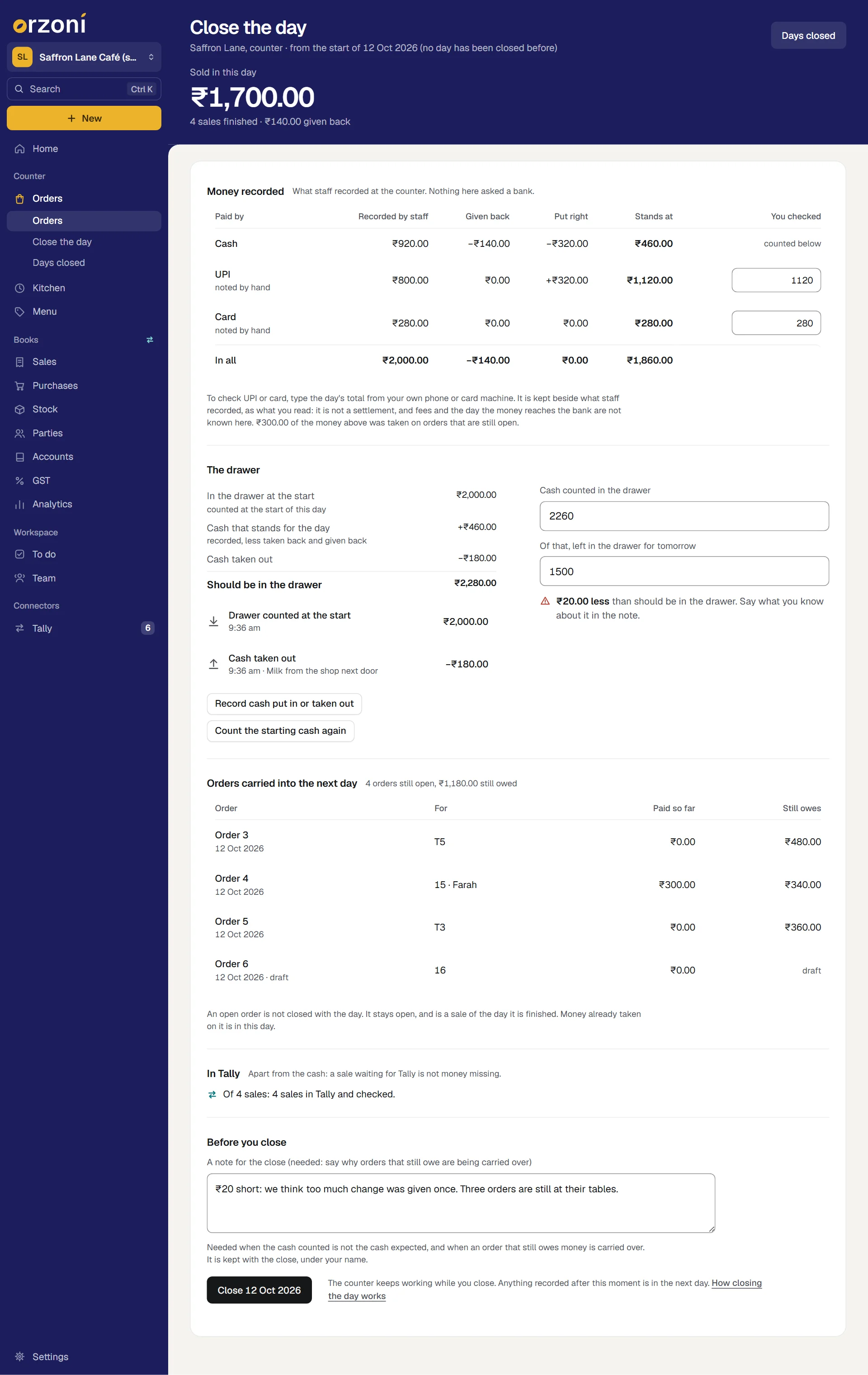
The page is headed Close the day. Under the heading it says where this day began: since the last close, with its day and time, or from the start of a day, (no day has been closed before). The large figure is Sold in this day, with how many sales were finished and anything given back.
The sheet reads from top to bottom, in the order you work.
Step 1: record the starting cash
Do this at the start of the day, before the first sale. It is what lets Orzoni say what should be in the drawer at the end.
On Close the day, under The drawer, press Record the starting cash.
A sheet opens, headed The cash the drawer starts with.
- Count the drawer, and type what is in it under Amount. Add A note, if you want one.
Press Record the starting cash.
A small message says The starting cash is recorded. The line In the drawer at the start now carries the amount, with counted at the start of this day under it.
From your second day on you need not count again. What you said you left in the drawer at the last close is carried over, and the line reads left in the drawer at the last close. If you do count, press Count the starting cash again, and your count is used.
If nobody recorded the starting cash
You can still close. But Orzoni then calls nothing "expected", because cash recorded is not the same as cash in a drawer. The screen says so:
Nobody has said what the drawer began with, so the cash recorded cannot be called the cash that should be in it, and no difference will be worked out. Record the starting cash to have one. You can still close.
The last line of the sums reads Cash recorded for the day in place of Should be in the drawer, and the close is listed afterwards as No starting cash.
Step 2: record cash put in or taken out
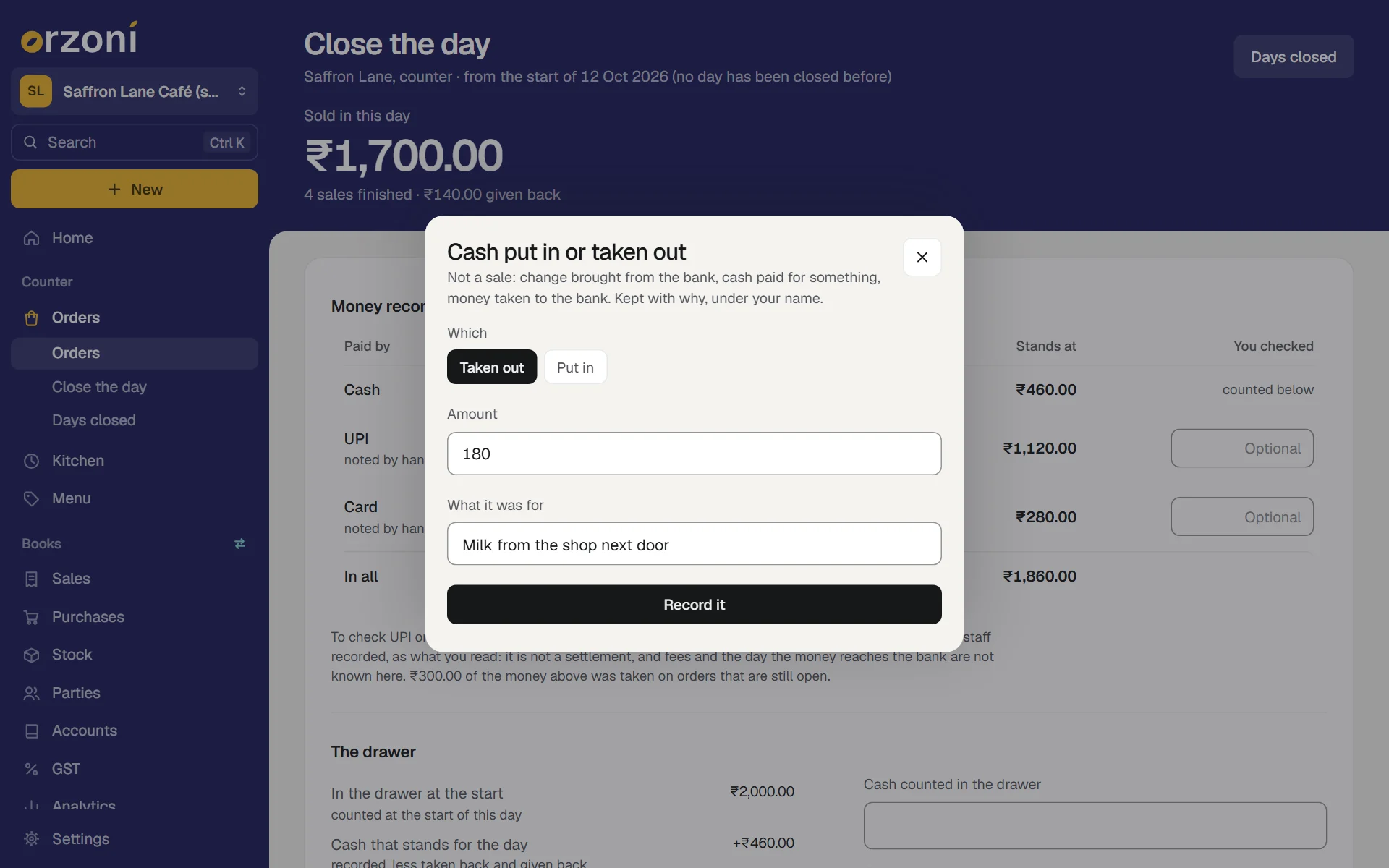
Cash that enters or leaves the drawer and is not a sale: change brought from the bank, milk paid for from the till, money taken to the bank.
- Under The drawer, press Record cash put in or taken out.
- Under Which, press Taken out or Put in.
- Type the Amount, and say What it was for in a few words. A reason is needed.
Press Record it.
A small message says, for example, ₹180.00 taken out is recorded. It joins the list under the sums, with the time, who recorded it and why.
Record each as it happens, not from memory at night. The drawer's sums are only as right as this list.
Step 3: read the money recorded
Money recorded is a table of what staff recorded at the counter, by the way it was paid. Under its heading it says What staff recorded at the counter. Nothing here asked a bank.
| Column | What it is |
|---|---|
| Recorded by staff | Every payment recorded in this day |
| Taken back | Payments taken back in this day, before their order was finished |
| Given back | Money given back on finished orders in this day |
| Put right | A payment recorded as one kind that was really another: taken off one row and added to the other |
| Stands at | What is left under that way of paying, after the columns before it |
| You checked | For UPI and card, a box for a total you read yourself. For cash it says counted below |
Taken back, Given back and Put right are shown only when they have something in them. Put a finished order right explains Given back and Put right.
Two lines under the table explain what would otherwise look odd:
- An amount was taken on orders that are still open. That money is in this day's drawer, and its sale comes when the order is finished.
- An amount of this day's sales was paid on an earlier day. It is in that day's money.
That is why Stands at, added up, need not equal Sold in this day. In the picture, ₹1,860.00 stands in all against ₹1,700.00 sold: ₹140.00 was given back, and ₹300.00 was taken on an order still open.
A UPI or card total you checked yourself
The boxes under You checked are optional. To use one, add up the day's UPI on your own phone, or read the day's total off your card machine, and type it.
It is kept beside what staff recorded, as what you read, with the difference between the two.
- It is not a bank settlement. Orzoni asks no bank and no payment company. Fees, and the day the money reaches your account, are not known to it.
- It does not change what staff recorded. Both figures are kept, side by side.
- A difference here does not stop the close, and needs no note. It is there for you and your accountant to follow up against the bank's own statement.
Step 4: count the drawer
- Count the cash in the drawer.
- Type it under Cash counted in the drawer. If the drawer is empty, type 0.
- Under Of that, left in the drawer for tomorrow, type what you are leaving in. It cannot be more than you counted. It becomes tomorrow's starting cash.
The line under the boxes tells you where you stand as you type.
| It says | What it means |
|---|---|
| The cash agrees: ₹2,280.00 counted, as expected. | The count matches |
| ₹20.00 less than should be in the drawer. Say what you know about it in the note. | The count is short. more in place of less when it is over |
| A count, then No difference is worked out without the starting cash. | Nobody recorded what the drawer began with |
What "Should be in the drawer" means
It is a sum, shown line by line on the left:
| Line | In the picture |
|---|---|
| In the drawer at the start | ₹2,000.00 |
| Cash that stands for the day: cash recorded, less taken back and given back, with any payment put right | +₹460.00 |
| Cash put in | none |
| Cash taken out | −₹180.00 |
| Should be in the drawer | ₹2,280.00 |
Only cash is in it. UPI and card money never enters the drawer.
Step 5: look at the orders carried over
Orders carried into the next day lists every order still open, by number, with who it is for, what has been paid so far and what it still owes. A draft is listed as a draft.
An open order is not closed with the day. It stays open, and becomes a sale of the day it is finished. Money already taken on it is in this day.
If you can, finish or void what should not be left open before you close. Where an order that still owes money is carried over, the close asks you to say why in the note.
Step 6: read how the sales stand with Tally
In Tally says how many of the day's sales are in Tally and checked, how many are waiting to go in, and how many need someone, each of those listed with its reason.
It is said apart from the cash on purpose. A sale waiting for Tally is not money missing, and a drawer that is short is not a fault in the books. Tally being closed, or its computer being off, does not stop you closing the day: the close writes down how things stood with Tally, and the sales go in by themselves when Tally is back.
Step 7: write the note, and close
Under Before you close, type A note for the close.
A note is needed in two cases, and the label says so when one applies:
When Orzoni says The cash counted is not the cash expected The cash does not agree. Say in a few words what you know about the difference, then close. An order that still owes money is carried over Orders that still owe money are being carried over. Say in a few words why, then close. Otherwise the note is yours to use or leave empty. It is kept with the close, under your name.
Press Close, which carries the day's name: Close 12 Oct 2026.
A small message says 12 Oct 2026 is closed. The close's own page opens.
Anything recorded after that moment is in the next day.
What a close keeps
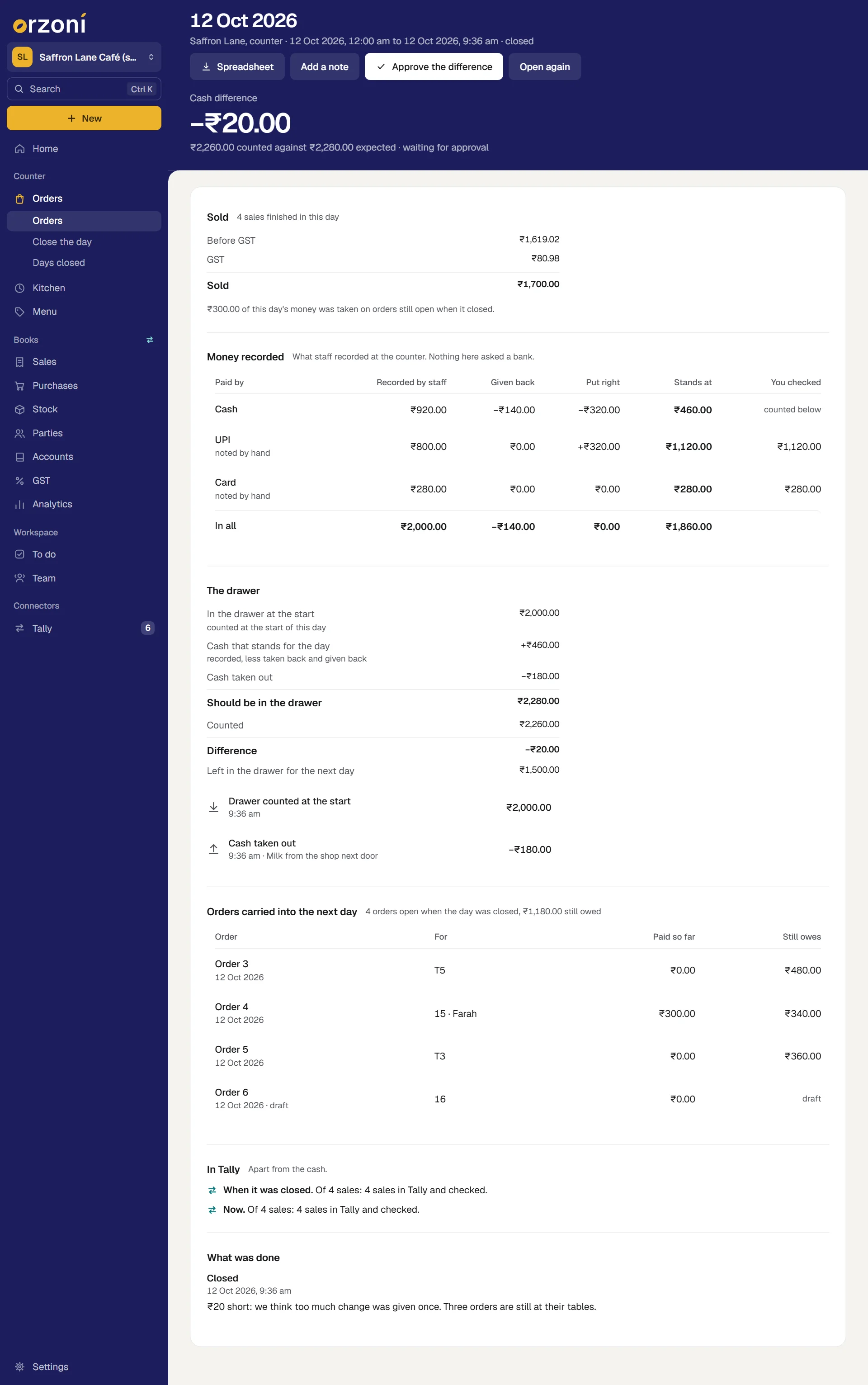
The close's page is headed with its day. Under the heading: the outlet, when the day began and ended, and who closed it.
| Part | What it holds |
|---|---|
| The figure at the top | Cash agreed, Cash difference or Cash counted, with what was counted against what was expected |
| Sold | The day's finished sales: before GST, GST, and the total |
| Money recorded | The same table as on the closing screen, with what you checked for UPI and card, or not checked |
| The drawer | The starting cash, the sums, what was counted, the difference, what was left for the next day, and each amount put in or taken out with its reason |
| Orders carried into the next day | Each order that was open when the day closed, with what it owed |
| In Tally | Two lines: When it was closed, and Now |
| Since it was closed | Anything done later to a record this close counted. See below |
| What was done | Who closed it and when, with the note, and every approval, note or reopening since |
It never changes afterwards
The figures of a close are kept as they stood, and nothing rewrites them.
- In Tally has two lines for that reason. When it was closed stays as it was. Now shows how the same sales stand today, so a sale that reached Tally the next morning shows there, and the close itself is unchanged.
- Since it was closed appears when something was done later to a record the close counted: a payment taken back the next day, money given back on one of its sales, a payment put right. Each is listed with its amount, its order, when and why, under the words None of this changes the close above. That money is counted in the day it was recorded.
Approve a difference
A close whose cash did not agree waits for someone who holds Approve a cash difference. Until then it is listed under Days closed as Difference to approve, and its page says waiting for approval.
- Open the close, and press Approve the difference.
Orzoni asks what was found, or what was decided. Type it. Words are needed.
A small message says Approved. The answer is kept with the close under your name, and the close is listed as Difference approved.
Approving changes no figure. It records that someone allowed to has looked.
Add a note to a close
Something learnt later can be said without changing the close.
- Open the close, and press Add a note.
Type the note.
It is added under What was done, with your name and the time.
Open a close again
Where a day was closed wrongly, for example before the last orders were finished, it can be counted and closed afresh. It needs Approve a cash difference.
- Open the close, and press Open again.
Say why. A reason is needed.
A small message says Opened again. Count and close it afresh. The closing screen opens, with a line at its head saying the day was closed, by whom, that it was opened again, and why.
- Count and close as before.
Nothing is thrown away. The earlier close is kept exactly as it was, tagged Opened again, and no longer stands. The close made in its place keeps the day's name and is tagged Closed again.
Only the newest close can be opened again, because every day after it began where it ended. On an older one Orzoni says so, and asks you to add a note to it instead, saying what is wrong.
Days closed
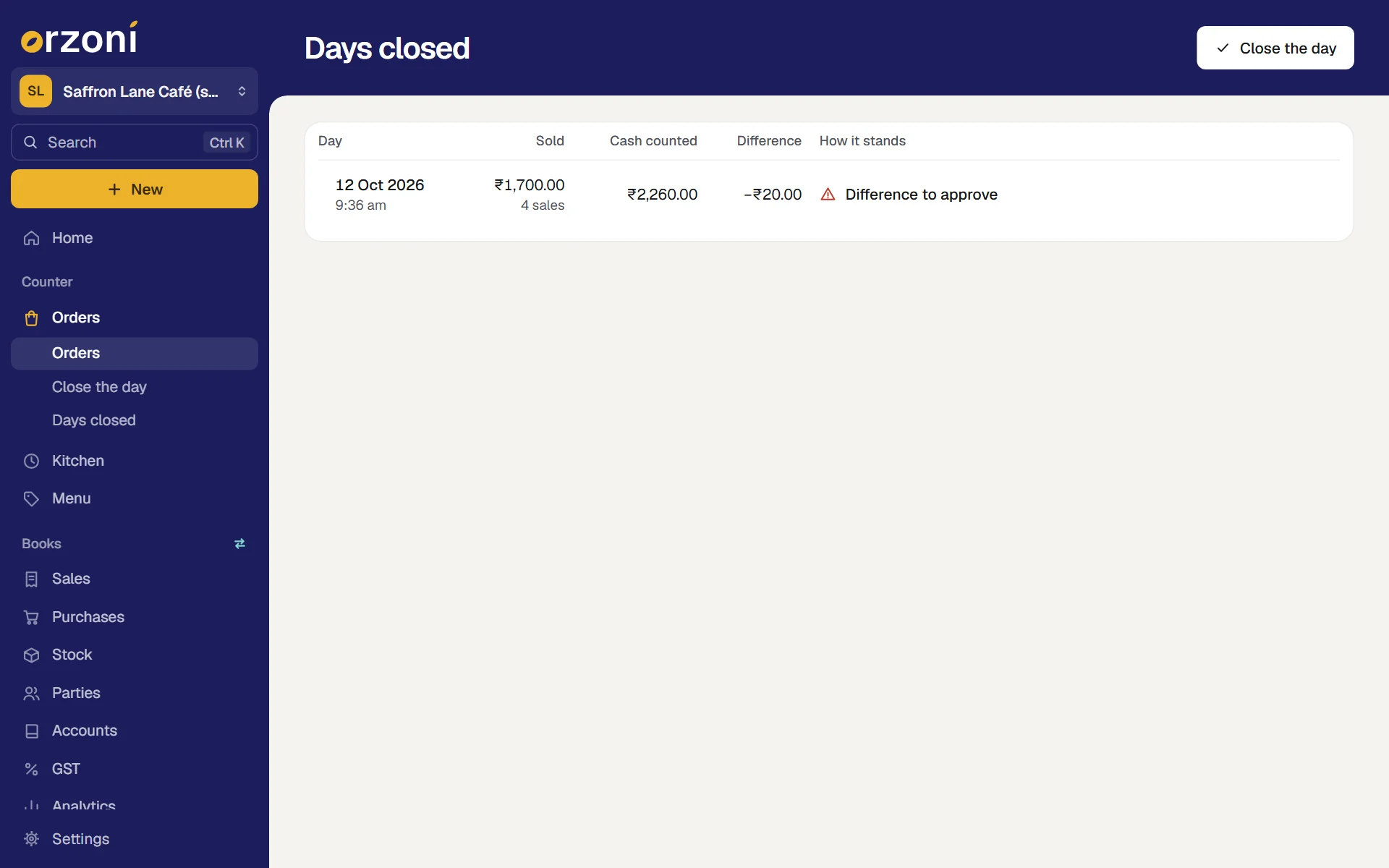
Days closed, under Counter, Orders at the side, lists every close, newest first.
| Under How it stands | What it means |
|---|---|
| Cash agreed | The count matched what should have been in the drawer |
| Difference to approve | The cash did not agree, and nobody allowed to has approved it |
| Difference approved | The cash did not agree, and it was approved |
| No starting cash | Nobody recorded what the drawer began with, so no difference was worked out |
| Opened again | This close no longer stands. The one made in its place is in the list too, tagged Closed again |
Press a row to open that close.
The Spreadsheet file, for your accountant
On a close's page, press Spreadsheet. A file is saved, named for the close's day and your company. It opens in any spreadsheet program.
The first lines are the close itself: what was sold, what stands under cash, UPI and card, the cash expected, the cash counted and the difference, with the note. For UPI and card the line says recorded by staff, not confirmed by a bank.
Under them is every record the close counted, one to a line:
| Line | What it carries |
|---|---|
| Sale | The order's number and day, when it was finished, the customer's name if one was given, the bill's reference, the total, and how the sale stands in Tally now, with Tally's number for it |
| Payment, and Payment taken back | The order, when, who recorded it, cash, UPI or card, the amount, and any reference as it was typed |
| Money given back, and Payment put right | The order, when, who, how, the amount and the reason |
| The starting cash, and each amount put in or taken out | When, who, the amount and the reason |
Every figure at the top can be added up again from the lines under it. That is how an accountant sets a day against the books:
- Sales against Tally. Each sale line carries its bill's reference and Tally's number, so it can be found in the Day book. A sale that is not in Tally says so on its line, with the reason.
- Cash against the cash ledger. The cash that stands for the day, with what was put in and taken out, against what was counted.
- UPI and card against the bank. What stands under each, and the total you checked if you typed one, against the bank's own statement. The bank's figure will differ by its fees, and may arrive on a later day.
If something stops you
| Orzoni says | Why | What to do |
|---|---|---|
| Enter the cash counted in the drawer. If there is none, enter 0. | The count is empty | Type the count |
| What is left in the drawer for tomorrow cannot be more than the cash counted. | The second box is larger than the first | Type what you are really leaving in |
| The cash does not agree. Say in a few words what you know about the difference, then close. | The count does not agree and the note is empty | Count again. If it still differs, write what you know in the note, and close |
| Orders that still owe money are being carried over. Say in a few words why, then close. | An unpaid order is still open and the note is empty | Finish or void the order if it should not stay open. Otherwise say why in the note, and close |
| This day was already closed, with who closed it | Someone else closed it while this screen was open | Press Open that close to see it. Nothing you typed is lost |
| The day has moved on since this screen was opened. Look at it again, then close it. | A close was opened again meanwhile | Press look at the day again, then close |
| This did not reach Orzoni, so it is not known whether the day was closed. | The connection dropped as you pressed | Check the connection, then press Close again. The same close is not made twice |
| Only the newest close can be opened again | You pressed Open again on an older close | Add a note to it instead |
| The cash in this close agreed: there is nothing to approve. | There was no difference | Nothing |
Mistakes you can undo
| The mistake | How to put it right |
|---|---|
| The wrong starting cash | Count the starting cash again, before closing. The latest count is used |
| Cash put in or taken out typed wrongly | Record another the other way for the same amount, with a reason that says so. Each stays on the list |
| A wrong count typed, not yet closed | Type it again. Nothing is kept until you press Close |
| The day closed too soon, or with the wrong count | Open again, by someone who holds Approve a cash difference, then close afresh. The first close is kept, marked |
| Something learnt after closing | Add a note to the close |
What it does to your data and to Tally
- Kept in Orzoni: each close with its figures as they stood, the starting cash, every amount put in or taken out, the notes, and who did each thing and when.
- Nothing is sent to Tally by closing a day. The starting cash, cash put in and taken out, the count and the difference are Orzoni's own records. If cash taken out was an expense, your accountant enters that expense in the books as they do today.
- What reaches Tally is unchanged: each finished sale as a bill with its receipts, and each finished order put right as its own entries.
- Nothing is deleted. A close opened again is kept beside the one that replaced it.
What next
- Put a finished order right: where Given back and Put right come from.
- Café receipts, and how a sale reaches Tally: what the In Tally lines mean.
- Where your data is kept: what is kept about a day's close.
Still stuck? Write to orzoni.official@gmail.com and say which step you are on, or book a walk-through call.