

Why your store's stock does not match the godown, and how to find out
The eight usual causes of a Shopify count that disagrees with the shelf, how to find the first difference, and a weekly check that keeps them apart.
On this page
Sunday morning, shutters down, and two of you are doing the stock-take. Brass diyas: the store says 9, Tally says 5, and there are 3 in the rack. Three numbers for one item, and the store is offering nine diyas to anyone who wants them while you can pack three.
The short answer to "where did the count go wrong" is that it went wrong on a particular day, for one of about eight reasons, and both can be found. Each gap between two of those numbers has a first cause and a date. Find the date and the cause is usually obvious. Then correct in one direction only: the shelf corrects Tally, and Tally corrects the store.
This post is the diagnosis. The method for keeping the two together once they agree is in How to keep Shopify stock in step with your Tally godown.
Three numbers, and which one to believe
There are three counts of every item, and they are not equals.
- The shelf is the fact. It is what you can pick up and pack.
- Tally is the record. It is what the purchases, sales, returns and write-offs you entered add up to.
- The store is a copy. It shows buyers a number that someone, or something, put there.
So the diya has two gaps, not one, and they are different problems.
The gap between the store and Tally (9 against 5, a difference of 4) means something happened to the copy. A number was typed, a message was lost, a refund put pieces back.
The gap between Tally and the shelf (5 against 3, a difference of 2) means something happened to the goods that never reached the books. Pieces broke, went out as samples, or were sold on a bill nobody entered.
Keep the two apart and the work halves. The natural thing in this spot is to compare the store with the shelf, see a difference of 6, and go looking for one mistake worth six. There isn't one. There is a four and a two.
The symptoms, and where each one points
You rarely start from a stock-take. You start from something going wrong.
| What you see | Which gap it is | Look first at |
|---|---|---|
| An order you cannot fulfil | Store above the shelf | Causes 1, 3, 4 and 8 |
| A listing at zero while pieces sit on the shelf | Store below the shelf | Causes 5, 6, and a purchase not entered |
| A count that never moves though the item sells | Store and Tally are not connected for it | Cause 5 |
| A difference that is a multiple of 6 or 12 | Store against Tally | Cause 2 |
| Many items wrong, all from the same day | Store against Tally | Cause 4 |
| The store showing more than the selling godown ever held | Store against shelf | Cause 6 |
| Shelf short, and nobody remembers selling it | Tally against shelf | Cause 7 |
The numbers refer to the eight causes further down.
Find the first difference
Do this for one item before you touch anything. The diya will do.
Get the store's history. Shopify keeps an adjustment history for every tracked variant. Open the product, open the variant, and in the Inventory section press View adjustment history. Each line shows the date, the activity ("the event that caused the adjustment") and who did it: "the staff member, app, or sales channel that made the adjustment". Shopify shows "only the last 180 days" there. For anything older, it points to the Inventory adjustment changes report, which can be filtered by SKU, location, staff member, app and reason.
Get the books' history. In Tally, open the Stock Summary and drill into the item. You reach its monthly summary, and from a month, the Stock Item Vouchers: every purchase, sale and journal that moved it, in date order.
Walk backwards from today. Put the two side by side and go back day by day until you reach a day on which they agreed. The day after that is the first difference.
Here is the diya's week:
| Day | Tally | Store | Gap |
|---|---|---|---|
| Monday | 12 | 12 | 0 |
| Tuesday | 11 | 11 | 0 |
| Wednesday | 11 | 11 | 0 |
| Thursday | 11 | 15 | 4 |
| Friday | 9 | 13 | 4 |
| Saturday | 7 | 11 | 4 |
| Sunday | 5 | 9 | 4 |
Two things stand out. The gap opens on Thursday. And it never changes afterwards: every sale from Friday onwards came off both sides correctly. That pattern means one event, on one day, worth four pieces.
Thursday's line in the store's history gives it away: four pieces added back when an order was refunded. The buyer had been refunded for four diyas that were still with the courier. The store put them back on sale. The godown never saw them, and Tally was never told anything, which in this case was correct.
Now the other gap. Tally says 5 and the shelf holds 3. Tally's vouchers for the item look clean, so the goods moved without a voucher. Ask in the godown: two diyas were dented when a carton was dropped on Tuesday, and went in the scrap bin. Nobody entered a stock journal.
Two causes, two dates, six pieces explained. It took one item and fifteen minutes.
A gap that grows week after week is a different animal. That is not one event. It is a rule being applied wrongly every time: a pack counted as one piece, a listing tied to the wrong item, a difference message that keeps getting lost.
The eight causes, each with its tell
Cause 1: returns and refunds
When you refund an order in Shopify, there is an option named Restock items. Shopify's help page says of it: "This option is selected by default." Cancelling an order works the same way: "The Restock inventory option is selected by default, which returns the canceled items to your inventory."
So the store's count goes up the moment the refund is pressed. It does not wait for the parcel to come back, and it does not know whether the piece is fit to sell again.
- The tell. A difference the size of one return, opening on the day of a refund. The store's history shows pieces added back.
- The fix. Make one rule: restock when the piece is back and checked, not when the money goes out. Shopify allows it: "If you want to restock your items manually, then deselect Restock items." And enter the credit note in Tally the day the goods return, so the books move with the shelf.
- With Orzoni. An order cancelled on the store leaves the list of orders waiting for a bill, and its units go back on the count. A refund is a credit note you make in Orzoni or in Tally. Once the store's counts follow Tally, a returned piece is back on sale when the credit note puts it back in the books.
Cause 2: bundles and packs
You keep diyas loose in Tally and sell them on the store singly and as a "Pack of 6". If the single listing and the pack listing each carry their own hand-typed count, they are counting the same pieces twice. Sell one pack and the pack listing falls by 1, while the single listing still offers the six pieces that just left.
The same thing happens in the books when a pack sale is billed as 1 piece instead of 6: Tally ends up five too high for every pack sold.
Shopify's own Bundles feature shows the right arithmetic. The number of bundles on sale is worked out from the components: divide each component's available stock by the quantity a bundle needs, round down, and take the lowest. Its example is a bundle of 2 chairs and 1 desk. With 15 chairs and 8 desks, the chairs allow 7 bundles and the desks 8, so 7 are offered.
- The tell. Differences in multiples of the pack: 6, 12, 18. Or in fives, if a pack was billed as a single piece.
- The fix. One count, in loose pieces. The pack listing shows whole packs only: 29 loose diyas are 4 packs, with 5 over.
- With Orzoni. A listing named as a pack is matched to the loose item with "one sale is 6". One order then takes six off the count, and the store is shown whole packs.
Cause 3: edits on the store
Somebody sees four kurtas on the rack, sees 0 on the store, and types 4 into the Shopify admin. It feels helpful. It is also how a lot of drift starts, because the books still say 0 and nobody has asked why.
- The tell. A round or convenient number, and a staff member's name in the adjustment history. The reason is often "Correction", which Shopify describes as "the default option when no other reason is selected". One caution: edits made in Shopify's bulk editor leave less behind. Shopify says "a record of your inventory movements isn't tracked when you use the bulk editor".
- The fix. A house rule that nobody types a count on the store. If the shelf and the store disagree, the question goes to whoever keeps Tally.
- With Orzoni. Under Send, and ask, a count someone changed on Shopify is not written over. The store's Health view shows both figures, such as "Shopify shows 20" and "Tally works out 11", with two buttons: Use Tally's count, or Correct Tally first if the store was the side that was right.
Cause 4: the shop computer was off
Tally lives on one computer. Whatever carries counts from it to the store, a person or a program, needs that computer on. Leave it off for a long weekend, or let it sleep through a sale evening, and every counter bill and purchase made in that time reaches the store late or not at all.
- The tell. Many items wrong at once, and when you walk each one back, they all part company on the same day.
- The fix. During a sale, leave the computer on with sleep switched off. After any outage, let the books catch up before you trust a count, and enter paper bills first.
- With Orzoni. While the computer is off, orders on the store still lower the counts. Tally's own changes follow when it is back, and the screen carries a line such as "Computer offline · as of 3:42 pm" for as long as it lasts.
Cause 5: an unlinked or doubly linked product
A new colour is added to the store on a busy day and never tied to a stock item. Its count is whatever was typed when it was listed, for ever.
The opposite mistake is two listings tied to one item: the same five pieces offered on both, ten in all. It often comes from two listings sharing one code, and Shopify's help page carries a warning about that: "Duplicate SKUs can cause issues with third-party integrations and inventory tracking."
- The tell. A count that never moves though the item sells. Or two listings that always show the same number.
- The fix. Every listing tied to exactly one item, and every pack with its own number to a sale. If your codes are the reason things do not link, One SKU for the store and the books is the fix for that.
- With Orzoni. A listing with no item is left as it is on the store and listed as No item chosen. Two listings matched to the same item, with the same number to a sale, are both left out of step and named The same item as another listing, because Tally cannot say how many pieces belong to which.
Cause 6: two godowns, one location
The store has one location. Tally has three godowns: the shop, the godown across town, and one for damaged goods. If the store is shown the total, it is selling pieces you cannot pack today and pieces you should never pack at all.
There is a quieter version. A sale is billed out of the wrong godown in Tally. Tally's help centre describes the result: "when you select an incorrect godown where no stock items exist, the Stock Summary displays negative balance in the godown". The total across godowns is still right, and one godown is below zero while another is too high.
- The tell. The store shows more than the selling godown holds, by exactly what another godown holds. Or a godown below zero in Tally.
- The fix. One store location to one godown. Move goods between godowns with a stock journal, not in your head. In TallyPrime that is Alt+F7.
- With Orzoni. Each store location is linked to one godown, and one godown to one location only. Where Tally's count for an item has gone below zero, Health says so and the store is shown 0 for it.
Cause 7: a stock journal nobody entered
Goods leave a godown in ways that are not sales. A carton is dropped. Six pieces go to a wholesale customer as samples. Two are used for a photo shoot and come back marked. One is replaced free for an unhappy buyer. Each of these needs an entry, and on a busy day none gets one.
- The tell. The shelf is below Tally, and the store agrees with Tally. By the books, the store is right. By the shelf, both are wrong.
- The fix. Write it off the day it happens. Tally's help centre puts it simply: where there is "a shortage or wastage of stock items", you "enter a stock journal to account for the increase or decrease". After a full count, Tally also has a Physical Stock voucher (Ctrl+F7), after which "the inventory is adjusted to match the physical count of items".
- With Orzoni. Correct the stock on an item's page offers Write off and Stock found. Either goes into Tally as a stock journal, and the store's count follows.
Cause 8: a count sent as a difference
Some tools, and some people, update the store by difference: an order for two arrives, so take two off. That works until one message is lost or repeated. A lost "minus 2" leaves the store two high for good. A repeated one leaves it two low. Two tools both deducting the same order does the same.
Shopify offers both kinds of update. Its admin has Set to and Adjust by, and apps can either set quantities "using absolute values" or adjust them "by applying incremental changes". Differences are the fragile kind.
- The tell. An error the size of one order, which never heals. Over months, several of them pile up on your busiest items.
- The fix. Send whole counts. "The count is 13" can be sent twice, or late, and does no harm.
- With Orzoni. A count is always sent as what the listing should show, never as "two fewer", and every count is read back from the store each night.
Fix one at a time, oldest first
Corrections go down the ladder: shelf, then Tally, then store. Never the other way.
- Stop the edits. Tell everyone that nobody changes a count on the store until this is finished.
- Count the shelf for the item. Write the number down with the date and time.
- Correct Tally to the shelf. A stock journal dated today, with the cause in the narration: "2 dented, scrapped, carton dropped Tuesday". Do not edit old vouchers to make the figures come out.
- Set the store from Tally. A whole count, less the units in orders you have not billed yet.
- Remove the cause. Change the refund habit, tie the listing to its item, link the right godown. Without this step you will be back here next month.
Work oldest first, because later differences sit on top of earlier ones. Once the oldest is corrected, what remains is easier to read.
For the diya, that means: write off 2 in Tally (5 becomes 3). Set the store to 3, less anything waiting for a bill. Had a buyer taken six in the meantime, there would be one more job, which no software does for you: write to them the same day, offer the three you have or a refund, and say when more arrive.
One case runs the other way, and only at the start. When a store is first tied to the books, or when somebody changed a count on Shopify and the shelf proves the store right, the store's figure is the better one. In Orzoni, the item's page sets the two sides next to each other and Merge as one brings the ticked rows into Tally, the count as a stock journal. Nothing on the store is changed by it. From then on Tally leads.
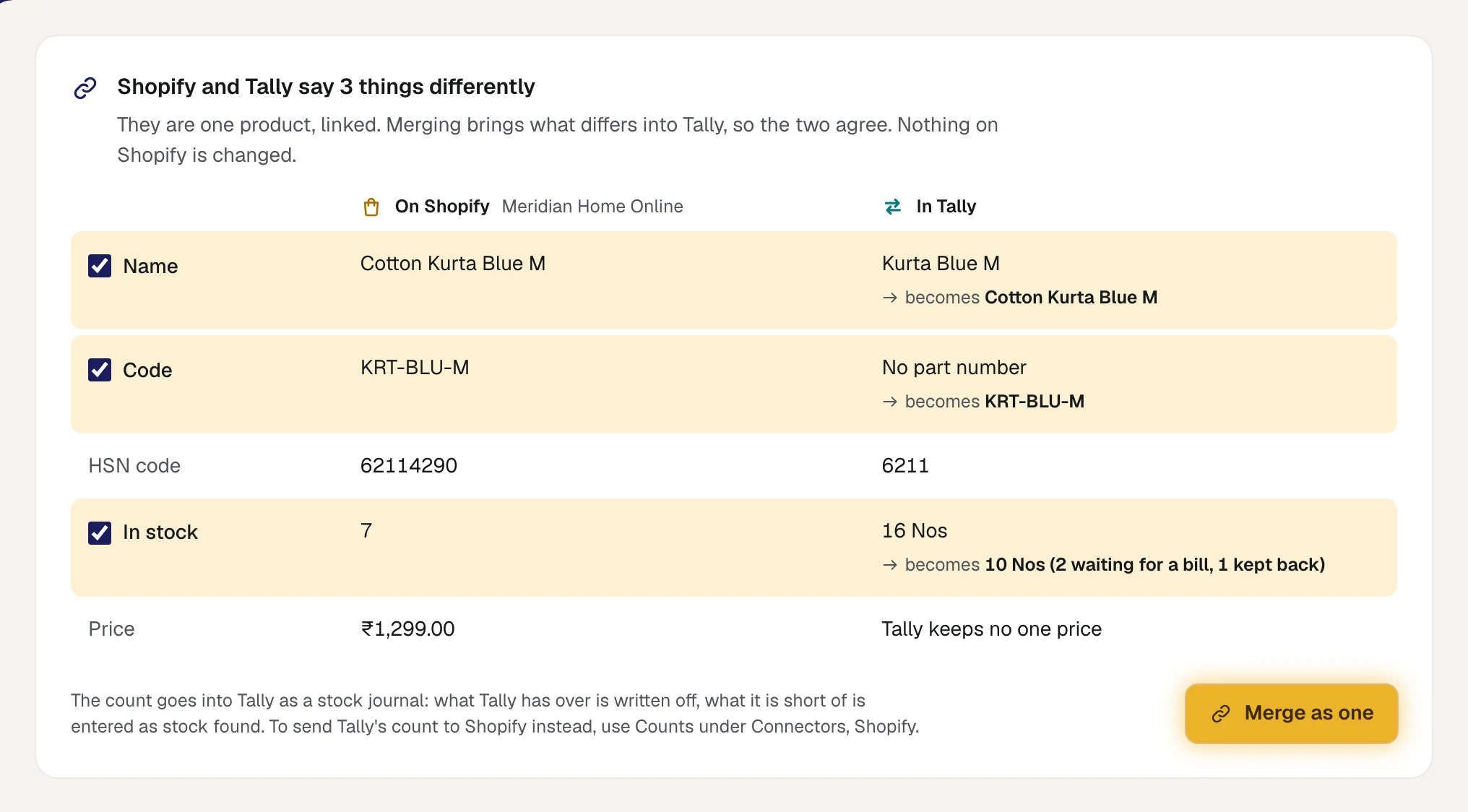
Why Tally, and not the store, as the one record? Because everything else already hangs off the Tally item: the godown that holds it, the bills that sell it, the purchase that brought it in, its HSN code and GST rate. The listing is one more thing hanging off it.
The weekly check
A full stock-take once a year tells you how bad things got. A small check every week stops them getting there. It has two halves.
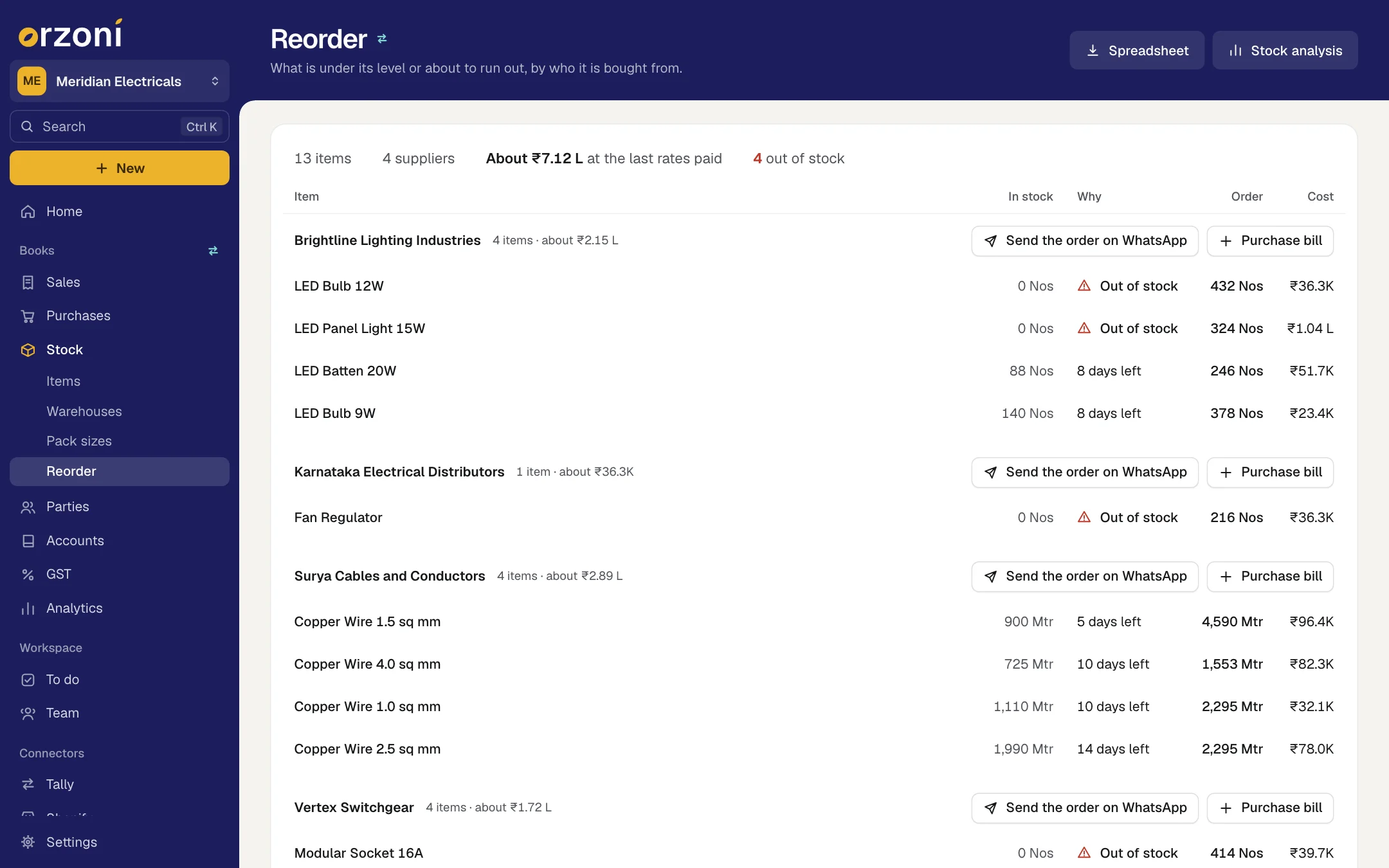
The screen, ten minutes. Look at what the store and the books disagree on today. In Orzoni this is the store's Health view. It gives one answer at the top, then lists what needs someone: counts that were changed on Shopify, counts the store refused, orders that have waited over a week for a bill, listings with no item, locations with no godown, items below zero in Tally. Each line has its own button.

The shelf, twenty minutes. Count about 20 items by hand and compare each with Tally first, then Tally with the store. Choose them like this:
- Your ten fastest sellers, every week.
- Anything that was oversold or refunded in the week.
- Ten more from the rest of the list, in rotation.
With 240 items, the rotation of ten a week gets round the slow movers in about 23 weeks, while the fast ones are counted 52 times a year. That is the right way round: drift follows movement.
Keep a plain register of every difference found: item, date, size, which gap, which of the eight causes. After two months the register will tell you which cause is yours. Expect it to name one or two, not eight.
A second lens costs nothing: the list of what the books say has run out. An item shown as out of stock while pieces sit on the shelf is usually a purchase bill that has not been entered, and it is keeping a product off your store.
Questions people ask
Which is right, the store or Tally?
Neither, until you have counted. The shelf is the fact. Once you know what the shelf holds, correct Tally to it and set the store from Tally.
How far back can I trace a count on Shopify?
On the variant's own page, Shopify shows the last 180 days of adjustment history. Older changes are in its Inventory adjustment changes report. In Tally you have every voucher for the year.
Should I just reset every count to the shelf and move on?
Count and correct, yes. But write down each difference before you wipe it out, or you lose the evidence of what caused it. A reset without the cause removed lasts about a month.
Why does the store show 0 when Tally has stock?
The usual reasons: the pieces are in a godown the store's location is not linked to; the units are in orders waiting for a bill; you keep some back; or the listing is a pack and what is left is less than one whole pack. Five loose diyas are no packs of six.
Will Orzoni tell me the cause?
It tells you what disagrees and gives the one reason a count is not kept in step: no item chosen, a location with no godown, the same item as another listing, changed on Shopify, refused by Shopify. The decision about which side is right stays with a person who can walk to the shelf.
Start with the screen
Run the store health check today. It names what disagrees, with what to do beside each line. Start with Your store's health, and keep Keep your store's counts in step and Troubleshooting to hand. If the figures in Orzoni and Tally themselves seem to differ, Data health and Sync and status say why. Plans are on the Pricing page, and nothing is charged today.
Facts and sources
Everything about Shopify and Tally below was read on the product's own pages on 11 October 2026. What is said about Orzoni comes from its own guides, linked in the text.
- Shopify, inventory adjustment history (what each line shows; "only the last 180 days"; the Inventory adjustment changes report for older history): help.shopify.com/en/manual/products/inventory/adjusting-inventory/adjustment-history. Read 11 October 2026.
- Shopify, refunding orders (Restock items, selected by default, and deselecting it to restock by hand): help.shopify.com/en/manual/fulfillment/managing-orders/refunding-orders. Read 11 October 2026.
- Shopify, cancelling orders (Restock inventory, selected by default): help.shopify.com/en/manual/fulfillment/managing-orders/canceling-orders. Read 11 October 2026.
- Shopify, bundles (how a bundle's available quantity is worked out, with the chairs and desk example): help.shopify.com/en/manual/products/bundles/eligibility-and-considerations. Read 11 October 2026.
- Shopify, adjusting inventory quantities (Set to, Adjust by, the reasons, and the bulk editor keeping no record of movements): help.shopify.com/en/manual/products/inventory/adjusting-inventory/adjusting-inventory-quantities. Read 11 October 2026.
- Shopify, SKUs (the warning about duplicate SKUs): help.shopify.com/en/manual/products/details/sku. Read 11 October 2026.
- Shopify for developers, setting quantities and adjusting them: shopify.dev/docs/api/admin-graphql/latest/mutations/inventorySetQuantities and shopify.dev/docs/api/admin-graphql/latest/mutations/inventoryAdjustQuantities. Read 11 October 2026.
- TallyPrime, Stock Summary (drilling from an item to its monthly summary and its vouchers): help.tallysolutions.com/track-your-inventory-stock-summary-tally/. Read 11 October 2026.
- TallyPrime, stock journals and the Physical Stock voucher (Alt+F7, Ctrl+F7, and the words quoted): help.tallysolutions.com/inventory-entry-tally/. Read 11 October 2026.
- TallyPrime, stock items FAQ (a wrong godown on a bill showing as a negative balance): help.tallysolutions.com/tally-prime/inventory/stock-items-faq/. Read 11 October 2026.
The diya's week, the 240-item rotation and the times given are worked examples, not measurements from a named business.

Guides this post leans on
The first view of a connected Shopify store. One answer to how it stands, then everything that needs someone, what is left to put right, and what explains a count, each dealt with on its own line.
Read the guide Keep your store's counts in stepThe Counts view of a connected Shopify store. How each count is worked out from Tally, the three ways counts are sent, turning counts on, keeping some back, what happens when a count is changed on Shopify, and how the store's locations are linked to your warehouses.
Read the guide TroubleshootingOrganised by what you see. Signing in, invitations, installing the connector, finding Tally, linking the computer, a computer that is offline, figures that look wrong, a bill that will not go in, and how to ask for help.
Read the guide Data healthOne answer on whether the figures in Orzoni agree with Tally, everything that needs you named on its own line, and the gaps in your Tally data filled in from the same screen.
Read the guide How Orzoni stays in step with TallyHow the Tally connector reads Tally and proves what it read, how the web is kept the same as the computer, where the status is shown, and what every status means with what to do about it.
Read the guide