

Four ways to get Shopify orders into Tally, compared
Hand entry, a Shopify app, a connector service, or Orzoni: what each puts into Tally, what it leaves out, and what it costs as published.
On this page
The week before Diwali, a store that usually takes ten orders a day takes seventy. The packing table in the godown keeps up, because it has to. The books do not. When the rush is over there are 400 orders on Shopify, not one of them in Tally, and the accountant wants every one as a sales voucher before the return goes in.
There are four ways to get them there. You can type each one. You can install a Shopify app that pushes sales across. You can pay a connector service on a monthly plan. Or you can use Orzoni, where an order becomes a draft invoice in one press and a person sends it. This post sets out what each puts into Tally, what it leaves to you, and what it costs as published on 11 October 2026.
The short answer: up to about a hundred orders a month, typing is fine and costs an evening. Past that, the choice turns on two things most price pages say little about. One is what happens to your stock count on the store. The other is what happens when an order does not match the items in your Tally.
What an order has to become in Tally
In Tally the bill is a sales voucher. Tally's own help has you open it with F8 and switch to Item Invoice mode, the one with the Name of Item column, so that every line is a stock item with a quantity and a rate. Whatever carries your orders across has to fill in the same things a clerk would.
| On the voucher | Where it comes from | What goes wrong |
|---|---|---|
| Party | Your choice: one ledger for all online sales, or one for each buyer | Hundreds of one-time ledgers, or a business buyer billed without a GSTIN |
| Stock items, quantity, rate | The order's lines, matched to your items in Tally | A listing with no item in Tally. A pack of 6 entered as one piece |
| Taxable value | What the buyer paid, with GST taken out where your prices include it | Tax charged on top of a price that already held it |
| CGST and SGST, or IGST | The state the parcel was delivered to | A Pune order billed as a Karnataka sale |
| Reference | The order's number | Nobody can say which orders are in the books |
| Date, and how it was paid | The day the goods left. Prepaid, or cash on delivery | A month of sales all dated the day someone caught up |
Take one order and follow it through. A buyer in Mysuru orders two cotton kurtas from a seller in Bengaluru and pays ₹2,598, tax included. Apparel sold at up to ₹2,500 a piece carries GST at 5% (the rate table from the GST Council's meeting of September 2025 is in the sources below).
The voucher is not ₹2,598 plus 5%. The tax is already inside the price, so you divide: ₹2,598 ÷ 1.05 comes to ₹2,474.29, which is ₹1,237.14 a piece. Two at that rate make ₹2,474.28 of taxable value. Buyer and seller are in the same state, so the tax splits in two: CGST at 2.5% is ₹61.86 and SGST at 2.5% is ₹61.86. The voucher totals ₹2,598.00, to the paisa what the buyer paid.
Send the same parcel to Pune and the total stays the same, but the tax changes its name. IGST at 5% is ₹123.71, a paisa of round-off brings the bill back to ₹2,598, and the money is owed under a different head.
Which state counts is not a matter of taste. For goods sold to a buyer who is not registered under GST, the place of supply is the address recorded on the invoice, and recording the name of the State is enough to count as recording the address. Where the billing address and the delivery address are in different states, the tax board has clarified that the delivery address decides. That is clause (ca) of Section 10(1) of the IGST Act, as set out in CBIC's Circular 209/3/2024. GST rules change, so read the current text or ask your accountant before you rely on any summary of them, this one included.
One more thing rides on the voucher that price pages rarely mention. A sales voucher with stock items on it lowers Tally's stock. Your store keeps a count of its own. Getting orders into Tally puts the books right. It does nothing for the count on the store unless the tool you pick also looks after stock. Keep that in mind through the four ways.
Way 1: entering by hand
This is where everyone starts, and for a small store it is a perfectly good place to stay.
Shopify's admin exports orders to a file. Its help page lists the columns, and they are the ones you need: the order's name, each line's name, quantity, price and SKU, the taxes, the shipping charge and the shipping province. An export of up to 50 orders downloads at once. A larger one is emailed to you. Someone then sits with the file on one side and Tally on the other, and presses F8 once for each order.
The cost is time, and it is easy to work out. What follows is a worked example on the assumptions stated, not a survey. Put your own figures in.
Say one order takes four minutes: find it in the file, pick the party, pick the items, check the tax, type the order number as the reference, save. Say the person doing it is paid ₹18,720 a month for 26 days of 8 hours, which is 208 hours, or ₹90 an hour. Four minutes of that is ₹6.
| Orders a month | Time at 4 minutes each | Cost at ₹6 an order |
|---|---|---|
| 100 | 6 hours 40 minutes | ₹600 |
| 300 | 20 hours | ₹1,800 |
| 1,000 | 66 hours 40 minutes | ₹6,000 |
| 3,000 | 200 hours | ₹18,000 |
At 100 orders it is one long evening. At 300 it is half a working week, every month. At 3,000 it is 200 of one person's 208 hours, which means you have hired someone to retype what your store already knows.
The wage is the smaller cost. The larger one is what typing lets through:
- The wrong state. The clerk bills every order as a local sale, because most are. The Pune order goes in with CGST and SGST where IGST was due.
- Tax on top of tax. The price of ₹1,299 is typed as the rate, and Tally adds 5% to a figure that already held it. The voucher says ₹1,363.95 and the bank says ₹1,299.
- The same order twice, or not at all. Without the order number as the reference on every voucher, nobody can check.
- The pile. Orders shipped on the 3rd are entered on the 28th. Section 31(1) of the CGST Act asks for the invoice before or at the time the goods are removed for supply. For 25 days Tally's stock was also wrong by every unit those orders took.
Suppose one voucher in fifty carries a slip of this kind. At 1,000 orders that is 20 vouchers to find at month-end, in a list of a thousand that all look alike.
What it is good at. It costs nothing to set up, a person sees every voucher, and odd orders (a gift, a replacement, a part refund) are handled with judgement.
Who it suits. A store under about a hundred orders a month, with someone careful who enters them daily and always types the order number as the reference.
Way 2: a Shopify app that pushes sales
The Shopify App Store has apps that read your orders and prepare them for Tally. Two are worth looking at, and they are built for different jobs.
Import2Tally, from Green Duck, is an importer. Its listing says it does "a batch import of sales, credit notes, settlement receipts, and commission expenses", through an add-on that sits in Tally and, in the listing's words, "can transfer 500 vouchers per minute into Tally". It lists both Tally ERP 9 and TallyPrime under what it works with. The plans, as the listing gave them on 11 October 2026:
- Free: up to 100 transactions a month.
- Starter, $9 a month: up to 500 transactions.
- SMB, $29 a month: up to 1,500 transactions.
Two things to notice. The limit is in transactions, not orders, and the app imports credit notes and settlement receipts as well as sales, so ask whether each of those counts as one. And the listing shows no plan above 1,500 a month, so a store at 3,000 orders has to ask the maker.
WebPlanex: GST Invoice India starts from the other end. It is first a maker of GST invoices on the store: its listing says "Generate GST Compliant invoices" and "Manage CGST, SGST & IGST calculations", with HSN codes, invoices for business buyers and consumers, credit notes, and a set of GST reports. Getting sales into the books is its second job: "Sync your sales data into Zoho Books and Tally with direct integration", and "Tally ready exports". Its plans:
- Startup, $4.99 a month: up to 100 orders.
- Basic, $9.90 a month: up to 300 orders.
- Medium, $19.90 a month: up to 1,200 orders.
- Advanced, $49.90 a month: up to 5,000 orders.
- E-invoice submission is a $9.90 add-on. Each plan has a 7-day free trial. The listing shows no free plan.
If your buyers expect a GST invoice from the store itself, with the paperwork made as the order is placed, this is the kind of tool built for it. The listing does not say which versions of Tally it works with, so ask.
Both apps are billed in US dollars, every 30 days. At the reference rate on the RBI's site for 9 October 2026, ₹96.6149 to the dollar, $9 is about ₹870 and $29 about ₹2,802. WebPlanex's four plans come to about ₹482, ₹956, ₹1,923 and ₹4,821. Those rupee figures move with the rupee. What reaches your card statement depends on the day's rate and your bank.
Neither listing mentions the stock count on your store. Neither says who looks at a voucher before it posts, or what happens to an order whose product has no stock item in Tally. Those are not criticisms. A listing is a short page. They are the first questions to put to the maker, and there is a list of them further down.
What they are good at. They install from the App Store in minutes, cost little at low volume, and the free tier of Import2Tally covers a small store outright.
Who they suit. A store whose trouble is the typing, whose stock is managed some other way, and which is comfortable with a bill in dollars.
Way 3: a connector service on a plan
Edesy sells a Shopify to Tally export with rupee pricing. Its product page describes four steps: connect Shopify, map the fields, export orders ("Manual or scheduled"), and import to Tally ("Load XML into Tally"). So what Edesy produces is a file in Tally's own XML format, and you load it. The page also says it will "Auto-create customer ledgers" and that the export suits ERP 9 and TallyPrime.
Its pricing page, on 11 October 2026:
| Plan | A month | A year | Orders a month | What the page lists |
|---|---|---|---|---|
| Starter | ₹499 | ₹4,790 | Up to 100 | Sales voucher export, basic GST mapping, a single store |
| Growth | ₹999 | ₹9,590 | Up to 500 | Adds scheduled sync and payment voucher export |
| Business | ₹1,999 | ₹19,190 | Up to 2,000 | Adds credit and debit notes, phone support |
| Enterprise | ₹4,999 | Custom | Unlimited | Adds multi-store support |
Every plan has a 7-day free trial. Notice where credit notes sit: on the Business plan. Going by that list, a store that wants its returns in Tally as credit notes is looking at ₹1,999 a month, whatever its order count.
Two things to confirm before you sign. The pricing page does not say whether GST is added to these prices. And Edesy's product page speaks of "one flat price" with "No per-order fees" and asks you to contact them, which does not sit easily beside four tiers by order count. Ask which applies to you. Neither page mentions the stock count on the store.
Nventory belongs in this section for the opposite reason. It does the half the others leave out, and leaves out the half they do. Its Shopify and Tally page describes syncing products and stock levels between the two, linking Shopify products to Tally stock items by SKU, and mapping Shopify locations to Tally godowns. On vouchers it is plain: "Nventory does not create sales vouchers, purchase vouchers, or receipt vouchers in Tally." Tally "must be running with the Gateway Server or ODBC connector active". It is priced in dollars by the number of listings, not by orders: free for 100 listings on one channel, then from $25 a month (about ₹2,415) for 2,000 listings on three channels.
So Nventory is a way to keep stock in step, and you would still need Way 1, 2 or Edesy for the vouchers. Two tools, two bills, and two places to look when a number is off.
What a service on a plan is good at. Rupee billing, and a file you can open and inspect before it goes into Tally.
Who it suits. An accountant who likes to import a batch at a set time and check it, and a business running several stores into one set of books, which Edesy's top plan lists.
Way 4: Orzoni
Orzoni is cloud software for running a business: bills, payments, stock, GST working papers, customers and suppliers, on a computer or a phone. It is joined to TallyPrime through the Tally connector, a small Windows program on the computer that runs Tally. Tally stays the book of record. Connect a Shopify store and three things happen that bear on this comparison.
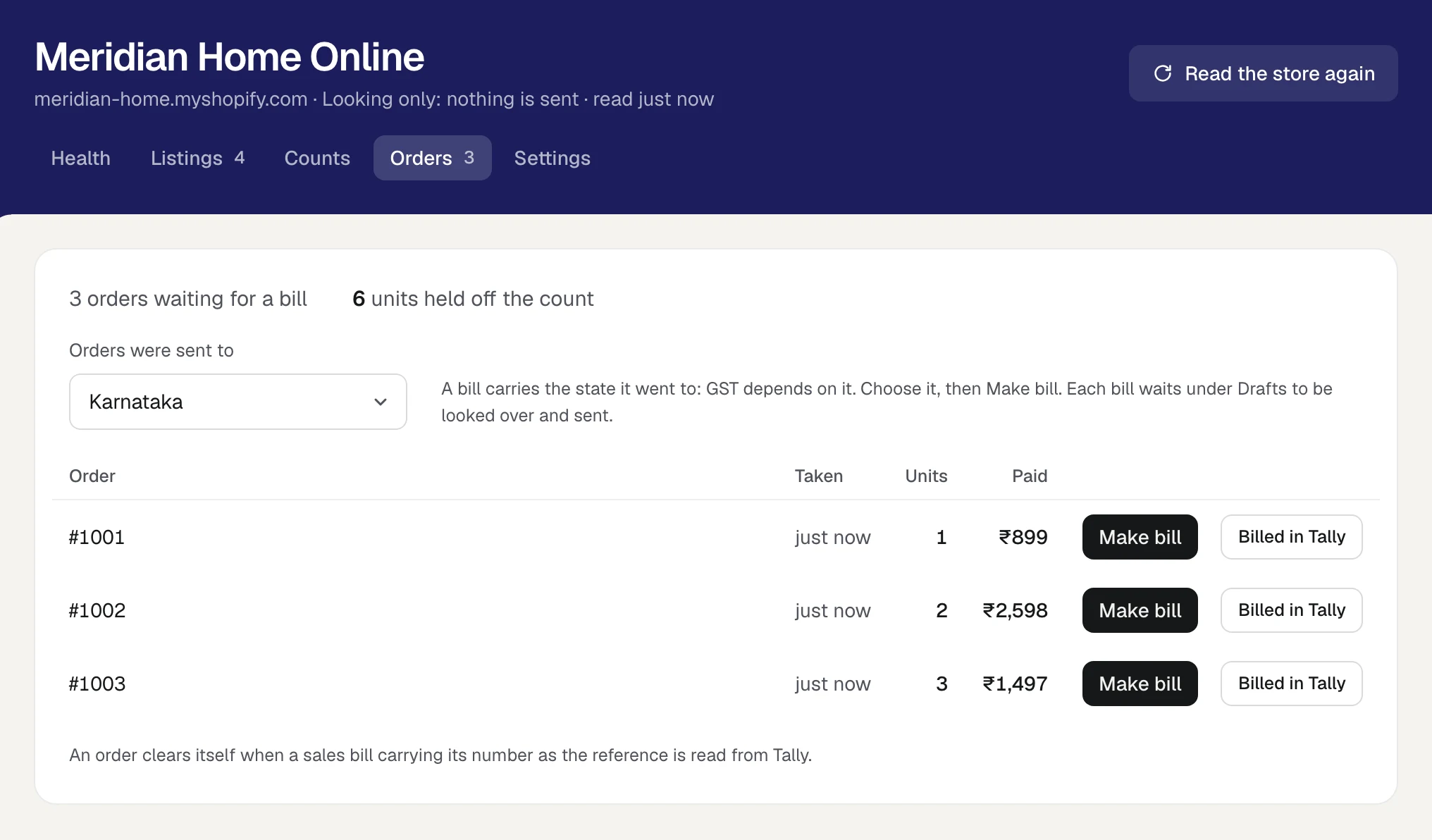
An order becomes a draft invoice in one press. The Orders view lists every order the store has taken that Tally has not billed. You choose the state the order was sent to and press Make bill. Orzoni writes a draft sales invoice: the customer you chose to bill the store's sales to, a line for each item by the Tally item its listing is matched to, the price the buyer paid with GST taken out at the item's own rate, shipping as a line of its own, and the order's number as the reference.
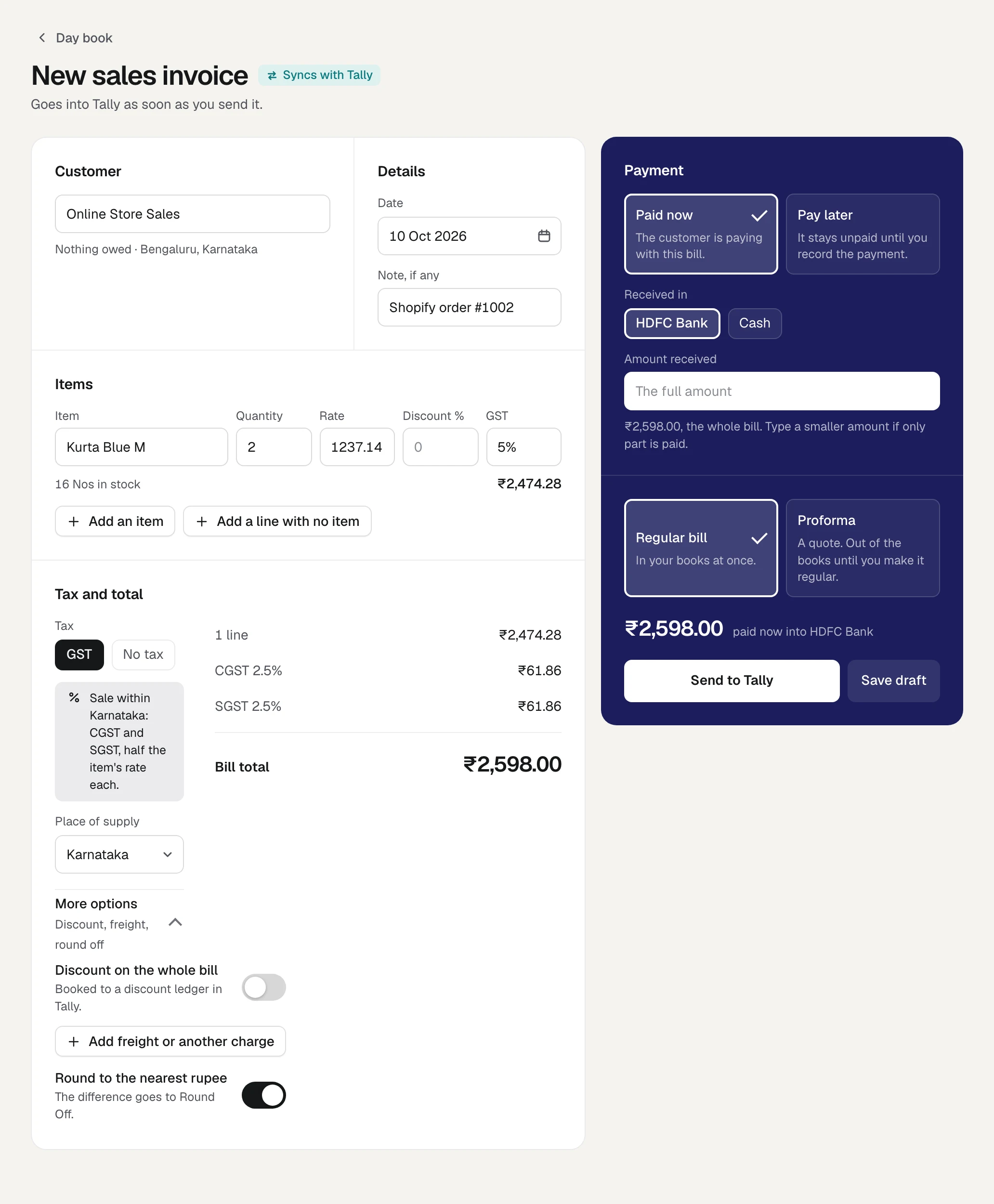
A person sends it. The draft opens as an ordinary invoice. You look it over and press Send to Tally. Nothing reaches Tally until someone has. When the bill is read back from Tally carrying the order's number, the order ticks itself off the list.
Stock is part of the same job. An order holds its units off the store's count the moment it lands, before any bill exists. Counts go one way, from Tally to the store, sent as "the count is 13" and never as "two fewer", so a count sent twice or sent late does no harm. The count is the only thing Orzoni changes on your store. The first set of counts always waits for a person to look at it.
Orzoni is also strict about what it will not do, and for a tax document that is worth having. It makes no bill where the bill would carry the wrong tax:
- a line whose listing is not matched to an item in Tally;
- an order taken in a currency other than rupees;
- lines that do not add up to what the buyer paid, as when a discount was taken off the whole order;
- an order of more than 60 lines;
- an order that already has a bill.
Each refusal names the reason and the way through. You match the listing and press again, or you bill that one order in Tally with the order's number as its reference, and it clears from the list like any other.
Two facts decide whether it fits you. Orzoni does not read who bought: no name, address, phone or email. Every bill from the store is made out to one customer in your Tally, such as Online Store Sales, and you say which state the parcel went to. For a seller to consumers this keeps the party list short and the buyers' details where they already are. If you need each buyer named on each voucher, change the customer on the draft before you send it, or choose a tool that reads the buyer from the order. Edesy's page says it creates customer ledgers. And a business connects one store.
The store is connected in about ten minutes through a small app in your own Shopify account, or on a 15-minute call where we guide and you press. When Orzoni's app is listed on Shopify, a store connected today carries on unchanged, and the Shopify screen offers a third way: approving it in one press. The steps are in Connect your Shopify store.
The plans are ₹999 a month for one company and ₹2,499 for up to three, by company and not by order count. Billing has not opened, so nothing is charged today, and you will be told before it does. The details are on the pricing page.
What it is good at. A person sees every bill before it posts, the store's count follows Tally, and the software that makes the bill also runs the rest of the business.
Who it suits. A business on TallyPrime with one Shopify store, selling mostly to consumers, that wants the books and the store's count kept right by the same tool.
The four ways side by side
| By hand | Import2Tally | WebPlanex | Edesy | Orzoni | |
|---|---|---|---|---|---|
| What it puts in Tally | Whatever you type | Sales, credit notes, settlement receipts, commission expenses | Sales data | Sales vouchers. Payment vouchers and credit notes on higher plans | A sales invoice for each order, made as a draft |
| How it gets there | Typed | A Tally add-on transfers the vouchers | "direct integration" and "Tally ready exports", in the listing's words | An XML file you load into Tally | Through the Tally connector, when you press Send |
| The store's stock count | Not touched | Not mentioned | Not mentioned | Not mentioned | Set from Tally's count |
| The party in Tally | Your choice | Not stated | Not stated | Customer ledgers created for you | One customer for the store, or one you pick on the draft |
| Billed in | Wages | US dollars | US dollars | Rupees | Rupees |
"Not mentioned" and "Not stated" mean exactly that: the maker's page, read on 11 October 2026, did not say. It is not a claim that the tool cannot do it.
What each costs at 300, 1,000 and 3,000 orders
The cheapest published plan that covers each volume, a month:
| Way | 300 orders | 1,000 orders | 3,000 orders |
|---|---|---|---|
| By hand, at ₹6 an order (worked example) | ₹1,800 | ₹6,000 | ₹18,000 |
| Import2Tally | $9, about ₹870 | $29, about ₹2,802 | No listed plan |
| WebPlanex | $9.90, about ₹956 | $19.90, about ₹1,923 | $49.90, about ₹4,821 |
| Edesy | ₹999 | ₹1,999 | ₹4,999 |
| Orzoni | ₹999 | ₹999 | ₹999 |
How to read it:
- At 300 orders the four tools are within ₹130 of each other. Price should not decide it. What the tool does should.
- WebPlanex's Basic plan covers "up to 300 orders", so a store at exactly 300 has no room. One busy week moves it to the next plan.
- Orzoni's ₹999 is the published plan, and nothing is charged today because billing has not opened.
- Edesy's yearly prices work out lower: ₹9,590 a year for Growth is about ₹799 a month.
- Add a stock tool to the order-only routes if the store's count is your trouble. With Nventory's first paid plan that is about ₹2,415 a month more.
Then set the cost against what is at stake. A store doing 1,000 orders a month at an average of ₹1,240 turns over ₹12.4 lakh a month. A tool at ₹2,000 is 0.16% of that. At that size, which tool is ₹1,000 cheaper matters less than which one keeps a kurta from being sold twice in a festival week.
Questions to ask any vendor
Put these to the maker of whatever you are considering, Orzoni included. The answers matter more than the price.
- What happens when an order's product has no stock item in Tally? Does it stop, skip the order, post to a catch-all item, or create a new item? A new item made without an HSN code and a GST rate is a problem you find in March.
- How does it decide CGST and SGST against IGST? From the delivery address, the billing address, or a setting? Ask to see one order sent to another state.
- Who looks before it posts? A voucher that goes in unseen is fast until it is wrong 400 times.
- Does it write to my store's stock count? If so, in which direction, and what does it do when someone has changed a count on Shopify by hand?
- What happens on a second run? The same order must not make a second voucher. Ask how it knows.
- What does it do with a return, a part refund and a cancelled order? A return is a credit note under Section 34 of the CGST Act, not a deleted sale.
- What does it read from my store? Orders can be read with or without the buyers' names, phones and addresses. Know which, since you answer to those buyers.
- What must be running? Tally open, a particular computer on, a tab kept open in a browser.
Which way suits which business
The chart leaves out one case. If your vouchers are fine and the store's count is the trouble, the order tools will not help. You need something that handles stock: a stock tool such as Nventory beside whatever makes your vouchers, or Orzoni.
And if you are under 100 orders a month, Import2Tally's free plan is worth an afternoon before you settle on typing.
Try it with five orders first
Whatever you choose, do not start with the whole month. Start with five orders picked to be awkward.
- One delivered in your own state.
- One delivered to another state.
- One with a shipping charge.
- One with a discount code on the whole order.
- One with two different products, or a pack.
Run the five through the tool, then open Tally and check each voucher against this list:
- The party is the one you meant.
- Every line is the right stock item, in the right quantity. A pack of 6 has taken 6.
- The total matches what the buyer paid, to the rupee.
- The local order carries CGST and SGST. The one to another state carries IGST.
- The reference is the order's number.
- Tally's stock fell by what was sold, in the right godown.
- Run the same five again. There are still five vouchers, not ten.
If all seven hold for all five, you have a tool. If one fails, you have found it on five vouchers in an afternoon, not on 400 at month-end.
FAQ
Can Shopify send orders to Tally by itself?
Shopify's own tool is the export: a file of orders with the columns listed in its help. A Tally sales voucher needs your ledgers and your stock items, which Shopify knows nothing about. Something has to map one to the other: a person, an app, a service, or a draft you send.
Should every online buyer be a ledger in Tally?
Many accountants bill consumer sales to one ledger and keep the party list for real, repeating customers. Rule 46 of the CGST Rules asks for the name and address of a buyer who is not registered where the taxable value is ₹50,000 or more, and below that only where the buyer asks for it. A registered buyer's name, address and GSTIN always go on. Settle the approach with your accountant, then check that your tool can do it.
Do these tools change the stock on my store?
Of the tools here, Nventory and Orzoni say they do. Nventory describes syncing stock levels between Shopify and Tally. Orzoni sets the store's count from Tally's and never the other way. The pages for Import2Tally, WebPlanex and Edesy's pricing do not mention the store's count.
What about returns?
A return is a credit note. Import2Tally lists credit notes among what it imports, WebPlanex lists credit notes, and Edesy lists credit and debit notes on its Business plan. In Orzoni a return is a credit note you make from the invoice's own page, and it goes into Tally like any other entry.
Do I need TallyPrime for all of these?
Import2Tally and Edesy list both Tally ERP 9 and TallyPrime. WebPlanex's listing does not name versions. Orzoni is built for TallyPrime and proven on 7.1.
What to do today
Count last month's orders, pick five awkward ones, and write down what their vouchers should say. That page is your test for any tool on this list, and it takes half an hour.
See this month's store orders as drafts in Orzoni. Connect your store on a 15-minute call, press Make bill on one order, and send it to Tally yourself.
Where to read more:
- Connect your Shopify store: the two ways to join a store, step by step.
- Orders from your store: Make bill, the draft, and how an order clears.
- Keep your store's counts in step: how each count is worked out from Tally.
- Match your store's listings: linking each listing to its item in Tally.
- Your store's health: everything that needs someone, in one place.
- From a Shopify order to a GST invoice in one press: the same draft, a step at a time.
Facts and sources
Prices as published on 11 October 202615 sources, each with its link and the day it was read
Every price and rule here was read on 11 October 2026 from the page named. Prices change and GST rules are amended, so check the page before you decide. Dollar prices are the makers' own. The rupee figures beside them are our conversion.
| Fact | Source |
|---|---|
| Import2Tally: free to 100 transactions a month, $9 for 500, $29 for 1,500, billed in US dollars every 30 days. Imports "sales, credit notes, settlement receipts, and commission expenses". Works with Tally ERP 9 and TallyPrime | apps.shopify.com/import2tally |
| WebPlanex GST Invoice India: $4.99 (100 orders), $9.90 (300), $19.90 (1,200), $49.90 (5,000) a month. E-invoice add-on $9.90. 7-day trial. The quoted lines on invoices and Tally | apps.shopify.com/gst-invoice-india |
| Edesy plans: ₹499, ₹999, ₹1,999 and ₹4,999 a month, the yearly prices, order limits, 7-day trial and what each plan lists | edesy.in/shopify-tally-invoice/pricing |
| Edesy's four steps, "Load XML into Tally", "Auto-create customer ledgers", "No per-order fees" | edesy.in/shopify-tally-invoice |
| Nventory: "does not create sales vouchers, purchase vouchers, or receipt vouchers in Tally". Stock and product sync by SKU and godown. Tally must be running | nventory.io/integrations/shopify/tally |
| Nventory plans: free for 100 listings on one channel, Starter $25 a month for 2,000 listings on three | nventory.io/pricing |
| ₹96.6149 to the US dollar, as at 1 pm on 9 October 2026, source FBIL | rbi.org.in |
| Shopify's order export: its columns, and the 50-order limit for a direct download | help.shopify.com, Exporting orders |
| A sale in TallyPrime: the sales voucher, F8, Item Invoice mode | help.tallysolutions.com, Sales of goods and services |
| CGST and SGST for a local sale, IGST for a sale to another state, by the place of supply | help.tallysolutions.com, Record sales under GST |
| Place of supply of goods to an unregistered buyer: clause (ca) of Section 10(1), IGST Act, and the delivery address where it differs from the billing address | CBIC Circular 209/3/2024-GST, 26 June 2024 |
| Apparel of sale value not exceeding ₹2,500 a piece at 5%, above that at 18% | PIB, Recommendations of the 56th GST Council meeting, 3 September 2025 |
| Section 31(1), CGST Act: a tax invoice for goods before or at the time of removal | taxinformation.cbic.gov.in, Section 31 |
| Section 34, CGST Act: a credit note where goods are returned | taxinformation.cbic.gov.in, Section 34 |
| Rule 46, CGST Rules: the buyer's name and address at ₹50,000 or more, or on request below it | taxinformation.cbic.gov.in, Rule 46 |
| Orzoni: ₹999 a month for one company, ₹2,499 for up to three. Billing is not open and nothing is charged today | orzoni.com/pricing |
The hand-entry figures (4 minutes an order, ₹90 an hour) are a worked example on stated assumptions, not a measured rate.

Guides this post leans on
Two ways to join your store to Orzoni: with us on a 15-minute call, or yourself in about ten minutes with a picture of every step.
Read the guide Orders from your storeThe Orders view of a connected Shopify store. Which orders wait for a bill and what that does to the count, choosing the customer the store's sales are billed to, making a draft bill from an order, and how an order clears once its bill is in Tally.
Read the guide Keep your store's counts in stepThe Counts view of a connected Shopify store. How each count is worked out from Tally, the three ways counts are sent, turning counts on, keeping some back, what happens when a count is changed on Shopify, and how the store's locations are linked to your warehouses.
Read the guide Match your store's listingsSay which item in Tally each of your store's listings is. Approve what Orzoni puts forward, choose by hand, set aside what is not kept in Tally, do many at once, and work through products sold in several sizes and through collections.
Read the guide Your store's healthThe first view of a connected Shopify store. One answer to how it stands, then everything that needs someone, what is left to put right, and what explains a count, each dealt with on its own line.
Read the guide