

One SKU for the store and the books: linking products once
Make the Tally stock item the one record, link each Shopify listing to it by code, barcode or name, and merge differences without touching the store.
On this page
The same kurta has three names in one shop. On the store it is "Cotton Kurta, Blue / M", with the code "kurta blue m" that someone typed on the day it was listed. In Tally it is "Kurta Blu M", entered in a hurry two Aprils ago, with the alias KBM. On the packing slip the godown staff write KBM. When an order comes in, somebody translates. On a good day that takes ten seconds. On a bad day a large goes to Nagpur in place of a medium, and the return costs more than the margin.
What cures this is a naming discipline, and no product is needed for it. Pick one record that leads, and for a business whose books are in Tally that is the Tally stock item. Give each thing you sell one code, and keep that code on both sides: as the SKU on the store, and as the part number on the Tally item. Link each listing to its item once. Where the two disagree, bring the books in line and leave the live store alone.
You can do all of that with a spreadsheet and patience. Later in this post is how Orzoni does the linking and merging, but the naming rules come first and they work with or without it.
What people mean by a master SKU
"Master SKU" is the phrase people search for when they are tired of translating. It bundles two different ideas, and it helps to pull them apart.
One is the master record: the single entry for a product that every other system defers to. When the store says Blue / M and the books say Blu M, the master record is the one that wins.
The other is the code: a short string that means this product and nothing else, wherever it is typed, scanned or printed.
You do not need a screen with that name on it. You need two decisions: which record leads, and which code travels with it. Orzoni has no feature called master SKU. What it does is link a listing to a Tally item and show the pair as one product, which is the same idea with the Tally item in the master's seat.
What a SKU is on Shopify, and what the same thing is in Tally
The two systems do not use the same words, which is half the confusion.
On Shopify, SKUs are "codes that you can use internally to track your inventory and report on your sales". A SKU belongs to a variant, not to a product: the blue medium has one, the red large has another. Shopify allows up to 2,048 variants on a product, across up to three options such as size and colour. And it wants every SKU to be the only one of its kind: "SKUs within your Shopify admin must be unique and no two product variants should include the same SKU in their details."
A barcode is something else. Shopify says so in one line: "SKUs are different from barcodes and are used for different purposes." The barcode is the number printed on the product, often by the manufacturer. The SKU is yours. A variant can carry up to 20 barcodes and one SKU.
In Tally, the thing a bill, a godown and a GST rate all point to is the stock item, and its identity is its name. Two more fields can help it be found:
- Aliases. Tally's help page says "you can specify multiple aliases for the stock item". An alias is another name the item answers to.
- Part number. Switch on "Provide Part No. for Stock Items" in the item's configuration (F12) and, in Tally's words, a "stock item can be created with actual names as well as by their part numbers".
| On Shopify | In Tally | |
|---|---|---|
| The thing itself | A variant of a product | A stock item |
| What identifies it | Product title and option values | The item's name |
| Your own code for it | SKU | Part number, or an alias |
| Where its count is kept | By location | By godown |
So "one SKU for the store and the books" comes to this: the variant's SKU and the stock item's part number are the same string.
Why codes fail
A code is compared by a computer, character by character. People read "krt blu m" and "KRT-BLU-M" as the same thing. A computer comparing the two does not, unless someone has taught it to.
The usual ways a code goes wrong:
- Spaces and capitals. One person types KRT-BLU-M, another krt blu m. A trailing space, which nobody can see, is the worst of these.
- Leading zeros. A code of 0012 goes through a spreadsheet and comes out as 12. Microsoft's own support page says "Excel automatically removes leading zeros, and converts large numbers to scientific notation". The same page gives the cure, which is to format the column as Text before pasting, and the catch: "This will not change numbers that have already been entered."
- Hyphens against underscores. KRT-BLU-M on the store, KRT_BLU_M in a supplier's sheet.
- Letters that pass for figures. SO10 and S010. Shopify's advice is to "avoid a format where the numbers 0 and 1 can be confused with the letters O and I".
- One code on two things. The loose diya and the pack of six both carry DIYA. Shopify warns that "duplicate SKUs can cause issues with third-party integrations and inventory tracking", and its admin shows a warning when it finds one.
- Codes that carry facts which change. The supplier's initials, the rack number, the season, the price. The day you change supplier, the code is a lie, and somebody "corrects" it on one side only.
- Variants with no code of their own. The product has a code and its five sizes share it, or have none.
Each of these produces the same morning: a listing that will not match its item, and a person matching by eye.
Anatomy of a code that lasts
A good code is boring. It says what the thing is and which one, in a fixed pattern, and nothing else.
The rules, with Shopify's own guidance where it has some:
- Short. Shopify: "Keep your SKUs as short as possible, such as no more than 16 characters." KRT-BLU-M is nine. It fits a shelf label, a packing slip and a phone screen.
- Capitals, figures and hyphens only. Shopify: "Don't use special characters, symbols, or spaces as they can cause search problems", and "Dashes and underscores are useful for separating product attributes". Pick one separator. The hyphen is the safer of the two: it survives being read aloud over the phone.
- Start with a letter. Then no spreadsheet can strip a leading zero.
- Avoid O and I, or avoid 0 and 1. Not both in the same catalogue.
- Describe what cannot change. What it is, its colour, its size. Never the supplier, the rack, the price or the year.
- One pattern for the whole catalogue. Product, then the attribute buyers choose first, then the next. If size comes last for kurtas, it comes last for shirts.
- A pack is a different thing sold, so it gets its own code. Add a suffix: -P6 for a pack of six.
- Never reuse a retired code. Old bills and old orders still carry it.
A small catalogue done this way:
| Sold as | Code | Characters |
|---|---|---|
| Cotton Kurta, Blue, M | KRT-BLU-M | 9 |
| Cotton Kurta, Red, L | KRT-RED-L | 9 |
| Ceramic Mug, Blue | MUG-BLU | 7 |
| Brass Diya, single | DIY-BRS | 7 |
| Brass Diya, Pack of 6 | DIY-BRS-P6 | 10 |
Write the pattern on one page and pin it up next to the computer where products are created. The page matters more than any tool: codes go wrong when the fourth person to add a product has never been told the rule.
Why the Tally item should be the record
The store is good at things the books have no place for: the title buyers see, the photographs, the description, the selling price, the collection. Let the store lead on those.
The Tally item leads on everything a bill depends on.
Tax hangs off it. The item carries the HSN code and the GST rate, and every invoice line takes them from there. How many digits of HSN an invoice must show depends on turnover: under Notification 78/2020-Central Tax, in force from 1 April 2021, a business with aggregate turnover up to ₹5 crore in the previous year shows 4 digits, and one above ₹5 crore shows 6. A business up to ₹5 crore may leave the HSN off invoices to unregistered buyers. And since the May 2025 return period, the HSN summary in Table 12 of GSTR-1 has been tightened under a GSTN advisory of 1 May 2025: the code is chosen from a list instead of typed, and the table is split between supplies to registered and unregistered buyers. A wrong HSN on a stock item is no longer a cosmetic matter. It follows that item into every return.
The count hangs off it. Purchases add to it, bills take from it, a stock journal corrects it, and the godown says where it is. The store's count is a copy of this one. How that copy is kept in step is its own subject: see How to keep Shopify stock in step with your Tally godown.
Your accountant already trusts it. Nobody closes a year from a storefront.
| Leads on | The Tally item | The store listing |
|---|---|---|
| Name in the books, HSN code, GST rate | Yes | |
| Count and cost | Yes | |
| Title, photographs, description | Yes | |
| Selling price | Yes |
The code is the one thing both carry, and it is the same on both.
Clean the codes first, then link
If you are going to fix your codes, fix them before you link anything, so every link is made on the clean code.
On the Shopify side there are two ways to change many SKUs: the bulk editor, or exporting products to a CSV file, editing the SKU column and importing it again. The CSV route is quicker for 200 listings and has two traps, both from Shopify's own page:
- Leave a column blank and it is taken literally: "the matching value in the product list is overwritten as blank". Change the SKU column and leave every other column exactly as it was exported.
- Do not touch the option values while you are in there. Changing them "deletes existing variant IDs, and creates new variant IDs", and whatever was tied to the old variant may need tying again.
Three habits make a rename safe:
- Format the code column as Text before you paste anything into a spreadsheet.
- Do fifty at a time, and never during a sale.
- Keep the old code alive on the Tally side as an alias of the item, so last year's paperwork still finds it.
Link once: certain, likely, one of several
Linking is saying, for each listing, "this is that item". It is done once per listing and remembered.
By hand, it is a two-column sheet: SKU on the left, Tally item on the right, sorted by SKU, with every blank and every duplicate chased down.
In Orzoni it is the Listings view of a connected store. Orzoni reads each listing's code, barcode and name, puts the likeliest Tally item forward, and says how far to trust it:
| It says | Why |
|---|---|
| Certain | The listing's code or barcode is one item's and no other's. The code can be the item's name, its part number or an alias it has in Tally |
| Likely | The very same name, the code written inside the item's name, or names that agree closely with no other item near |
| One of several | The closest of several items that could be it |
What tells two items apart has to agree before anything is put forward: a size, a colour, a weight, a number. A red shirt in medium is never offered for the same shirt in large.
Everything marked certain is approved in one press, up to 500 listings at a time. The rest you approve, change or set aside one by one. Linking sends nothing to the store.
Here is how it can fall out. Take a store with 200 listings and a Tally company with 180 stock items, where about half the codes are already good. These figures are an example, not a measurement.
| What the first read shows | Listings | What you do |
|---|---|---|
| Certain | 96 | Approve all, one press |
| To check (likely, or one of several) | 58 | Look at each. At 15 seconds apiece, about 15 minutes |
| No item, but it is in Tally under another name | 14 | Choose the item by hand |
| No item, and it is not in Tally | 20 | Create it in Tally (below) |
| No item, and it never should be: gift cards, wrapping | 12 | Set aside |
| Total | 200 |
That is 96 + 58 + 14 + 20 + 12 = 200. It is an afternoon's work, and the clean codes are why 96 of them took one press.
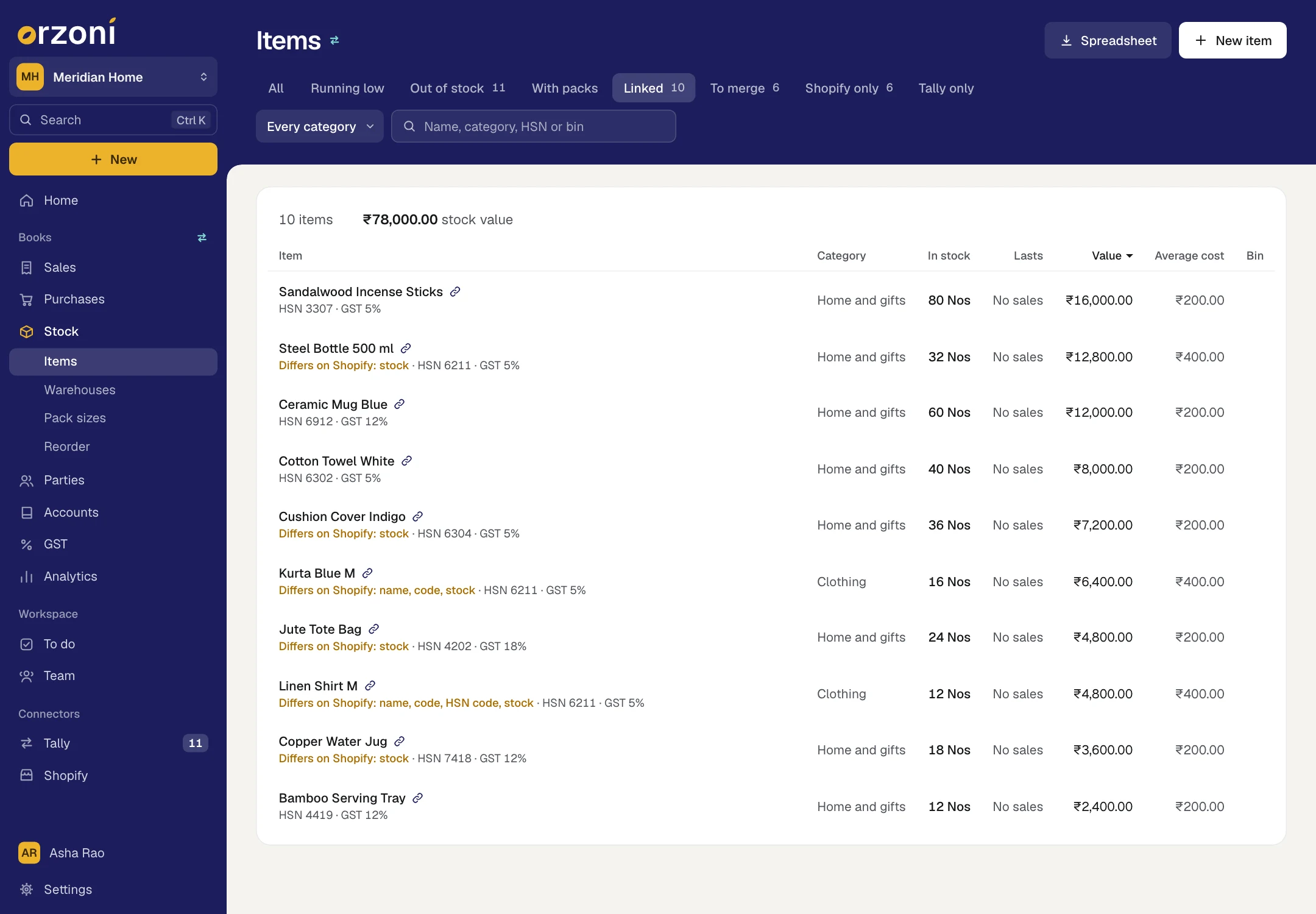
Once linked, a listing and its item are one product wherever products appear: one row, with a small chain mark. The steps are in Match your store's listings.
Merge the differences: name, code, HSN and count
Linked does not mean identical. The store says "Cotton Kurta Blue M", Tally says "Kurta Blu M". The store has the code, Tally has none. A merge is how the books are brought in line.
In Orzoni, a linked item whose two sides differ opens with a sheet that sets them next to each other, a row for each thing compared. Rows that differ are ticked. Untick anything you want left as it is, then press Merge as one.
| Row | What merging does in Tally |
|---|---|
| Name | Renames the item to the store's name, with the variant after it |
| Code | Sets the store's code as the item's part number |
| HSN code | Sets the item's HSN code. A code that is the other with more digits after it counts as the same |
| In stock | Sets Tally's count by a stock journal: what Tally has over is written off, what it is short of is entered as stock found |
| Price | Nothing. It is shown and never ticked |
Three things to understand before you press.
It goes one way. Merging updates the item in Tally. It never changes the live Shopify product: not its name, not its code, not its price.
The count is turned back into Tally's terms. If the store shows 7, with 2 sold online and waiting for a bill and 1 kept back, Tally is set to 10. That is 7 + 2 + 1. After that the store's count works out to exactly what it already shows.
A count is offered for merging at the start, not for ever. It is offered when the two sides have never agreed, or when someone changed the count on Shopify. Once they have agreed, Tally leads, and a later difference just means the store is waiting for Tally's newer count.
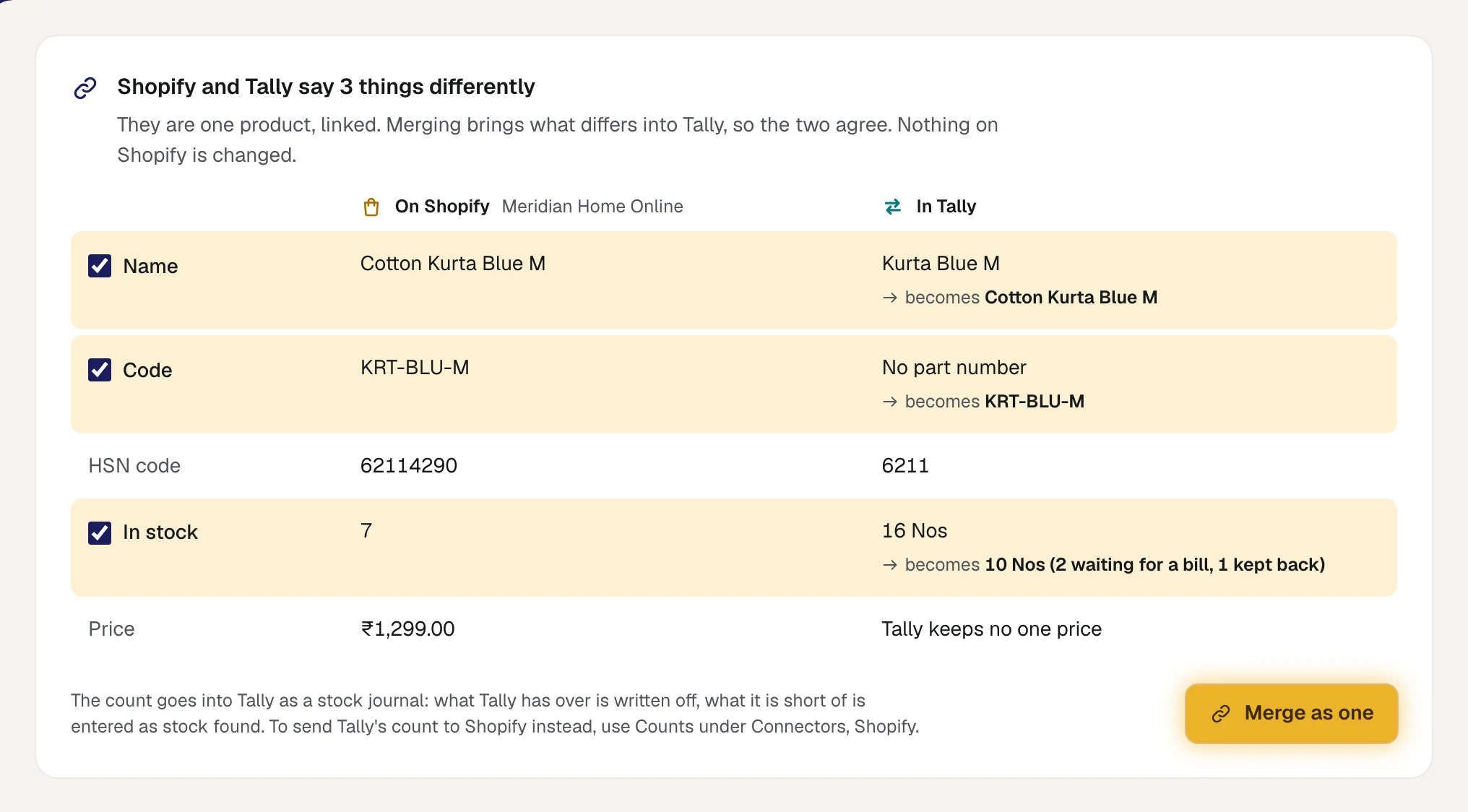
Price is left out for a reason the sheet states in a few words: Tally keeps no one price for an item. The store's price is kept in Orzoni as the item's selling price, where none was set.
A product only on Shopify: create it in Tally in one press
Twenty of the 200 listings in the example were not in Tally at all. They were new arrivals, listed on the store the week they came in and never entered in the books. Until each is a stock item it cannot go on a bill.
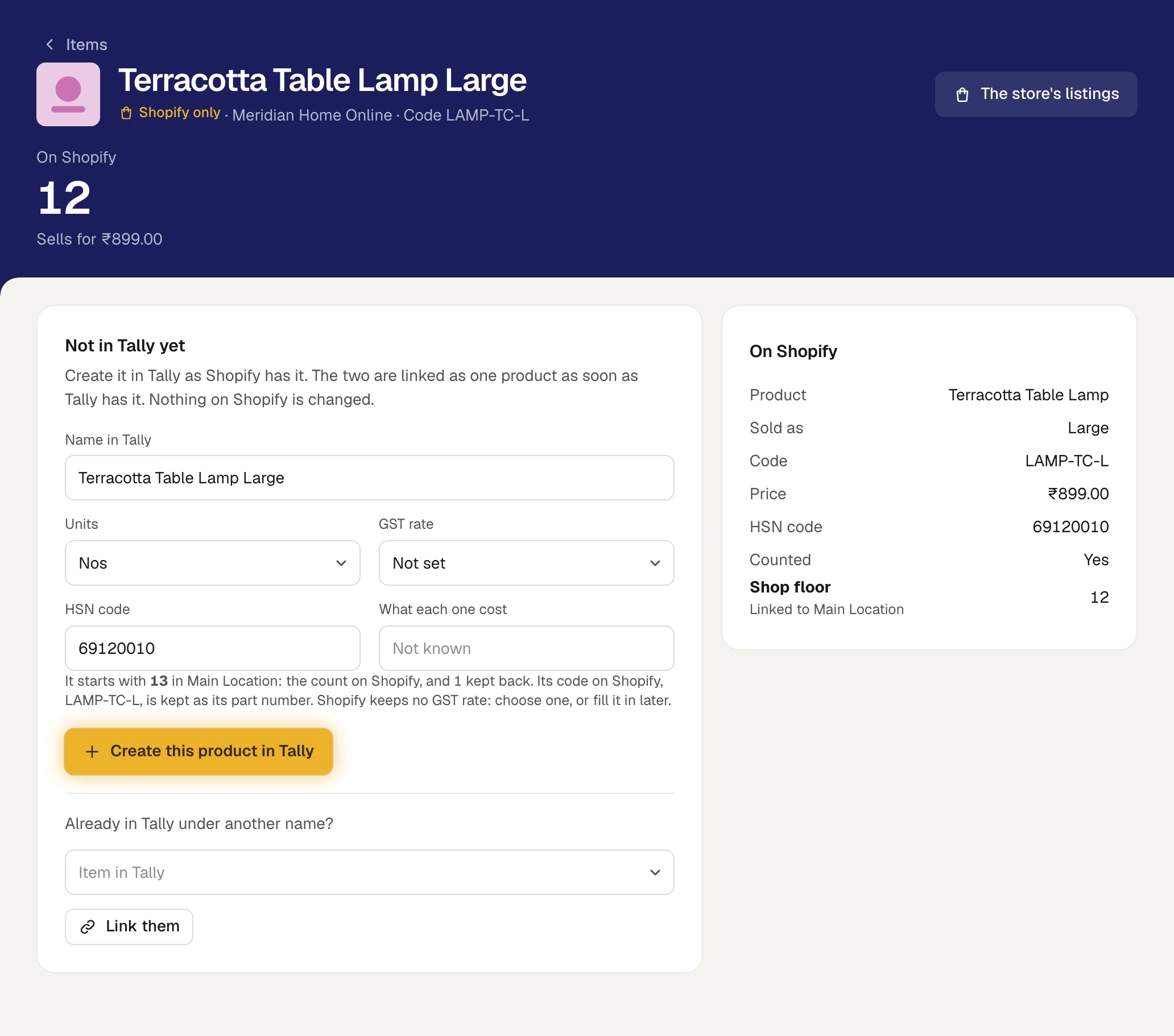
Typing twenty item masters by hand is where a new round of mismatched names begins. In Orzoni, a product in the Shopify only view opens on a form already filled in from the store:
| Box | Starts as |
|---|---|
| Name in Tally | The product's name, with its variant after it |
| Units | The unit most of your items are counted in |
| GST rate | Not set: choose one |
| HSN code | The store's code |
| What each one cost | Empty |
Press Create this product in Tally and the item is made in Tally and linked, with the store's code kept as its part number. It starts with a count that makes the store's figure the right one: what the store shows, plus what was sold there and not yet billed, plus what you keep back.
Fill in two boxes before you press. Choose the GST rate, because a bill cannot work out tax without it. And give the cost, or the stock goes into the books at no value.
If Tally already has an item of that name, Orzoni makes nothing and says so. Link the product to that item instead: that is the 14 in the table, the ones that were in Tally all along under another name.
An item only in Tally: it waits
The other side of the list is items in Tally that no listing points to. Some are raw material or packing. Some are goods you sell only over the counter. Some you have been meaning to put online.
Nothing happens to these. Orzoni does not make a product on your store from a Tally item, and it does not change one that is there. They sit in the Tally only view until you decide.
When you do list one, the discipline pays for itself. Create the product in Shopify and give its variant the same code the Tally item has as its part number. At the next read of the store, the listing's code is one item's and no other's, so it comes up as certain and is approved in a press.
Variants and packs
Every variant is its own thing. Blue / M and Red / L are two SKUs on the store and two stock items in Tally. A "Kurta" item in Tally with five sizes folded into it cannot be linked to five variants, and cannot tell you which size to reorder.
Linking variants goes quickly once the first is done. Match Blue / M to Kurta Blue M by hand, and Orzoni looks for the item whose name fits each sibling: Red / L is offered Kurta Red L, marked as following the first. You approve those where you can see them. They are never swept up with the certain ones.
A pack on the store can draw on loose stock. Keep the stock in Tally loose, give the pack its own code on the store, and say how many pieces one sale takes: "one sale is 6". The pack then draws on the same count as the single piece and shows how many whole packs are left. A pack is shown as linked, and is not merged by name or code, since its name and code are rightly different from the loose item's.
Two listings must not stand for the same item in the same quantity. If they do, nobody can say how many pieces belong to which, and no count is sent for either. A pack and the loose piece do not clash: one sale of each is a different number.
A checklist for the first fifty
Do the first fifty products properly and the next 150 follow the pattern.
- Write the code pattern on one page: parts, order, separator, pack suffix.
- Pick your fifty fastest sellers. They are where a wrong pick costs most.
- In a sheet formatted as Text, write the new code beside each old one. Check for duplicates.
- Change the SKUs on the store, by bulk editor or CSV, touching no other column.
- In Tally, switch on part numbers for stock items.
- Link the fifty listings to their items. Approve the certain ones, look at the rest.
- For each linked product, read what differs and merge name, code and HSN into Tally.
- Create in Tally anything that is on the store only, with its GST rate and cost.
- Count the shelf for those fifty, and correct Tally before any count goes to the store.
- Add the old codes as aliases, then tell the godown staff the new ones.
When a count on one of those fifty still looks wrong afterwards, the cause is no longer the name. Why your store's stock does not match the godown lists the others.
Questions people ask
Do I need Orzoni to do this?
No. The rules for a code, and the decision that the Tally item leads, work with a spreadsheet. What Orzoni adds is the matching, the pair shown as one product, and bringing Tally in line in a press where you would otherwise retype item masters.
Should my SKU be the barcode number?
Keep them separate. The barcode is printed on the product and belongs to whoever numbered it. The SKU is your own code and should be readable by your staff. Shopify treats them as two fields for that reason, and Orzoni reads both when it looks for a match.
Will merging change anything on my live store?
No. A merge updates the item in Tally only. Orzoni does not write a name, a code or a price to the store. The stock count is the one thing it sends there, and only after you have turned counts on and looked at what would change.
Why is price left out of a merge?
Tally keeps no single price on a stock item, so there is nothing to bring in line. The store stays the place where the selling price is decided, and Orzoni keeps that price as the item's selling price where none was set.
My Tally item names are long descriptions. Do I have to rename them?
No. Rename only where the name is wrong or misleading. The name row on the merge sheet can be unticked, and the code can still be set as the part number. One code is the point. One name is a convenience.
What does Orzoni cost?
₹999 a month for one company, or ₹2,499 for up to three. Billing is not open, so nothing is charged today. See Pricing.
Start with ten
Link the first ten products and list what does not match. Orzoni shows the certain matches first; approve them in one press. Then read what differs on each, and you will know by evening how much renaming your catalogue needs. The screens are in Products on Shopify and in Tally, shown as one, Match your store's listings and Items.
Facts and sources
Everything about Shopify, Tally, Excel and GST below was checked on 11 October 2026 at the addresses given. What is said about Orzoni comes from its own guides, linked in the text.
- Shopify, SKUs (what a SKU is, uniqueness, the format advice, duplicates, SKUs against barcodes): help.shopify.com/en/manual/products/details/sku. Read 11 October 2026.
- Shopify, variants (up to 2,048 variants and three options on a product): help.shopify.com/en/manual/products/variants/add-variants. Read 11 October 2026.
- Shopify, product CSV files (the SKU column, up to 20 barcodes, blank columns overwriting, and option values creating new variant IDs): help.shopify.com/en/manual/products/import-export/using-csv. Read 11 October 2026.
- TallyPrime, stock items (aliases, and "Provide Part No. for Stock Items"): help.tallysolutions.com/manage-stock-item-tally/. Read 11 October 2026.
- Microsoft, keeping leading zeros in Excel: support.microsoft.com/en-us/office/keeping-leading-zeros-and-large-numbers-1bf7b935-36e1-4985-842f-5dfa51f85fe7. Read 11 October 2026.
- HSN digits on a tax invoice: Notification No. 78/2020-Central Tax, dated 15 October 2020, in force from 1 April 2021. The Central Board of Indirect Taxes and Customs publishes it; its text was read as reproduced at taxheal.com/notification-no-78-2020-central-tax-hsn-code-in-tax-invoice-from-01-04-2021.html. Read 11 October 2026.
- Table 12 of GSTR-1: GSTN advisory dated 1 May 2025, applying the third phase of HSN reporting from the May 2025 return period, as reported by Taxmann at taxmann.com/post/blog/hsn-dropdown-table-13-mandatory-in-gstr-1. Read 11 October 2026.
The catalogue of 200 listings and 180 items is a worked example. HSN 6211 in the pictures is the sample company's own data, not advice on classifying a kurta: take the HSN for your goods from your accountant.

Guides this post leans on
Say which item in Tally each of your store's listings is. Approve what Orzoni puts forward, choose by hand, set aside what is not kept in Tally, do many at once, and work through products sold in several sizes and through collections.
Read the guide Products on Shopify and in Tally, shown as oneWhere a store is connected, a product is one row whichever side it is on. The three marks, the views on Items, merging what differs into Tally, a product that is on Shopify only, and a store's product on a bill line.
Read the guide ItemsEvery stock item in your Tally books with what is in stock and what it is worth, one item's page, and how to add, alter or hide an item.
Read the guide