

Tally on your phone: four setups compared, with prices
Reports in Browser, Remote Access, Cloud Access, or Orzoni on top of Tally: what each shows on a phone, what each needs and what each costs.
On this page
It is twenty to seven on a Saturday and you are standing at a supplier's counter in Chickpet. He says you owe him ₹4,82,000. You remember something closer to ₹3,60,000, because a payment went out on the 28th. The answer is sitting in Tally on the office computer, eleven kilometres away, and your accountant left at six.
So, can you see Tally on your phone? Yes. There are four working setups, and they differ on two things: whether the phone can only look or can also make an entry, and where your books sit while it does. Tally's own Reports in Browser shows reports on a phone, read only, as part of an active TSS subscription. Tally's Remote Access and Cloud Access give you full Tally, on a computer. Orzoni sits on top of Tally and lets you see the books and make a bill from the phone, at ₹999 a month once billing opens.
The rest of this post takes each one in turn, with what its maker publishes about it and the date we read it.
The short answer
| Setup | On a phone | Where the books sit |
|---|---|---|
| Reports in Browser | Reports, read only | Office computer |
| Remote Access | Not from a phone | Office computer |
| Cloud Access | Not supported, per Tally's help | A hosted computer |
| Orzoni | Books and billing | Office computer, with a checked copy on the web |
| Setup | What you pay for | One user, one year |
|---|---|---|
| Reports in Browser | An active TSS | ₹5,310 |
| Remote Access | An active TSS | ₹5,310 |
| Cloud Access | Hosting, on top of your licence | ₹8,496 |
| Orzoni | A monthly plan | ₹11,988 listed, nothing charged today |
Those yearly figures are for a business that already owns a TallyPrime Silver licence. The sums behind them are worked out further down.
See and do are different questions
An owner who asks for Tally on the phone means one of two things, and it is worth knowing which before you spend anything.
The first is to see. What does this customer owe, what do I owe this supplier, how much is in the bank, what sold today, is the 4 sq mm wire in stock. Nothing is typed. A figure is read and a decision is made.
The second is to do. Make the bill at the customer's site before you leave. Record the cheque you were just handed. Add the new customer while his GSTIN is in front of you.
Seeing is the easier problem and Tally itself solves it. Doing from a phone is harder. Tally is a keyboard program built for a desk, and its voucher screen is not something Tally offers in a phone browser. If you only need to see, you may not need to buy anything at all.
Where you are likely to be today
The setup you already have is the office computer and a phone call. Someone at the desk opens the ledger and reads out a number, or sends a photo of the screen.
It costs nothing and it works during office hours. It fails at twenty to seven on a Saturday, it fails when the accountant is on leave, and it puts your outstanding figures into photographs on other people's phones. It also makes you the kind of owner who cannot answer a supplier without calling someone. That is the real reason people go looking for something else.
Each of the four setups below replaces that phone call in a different way.
Setup 1: Tally's Reports in Browser
This is the one to try first, because you may already be paying for it.
What it is. A feature of TallyPrime that lets you sign in on Tally Solutions' website with a Tally.NET ID and open your company's reports in any browser. Tally's help page puts it this way: "All you need is TallyPrime, and a device with a web browser and internet connection." Nothing is installed on the phone.
What you see. Tally's help page lists the reports: Balance Sheet, Profit and Loss, Trial Balance, Day Book, Cash and Bank Books, Bills Receivable, Bills Payable, Ledger Outstanding, Group Outstanding, Ledger Vouchers, Sales and Purchase Registers, Stock Summary, Stock Query and more. You can change the period, drill down to a voucher in many of them, and download a report or a voucher as a PDF or an Excel file if you have been given print access. From TallyPrime Release 2.0 the reports are laid out for a phone screen.
So the owner at the Chickpet counter opens Ledger Outstanding for that supplier, sees the payment of the 28th, and settles the argument in a minute.
What you cannot do. Make or change anything. Tally's FAQ is plain: "currently you can only view and download vouchers in a browser."
What it needs.
- A valid TallyPrime licence and an active TSS. Tally's page for owners says Reports in Browser "is included with an active TSS subscription".
- The company connected to Tally.NET services, with browser access switched on.
- A Tally.NET ID for each person who will look. It is an email address you authorise, with a security level that decides which reports that person sees.
- The office computer on and online, with the company open. Tally's FAQ says the data "is fetched on demand from your TallyPrime Company", and tells you to check whether the computer has gone to sleep or hibernated when the browser stops answering. A locked screen is fine.
Where the books sit. On your computer, and only there. Tally's words: "the data remains with you and is not stored anywhere else."
What it costs. Nothing beyond TSS. For a Silver licence that is ₹4,500 a year plus 18% GST, ₹5,310 in all. Rental plans list TSS as included.
Who it suits. The owner who wants to check figures and is happy to leave entry to the office. The partner who reviews the month from home. An auditor who needs to read, not write. If that is you, this is the right answer and you can stop reading here. The step-by-step is in our companion post, how to get Tally on your phone without moving your books.
Setup 2: Tally's Remote Access
Remote Access is often mixed up with Reports in Browser. They are separate features that answer separate needs.
What it is. A way to open your office company from a second TallyPrime installation somewhere else. Tally's help page: "All you need at the remote location is a TallyPrime installation, and an internet connection." That second copy can even be TallyPrime in Educational Mode. What appears is Tally itself, with its own screens and keys.
What you can do. Nearly everything your permissions allow. "The user with the required permissions can create or alter vouchers," says the help page, and a remote user can print at their own end and export. Backup, restore, split and import are not allowed from a remote login.
On a phone. No. Tally's Remote Access FAQ, updated on 21 July 2026, answers the question directly. A computer that gets its internet from a phone's hotspot works. Then: "However, you cannot access your Tally data remotely using your mobile."
What it needs. At the office: a valid licence, an active TSS, an internet connection, and the company connected to Tally.NET. At the other end: TallyPrime of the same release, and a Tally.NET ID that you have allowed. A Silver licence allows one remote user at a time; Gold allows ten.
Where the books sit. On your computer. Tally says the Tally.NET server "acts as a facilitator, and does not hold back any data or information."
What it costs. The same active TSS: ₹5,310 a year on Silver, ₹15,930 on Gold.
Who it suits. The accountant who works from home two days a week, and the CA who wants to pass entries in a client's books from his own office. It is the closest thing to sitting at the office desk, and for someone who knows Tally's keys it is faster than any phone app will ever be. It is simply not a phone setup.
Setup 3: TallyPrime Cloud Access
What it is. TallyPrime running on a hosted computer instead of the one under your desk. Tally's page says it is hosted on Oracle Cloud Infrastructure, and that you reach it "through web browsers or a virtual client installed on your system". Your company data lives on that hosted computer.
This is the only one of the four that moves the books.
What you can do. Work in Tally in full, vouchers and reports alike, because it is TallyPrime. Several people in different cities can work in the same company with no office computer to keep on.
On a phone. Tally's Cloud Access help FAQ, updated on 29 September 2026, asks "Can I connect to the Virtual Computer through a browser using a Mobile/Tablet?" and answers: "No, currently Mobile/Tablet devices are not supported for accessing the Virtual Computer." Tally's product page lists access "on any device" among the benefits. If the phone matters to you, ask your Tally partner to show it working on your own phone before you count on it.
What it needs. A TallyPrime licence of your own. The pricing section says so in brackets: "Price is for cloud hosting. TallyPrime license required separately." Tally's help FAQ adds that a valid TSS brings the latest product updates; access itself needs the licence.
What it costs. Tally's plans page lists six packs, priced per user per month.
| Pack | Users | Per user, per month |
|---|---|---|
| Personal | 1 | ₹600 |
| Regular | 2 | ₹600 |
| Regular Plus | 4 | ₹450 |
| Regular Pro | 8 | ₹450 |
| Performance | 12 | ₹450 |
| Performance Plus | 16 | ₹450 |
Tally's product page shows 18% GST on top. One user for a year is ₹600 x 12 = ₹7,200, plus ₹1,296 of GST: ₹8,496. Four users on Regular Plus is ₹450 x 4 x 12 = ₹21,600, plus ₹3,888 of GST: ₹25,488 a year. Tally sells Silver for a single PC and Gold for multi-user work, so ask your partner which licence four people working together will need.
Who it suits. A business with people in more than one place who all need to work in Tally. A firm that does not want a computer in the office to be the single point everything hangs on. An owner on a Mac, who can sign in through a browser. For these, Cloud Access does something Orzoni does not attempt: it gives everyone full Tally with no office computer to keep switched on.
Setup 4: Orzoni on top of Tally
Orzoni is our product, so read this section with that in mind. We have tried to hold it to the same standard as the three above.
What it is. Cloud software for running the business, opened in a browser or on a phone, and joined to your TallyPrime. Your books stay in Tally. A small Windows program, the Tally connector, sits beside Tally on the office computer. It reads Tally every minute, hands what changed up to Orzoni, and sends into Tally what you make in Orzoni.
What you see. The books as working screens made for a phone: what is to collect and to pay with how much is overdue, cash and bank, sales, every invoice, each customer's unpaid bills, stock with days left, and a list of what needs your attention.
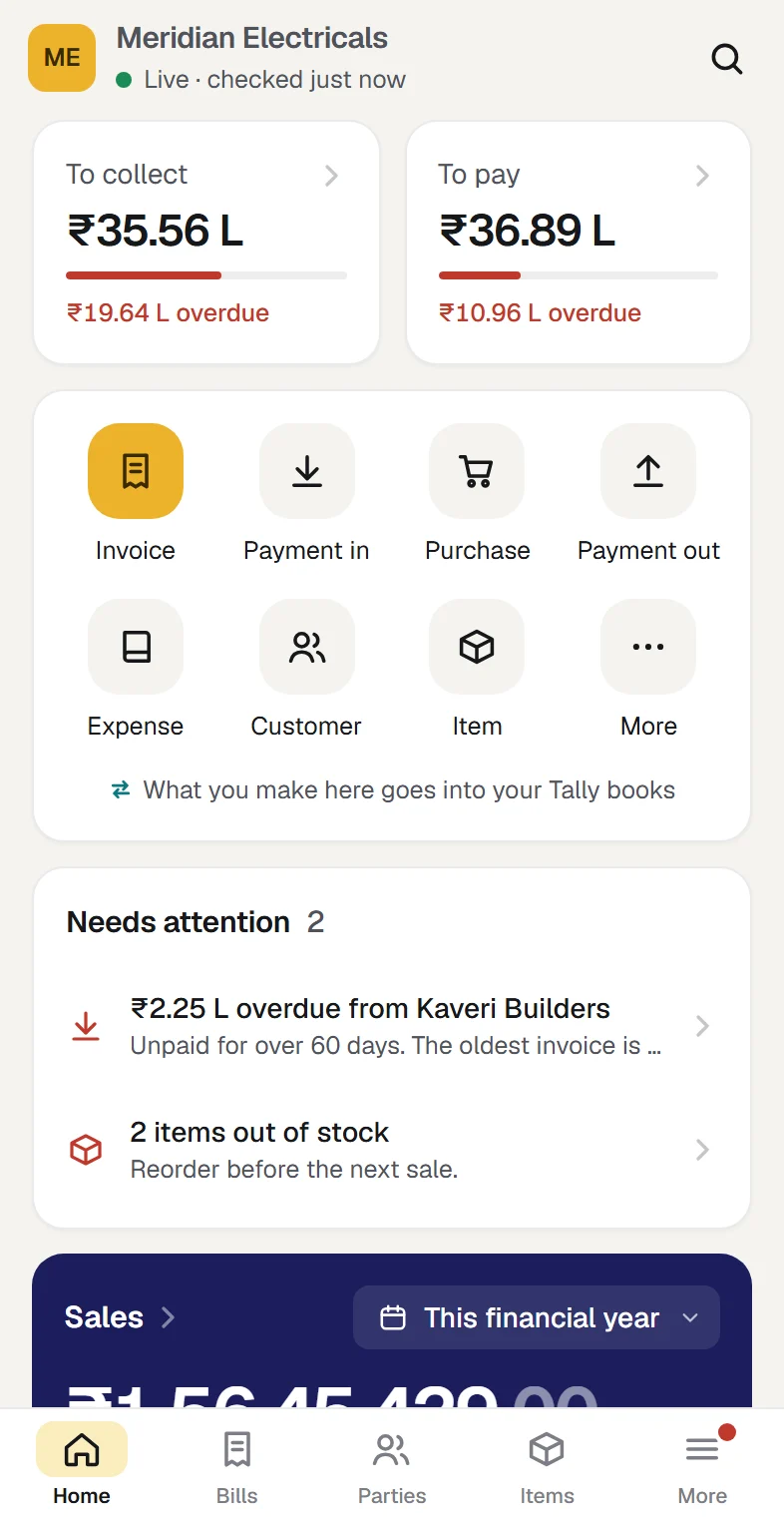
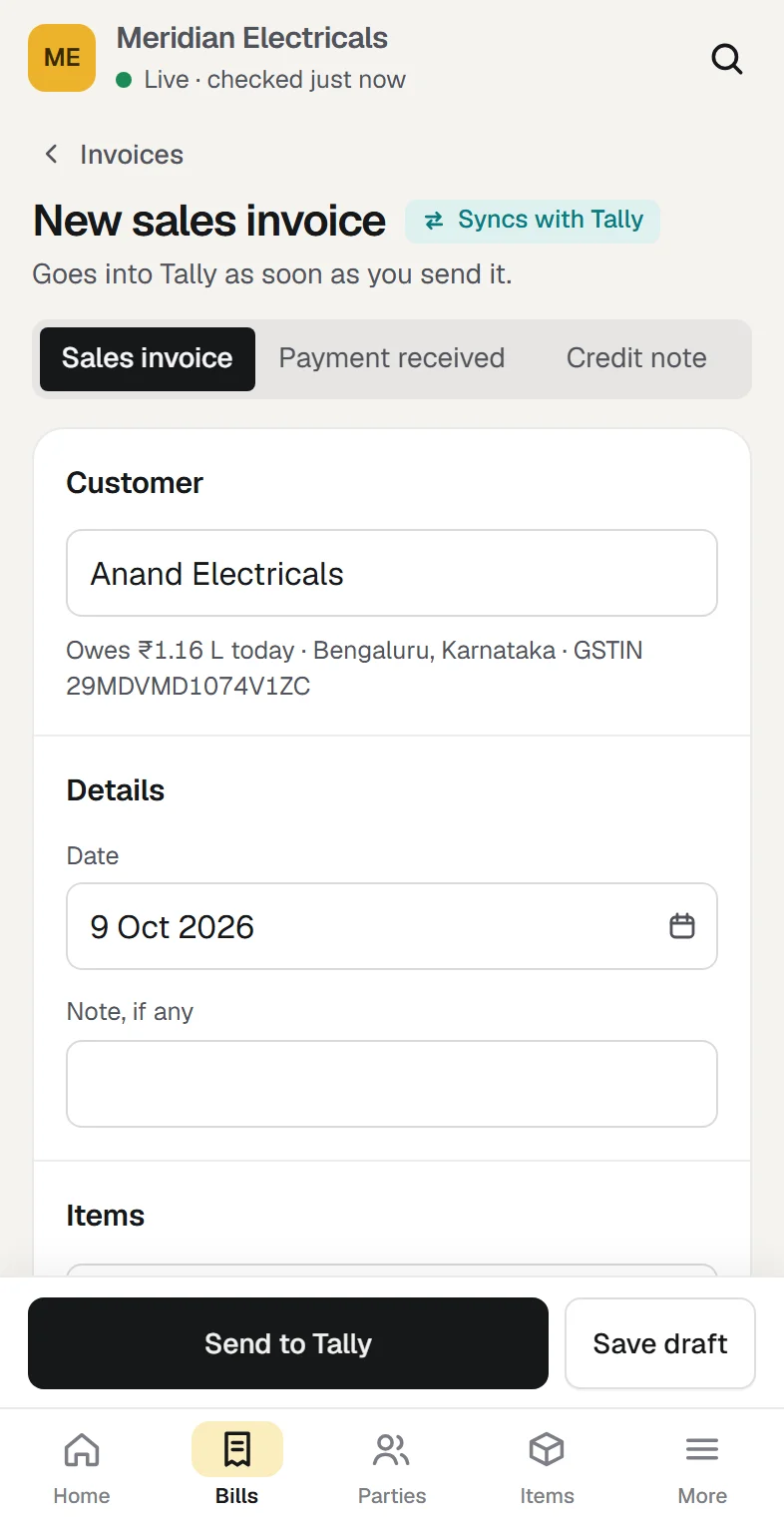
What you can do. Make a sales invoice, record a payment, enter a purchase, add a customer or an item, mark attendance. A bill made on the phone goes into Tally as a real sales voucher, numbered by Tally, and is read back to check that it landed as sent. With the office computer on, that happens within the minute.
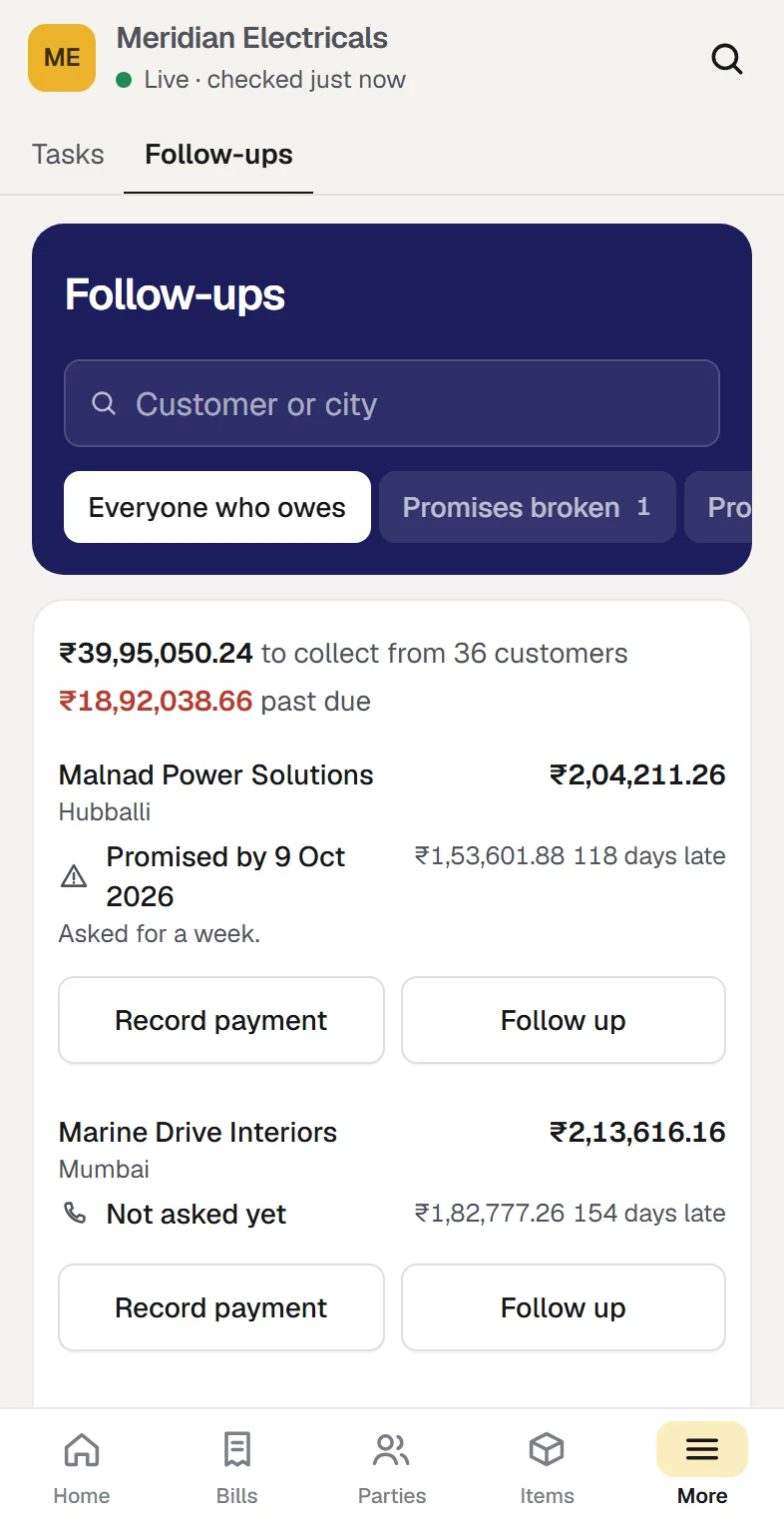
You can also follow up dues. A customer's page lists their unpaid bills, and Remind writes the message with those bills in it for you to send from your own WhatsApp.
What it needs. TallyPrime with your company in it. A Windows 10 or 11 computer, 64-bit, running Tally, with the connector installed. That computer on and online, with the company open in Tally, for anything new to move. The connector talks to Tally on that same computer, so no Tally.NET ID is involved. Orzoni is built for TallyPrime and proven on release 7.1.
When the computer is off. Orzoni shows the books as they stood at the last read, and says from when. A bill made meanwhile is saved and goes into Tally when the computer is back on. Nothing is lost by a night with the computer off.
Where the books sit. In Tally, which stays the original. Orzoni keeps a working copy on the web, each company in its own database, and checks it against Tally's own figures after every read: ledger balances, stock counts, stock value, net profit, unpaid bills and party balances. That copy is the reason your figures still open when the office computer is off. It is also the plain difference from Reports in Browser, which keeps nothing outside your computer. If you want no copy of your books anywhere else, Reports in Browser is the setup for you.
What it does not do. It is not Tally's screen on a phone. E-invoices and e-way bills are made in Tally. Sales orders, delivery notes and manufacturing entries are made in Tally. Nothing is pushed to your phone as a notification: what needs you is listed on Home. There is no app in an app store: you open it in the browser and add it to your home screen. The full list is in what Orzoni leaves to Tally.
What it costs. ₹999 a month for one company, ₹2,499 for up to three, priced by companies and not by the number of people. Billing has not opened, so nothing is charged today. The pricing page will say so before that changes.
Who it suits. The owner who wants to bill and collect from wherever he is, the business whose counter staff find Tally's voucher screen slow, and the team where each person should sign in as themselves, with one of seven roles.
What a year costs, side by side
All Tally prices below are from Tally Solutions' own pages, read on 11 October 2026, with 18% GST added where Tally adds it.
Take a trader with one TallyPrime Silver licence, bought outright some years ago. The licence is paid for. What he pays every year is TSS, if he renews it: ₹4,500 plus ₹810 of GST, which is ₹5,310.
- Reports in Browser: needs that TSS and nothing else. ₹5,310 a year.
- Remote Access: the same. ₹5,310 a year, plus a second computer to work from.
- Cloud Access: ₹8,496 a year for the Personal pack. If he also keeps TSS for upgrades, ₹8,496 + ₹5,310 = ₹13,806.
- Orzoni: ₹999 x 12 = ₹11,988 a year at the listed price, and nothing today. If he also keeps TSS, ₹11,988 + ₹5,310 = ₹17,298.
Now take a business starting fresh on a Silver rental. Tally lists the twelve-month plan at ₹8,100 plus GST, ₹9,558 in all, with TSS included.
| Setup | Added to the rental | Year one in all |
|---|---|---|
| Reports in Browser | Nothing | ₹9,558 |
| Remote Access | Nothing | ₹9,558 |
| Cloud Access | ₹8,496 | ₹18,054 |
| Orzoni | ₹11,988 at list | ₹21,546 |
Two honest readings of that table. Tally's own two features are the cheapest by a distance, because they come with what you already pay. And Orzoni is the dearest of the four on price alone. What you are buying with the difference is the "do" column: billing, payments and follow-ups from the phone, and a sign-in for each person on the team at no extra charge per head. If you will not use those, do not pay for them.
Which fits a shop, a trader, a CA's clients
A retail shop with one computer at the counter. The owner is in the shop most of the day and wants to see the day's sales and the bank balance from home at night. Reports in Browser does that, provided the counter computer is left on. If the computer is shut with the shutters, the reports go with it, and that is the usual catch for shops.
A trader or wholesaler who is out more than in. He is at suppliers, at customers' sites, at the transporter. He wants outstanding figures in his pocket and, more and more, wants to make the bill on the spot. For seeing, Reports in Browser. For billing and collecting from the phone, Orzoni. The two work in different ways, one through Tally.NET and the other on the computer itself, and Orzoni changes nothing inside Tally. The one setting it needs, Tally's own connection switched on, you set yourself and can switch off. So choosing it does not mean giving up Tally's own reports.
A business with an accountant who works from home. She needs Tally, not a summary of it. Remote Access, on her laptop, with a Tally.NET ID.
A business with branches, or no dependable office computer. Cloud Access, so that nobody's work depends on one machine in one room.
A CA's clients. The CA wants to read and sometimes correct a client's books without visiting. Tally's Remote Access and its auditor access are built for this. Where a client's owner wants the phone as well, Orzoni has an Accountant role that sees the books in full, so the CA and the owner can look at the same figures from two places.
A checklist before you choose
- Write down the last three times you needed a figure away from the office. Were you reading or entering?
- Check whether your TSS is active. Your Tally partner can confirm the date it runs to. If it is active, Reports in Browser is already yours to switch on.
- Decide whether the office computer can stay on through the hours you will look. Three of the four setups depend on it.
- Count the people who need access, and what each should be kept from seeing. A Tally.NET ID has a security level. Orzoni has seven roles.
- Decide how you feel about a copy of your books outside the office. None with Reports in Browser and Remote Access. On a hosted computer with Cloud Access. A checked working copy with Orzoni.
- If the phone is the point, test on your own phone before paying for a year.
- Ask what happens when you stop. With every setup here, your Tally data remains yours. With Orzoni, unlinking the computer and removing the connector leaves Tally exactly as it was.
FAQ
Is there an official Tally app for phones?
Tally's route for owners on a phone is Reports in Browser, which runs in the phone's browser and needs no app. Tally's page for owners also names an app called Docs by Ira for uploading invoices from a phone. We have not tested it or read a price for it, so we leave it to Tally's own page.
Can I make a sales bill in Tally from my phone?
Not through Reports in Browser, which is read only, and not through Remote Access, which Tally says does not work from a mobile. With Orzoni you make the bill on the phone and it goes into Tally as a sales voucher when you press Send to Tally, with the office computer on.
Does the office computer have to stay on?
For Reports in Browser, Remote Access and Orzoni, yes, with Tally open on the company. Set Windows not to sleep during working hours. With Reports in Browser and Remote Access, nothing opens while it is off. With Orzoni, the last figures still open and new bills wait. Cloud Access does not use the office computer.
Is Reports in Browser really free?
It has no price of its own. Tally says it is included with an active TSS subscription, which is ₹4,500 a year plus GST on Silver and ₹13,500 plus GST on Gold. Tally's FAQ also says user limits by licence type "will be coming soon", so read the page again before you plan around many viewers.
Will Orzoni change anything in my Tally?
It reads your books, and it writes only what someone makes or changes in Orzoni: a bill, a payment, a customer, an item. It does not change Tally's settings, features or period. To let the connector read it, Tally's own connection is switched on in Tally's settings, which is a Tally feature. Unlink the computer and remove the connector, and Tally is exactly as it was.
One thing to do today
Find out whether your TSS is active. If it is, switch on Reports in Browser this week and use it for a fortnight. You will learn quickly whether seeing is enough. If you find yourself wanting to make the bill as well, read how Orzoni stays in step with Tally and Orzoni on your phone, then follow Connect Tally and link the computer. What the connector is, and how to remove it, is in the Tally connector on your computer.
Link the Tally computer and open the company on your phone the same day. Nothing in Tally moves.
Facts and sources
Prices as published on 11 October 202611 sources, each with its link and the day it was read
Every price and product fact about Tally below was read on Tally Solutions' own website on 11 October 2026. Prices change: check the page before you buy.
| Fact | Source |
|---|---|
| TallyPrime Silver ₹22,500 one time; rental ₹750 a month, ₹8,100 for twelve months; Gold ₹67,500, rental ₹2,250; all plus 18% GST. Rental plans list "Includes TSS"; lifetime lists "Includes 1-year TSS" | tallysolutions.com/buy-tally |
| TSS renewal for one year: Silver ₹4,500 plus GST of ₹810; Gold ₹13,500 plus GST of ₹2,430 | tallysolutions.com/renew-tss |
| Reports in Browser: what it needs, the list of reports, PDF and Excel downloads, Release 2.0 for phone layouts. Page dated 14 May 2025 | help.tallysolutions.com/tally-reports-in-browser-tally |
| Reports in Browser FAQ: view and download only, data fetched on demand and not stored elsewhere, sleep and lock, any number of viewers at present. Page dated 14 May 2025 | help.tallysolutions.com/browser-reports-faq-tally |
| Reports in Browser "is included with an active TSS subscription"; a Tally.NET ID for each viewer; Docs by Ira named | tallysolutions.com: mobile experience for business owners |
| Remote Access: what each end needs, same release, Educational Mode, creating and altering vouchers. Page dated 20 January 2026 | help.tallysolutions.com/remote-access-tally |
| Remote Access FAQ: "you cannot access your Tally data remotely using your mobile"; one remote user on Silver, ten on Gold; no backup, restore or split. Page dated 21 July 2026 | help.tallysolutions.com/remote-access-faq-tally |
| Tally Virtual User for Remote Desktop and similar tools | help.tallysolutions.com: work from home or anywhere |
| Cloud Access: hosted on Oracle Cloud Infrastructure, from ₹600 a user a month plus 18% GST, licence required separately, browser or client, bought through a Tally partner | tallysolutions.com/tallyprime-cloud-access |
| Cloud Access packs and per-user prices. Page dated 30 September 2025 | tallysolutions.com: Cloud Access pricing plans |
| Cloud Access FAQ: mobile and tablet not supported for the virtual computer; a valid licence needed; TSS for product updates. Page dated 29 September 2026 | help.tallysolutions.com/tallyprime-cloud-access-faq |
| Orzoni: ₹999 a month for one company, ₹2,499 for up to three; billing has not opened | Pricing |
| Orzoni on a phone, what it needs and what it leaves to Tally | Orzoni on your phone, What Orzoni leaves to Tally, and what is coming |
Not published, so left out: a price for Tally Virtual User packs, a price for Docs by Ira, and any limit on the number of Tally.NET IDs a licence may hold. The yearly totals are our own arithmetic on the published prices.
Tally and TallyPrime are trademarks of Tally Solutions Pvt. Ltd. Orzoni is an independent product and is not affiliated with or endorsed by Tally Solutions.

Guides this post leans on
What Orzoni needs, what is made in Tally rather than here, how some figures are worked out, and what is coming next.
Read the guide How Orzoni stays in step with TallyHow the Tally connector reads Tally and proves what it read, how the web is kept the same as the computer, where the status is shown, and what every status means with what to do about it.
Read the guide Orzoni on your phoneSign in on a phone and your books are there. The five tabs, the create button, the More menu, how to add Orzoni to your home screen on an iPhone or an Android phone, and what works with no signal.
Read the guide Connect Tally and link the computerThe connector's set-up, step by step. It finds Tally, you choose your company, it reads your books and checks every balance, and you link the computer to your account with a six-character code. With what to do when a step stalls.
Read the guide The Tally connector on your computerThe small Windows app beside Tally. Its status screen, its settings, the icon beside the clock, how to keep it running, the Connection view on the web, and how to unlink, move to a new computer, update, repair or uninstall it.
Read the guide